Milano WordPress Theme
by leebrosus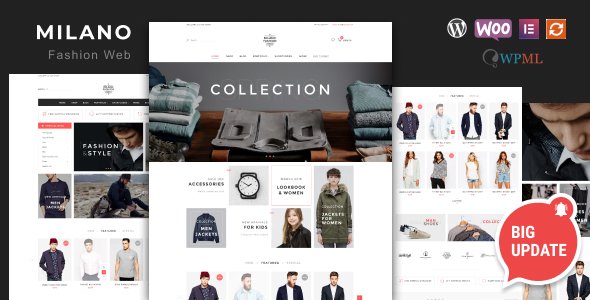
Stuck on your Milano WordPress theme? Let's fix it.
No endless back-and-forth. Just send us the details and we'll get it done.
No obligation · Replies within 1 hour · Quote within 1 day
Setup · Customization · Bug fixes · WooCommerce integration
About Milano WP Theme
Milano is a WordPress theme developed by leebrosus, built for creative professionals and businesses that want a clean, image-forward layout. It suits photographers, agencies, portfolio sites, and small businesses looking for a minimal aesthetic with structured content areas.
The theme ships with a page builder-compatible layout, customizable header and footer sections, and a responsive grid that holds up across device sizes. Typography options are well-considered, and the overall design leans toward whitespace and visual breathing room rather than dense content blocks.
Milano works best when the site owner has strong visual content to lead with. It is not a theme that carries weak imagery. If your photos and branding are solid, Milano gives them space to do the work. Setup is straightforward for intermediate WordPress users, though deeper customization will likely need developer input.
Get matched with a Milano developer in under one day
Tell us about your Milano project. Small fixes, Milano theme customization, or a full website build, whatever you need, we've got it covered.
We'll connect you to the right Milano developers, define the scope, and get everything 100% clear.
You'll get one estimate, hire your preferred developer, and start collaborating.
Not every WordPress developer knows Milano’s structure, and generic fixes often create new problems. FoxyConcept works through Codeable, a vetted network of specialist WordPress developers. Every developer on the platform is screened, rated, and accountable. You post your project, get a clear estimate within 24 hours, and only proceed if you are happy with the proposal. No guesswork, no hidden costs. If you want Milano handled correctly from the start, this is the right path. See our full WordPress development services for what is available.
Pros
- Clean, minimal design that puts visual content front and center
- Responsive layout that handles well on mobile and tablet without major tweaking
- Compatible with popular page builders, giving layout flexibility
- Straightforward Customizer options make basic changes accessible without coding
- Lightweight base that supports good page speed scores when properly optimised
Cons
- Limited built-in demo content makes initial setup slower for non-developers
- WooCommerce styling requires manual CSS work to match the theme aesthetic
- Typography options are decent but limited compared to themes with Google Fonts deep integration
- No dedicated theme support forum or active community thread for troubleshooting
- Advanced layout changes require editing template files, which risks breaking on theme updates without a child theme
Who is Milano for?
Photography Portfolio
Milano’s grid layout and whitespace-first design make it a natural fit for photographers. Full-width image sections and clean gallery formatting let the work speak without the theme competing for attention. A developer can add filterable portfolio categories and lightbox functionality to improve the browsing experience for potential clients.
Creative Agency
Agencies with a curated portfolio of client work benefit from Milano’s structured layout. Case studies, service pages, and a minimal contact section all fit the template well. Custom post types for projects and team members can be added to give the site a more professional content structure without rebuilding from scratch.
Freelance Designer
Freelance designers need a site that does not distract from the work. Milano’s clean aesthetic supports that well. With a few targeted customisations, a freelancer can have a portfolio, a services page, a blog, and a contact form all working together in a cohesive layout that reflects their own design sensibility.
Boutique Retail
Small boutique shops selling a focused product range can use Milano with WooCommerce to create a visually strong storefront. The theme’s minimal style works particularly well for lifestyle products, handmade goods, or fashion. Some CSS work is needed to align WooCommerce templates with the theme’s visual tone.
Architecture or Interior Design Firm
Architecture and interior design firms rely on strong project imagery and structured case study content. Milano handles both well. A developer can configure project galleries, add filtering by typology or location, and build custom page templates that showcase completed work in a way that aligns with the firm’s brand positioning.

Customizing Milano
Out of the box, Milano gives you color controls, font selection, and layout options through the WordPress Customizer. For most users, that covers the basics. But if you want Milano to match a specific brand identity or behave differently from the default template, you will hit its limits fairly quickly.
A Milano expert can rework the layout structure, add custom post types, adjust the header and navigation behavior, and integrate third-party plugins without breaking the visual style. Common customization requests include custom portfolio filtering, unique landing page templates, and modified footer layouts.
If you need modifications beyond what the Customizer offers, working with someone who knows Milano’s template hierarchy and CSS structure saves time. Child theme development is strongly recommended before any code changes to keep updates safe and changes organized.
Recommended plugins for Milano
Milano pairs well with WooCommerce if you need a shop layer, though you may need styling adjustments to match the theme’s aesthetic. Contact Form 7 and WPForms both integrate cleanly. For SEO, a dedicated plugin like Yoast or Rank Math is necessary since the theme has no built-in SEO tooling. Check out our WordPress SEO optimisation service if you need structured help there.
Page speed is worth monitoring on image-heavy Milano builds. Caching, image optimisation, and a CDN can make a real difference. Our WordPress performance service covers this end-to-end.
Not sure which plugins to use? This WordPress plugins directory covers the most popular options with reviews and setup guides.
Milano common issues
Milano theme not displaying featured images correctly
Featured image display issues in Milano are usually caused by incorrect image size registration or a missing add_image_size call in the theme functions file. Check whether your images meet the minimum dimensions the theme expects. If images uploaded before a theme change appear cropped wrong, running a thumbnail regeneration plugin will rebuild image sizes to match the current theme settings. If the issue persists, a developer can trace it through the template hierarchy.
Milano WordPress menu not showing on mobile
A broken mobile menu in Milano typically points to a JavaScript conflict with another plugin, or a missing call to wp_footer() in the theme template. Open your browser’s console on mobile or using device simulation to check for JS errors. Deactivating plugins one at a time can isolate a conflict. If the theme is not loading its mobile menu toggle script, the footer hook may need to be restored in the template file. Our WordPress bug fixing service handles this type of issue efficiently.
Milano theme broken after WordPress update
If Milano broke after a WordPress core update, the most common causes are a deprecated function call, a PHP version conflict, or a plugin that is now incompatible with the updated environment. Check your PHP error log first. If you made changes directly to theme files without a child theme, a core update may have overwritten them. Restoring from a recent backup and moving modifications into a child theme is the safest way forward. WordPress maintenance plans help prevent this situation.
Milano portfolio page not loading or showing blank
A blank or non-loading portfolio page in Milano is often a permalink issue, a missing template file, or a query that is returning no results due to a post type not being registered properly. Go to Settings, Permalinks, and resave without changing anything. If that does not fix it, check whether your portfolio posts are published and assigned to the correct template. A developer can inspect the page template assignment and the underlying query to identify what is failing.
Milano FAQ
Milano is developed by leebrosus and available through ThemeForest. Support availability depends on the developer’s current activity on the platform. If you have purchased the theme, you are entitled to the support period included with your license. For sites where ongoing support is uncertain, working with an independent WordPress developer ensures you have reliable help regardless of the original theme author’s availability.
Milano is generally compatible with page builders like Elementor and WPBakery, but the experience varies depending on which templates you are working with. Some sections may need CSS adjustments to display correctly inside a builder environment. Testing in a staging environment before going live is recommended. A developer familiar with Milano can map out which areas work cleanly with your chosen builder and which need intervention.
Creating a child theme for Milano involves creating a new folder in your themes directory, adding a style.css file with the correct Template: header pointing to the Milano parent, and a functions.php file that enqueues the parent stylesheet. Activate the child theme from the WordPress dashboard. All customisations should live in the child theme to survive future Milano updates safely.
Milano can work with WooCommerce, but it does not have a dedicated WooCommerce integration built in. That means default WooCommerce templates will render with basic styling that may not match the theme’s visual design. A developer can write targeted CSS or override WooCommerce templates within a child theme to bring the shop pages in line with the rest of the site.
Migrating an existing site to Milano means installing the theme, rebuilding your page templates to match Milano’s layout options, and carrying over your content. It is not an automatic switch. Posts and pages transfer fine, but custom layouts built with a different theme’s shortcodes or templates will need to be rebuilt. Our WordPress migration service can handle the transition cleanly with minimal downtime.
Hire a Milano WordPress Expert
Whether you need Milano set up from scratch, customised to fit your brand, or fixed after something broke, working with a specialist matters. FoxyConcept connects you with experienced WordPress developers through Codeable. Get a free estimate with no obligation to hire. You will have a clear scope and price before any work begins. The process takes less than 24 hours to get started.
You'll need a free Codeable account so developers can ask questions and send their quotes.