PixieFreak WordPress Theme
by pxsquad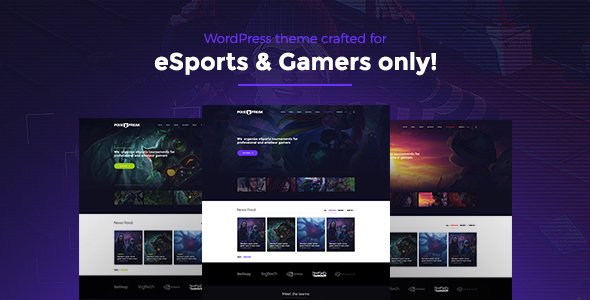
Stuck on your PixieFreak WordPress theme? Let's fix it.
No endless back-and-forth. Just send us the details and we'll get it done.
No obligation · Replies within 1 hour · Quote within 1 day
Setup · Customization · Bug fixes · WooCommerce integration
About PixieFreak WP Theme
PixieFreak is a WordPress theme developed by pxsquad, built for creative portfolios, digital agencies, and lifestyle brands that need a visually expressive site without sacrificing performance. It ships with a drag-and-drop page builder, multiple demo layouts, and a clean codebase that keeps load times reasonable out of the box.
The theme targets designers, photographers, and small creative studios who want full control over layout without writing code. Built-in shortcodes, custom widgets, and WooCommerce compatibility make it a practical choice beyond just a portfolio. pxsquad maintains regular updates, which means compatibility with current WordPress versions stays on track. If you need a site that looks distinct from generic templates, PixieFreak gives you a real starting point.
Get matched with a PixieFreak developer in under one day
Tell us about your PixieFreak project. Small fixes, PixieFreak theme customization, or a full website build, whatever you need, we've got it covered.
We'll connect you to the right PixieFreak developers, define the scope, and get everything 100% clear.
You'll get one estimate, hire your preferred developer, and start collaborating.
Getting PixieFreak to match a specific design or business requirement is faster with the right developer. FoxyConcept works through Codeable, a vetted network of WordPress specialists. That means you skip the freelancer lottery and get someone who has worked inside themes like PixieFreak before. Whether you need a custom layout built, a plugin conflict resolved, or the theme adapted for a client project, the process is straightforward: post your project, get an estimate, and decide with no obligation to hire.
Pros
- Multiple pre-built demo layouts that import with one click, cutting initial setup time significantly
- Native WooCommerce support means product pages inherit the theme styling without extra plugins
- Built-in portfolio custom post type with filterable grid, useful for creative and agency sites
- Live Customizer covers most visual settings so non-technical clients can make basic edits independently
- pxsquad pushes regular updates, keeping the theme compatible with current WordPress and PHP versions
Cons
- The built-in page builder is not Gutenberg-native, which creates friction if you work primarily in the block editor
- Demo content imports do not always pull in all images, leaving placeholder gaps that need manual replacement
- Font options are limited to Google Fonts inside the Customizer, requiring a plugin or custom code for self-hosted fonts
- Mobile menu behavior on nested sub-menus needs CSS fixes on smaller screens in some configurations
- Limited documentation for advanced customization means developers unfamiliar with pxsquad's structure spend time reverse-engineering templates
Who is PixieFreak for?
Creative Portfolio
PixieFreak’s filterable portfolio grid and fullscreen project layouts make it a solid fit for designers and illustrators. Work is displayed cleanly, category filtering keeps navigation simple, and the single project page gives enough space to show process and final results without a custom build from scratch.
Digital Agency Website
Agencies can use PixieFreak’s service section layouts, team member templates, and case study pages to build a client-facing site quickly. The multiple demo options mean you can start from a layout that already fits the agency’s tone and customize from there rather than rebuilding every section.
Photography Studio
Full-width image galleries, minimal header options, and a clean whitespace-heavy aesthetic make PixieFreak work well for photography studios. The portfolio post type handles shoot categories naturally, and WooCommerce integration covers print sales or booking deposits without needing a separate plugin stack.
Lifestyle Blog
PixieFreak’s blog layouts support featured images, category labels, and reading-time estimates. The typography controls in the Customizer give lifestyle bloggers enough flexibility to match a personal brand. Sidebar widget areas and social sharing hooks cover the standard blog functionality most readers expect.
Small WooCommerce Store
For small product-based businesses, PixieFreak’s WooCommerce styling keeps shop pages on-brand without heavy plugin overhead. Product grids, single product pages, and cart styling all inherit the theme’s design language. It works best for shops with a limited catalog rather than large inventory builds.

Customizing PixieFreak
PixieFreak comes with a Live Customizer panel that covers colors, fonts, header styles, and layout options. Most changes are point-and-click, but pushing the theme beyond its defaults takes real CSS and PHP knowledge. Custom post types, modified loop templates, and child theme work are common requests that go past what the panel offers.
A PixieFreak expert knows where pxsquad built flexibility into the theme and where the template files need direct editing. They can set up a child theme properly, adjust the built-in page builder sections, and wire up custom functionality without breaking future updates. If your project needs a tailored look or specific behavior that the Customizer can not deliver, working with someone who knows this theme saves hours of trial and error.
Recommended plugins for PixieFreak
PixieFreak works well with WooCommerce for product showcases, Contact Form 7 for lead capture, and WPML for multilingual builds. The theme is tested against popular caching plugins, which helps when you start thinking about WordPress performance optimization.
For agencies using it as an SEO foundation, pairing PixieFreak with Yoast or Rank Math and a proper WordPress SEO setup gets the most out of its clean heading structure. Slider Revolution and WPBakery also integrate without major conflicts, though some CSS overrides are usually needed to match your brand.
Not sure which plugins to use? This WordPress plugins directory covers the most popular options with reviews and setup guides.
PixieFreak common issues
PixieFreak demo import not working
Demo imports failing in PixieFreak are usually caused by PHP memory limits or server timeout settings. Set memory_limit to at least 256MB and max_execution_time to 300 in your php.ini or wp-config.php. Also confirm that all required plugins listed in the theme’s import instructions are activated before you run the import. If problems continue, a WordPress bug fix can identify the exact server-side conflict.
PixieFreak mobile menu not opening on iPhone
Mobile menu failures on iOS are typically caused by a JavaScript conflict with another plugin, or the theme’s menu script loading out of order. Open your browser console on the affected device and look for JS errors. Deactivating plugins one at a time helps isolate the conflict. If the issue appeared after a theme update, check pxsquad’s changelog for known mobile fixes and clear your cache before testing again.
PixieFreak portfolio filter broken after update
If PixieFreak’s portfolio isotope filter stops working after an update, the most common cause is a jQuery conflict or a cached version of the filter script. Clear all caches, then check whether your caching plugin is minifying JavaScript. Disable JS minification and retest. If the filter worked before and broke with a specific plugin update, roll back that plugin to confirm it as the source.
PixieFreak page builder showing blank sections
Blank sections in PixieFreak’s page builder usually point to a plugin conflict, a missing shortcode handler, or a PHP error suppressed on the frontend. Enable WordPress debug mode by setting WP_DEBUG to true in wp-config.php and reload the page to surface any errors. Also confirm the companion plugin bundled with PixieFreak is active and on the version matching your theme.
PixieFreak FAQ
pxsquad has kept PixieFreak updated alongside WordPress core releases. As of recent versions, it is compatible with WordPress 6.x. That said, compatibility between the theme and third-party plugins can still cause issues on major WordPress updates. Testing on a staging site before updating your live environment is a good habit regardless of the theme you use.
Yes. PixieFreak includes WooCommerce template support, so shop pages, product archives, and cart pages inherit the theme’s styling. Basic product display works without extra configuration. For heavier customization like custom product layouts or checkout modifications, a developer familiar with both WooCommerce and PixieFreak’s template structure will be more efficient.
PixieFreak ships with its own page builder and is not officially built for Elementor. It can run alongside Elementor, but styling conflicts between the two systems are common. Most developers working with PixieFreak stick to the theme’s native builder or use the standard block editor for simpler pages to avoid unnecessary CSS overrides.
Create a new folder in /wp-content/themes/ named something like pixiefreak-child. Add a style.css with the correct Template: header pointing to the parent theme, then add a functions.php that enqueues both the parent and child stylesheets. Activate the child theme from the WordPress dashboard. All customizations go into the child theme files so updates do not overwrite your work.
Migrating an existing site to a new theme like PixieFreak is mostly about rebuilding page layouts rather than moving content. Posts, pages, and media transfer cleanly via standard WordPress export and import. The design work is the time-consuming part. If you need help with the migration itself, a WordPress migration service can handle the technical side while you focus on the new layout.
Hire a PixieFreak Developer
If you need a PixieFreak expert to handle setup, customization, or ongoing changes, FoxyConcept can help. Work is scoped clearly before anything starts, and you only move forward if the estimate fits your budget. From single fixes to full builds, the process is transparent from day one. Get a free estimate and see exactly what your project involves before committing.
You'll need a free Codeable account so developers can ask questions and send their quotes.