Power Gym WordPress Theme
by VegaThemes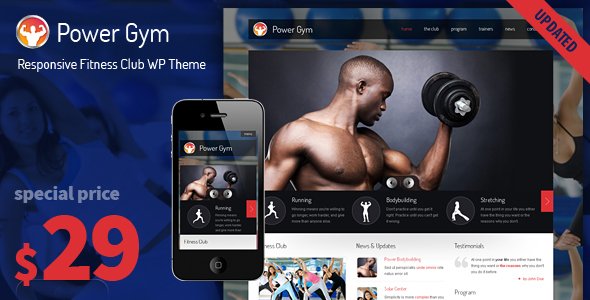
Stuck on your Power Gym WordPress theme? Let's fix it.
No endless back-and-forth. Just send us the details and we'll get it done.
No obligation · Replies within 1 hour · Quote within 1 day
Setup · Customization · Bug fixes · WooCommerce integration
About Power Gym WP Theme
Power Gym is a WordPress theme built by VegaThemes for gyms, fitness studios, personal trainers, and health clubs. It ships with a bold visual style designed to convert visitors into members, with full-width hero sections, class schedule layouts, trainer profile pages, and pricing tables built in.
The theme is compatible with Elementor, which makes editing layouts accessible without touching code. It also integrates with popular booking and membership plugins, so you can handle class registrations and recurring memberships directly from your site.
Out of the box, Power Gym covers the essentials: contact forms, Google Maps integration, testimonials, and a blog. It is translation-ready and mobile-responsive, making it practical for local gyms and international fitness brands alike.
Get matched with a Power Gym developer in under one day
Tell us about your Power Gym project. Small fixes, Power Gym theme customization, or a full website build, whatever you need, we've got it covered.
We'll connect you to the right Power Gym developers, define the scope, and get everything 100% clear.
You'll get one estimate, hire your preferred developer, and start collaborating.
Power Gym is a capable theme, but getting it to work exactly the way your business runs takes more than drag-and-drop editing. A vetted developer from Codeable can handle custom layouts, plugin integration, booking flows, and member portals without breaking your existing setup. Whether you need a small fix or a full build, you get a real WordPress specialist who knows the theme inside out. No generalist freelancers, no project managers in the way, just direct work from someone qualified to do it.
Pros
- Purpose-built layout blocks for class schedules, trainer profiles, and pricing tables save significant setup time
- Full Elementor compatibility lets non-technical users edit most page sections without custom code
- Compatible with major booking and membership plugins including Amelia, MemberPress, and WooCommerce
- Mobile-responsive design tested across common fitness site use cases out of the box
- Translation-ready with RTL support, making it usable for gyms in non-English markets
Cons
- Design options in the theme customizer are limited, deeper branding changes require CSS or child theme work
- Built-in class schedule functionality is basic and often needs a dedicated booking plugin to handle real scheduling logic
- Some demo content sections are not easily removable without editing template files directly
- Plugin compatibility can break after major theme updates if customizations were made without a child theme
- Documentation from VegaThemes is thin in places, making advanced configuration harder without developer support
Who is Power Gym for?
Gym and Fitness Club
Power Gym works well for full-service fitness clubs that need to display multiple class types, show team trainers, and promote membership tiers. The pricing table layouts handle monthly and annual plan comparisons cleanly, and the schedule blocks give members a quick way to find their next class without calling the front desk.
Personal Trainer Website
Personal trainers can use Power Gym to build a site that showcases their story, client results, and service packages. Combined with a booking plugin, it handles one-to-one session scheduling. The trainer profile templates are already built for this use case and just need your content swapped in and a booking form connected.
Yoga and Pilates Studio
Yoga and Pilates studios benefit from the class schedule and instructor profile layouts. The visual style can be toned down from its default gym aesthetic with adjusted typography and a softer color palette. A developer can make those changes quickly so the site reflects the studio’s actual brand rather than a generic gym look.
Martial Arts and Boxing Gym
Martial arts gyms need to communicate program levels, age groups, and trial class offers. Power Gym’s section layouts support this structure without custom page building from scratch. Adding a simple inquiry or trial booking form on top of the default layout covers the key conversion point most martial arts sites need.
CrossFit and HIIT Box
CrossFit boxes and HIIT studios need a site that reflects high energy and handles Workout of the Day content or programming updates. Power Gym’s bold layout suits this well. A blog or custom post type for daily WODs, paired with a membership plugin for community access, covers most of what a box needs online.

Customizing Power Gym
Power Gym gives you a solid foundation, but most gym owners need adjustments that go beyond what the theme panel allows. A Power Gym expert can rebuild page templates to match your brand, add custom class filtering by day or category, and wire up booking plugins like Amelia or BookingPress to your specific schedule logic.
Common customization requests include custom trainer profile cards, member portal integration, sticky headers with live class countdowns, and color scheme changes that go deeper than the built-in options. CSS overrides and child theme development keep your changes safe when VegaThemes releases updates.
If your site needs WooCommerce for selling memberships or merchandise, a developer can configure product pages that match your Power Gym layout so nothing looks bolted on.
Recommended plugins for Power Gym
Power Gym pairs well with several plugins that extend its core functionality. Amelia and BookingPress handle class bookings and trainer appointments. MemberPress or Paid Memberships Pro add subscription tiers and member-only content. WooCommerce covers merchandise and drop-in class purchases.
For speed, a developer can configure caching, image optimization, and a CDN to keep your gym site loading fast on mobile. If you need better search visibility, structured data markup for local business and fitness classes can improve how Google displays your site. Check our WordPress performance and SEO optimisation services for both.
Not sure which plugins to use? This WordPress plugins directory covers the most popular options with reviews and setup guides.
Power Gym common issues
Power Gym theme class schedule not displaying correctly
Schedule display problems in Power Gym are usually caused by a conflict between the theme’s built-in schedule shortcode and a third-party booking plugin trying to render its own output in the same space. First, check whether the issue appears with all plugins disabled. If the schedule renders correctly, re-enable plugins one at a time to find the conflict. If you’re using Amelia or BookingPress, their schedule widgets need to replace the native one, not sit alongside it. A developer can resolve this quickly through your WordPress bug fixing service.
Power Gym Elementor widgets broken after update
Broken Elementor widgets after a Power Gym update usually mean the theme changed a CSS class or template structure that your saved Elementor layouts depend on. Regenerating the CSS cache in Elementor under Tools often fixes visual glitches. For broken functionality, compare the updated theme files against your custom changes. If you weren’t using a child theme, those changes are gone and will need to be reapplied. Going forward, all custom work should live in a child theme to survive updates without this problem recurring.
Power Gym theme slow loading on mobile
Power Gym’s default setup loads several large background images and scripts that hurt mobile performance. Start by running the site through Google PageSpeed Insights to identify the specific bottlenecks. Common fixes include converting images to WebP, enabling lazy loading, removing unused Google Fonts loaded by the theme, and setting up a caching plugin. If the theme is loading third-party scripts for features you don’t use, a developer can disable those cleanly without breaking active functionality. See our WordPress performance service for a full speed audit.
Power Gym booking plugin not working with theme layout
When a booking plugin’s output looks misaligned or broken inside a Power Gym page, the issue is almost always a CSS conflict between the plugin’s stylesheet and the theme’s global styles. Most booking plugins like Amelia and BookingPress have their own styling that Power Gym was not specifically built to accommodate. A developer can write targeted CSS overrides in a child theme to make the booking interface match your site’s design. Avoid editing the theme’s core CSS files directly, as any fix made there will disappear on the next theme update.
Power Gym FAQ
Yes. Power Gym is built to work with Elementor and most page sections are editable through the Elementor builder. You get access to the standard Elementor widget library alongside the theme’s own section templates. For deeper layout changes beyond what Elementor’s interface allows, a developer can add custom Elementor widgets or modify templates in a child theme without disrupting your existing content.
Power Gym works alongside membership plugins like MemberPress, Paid Memberships Pro, and WooCommerce Memberships. The theme itself does not include membership logic, so you need one of those plugins to handle subscription plans, member-only content, and payment processing. A developer can configure the membership plugin to match Power Gym’s visual style so the signup and account pages look consistent with the rest of your site.
The most reliable way to add class bookings to Power Gym is with a dedicated plugin like Amelia or BookingPress. Install the plugin, configure your services, staff, and availability, then embed the booking calendar into your pages using a shortcode or Elementor widget. The default theme schedule display should be replaced rather than doubled up. A developer can handle the full setup and style the booking interface to match your site.
Power Gym supports WooCommerce for selling memberships, class packs, and merchandise. The theme applies basic WooCommerce styling, though the shop and product pages often need CSS work to match the rest of your design cleanly. If you’re selling recurring memberships, pairing WooCommerce with WooCommerce Subscriptions covers automatic billing. Our WordPress development services include full WooCommerce setup and integration.
Migrating an existing gym site to Power Gym involves moving your content, setting up the new theme’s templates, and reconnecting any plugins. The content migration itself is straightforward, but rebuilding your pages inside Power Gym’s layout system takes time if your current site has complex page designs. Our WordPress migration service covers the full process including content transfer, plugin configuration, and testing before you go live.
Hire a Power Gym WordPress Developer
Need a Power Gym developer who can hit the ground running? Our vetted WordPress specialists have hands-on experience with VegaThemes builds, fitness booking plugins, and membership setups. Post your project and get a free estimate within 24 hours, with no obligation to proceed. From quick fixes to full custom builds, you get matched with the right person for the job. Get your free estimate here and see exactly what your project will cost before committing.
You'll need a free Codeable account so developers can ask questions and send their quotes.