cvCard WP WordPress Theme
by pixelwars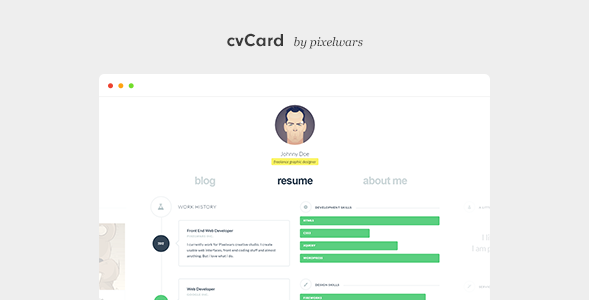
Stuck on your cvCard WP WordPress theme? Let's fix it.
No endless back-and-forth. Just send us the details and we'll get it done.
No obligation · Replies within 1 hour · Quote within 1 day
Setup · Customization · Bug fixes · WooCommerce integration
About cvCard WP WP Theme
cvCard WP is a WordPress theme built by pixelwars, designed specifically for personal CV and resume websites. It gives freelancers, job seekers, and professionals a clean, single-page layout to present their skills, experience, portfolio, and contact details in one place.
The theme uses a card-style design that works well on mobile and desktop. It includes sections for a bio, work history, education, skills progress bars, portfolio items, and a contact form. Setup is relatively quick compared to building a custom layout from scratch.
It sits in a focused niche: personal branding sites. If you need a simple, professional online presence that functions like a digital business card, cvCard WP covers the basics without requiring heavy customization out of the box.
Get matched with a cvCard WP developer in under one day
Tell us about your cvCard WP project. Small fixes, cvCard WP theme customization, or a full website build, whatever you need, we've got it covered.
We'll connect you to the right cvCard WP developers, define the scope, and get everything 100% clear.
You'll get one estimate, hire your preferred developer, and start collaborating.
cvCard WP is simple in concept but specific in execution. Getting it to look exactly right, behave correctly on all devices, and integrate cleanly with plugins takes experience with the theme’s structure. Guessing at fixes costs time you do not have.
Through Codeable, you get matched with vetted WordPress developers who have hands-on experience with themes like cvCard WP. Post your project, get a free estimate within 24 hours, and only move forward if you are satisfied. No risk, no obligation.
Pros
- Purpose-built for CV and resume sites, so the section structure matches what hiring managers actually look for
- Single-page layout keeps visitors focused without navigating away from your profile
- Skills progress bars and timeline sections are already coded in, no page builder needed
- Lightweight codebase means faster load times compared to multipurpose themes used for the same purpose
- Customizer controls cover the most common styling changes without touching code
Cons
- Very limited layout flexibility — you are mostly locked into the single-page card structure
- No built-in blog or multi-page support, which matters if you want to publish articles or case studies
- Portfolio section is basic — no filtering, lightbox, or project detail pages without custom work
- Updates from pixelwars have been infrequent, which can raise compatibility concerns with newer WordPress versions
- Documentation is thin, making it harder for non-developers to troubleshoot or extend the theme independently
Who is cvCard WP for?
Freelance Designers
Freelance designers need a portfolio that loads fast and looks sharp. cvCard WP’s card layout puts your work and contact details front and center. You can showcase selected projects in the portfolio section and link to full case studies hosted elsewhere, keeping the site lean while still giving potential clients what they need to make a decision.
Software Developers
Developers applying for roles or attracting freelance clients benefit from a clean, professional web presence that does not look like a template dump. cvCard WP’s minimal design lets your skills list, GitHub links, and work history speak clearly. Pair it with a custom domain and basic SEO setup and it outperforms a LinkedIn profile for first impressions.
Recent Graduates
A recent graduate with no budget for a custom site can get a credible online CV live in a day using cvCard WP. The education and skills sections are well structured for entry-level profiles. It beats a PDF resume for shareability and gives recruiters a URL to click rather than an attachment to open, which matters during active job searches.
Consultants and Coaches
Consultants and coaches need a site that communicates authority quickly. cvCard WP’s layout puts your bio, expertise, and contact form in a single scrollable page. There is no distraction from navigation menus or extra pages. Clients can read your background and reach out without friction, which suits service-based professionals who rely on inbound inquiries.
Creative Professionals
Photographers, illustrators, and other creative professionals who want a simple personal site without managing a full portfolio theme will find cvCard WP practical. The portfolio grid handles visual work well for smaller collections. It is not a replacement for a dedicated portfolio platform, but as a personal hub with contact details and a short bio, it works cleanly.

Customizing cvCard WP
Out of the box, cvCard WP handles basic styling through the WordPress Customizer. You can adjust colors, upload a profile photo, set your social links, and reorder sections. For most users, that is enough to get a working CV site live.
Beyond the defaults, things get more technical. Changing the layout structure, adding custom post types, modifying the skills section behavior, or integrating third-party plugins often requires direct PHP and CSS edits. Without that knowledge, you can hit a wall quickly.
A cvCard WP expert can make those deeper changes cleanly, without breaking the theme on updates. Whether you need a custom section, a different color scheme, or a language switch added, working with someone who knows the theme saves significant time and avoids messy workarounds.
Recommended plugins for cvCard WP
cvCard WP is a lightweight theme, which means it does not ship with built-in bloat. That also means useful features need to come from plugins. Adding a blog section, multilingual support via WPML or Polylang, contact form handling through WPForms or Contact Form 7, or analytics tracking all require separate setup.
If site speed matters for your job search or personal brand, plugin choices directly affect load time. You can explore WordPress performance optimization to keep the site fast. For visibility in search results, pairing cvCard WP with an SEO plugin and proper configuration covered in WordPress SEO makes a real difference.
Not sure which plugins to use? This WordPress plugins directory covers the most popular options with reviews and setup guides.
cvCard WP common issues
cvCard WP contact form not sending emails
The built-in contact form in cvCard WP relies on PHP mail, which most shared hosts block by default. Emails appear to send but never arrive. Fix this by installing an SMTP plugin like WP Mail SMTP and connecting it to a mail service such as Gmail, Mailgun, or SendGrid. Set the from address to match your domain. Test after setup. If the form itself is broken rather than just the delivery, check for JavaScript conflicts with other plugins first. Our WordPress bug fixing service can diagnose this quickly.
cvCard WP not displaying correctly on mobile
cvCard WP is responsive by design, but certain customizations break the mobile layout. Common causes include images without max-width set, custom CSS that uses fixed pixel widths, or a plugin injecting elements that override the theme’s media queries. Open Chrome DevTools, switch to mobile view, and check which element is causing overflow. If you added custom CSS recently, remove it and test. Font size overrides and container width changes in the Customizer are also frequent culprits on smaller screens.
cvCard WP portfolio section images not loading
Portfolio images failing to load in cvCard WP usually points to one of three things: the image was not properly attached to the portfolio post, the thumbnail size was not generated after upload, or a caching plugin is serving a broken cached version. Go to each portfolio item and confirm a featured image is set. Then run a thumbnail regeneration plugin like Regenerate Thumbnails. Clear all caches afterward. If images load in the admin but not on the front end, check for a CDN or security plugin blocking the image directory path.
cvCard WP skills bar not animating on scroll
The skills progress bar animation in cvCard WP triggers via a JavaScript scroll event. If it fires once and never resets, or does not fire at all, the most common cause is a JavaScript error elsewhere on the page stopping execution. Open the browser console and look for errors. Conflicts with jQuery versions loaded by plugins are a frequent issue. Also check if you are using a lazy load plugin that delays element rendering — this can prevent the scroll trigger from detecting the skills section entering the viewport correctly.
cvCard WP FAQ
cvCard WP is available as a premium theme through ThemeForest and pixelwars directly. There is no official free version. A one-time purchase covers a single site license. Extended licenses are available if you plan to use it for a client project or a site where end users are charged for access. Check the pixelwars or ThemeForest listing for current pricing.
cvCard WP is built around a single-page structure. You can technically create additional WordPress pages, but the theme does not include templates or navigation designed for multi-page use. Adding a blog or separate project detail pages requires custom template work. If you need a multi-page site, either a developer needs to extend the theme or a different theme is a better starting point.
cvCard WP is not officially optimized for Elementor or other page builders. You can install them, but the theme’s existing sections and layout are not built with builder compatibility in mind. Using a page builder inside the theme’s structure can cause styling conflicts or break the intended design. For light customization, the Customizer and direct CSS edits are more reliable approaches with this theme.
cvCard WP supports translation via .po and .mo files. You can use Loco Translate or WPML to translate the theme strings. The theme should be shipped with a .pot file for this purpose. For a fully bilingual or multilingual CV site, WPML or Polylang handles the language switching, but initial setup requires some configuration. If you need help with this, WordPress development support can set it up correctly.
Update frequency from pixelwars has been limited in recent years. Before purchasing or building a site on cvCard WP, check the ThemeForest changelog to see when the last update was released and whether it covers the current WordPress version. Running an outdated theme on a newer WordPress install can cause functionality issues or security gaps. Consider a WordPress maintenance plan to keep your site monitored if updates are infrequent.
Hire a cvCard WP Developer
Need help setting up cvCard WP, customizing a section, or fixing something that broke? A vetted cvCard WP developer can handle it cleanly and quickly. Through our free estimate process, you describe what you need, get a clear quote within 24 hours, and decide from there. No commitment required. Whether it is a small CSS tweak or a full build-out, you get professional help without the guesswork. Get your free estimate today.
You'll need a free Codeable account so developers can ask questions and send their quotes.