KidsWorld WordPress Theme
by Softwebmedia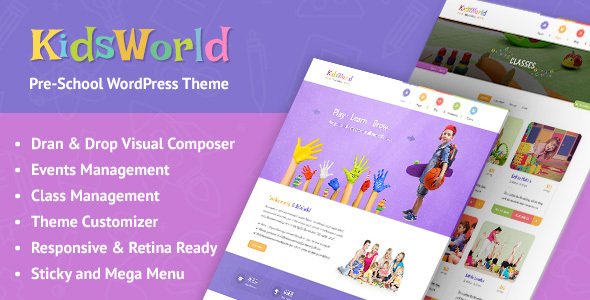
Stuck on your KidsWorld WordPress theme? Let's fix it.
No endless back-and-forth. Just send us the details and we'll get it done.
No obligation · Replies within 1 hour · Quote within 1 day
Setup · Customization · Bug fixes · WooCommerce integration
About KidsWorld WP Theme
KidsWorld is a WordPress theme built by Softwebmedia for children-focused websites. It targets schools, kindergartens, daycare centers, kids’ activity clubs, and educational platforms. The design is colorful and playful, with rounded elements, bold typography, and a layout structure that communicates warmth and trust to parents.
Out of the box, KidsWorld includes pre-built page templates for class schedules, teacher profiles, event listings, and contact forms. It ships with Visual Composer support, giving site owners a drag-and-drop editing experience without writing code. The theme is translation-ready and WPML compatible, making it a solid pick for multilingual school sites. Responsive across mobile and tablet, KidsWorld keeps its visual personality intact on smaller screens without major layout breaks.
Get matched with a KidsWorld developer in under one day
Tell us about your KidsWorld project. Small fixes, KidsWorld theme customization, or a full website build, whatever you need, we've got it covered.
We'll connect you to the right KidsWorld developers, define the scope, and get everything 100% clear.
You'll get one estimate, hire your preferred developer, and start collaborating.
KidsWorld is a niche theme. Generic WordPress help rarely accounts for its specific template structure or the Softwebmedia options panel quirks. A developer familiar with this theme knows where customizations belong and what breaks if done incorrectly.
Through Codeable, you get matched with vetted WordPress developers who have worked on similar education and children-focused sites. No guesswork on hiring. Post your project, get an estimate within 24 hours, and only proceed if it fits your budget. No obligation.
Pros
- Colorful, child-friendly design that immediately communicates the right tone to parents visiting school or daycare sites
- Includes pre-built templates for teachers, classes, and events, reducing initial setup time significantly
- Visual Composer bundled in, so non-technical users can edit page layouts without writing code
- WPML compatible and translation-ready, useful for bilingual or international school websites
- Responsive layout that maintains its visual structure well on phones and tablets
Cons
- Visual Composer bundling means you are tied to a specific page builder, which can conflict with block editor workflows
- Theme options panel is dated compared to Customizer-based themes, making live previews harder to use
- Limited documentation makes troubleshooting non-obvious issues time-consuming without developer help
- Update frequency from Softwebmedia is slow, which can create compatibility gaps with newer WordPress versions
- Default demo content import does not always work cleanly, often requiring manual setup of sliders and widgets
Who is KidsWorld for?
Primary Schools and Elementary Schools
KidsWorld suits primary schools that need to publish class schedules, term dates, staff profiles, and parent contact forms. The built-in event and teacher templates reduce custom development time. Schools with multiple classes benefit from the custom post type structure to keep content organized without complex plugin setups.
Kindergartens and Daycare Centers
Daycare centers need sites that feel safe and welcoming to parents. KidsWorld’s playful color palette and rounded visual style deliver that immediately. Enrollment inquiry forms, age group pages, and a gallery of facilities can all be built using the included templates with minimal additional development work.
Kids' Activity and Sports Clubs
Football academies, gymnastics clubs, swimming schools, and art classes for children all need clear schedules and age-group session listings. KidsWorld’s events and class templates handle this without requiring a dedicated booking plugin for simpler setups. WooCommerce can be added when paid enrollment is needed.
Online Children's Learning Platforms
Educational platforms offering video lessons, worksheets, or reading programs for children can use KidsWorld as a front-end theme paired with LMS plugins like LearnDash or LifterLMS. The theme’s structure supports course listing pages, and a developer can customize the layout to match your content delivery model.
After-School Programs and Tutoring Centers
Tutoring centers and after-school programs need to communicate subject areas, session times, tutor qualifications, and pricing. KidsWorld’s teacher profile templates adapt well for tutors, and its contact forms work for session inquiries. A developer can extend this with a booking calendar for more structured scheduling.

Customizing KidsWorld
KidsWorld gives you a Theme Options panel where you can swap color palettes, upload a custom logo, adjust typography, and configure the homepage slider. That covers the basics. But many site owners hit limits quickly when they need custom class booking systems, age-group filtering, or unique homepage section layouts that go beyond the included templates.
A KidsWorld expert can extend these customizations without hacking core theme files. Work done properly uses child themes, custom post types, and targeted CSS or PHP overrides. That means your changes survive theme updates. If you need a specific layout for term dates, fee structures, or teacher bios that the theme panels do not support, working with a KidsWorld developer gets you there cleanly and without breaking existing functionality.
Recommended plugins for KidsWorld
KidsWorld pairs well with WooCommerce if you want to sell merchandise, uniforms, or paid course enrollments. The Events Calendar plugin integrates cleanly for managing school terms and activity schedules. For forms, Gravity Forms handles registration and enrollment inquiries reliably.
If your site is slow, plugin bloat or unoptimized images are usually the cause. A WordPress performance audit can identify the bottlenecks. For schools wanting to rank in local search results, pairing KidsWorld with a solid WordPress SEO strategy helps parents find you before competitors.
Not sure which plugins to use? This WordPress plugins directory covers the most popular options with reviews and setup guides.
KidsWorld common issues
KidsWorld theme not compatible with WordPress latest version
Softwebmedia updates KidsWorld infrequently. After a WordPress core update, deprecated functions in the theme can trigger white screens or PHP errors. The fix involves identifying the specific function causing the error in the debug log, then patching it via a child theme function override rather than editing the parent theme directly. A WordPress bug fixing service can resolve this quickly without risking the rest of your site configuration.
KidsWorld Visual Composer not working after update
KidsWorld bundles a specific version of Visual Composer (WPBakery). When either the theme or the plugin updates independently, version mismatches cause builder elements to break or disappear. The solution is usually to align the WPBakery version with what the theme expects, or to migrate problematic pages to compatible layouts. Avoid updating either component without testing on a staging copy first.
KidsWorld demo content import not working
One-click demo import failures in KidsWorld are usually caused by server timeout limits, memory restrictions, or a missing required plugin like Revolution Slider. Increase the PHP memory limit to at least 256MB, set max execution time to 300 seconds, and confirm all required plugins are active before attempting the import. If it still fails, manual XML import via WordPress Tools is the reliable fallback method.
KidsWorld homepage slider not displaying on mobile
KidsWorld’s homepage slider often uses Revolution Slider or a custom shortcode that does not always scale cleanly on mobile. First check if a mobile-specific hide setting is accidentally enabled in the slider options. If the slider displays but overflows, the issue is usually a CSS width conflict. Adding a targeted CSS rule in the child theme’s stylesheet corrects the overflow without affecting desktop layouts.
KidsWorld FAQ
Yes, KidsWorld was specifically designed for school and children’s organization websites. It includes teacher profile templates, class schedule pages, and event listings out of the box. For small to mid-size schools that need a fast, visually appropriate site without heavy custom development, it is a practical starting point. Larger schools with complex requirements may need additional custom development on top of it.
KidsWorld is compatible with WooCommerce. You can add a shop for school merchandise, uniforms, or paid course registrations. Some styling adjustments are needed because the theme does not include dedicated WooCommerce templates, so shop pages inherit default WooCommerce styling. A developer can add custom WooCommerce styling to match the KidsWorld design properly.
From the WordPress dashboard, go to Appearance, then Import Demo Data if the theme includes that panel, or use the Tools import option with the provided XML file. Install required plugins like Revolution Slider before importing. If the import times out, increase PHP limits via your hosting control panel or ask your host to raise them temporarily during the import process.
Yes, KidsWorld sites can be migrated to a new host. The process involves moving your files and database, then updating the site URL in WordPress settings. A WordPress migration service handles this without downtime or data loss. Check that the new host meets the PHP and memory requirements the theme uses, especially if Revolution Slider is active.
KidsWorld was built around WPBakery (Visual Composer), not Elementor or Gutenberg. You can use the block editor for basic pages, but the theme’s pre-built templates were designed for WPBakery. Elementor can be installed alongside it, but conflicts are possible. Fully migrating a KidsWorld site to Elementor requires rebuilding templates, which is worth considering if long-term flexibility matters to you.
Hire a KidsWorld WordPress Developer
Whether you need a new feature added, a layout adjusted, or a performance issue fixed, working with an experienced KidsWorld developer saves time and avoids costly mistakes. Our developers on Codeable are vetted, reviewed, and specialized in WordPress theme work.
Get a free estimate today with no obligation to hire. Describe your project and receive a quote within 24 hours. 100% risk-free.
You'll need a free Codeable account so developers can ask questions and send their quotes.