Knowledge Base WordPress Theme
by InspiryThemes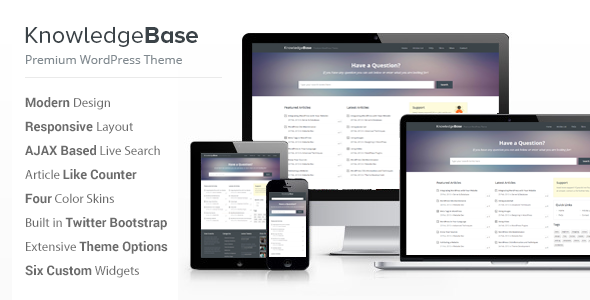
Stuck on your Knowledge Base WordPress theme? Let's fix it.
No endless back-and-forth. Just send us the details and we'll get it done.
No obligation · Replies within 1 hour · Quote within 1 day
Setup · Customization · Bug fixes · WooCommerce integration
About Knowledge Base WP Theme
Knowledge Base is a WordPress theme by InspiryThemes built specifically for documentation sites, support portals, and self-service help centers. It ships with a clean, distraction-free layout that puts article search front and center, which is exactly what users need when they are looking for answers fast.
The theme includes a built-in search bar on the homepage, category-based article organization, breadcrumb navigation, and a reading progress indicator. It works alongside the free Knowledge Base plugin from InspiryThemes, giving you a structured content type for articles separate from standard posts.
Setup is straightforward. The demo content imports cleanly, and the Customizer covers most visual settings without touching code. It is a focused theme that does one job well: helping visitors find information quickly and reducing support load for the site owner.
Get matched with a Knowledge Base developer in under one day
Tell us about your Knowledge Base project. Small fixes, Knowledge Base theme customization, or a full website build, whatever you need, we've got it covered.
We'll connect you to the right Knowledge Base developers, define the scope, and get everything 100% clear.
You'll get one estimate, hire your preferred developer, and start collaborating.
Knowledge Base does the visual and structural groundwork, but a production-ready support site usually needs more. A developer can build restricted article sections for paying customers, connect the theme to your CRM, set up automated article feedback collection, or restructure your content taxonomy from scratch.
Through Codeable, you get access to vetted WordPress specialists who have worked on documentation and support portal projects before. No generalist freelancers. Post your project, get a clear estimate, and only hire if it makes sense. See our WordPress development services for more detail.
Pros
- Dedicated article content type keeps documentation separate from blog posts
- Built-in homepage search bar is prominently placed and works on install
- Category grid layout makes large article collections easy to scan
- Reading progress bar helps users track where they are in long articles
- Demo content imports quickly and reflects a realistic documentation structure
Cons
- Article rating and feedback features require third-party plugins to implement
- Search accuracy relies on default WordPress search, which misses partial matches
- Mobile layout on deeply nested categories can feel cramped on small screens
- No built-in access control for restricting articles to logged-in or paying users
- Advanced layout customization requires editing template files directly
Who is Knowledge Base for?
Software Documentation
Software teams use Knowledge Base to host technical documentation, API references, and setup guides. The category structure maps naturally to product modules or versions. A developer can add version-specific article filtering and anchor-linked tables of contents, making long technical docs much easier to navigate without rebuilding the theme from scratch.
SaaS Help Center
SaaS companies need a help center that deflects support tickets. Knowledge Base gives you the article infrastructure. Add SearchWP for better search accuracy, connect a live chat widget for fallback support, and gate advanced documentation behind a login. The result is a support hub that handles common questions before users reach your team.
Internal Company Wiki
Teams use Knowledge Base for internal wikis covering onboarding, HR policies, and process documentation. With a membership plugin handling access control, the entire site stays private. A developer can configure role-based article visibility so different departments only see what is relevant to them, keeping the wiki clean and focused.
E-commerce Support Portal
Online stores with large product catalogues benefit from a structured support portal covering returns, shipping, sizing, and troubleshooting. Knowledge Base handles the article organization. Connect it to WooCommerce customer accounts so buyers can access order-specific help, reducing repetitive support emails and improving post-purchase experience significantly.
Educational Resource Library
Course creators and educators use Knowledge Base to build resource libraries covering study guides, FAQs, and supplemental reading. Articles can be organized by subject or level. Pair it with a membership plugin to restrict premium resources to enrolled students, and add a search bar so learners find what they need without scrolling through every category manually.

Customizing Knowledge Base
Out of the box, Knowledge Base handles the basics through the WordPress Customizer. You can adjust colors, typography, header layout, and homepage sections without writing a line of code. The demo importer gives you a working starting point in minutes.
Beyond that, customization gets more technical. Custom article templates, advanced search filtering, member-restricted content, or integrations with helpdesk tools like Crisp or Intercom all require custom development. A Knowledge Base expert can also restructure the category hierarchy to match your actual support content, not just the demo defaults.
If you need a branded, polished help center rather than a slightly adjusted demo, working with a developer is the faster and more reliable path. They can modify templates, add custom fields to articles, and make the theme fit your product documentation workflow properly.
Recommended plugins for Knowledge Base
Knowledge Base pairs well with several plugins. BetterDocs and Heroic KB can extend or replace the built-in article system with more advanced features like table of contents, article ratings, and analytics. For search, adding SearchWP gives you far more accurate results than the default WordPress search.
Adding a live chat widget such as Tidio or Crisp turns the knowledge base into a full support hub. You can also connect it to performance optimization tools to keep load times short since documentation sites often have high page counts. If you are scaling up, structured SEO work and performance tuning will help your articles rank and load properly at volume.
Not sure which plugins to use? This WordPress plugins directory covers the most popular options with reviews and setup guides.
Knowledge Base common issues
Knowledge Base search not returning relevant results
The default WordPress search does not index article content reliably, especially with custom post types. First, confirm the Knowledge Base article post type is included in the search index. If results are still poor, install SearchWP, which indexes all post types and handles partial matches properly. For larger sites, adding Elasticsearch via a plugin like ElasticPress gives significantly more accurate and faster results across thousands of articles.
Knowledge Base articles not showing in correct category
Articles appearing in the wrong category usually point to a taxonomy assignment issue or a caching problem. Check the article editor and confirm the correct Knowledge Base category is selected, not a standard WordPress category. Clear your cache plugin after making changes. If the issue persists after rechecking assignments, a WordPress bug fix may be needed to diagnose whether a plugin conflict is overriding the taxonomy output.
Knowledge Base homepage layout broken after update
Homepage layout breaks after updates are almost always caused by a Customizer setting that got reset or a plugin conflict introduced by the update. Start by clearing all caches and checking the Customizer for missing widget areas. If sections have disappeared, check whether the Knowledge Base plugin version is compatible with the updated theme version. InspiryThemes documents breaking changes in their changelog, so review that first before making template edits.
Knowledge Base theme slow to load on shared hosting
Documentation sites with hundreds of articles can strain shared hosting. Start by installing a caching plugin like WP Rocket or LiteSpeed Cache and enabling object caching if your host supports it. Optimize images in article content, and defer non-critical JavaScript. If the site is still slow after those steps, the issue may be hosting capacity rather than the theme itself. Consider moving to a managed host or a VPS. See our WordPress performance service for a full audit.
Knowledge Base FAQ
Knowledge Base by InspiryThemes has a free version available on the WordPress theme directory with core features included. The premium version adds more layout options, advanced customization settings, priority support, and additional homepage styles. For most production help centers, the premium license is worth the cost given the additional flexibility it provides over the free version.
Knowledge Base is not built around Elementor and does not ship with dedicated Elementor templates. You can use Elementor on standard pages, but the article and category templates are controlled by the theme’s own template files. If you need full Elementor control over documentation layouts, a developer would need to create custom templates, which is achievable but requires hands-on work beyond standard Elementor page building.
The theme does not include built-in access control for articles. To restrict content to logged-in users or specific membership tiers, you need a plugin like MemberPress, Paid Memberships Pro, or Restrict Content Pro. A developer can configure the restriction rules to target Knowledge Base article post types specifically, so public visitors see a login prompt instead of the article content.
Knowledge Base theme works alongside the free Knowledge Base plugin also developed by InspiryThemes. This plugin registers the custom article post type and category taxonomy that the theme relies on for its templates and layouts. Both the theme and plugin need to be installed together for the documentation features to work correctly. They are designed to function as a paired system.
Yes, migration is possible. If your existing documentation is in another knowledge base plugin or a different theme, a developer can write an import script or use tools like WP All Import to move articles into the Knowledge Base custom post type. Internal links and category assignments will need remapping. For larger migrations, professional help avoids broken links and missing content. See our WordPress migration service for details.
Hire a Knowledge Base Developer
Need custom article templates, member-gated content, advanced search, or a full design overhaul for your Knowledge Base site? A developer handles it faster and cleaner than trial and error. Work is delivered through Codeable, a vetted network of WordPress professionals. Post your project, get a free estimate with no obligation, and move forward only when you are confident. Get a free estimate today.
You'll need a free Codeable account so developers can ask questions and send their quotes.