Hallelujah WordPress Theme
by axiomthemes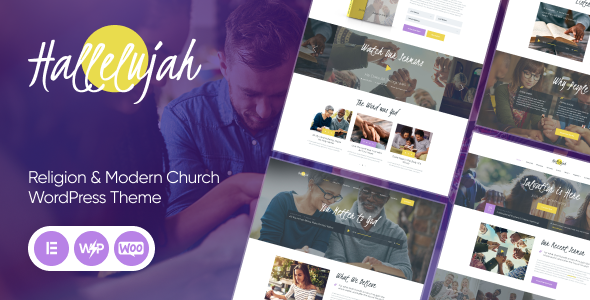
Stuck on your Hallelujah WordPress theme? Let's fix it.
No endless back-and-forth. Just send us the details and we'll get it done.
No obligation · Replies within 1 hour · Quote within 1 day
Setup · Customization · Bug fixes · WooCommerce integration
About Hallelujah WP Theme
Hallelujah is a WordPress theme built by AxiomThemes, designed primarily for churches, religious organizations, and faith-based communities. It ships with a visual page builder, pre-built demo content, and a layout focused on events, sermons, and donation calls to action.
The theme supports WooCommerce for selling merchandise or accepting online giving, and includes custom post types for sermons and events out of the box. Built on a clean, responsive framework, it works across mobile, tablet, and desktop without extra configuration.
AxiomThemes maintains the theme with regular updates and provides documentation to help site owners get started. It sits in a specific niche, and when set up correctly, it gives churches a functional, good-looking site without needing a fully custom build.
Get matched with a Hallelujah developer in under one day
Tell us about your Hallelujah project. Small fixes, Hallelujah theme customization, or a full website build, whatever you need, we've got it covered.
We'll connect you to the right Hallelujah developers, define the scope, and get everything 100% clear.
You'll get one estimate, hire your preferred developer, and start collaborating.
Most Hallelujah issues come down to one thing: the person building the site doesn’t know the theme well enough. AxiomThemes themes have their own structure, and working against it causes problems that are hard to diagnose later.
FoxyConcept connects you with vetted WordPress developers through Codeable. Every developer has passed a strict vetting process, so you get someone who knows what they’re doing from day one. No freelancer roulette, no wasted hours, no half-finished work.
Pros
- Sermon and events custom post types are built in, saving setup time for church sites
- Pre-built demo content lets you launch a complete-looking site quickly
- WooCommerce compatibility makes online donations and merchandise stores easy to add
- Responsive layout works on mobile without additional plugins or configuration
- Regular updates from AxiomThemes keep compatibility with current WordPress versions
Cons
- Page builder dependency can bloat page load times if assets are not properly optimized
- Design is clearly church-focused, which limits flexibility for repurposing in other niches
- Demo content import can overwrite existing settings if not handled carefully
- Support from AxiomThemes is documentation-based and can be slow for specific technical issues
- Child theme setup is not included out of the box, which creates update risks for customized sites
Who is Hallelujah for?
Local Church Website
Hallelujah is purpose-built for local churches that need a homepage, about page, service times, and contact information. The pre-built layouts cover these use cases directly. A developer can import the demo, swap in your content and branding, and have a clean site live within a short timeframe.
Nonprofit Religious Organization
Nonprofits with a religious mission need donation calls to action, volunteer sign-ups, and event promotion. Hallelujah handles all three with its WooCommerce integration, form plugin compatibility, and events layout. A developer can wire these together into a site that actually drives action from visitors.
Online Sermon Library
If your organization publishes weekly sermons, Hallelujah’s sermon custom post type gives you a structured archive out of the box. Sermons can be tagged by series, speaker, or topic. With the right setup, visitors can search and filter through years of content without a custom-built solution.
Church Events and Calendar Site
The events functionality in Hallelujah pairs cleanly with The Events Calendar plugin. You can display upcoming services, retreats, community events, and special programs in a calendar or list format. This removes the need for a separate events platform and keeps everything inside WordPress.
Faith-Based Online Store
Churches that sell branded merchandise, books, or study materials can activate WooCommerce inside Hallelujah without needing a separate store theme. Product pages, cart, and checkout all work within the existing design. A developer can configure payment gateways and adjust the shop layout to match the rest of the site.

Customizing Hallelujah
Hallelujah gives you a solid starting point, but most church sites need adjustments before they go live. That might mean reworking the homepage layout, customizing sermon archive pages, integrating a specific donation plugin, or adjusting the typography and color scheme to match your brand.
The theme uses a page builder approach, which is flexible but can slow things down if not handled carefully. A Hallelujah expert knows where the theme stores its settings, which customizations are safe to make via child theme, and which ones need code-level changes.
Working with someone who has hands-on experience with Hallelujah saves time and avoids the common mistakes that come from trial-and-error customization on a live site.
Recommended plugins for Hallelujah
Hallelujah integrates with several plugins that extend its functionality. WooCommerce handles online donations and merchandise sales. The Events Calendar plugin pairs well with the built-in events layout. Contact Form 7 and Gravity Forms both work for contact and volunteer sign-up pages.
For sermon management, some sites add a dedicated podcast or sermon plugin alongside the theme’s native custom post type. If site speed is a concern, pairing Hallelujah with a caching and optimization setup helps significantly. You can learn more about WordPress performance optimization and WordPress SEO to get more from your site.
Not sure which plugins to use? This WordPress plugins directory covers the most popular options with reviews and setup guides.
Hallelujah common issues
Hallelujah theme not loading demo content correctly
Demo import failures in Hallelujah are usually caused by server memory limits, PHP timeout settings, or a missing required plugin. Check that all recommended plugins are active before importing. If the import stalls, increase the PHP memory limit to at least 256MB and set the max execution time higher. If problems persist, import the XML content file manually through the WordPress importer tool instead of using the one-click method.
Hallelujah WordPress theme slow page speed
Hallelujah loads several scripts and stylesheets by default, not all of which you may be using. Start by running a speed test through GTmetrix or PageSpeed Insights to identify the specific assets causing delays. Disable unused plugins, enable a caching plugin, and serve images in modern formats. If the page builder is generating excessive DOM elements, a developer can strip out unused shortcode output and inline styles at the theme level. Learn more about WordPress performance optimization.
Hallelujah sermon custom post type not showing on frontend
If sermon posts are not appearing on the frontend, the most common cause is a permalink flush issue. Go to Settings, then Permalinks, and click Save Changes without changing anything. This forces WordPress to re-register custom post type rewrite rules. If that does not fix it, check that the sermon post type is set to public in the theme settings, and confirm the archive page is assigned correctly in the theme options panel.
Hallelujah theme breaking after WordPress update
Hallelujah theme conflicts after a WordPress core update are usually caused by deprecated functions or a plugin incompatibility introduced by the update. Start by switching to a default theme temporarily to confirm the issue is theme-specific. Check the AxiomThemes changelog for a newer theme version. If you made customizations directly to the theme files rather than a child theme, those changes may have been overwritten or may now conflict. A developer can audit and resolve these cleanly. See our WordPress bug fixing service for help.
Hallelujah FAQ
Yes, Hallelujah is one of the more practical options for church websites. It includes sermon and events post types, WooCommerce support for donations, and pre-built page layouts that match what most churches need. It is not the most flexible theme on the market, but for its specific use case it does the job well without heavy customization out of the box.
Hallelujah is built around AxiomThemes’ own page builder and shortcode system rather than Elementor. You can use Elementor on pages within the theme, but the full demo content and pre-built layouts are not Elementor-based. Forcing Elementor into every page may cause style conflicts. A developer can advise on the cleanest approach for your specific setup.
Basic customization like colors, fonts, and logos is handled through the WordPress Customizer and the theme options panel. Structural or layout changes require either page builder edits or custom code. Always use a child theme before making code changes so your work survives theme updates. If you are unsure where to start, working with a Hallelujah expert avoids the common mistakes.
Yes, Hallelujah is compatible with WooCommerce. Most churches use this for online donations, merchandise, or selling study materials. The theme applies basic WooCommerce styles automatically, though you may want a developer to fine-tune the product and cart page layouts so they match the rest of your site’s design consistently.
Technically yes, but it is not ideal outside church and faith-based contexts. The design language, demo content, and feature set are built around religious organizations. Repurposing it for a restaurant, portfolio, or business site would require significant customization that might be better served by starting with a more general-purpose theme from the beginning.
Hire a Hallelujah WordPress Developer
If you need a Hallelujah developer to build, customize, or fix your church website, FoxyConcept can match you with the right person fast. Work is delivered through Codeable, where every developer is vetted and reviewed. Post your project, get an estimate within 24 hours, and only pay if you decide to move forward. Get a free estimate with no obligation.
You'll need a free Codeable account so developers can ask questions and send their quotes.