Pergo WordPress Theme
by Jthemes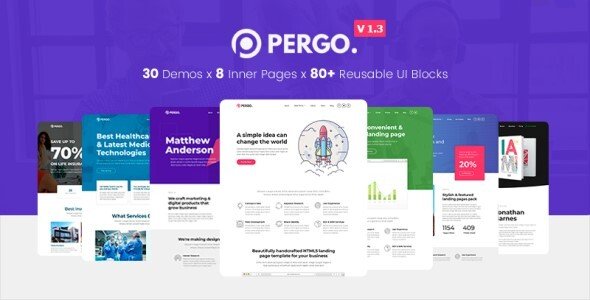
Stuck on your Pergo WordPress theme? Let's fix it.
No endless back-and-forth. Just send us the details and we'll get it done.
No obligation · Replies within 1 hour · Quote within 1 day
Setup · Customization · Bug fixes · WooCommerce integration
About Pergo WP Theme
Pergo is a multipurpose WordPress theme built by Jthemes, designed primarily for construction, renovation, and industrial businesses. It ships with multiple pre-built demo layouts, a drag-and-drop page builder, and purpose-built sections for services, project portfolios, and team members.
The theme uses a clean, grid-based structure that works well for trades businesses wanting a professional online presence without hiring a designer from scratch. It includes WooCommerce support, contact form integration, and a responsive layout that holds up across mobile and tablet devices.
Pergo suits small to mid-sized construction companies, architects, interior designers, and home improvement contractors. It is a solid starting point, though most businesses will want to customise it beyond the defaults to stand out from other Pergo-based sites.
Get matched with a Pergo developer in under one day
Tell us about your Pergo project. Small fixes, Pergo theme customization, or a full website build, whatever you need, we've got it covered.
We'll connect you to the right Pergo developers, define the scope, and get everything 100% clear.
You'll get one estimate, hire your preferred developer, and start collaborating.
Most Pergo sites look identical because they stop at the demo content. A proper Pergo developer does not just swap in your logo and copy. They restructure page templates, build out custom project or service layouts, and make sure the theme does not slow your site down as you add content.
Through Codeable, you get matched with vetted WordPress developers who have worked with construction and trades themes before. No junior freelancers, no guesswork. Just a developer who can look at your site and fix or build what you actually need.
Pros
- Multiple construction and industrial demo layouts included, ready to import with one click
- Built-in portfolio post type works well for showcasing completed projects with filterable categories
- WooCommerce compatible out of the box for selling products or service packages
- Responsive layout handles mobile and tablet without significant extra configuration
- Regular updates from Jthemes and ThemeForest support channel for buyer queries
Cons
- Demo content imports can overwrite existing settings, requiring a clean install to use safely
- Heavy reliance on shortcodes means content becomes theme-dependent and harder to migrate later
- Typography and spacing controls are limited in the Customizer compared to block-based themes
- Some demo sections require Jthemes' companion plugin, which adds a dependency risk
- Default page load includes unused CSS and JS from bundled plugins, which hurts performance scores
Who is Pergo for?
Construction Companies
Pergo’s project portfolio layouts and service section templates are a practical fit for construction businesses. You can list services, showcase completed builds with before/after imagery, and include a contact or quote form. A developer can extend this with custom filterable project archives sorted by project type or location.
Architecture Firms
Architecture firms need clean typography and strong image presentation. Pergo’s grid-based portfolio works for this, though most firms will want a developer to strip back the default industrial styling and replace it with something more minimal. Custom project pages with specification details are a common addition.
Interior Design Studios
Interior design studios benefit from Pergo’s gallery and portfolio sections. The theme supports full-width image layouts that suit mood boards and room reveals. You will likely want custom post types for rooms or styles, and a developer can set those up so clients can browse by project category or aesthetic.
Home Renovation Contractors
Renovation contractors can use Pergo’s service pages, testimonial sections, and project galleries to build trust with local prospects. Adding a lead capture form, Google Maps integration for service areas, and local SEO schema markup on top of the theme turns it into a proper lead generation site.
Industrial Equipment Suppliers
Industrial suppliers can use Pergo’s WooCommerce compatibility to list products alongside company pages. The theme’s structured layout handles product categories and specification tables reasonably well. Custom filtering and bulk enquiry forms are typical additions a developer would build to support B2B purchasing workflows.

Customizing Pergo
Out of the box, Pergo gives you colour controls, font options, and layout toggles through the WordPress Customizer. That covers basic branding. Anything beyond that, such as custom project filtering, unique service page layouts, or a quote request workflow, requires either CSS work, PHP modifications, or additional plugin integration.
A Pergo expert can adapt the theme to match your actual brand rather than just swapping colours. This means modifying demo content into real page templates, building custom post type displays for projects, and cleaning up the default spacing and typography to match your style guide.
If you need specific functionality baked into the theme rather than bolted on, working with a developer who knows Pergo’s template structure saves significant time and avoids layout conflicts down the line.
Recommended plugins for Pergo
Pergo works well with a number of popular WordPress plugins. Contact Form 7 or WPForms handle enquiry and quote forms. WooCommerce can be added for selling products or service packages. For project galleries, Envira or FooGallery both integrate cleanly.
If site speed is a concern after adding plugins, a caching layer and image optimisation are usually the first fixes. You can learn more about that on our WordPress performance page. For businesses wanting to rank locally, structured data and on-page optimisation covered in our WordPress SEO service makes a real difference with a trade-based theme like Pergo.
Not sure which plugins to use? This WordPress plugins directory covers the most popular options with reviews and setup guides.
Pergo common issues
Pergo theme portfolio filter not working
Portfolio filter issues in Pergo are usually caused by a JavaScript conflict with another plugin, or by the Jthemes companion plugin not being active. Start by checking the browser console for JS errors. If a caching plugin is active, clear it and test again. If the filter still fails, the issue is often a script loading order conflict that needs manual enqueue adjustment in the theme’s functions file. Our WordPress bug fixing service can trace and resolve this quickly.
Pergo WordPress theme slow loading speed
Pergo loads several bundled scripts and stylesheets by default, many of which may not apply to your specific page layout. Start with a performance audit using GTmetrix or PageSpeed Insights to identify the largest offenders. Minifying CSS and JS, enabling lazy loading for images, and using a caching plugin like WP Rocket are the standard first steps. Deeper fixes involve dequeuing unused scripts on specific page templates, which requires code-level changes. See our performance optimisation service for a full audit.
Pergo theme demo import not working correctly
Demo imports in Pergo can fail due to server memory limits, PHP timeout settings, or a missing companion plugin. Check that your host allows at least 256MB of PHP memory and that the maximum execution time is set to 300 seconds or higher. The Jthemes companion plugin must be active before importing. If the import completes but images are missing, the external media download likely timed out. Re-importing with a local XML file or manually uploading images is the practical fix in that case.
Pergo theme mobile menu not opening on iOS
Mobile menu failures on iOS with Pergo are almost always caused by a touch event conflict in the theme’s navigation JavaScript. This often surfaces after a theme or plugin update changes the script load order. The fix involves either patching the nav toggle script to handle touchstart events correctly, or replacing the bundled mobile menu with a lightweight plugin alternative. Test in Safari on iOS specifically, as Chrome on iOS can mask the issue. A developer can patch this in under an hour.
Pergo FAQ
Yes, Pergo is a reasonable starting point for construction businesses. It includes project portfolios, service page layouts, and testimonial sections that suit trades and building companies. That said, most construction sites need customisation beyond the demo to look distinct. A developer familiar with the theme can tailor it to your specific services and local market without rebuilding from scratch.
Pergo is built around its own bundled page builder and shortcode system rather than Elementor. You can install Elementor alongside it, but there will be conflicts and layout inconsistencies, particularly with the header and footer areas. If you want to use Elementor, a developer would need to disable parts of the theme’s default builder to avoid those conflicts before you start building pages.
Yes, migrating a Pergo site to a new host is straightforward. You need a full backup of your files and database, which plugins like Duplicator or All-in-One WP Migration handle well. After restoring on the new host, update the site URL in the database and clear any caches. If you run into issues post-migration, our WordPress migration service covers the full process.
Never edit Pergo’s core theme files directly. Use a child theme for any CSS or PHP changes so updates do not overwrite your work. Before updating, back up both files and the database. After updating, check key pages and the companion plugin compatibility. If you made changes to parent theme templates, you will need to re-apply those changes to the updated files manually.
Jthemes continues to update Pergo on ThemeForest and responds to buyer support queries through their support channel. As with most premium themes, support is tied to an active ThemeForest licence. Check the item’s changelog on ThemeForest to see the date of the last update. If the theme has not been updated in over a year, consider whether you need a maintenance plan to monitor compatibility with current WordPress versions.
Hire a Pergo WordPress Developer
Need help customising Pergo, fixing a layout issue, or building something the theme does not support out of the box? FoxyConcept connects you with experienced Pergo developers through Codeable’s vetted network. You get a free estimate within 24 hours and no obligation to proceed.
Get a free estimate and describe what you need. Whether it is a full build, a specific feature, or a bug that has been sitting there for weeks, a developer can take a look and give you a straight answer.
You'll need a free Codeable account so developers can ask questions and send their quotes.