Meetup WordPress Theme
by TemPlaza-Hub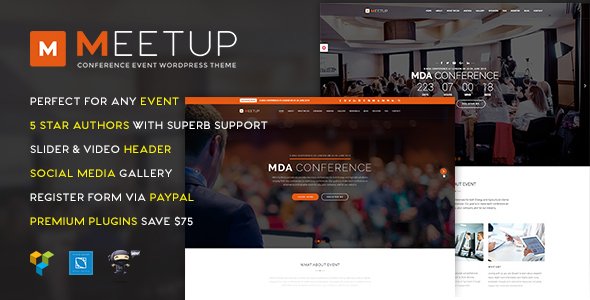
Stuck on your Meetup WordPress theme? Let's fix it.
No endless back-and-forth. Just send us the details and we'll get it done.
No obligation · Replies within 1 hour · Quote within 1 day
Setup · Customization · Bug fixes · WooCommerce integration
About Meetup WP Theme
Meetup is a WordPress theme built by TemPlaza-Hub, designed specifically for event management websites, conference organizers, and community groups. It ships with a clean layout, pre-built demo content, and native support for event listings, speaker profiles, and ticket sections.
The theme is built on the T3 Framework and integrates tightly with JoomlaShine components, though the WordPress version runs on a more standard stack. You get a visual page builder, multiple header styles, and a homepage that works out of the box for event-focused sites.
It suits organizations that need to promote scheduled events, showcase speakers, and sell or register attendees without heavy custom development. The design is polished enough to launch quickly, but flexible enough to adapt to different event types.
Get matched with a Meetup developer in under one day
Tell us about your Meetup project. Small fixes, Meetup theme customization, or a full website build, whatever you need, we've got it covered.
We'll connect you to the right Meetup developers, define the scope, and get everything 100% clear.
You'll get one estimate, hire your preferred developer, and start collaborating.
Meetup looks straightforward until you start adapting it to a real event. Custom session layouts, speaker filtering, multi-day schedule views, and payment integrations all require developer work that goes beyond theme settings.
Through Codeable, you get matched with a vetted WordPress developer who knows event themes inside out. No guesswork, no generic freelancers. Explore our WordPress development services to see what’s possible with the right developer on your project.
Pros
- Pre-built event layout works well for conference and meetup-style homepages
- Speaker profile sections and schedule blocks are included in the demo content
- Multiple header styles give layout flexibility without custom code
- Compatible with popular event plugins like The Events Calendar
- Clean typography and spacing make event details easy to read
Cons
- Built on T3 Framework, which adds complexity for developers unfamiliar with it
- Documentation is limited and not always up to date with recent WordPress versions
- Mobile layout for schedule grids can break without additional CSS fixes
- No built-in ticketing or payment system, requires third-party plugin setup
- Demo import does not always transfer cleanly, requiring manual content setup
Who is Meetup for?
Tech Conferences
Tech conferences need speaker bios, session tracks, and a schedule grid. Meetup handles all three out of the box. A developer can wire up filtering by session type and connect a ticketing plugin so attendees can register and pay directly on the site.
Community Meetup Groups
Local meetup groups need a simple homepage, event listings, and an RSVP or registration form. The theme’s clean layout works well here. Pair it with The Events Calendar and a basic form plugin to cover the full workflow without overcomplicating the setup.
Online Summits
Virtual summits need countdown timers, speaker spotlights, and session links. Meetup’s homepage sections adapt well to this format. Adding a webinar platform integration and a members-only content area gives you a complete online event experience.
Corporate Training Events
Corporate training events require a professional layout, course schedule, and registration flow. Meetup’s structured design fits this use case. A developer can connect it to a booking or form plugin and set up automated confirmation emails for registered participants.
Music and Arts Festivals
Festivals need high-impact visuals, lineup announcements, and ticketing. Meetup’s hero section and speaker grid adapt well to artist profiles and stage schedules. Combined with WooCommerce, you can handle ticket sales and merchandise from the same site.

Customizing Meetup
Out of the box, Meetup handles the basics well. Customizing beyond the demo, though, takes real effort. Changing the event layout, adjusting speaker card styles, or wiring up a custom registration flow often means editing template files or overriding CSS manually.
A Meetup expert can map your specific event workflow to the theme properly. That means configuring the right plugins for ticketing or scheduling, matching your brand colors and typography without breaking existing layout logic, and setting up reusable content blocks for recurring events.
If you need a schedule grid, multi-track sessions, or a speaker archive that filters by topic, those features need hands-on configuration. Getting them right the first time saves hours of trial and error.
Recommended plugins for Meetup
Meetup pairs well with The Events Calendar for structured event data, WooCommerce for paid ticketing, and Gravity Forms or WPForms for attendee registration. Yoast or Rank Math can add event-specific schema markup to improve search visibility.
For performance, lazy loading images and a caching layer like WP Rocket make a real difference, especially on event pages with large image galleries or speaker grids. Learn more about WordPress performance optimisation and WordPress SEO to get the most from your event site.
Not sure which plugins to use? This WordPress plugins directory covers the most popular options with reviews and setup guides.
Meetup common issues
Meetup theme demo content not importing correctly in WordPress
Demo import failures in Meetup usually come down to missing required plugins or a PHP memory limit that is too low. Make sure all bundled plugins are installed and activated before running the import. Set WP_MEMORY_LIMIT to at least 256MB in your wp-config.php. If images fail to import, re-run the media import step separately using the WordPress importer tool. If issues persist, a WordPress bug fixing service can resolve it cleanly.
Meetup speaker layout broken on mobile
The speaker grid in Meetup uses a CSS column layout that collapses inconsistently on smaller screens. Open your browser’s dev tools and inspect the .speaker-grid or equivalent wrapper class. Add a media query in your child theme’s stylesheet to switch to a single-column layout below 768px. If the theme does not include a child theme, create one before making CSS changes to avoid losing edits on the next update.
Meetup theme not showing event dates or schedule correctly
If event dates or schedule blocks are not displaying, check whether The Events Calendar plugin is installed and that event posts are published, not in draft. Meetup relies on specific post types and shortcodes to pull schedule data. If you are using a custom events setup, the theme template files may need adjusting to query the right post type. A developer familiar with the theme can audit the template logic quickly.
Meetup WordPress theme slow to load on event pages
Event pages in Meetup can load slowly due to unoptimized images in speaker and gallery sections. Start by compressing images and enabling lazy loading. Add a page caching plugin like WP Rocket or W3 Total Cache. Check for render-blocking scripts in the page source and defer any non-critical JavaScript. If the theme loads multiple Google Fonts requests, consolidate them. More detail is available on our WordPress performance page.
Meetup FAQ
The Meetup theme from TemPlaza-Hub is a premium theme and requires a purchase. Pricing depends on the license type, typically single site or developer. TemPlaza-Hub occasionally offers bundle deals through their marketplace. There is no fully featured free version, though some limited demos are publicly accessible.
Yes, the Meetup theme is compatible with The Events Calendar plugin. You may need to adjust some template styling to match the theme’s design, but the core event listing and single event page functionality works. A developer can customize the event templates to match Meetup’s layout more precisely if needed.
Yes. While Meetup was designed with in-person events in mind, its layout adapts to virtual events. You can replace venue details with webinar links, add countdown timers via a plugin, and configure speaker sections to link to session recordings or live stream pages. Custom development helps fit it to a full virtual summit format.
The Meetup theme does not include built-in ticketing. The most common approach is to add WooCommerce with an event ticketing extension, or use a dedicated plugin like WooCommerce Box Office. A developer can integrate the checkout flow into the theme’s existing design so it feels native rather than bolted on.
Yes, migrating to the Meetup theme is possible, but existing event data, speaker profiles, and page layouts will need to be rebuilt or mapped to the new theme structure. A WordPress migration specialist can handle the content transfer and template matching to keep disruption minimal during the switch.
Hire a Meetup WordPress Developer
Need help setting up, customizing, or extending the Meetup theme? Whether it’s a speaker archive, ticketing integration, or a full event site build, a specialist developer can get it done cleanly and fast.
Post your project and get a free estimate within 24 hours, no obligation to hire. Get your free estimate today and work with a developer who has handled event WordPress projects before.
You'll need a free Codeable account so developers can ask questions and send their quotes.