Techland WordPress Theme
by Ninetheme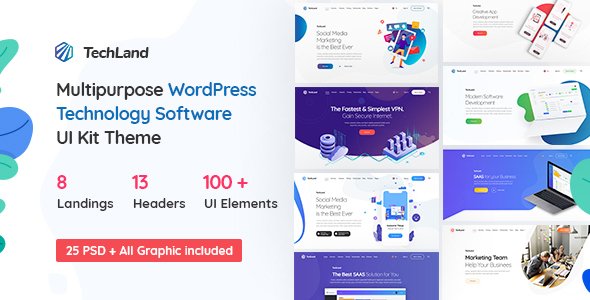
Stuck on your Techland WordPress theme? Let's fix it.
No endless back-and-forth. Just send us the details and we'll get it done.
No obligation · Replies within 1 hour · Quote within 1 day
Setup · Customization · Bug fixes · WooCommerce integration
About Techland WP Theme
Techland is a technology-focused WordPress theme built by Ninetheme. It targets IT companies, digital agencies, software firms, and tech startups that need a clean, professional online presence without heavy custom development.
The theme ships with multiple homepage layouts, a drag-and-drop page builder, pre-built inner pages, and WooCommerce support. It uses the Elementor builder, so editing content is straightforward without touching code.
Ninetheme has built Techland around speed and visual clarity. The layouts are structured for service-based businesses — think section blocks for features, pricing tables, team members, and client logos. Demo content imports in one click, giving you a working site to build from rather than starting blank.
If your business is in tech or digital services, Techland gives you a solid foundation. It covers the basics well and avoids unnecessary bloat that slows sites down.
Get matched with a Techland developer in under one day
Tell us about your Techland project. Small fixes, Techland theme customization, or a full website build, whatever you need, we've got it covered.
We'll connect you to the right Techland developers, define the scope, and get everything 100% clear.
You'll get one estimate, hire your preferred developer, and start collaborating.
Most Techland issues are not theme bugs — they are configuration problems or conflicts with other plugins. Fixing them without understanding the theme structure takes time and often creates new issues.
FoxyConcept works with vetted WordPress developers through Codeable, a specialist platform for serious WordPress work. Every developer is screened, and you get a clear estimate before any work starts. No guessing on cost, no offshore lottery. Just developers who know what they are doing with themes like Techland.
Pros
- Ships with multiple pre-built homepage demos that import with one click, saving significant setup time
- Built on Elementor, so non-technical users can edit pages without touching code
- Includes structured sections for IT services, pricing tables, and team pages out of the box
- WooCommerce compatible, allowing tech businesses to sell products or services without a separate theme
- Regularly updated by Ninetheme with compatibility fixes for newer versions of WordPress and Elementor
Cons
- Heavy dependency on Elementor means switching page builders later requires rebuilding all page content
- Demo designs look similar to many other tech themes, so standing out requires meaningful customization
- Default page weight can be high if multiple demo sections are used without image and script optimization
- Support from Ninetheme is limited to ThemeForest ticket system, which can be slow for urgent issues
- Some advanced layout options require Elementor Pro, which is a separate paid subscription on top of the theme cost
Who is Techland for?
IT Services Company
Techland’s service block layouts and feature grids are built for IT companies. You can map services, list certifications, and display case studies without custom templates. The structured inner pages reduce the time it takes to build out a full company site with multiple departments and service lines.
Software Development Agency
Software agencies need a site that signals technical credibility. Techland’s clean typography, portfolio sections, and team pages fit that positioning. Adding a custom project showcase or filtering by technology stack is straightforward with Elementor, and a developer can extend it further if needed.
Digital Marketing Agency
Digital agencies benefit from Techland’s pre-built pricing tables, client logo sections, and testimonial blocks. These are standard agency site requirements. The one-click demo gives you a working structure to customise, which is faster than building from a blank theme or a generic multipurpose option.
Tech Startup
Startups need to move fast. Techland’s demo import and Elementor editing mean a presentable site can go live in a day or two. The theme handles hero sections, feature highlights, and call-to-action layouts well, which covers most of what an early-stage tech product site requires.
SaaS Product Website
SaaS businesses need landing pages that convert. Techland includes sections for feature breakdowns, pricing comparison tables, and FAQ layouts. These translate directly to SaaS homepage needs. Connecting a payment gateway or trial signup form through WooCommerce or a dedicated plugin is also supported.

Customizing Techland
Techland customization happens primarily through Elementor and the WordPress Customizer. You can adjust colors, fonts, header layouts, and footer styles without writing code. The theme includes multiple header variations and sticky navigation options that work well for corporate sites.
Beyond the surface-level options, deeper changes need developer input. Custom post type layouts, WooCommerce template overrides, third-party plugin integration, and performance tuning all benefit from hands-on work. If you need the theme to behave in a way the default settings do not support, a Techland expert can build that out cleanly without breaking the existing structure.
Common customization requests include custom service page templates, portfolio filtering, multilingual setup with WPML, and integrating CRM or booking tools into the existing design. These are achievable but require careful implementation to keep the theme stable.
Recommended plugins for Techland
Techland works well with several popular plugins. Elementor Pro unlocks additional widgets that extend what the theme can display. WooCommerce adds an online store. WPML or Polylang handles multilingual content for international tech businesses.
For performance, caching plugins like WP Rocket combined with image optimization will help, especially if you load multiple sections on a page. See our WordPress performance service for details.
If organic traffic matters, pairing Techland with a solid SEO setup is worth the time. Our WordPress SEO service covers schema, technical SEO, and on-page structure that Techland alone does not handle automatically.
Not sure which plugins to use? This WordPress plugins directory covers the most popular options with reviews and setup guides.
Techland common issues
Techland theme header not displaying correctly after update
Header display issues after a theme or Elementor update are usually caused by cached styles or a change in how the updated version handles header templates. Start by clearing all caches, including server-side and CDN caches. If the issue persists, check whether the header template was built with Elementor Pro’s Theme Builder — updates sometimes reset template conditions. If you are not comfortable diagnosing this, our WordPress bug fixing service can identify and resolve it quickly.
Techland Elementor sections broken or not loading on frontend
Broken Elementor sections usually point to a plugin conflict, a failed Elementor data migration, or a missing Elementor Pro licence that has expired. First, check the browser console for JavaScript errors. Then deactivate non-essential plugins one by one to isolate a conflict. If sections were built with Elementor Pro widgets and the licence is inactive, those widgets will stop rendering. Renewing the licence or rebuilding with free widgets resolves it. For recurring issues, a developer review through our bug fixing service is the fastest path forward.
Techland theme slow page load speed
Techland pages can get heavy if you stack multiple full-width sections with large images and multiple scripts loading. Start with image compression — use WebP format and lazy loading. Then audit what scripts are loading on each page and defer non-critical ones. A caching plugin like WP Rocket helps significantly. If you have a lot of Elementor sections, consider removing unused ones rather than hiding them. Our WordPress performance service covers a full audit and implementation if you need structured help.
Techland WooCommerce shop page layout not matching demo
WooCommerce shop and product page layouts in Techland depend on both the theme’s WooCommerce template files and the Elementor layout structure. If the demo was imported but WooCommerce was not installed first, some templates may not have loaded correctly. Reimporting the demo with WooCommerce active often fixes this. If you have already customised content, manual template adjustment is safer. A developer familiar with Techland can align the shop layout without overwriting your existing product data.
Techland FAQ
Ninetheme updates Techland periodically to maintain WordPress compatibility. Before updating WordPress core or the theme, check the ThemeForest changelog for any noted compatibility issues. Running updates on a staging site first is always the safer approach. If an update breaks something, the issue is usually in cached CSS or a plugin conflict rather than the theme itself.
The core theme works with Elementor Free, but several demo layouts use Elementor Pro widgets like the Flip Box, Price Table, and Form widgets. If you import a demo that includes these and do not have Elementor Pro, those sections will not render correctly. You can rebuild them with free alternatives or purchase Elementor Pro to match the demo output exactly.
Demo import will overwrite your Customizer settings, menus, and homepage layout. It does not delete existing posts or pages, but it does create new ones and may set a new static homepage. Back up your site before importing. If you want specific demo sections without a full import, copy the Elementor template JSON instead of running the one-click importer.
Official support comes through the ThemeForest comments and ticket system on the Ninetheme item page. Response times vary. For faster resolution of bugs, customisation requests, or plugin conflicts, using a specialist service is more reliable. Our WordPress maintenance service includes ongoing support for theme-related issues.
Yes. Techland is compatible with WPML and Polylang, the two main multilingual plugins for WordPress. WPML is the more full-featured option and integrates cleanly with Elementor. Setup requires configuring language switchers and translating Elementor template content, which takes time to do properly. A developer familiar with both Techland and WPML will get this done without breaking existing layouts.
Hire a Techland WordPress Developer
Whether you need a full Techland setup, a specific feature built out, or something broken fixed, we can match you with a developer who knows the theme. Work is scoped before it starts, so you know exactly what you are paying for.
Get a free estimate — no commitment, no upfront payment, and the first step takes less than five minutes. Our WordPress development services cover everything from single fixes to full builds.
You'll need a free Codeable account so developers can ask questions and send their quotes.