Linoor WordPress Theme
by Layerdrops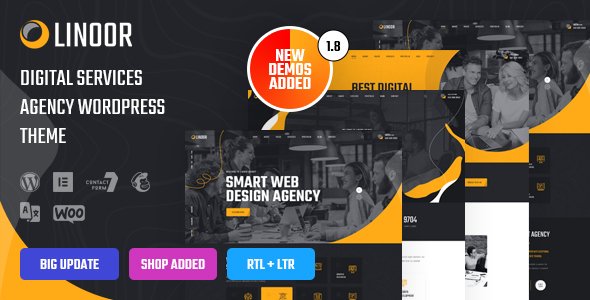
Stuck on your Linoor WordPress theme? Let's fix it.
No endless back-and-forth. Just send us the details and we'll get it done.
No obligation · Replies within 1 hour · Quote within 1 day
Setup · Customization · Bug fixes · WooCommerce integration
About Linoor WP Theme
Linoor is a multipurpose WordPress theme built by Layerdrops. It ships with a collection of pre-built demo sites covering IT services, digital agencies, SaaS landing pages, and corporate portfolios. The theme is built on Elementor, so every section is editable through a visual drag-and-drop interface without touching code.
Linoor includes a header and footer builder, WooCommerce compatibility, and a library of inner page templates. Page speed is decent out of the box compared to many bloated multipurpose themes, and the demos import cleanly with one click. It supports WPML for multilingual sites and integrates with popular form plugins like Contact Form 7 and WPForms. If you run a tech company, IT consultancy, or digital agency, Linoor fits that brief well without requiring a full custom build from scratch.
Get matched with a Linoor developer in under one day
Tell us about your Linoor project. Small fixes, Linoor theme customization, or a full website build, whatever you need, we've got it covered.
We'll connect you to the right Linoor developers, define the scope, and get everything 100% clear.
You'll get one estimate, hire your preferred developer, and start collaborating.
Linoor is flexible, but flexibility creates room for mistakes. Wrong widget nesting, missing mobile styles, or a broken header builder config are all common. An experienced Linoor developer knows where those problems hide and avoids them from the start. Through Codeable, you get access to vetted WordPress specialists who have worked with Elementor-based themes like Linoor at a professional level. No junior developers, no guesswork. Post your project, get a clear estimate, and move forward only when you’re ready.
Pros
- Elementor-based page builder means visual editing without custom code
- Large library of pre-built IT and agency demo sites speeds up setup
- Built-in header and footer builder with sticky and transparent options
- WooCommerce compatible with styled shop and product page templates
- WPML ready for multilingual sites with proper RTL support included
Cons
- Heavy demo content can slow pages down if assets aren't cleaned up after import
- Many features depend on Elementor Pro, which is a separate paid licence
- Theme options panel is large and can be disorienting for first-time users
- Some demo sections use hardcoded styles that conflict with global Elementor settings
- Support response times from Layerdrops can be slow during high-volume periods
Who is Linoor for?
IT Services Company
Linoor was originally designed with IT service businesses in mind. The demos include service listing pages, team grids, case study layouts, and pricing tables that map directly to what an IT company needs. With a Linoor developer, these templates can be configured to reflect your actual service structure rather than placeholder content.
Digital Marketing Agency
Digital agencies need a site that looks sharp and loads quickly. Linoor’s agency demos include animated counters, client logo carousels, portfolio filterable grids, and testimonial sections. A developer can remove redundant sections, tighten the layout, and make sure the site performs well under real traffic conditions.
SaaS Product Landing Page
Linoor includes focused landing page demos with feature lists, pricing tables, and clear CTA blocks that suit SaaS products. The single-page layout options work well for lead generation. A developer can integrate with tools like HubSpot or Mailchimp and set up A/B-friendly section structures for ongoing testing.
Corporate Portfolio Site
Corporate sites need consistency across many inner pages. Linoor’s inner page templates cover about, contact, team, and service detail pages. A developer can unify typography, spacing, and colour usage across all templates so the site reads as a single coherent brand rather than a collection of demo pages.
Freelance Tech Consultant
Solo consultants need a professional online presence without a large budget. Linoor’s lighter demos work well for one-person operations. A developer can strip the demo to essentials, set up a contact or booking form, and configure a simple blog for content marketing, keeping the build lean and easy to maintain.

Customizing Linoor
Linoor gives you a solid starting point, but most serious projects need work beyond the demo. Swapping the default layout for something that fits your brand means working inside Elementor, the theme options panel, and sometimes the child theme. Font pairings, colour systems, section spacing, and mobile breakpoints all need deliberate attention.
A Linoor expert can build custom Elementor widgets, set up a proper global style system, and make the header builder behave exactly how you need it to. Custom post types, filtered portfolio grids, and AJAX-powered service pages are common requests that go beyond what the theme panel alone can handle. If you want the site to look nothing like the demo, working with someone who knows Linoor’s structure saves significant time and avoids layout conflicts down the line.
Recommended plugins for Linoor
Linoor works with the standard Elementor addon ecosystem. Libraries like Essential Addons for Elementor or ElementsKit extend the widget library significantly. For performance, combining Linoor with a caching plugin and image optimisation is worth doing early. WooCommerce shop pages can be styled directly through Elementor’s WooCommerce builder.
Need faster load times? A proper WordPress performance setup makes a real difference on Linoor sites with heavy demo content. If organic traffic matters, pairing the theme with structured WordPress SEO work ensures your pages are indexed correctly and rank for the right terms.
Not sure which plugins to use? This WordPress plugins directory covers the most popular options with reviews and setup guides.
Linoor common issues
Linoor header not sticking on scroll after update
Sticky header issues in Linoor usually follow a theme or Elementor update that resets header behaviour settings. Check the Header Builder in the theme panel and confirm the sticky option is still enabled for the correct header template. If Elementor’s canvas cache is stale, regenerating CSS files from Elementor > Tools > Regenerate CSS often fixes it. If the problem persists, a WordPress bug fix can isolate whether a plugin conflict is overriding the sticky script.
Linoor one-click demo import failing or incomplete
Failed demo imports in Linoor are usually caused by low PHP memory limits, file upload size restrictions, or a timeout on the server. Set memory_limit to at least 256MB and max_execution_time to 300 in your PHP config. If you’re on shared hosting, these values may need to be set via .htaccess or by contacting your host. Import the demo content, widgets, and customiser settings separately if the all-in-one import keeps failing.
Linoor mobile menu not opening or overlapping content
Mobile menu problems in Linoor typically involve a z-index conflict with another plugin or a missing breakpoint setting in the header template. Open the header in Elementor, select the nav menu widget, and check the mobile menu toggle settings and breakpoint threshold. If a slider or hero section is covering the open menu, increase the menu’s z-index in the widget’s advanced CSS settings. Clearing your browser cache and Elementor’s cache afterwards is necessary to see the change.
Linoor Elementor widgets missing after theme activation
If Linoor’s custom Elementor widgets are missing after activation, the most common cause is that required plugins were not installed. Linoor depends on Elementor and often on a bundled plugin called Linoor Core. Go to Appearance > Install Plugins and install all recommended plugins. If the widgets still don’t appear, deactivate all other plugins temporarily to check for conflicts. Reinstalling the Linoor Core plugin through the theme panel usually resolves it cleanly.
Linoor FAQ
Yes, Linoor works with both the free and Pro versions of Elementor. Some of the more advanced demo sections use Elementor Pro widgets like the Popup Builder, Theme Builder, and WooCommerce product widgets. If you’re using free Elementor only, those specific sections won’t function, but the core theme and most templates still work without a Pro licence.
Always use a child theme for customisations. If you’ve edited the parent theme directly, those changes will be overwritten during updates. Before updating, back up your site fully. After updating, check your header and footer templates, global colours, and any custom CSS you added through the theme panel. Using a WordPress maintenance plan makes update management safer and less manual.
Yes, Linoor includes WooCommerce support with styled shop, product, cart, and checkout pages. The templates are editable through Elementor’s WooCommerce builder if you have Elementor Pro. Basic shop functionality works without Pro, but full template control requires it. Product grids and category pages pull from WooCommerce natively and respond correctly to your theme’s global styles.
Linoor is WPML compatible, which is the most widely used multilingual plugin for WordPress. It also includes RTL stylesheet support for right-to-left languages like Arabic or Hebrew. For a proper multilingual setup, you’ll need a WPML licence and someone familiar with configuring language switchers inside Elementor-built headers.
Cost depends on the scope. A simple demo setup and branding swap might take 8 to 15 hours. A fully custom build with bespoke layouts, custom post types, and integrations will cost more. The best way to get an accurate number is to submit a free estimate request and describe what you need. You’ll get a fixed price before any work starts.
Hire a Linoor Expert Developer
Whether you need a full Linoor site built from scratch, a demo customised to match your brand, or specific features added to an existing build, the right developer makes the difference. Post your project through our free estimate form and get matched with a Linoor-experienced WordPress developer within 24 hours. No obligation, no upfront payment. Just a clear scope and a fixed estimate before any work begins.
You'll need a free Codeable account so developers can ask questions and send their quotes.