Construction WordPress Theme
by Anps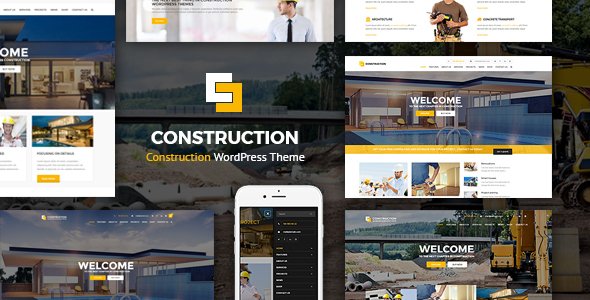
Stuck on your Construction WordPress theme? Let's fix it.
No endless back-and-forth. Just send us the details and we'll get it done.
No obligation · Replies within 1 hour · Quote within 1 day
Setup · Customization · Bug fixes · WooCommerce integration
About Construction WP Theme
Construction is a WordPress theme built by Anps, a ThemeForest author with a long track record in niche business themes. It’s designed specifically for construction companies, contractors, builders, and related trades. The theme ships with a Visual Composer page builder, multiple pre-built demo layouts, and a set of custom shortcodes that cover the typical content needs of a construction business site.
Out of the box you get project portfolio pages, service listings, team member profiles, a testimonials section, and a pricing table. The design is clean and grid-heavy, suited to showcasing physical work. It uses a dark industrial color palette by default, though that’s fully adjustable through the theme options panel. Built on a solid Bootstrap foundation, it’s responsive across devices and includes basic on-page SEO structure. Suitable for small firms and established contractors alike.
Get matched with a Construction developer in under one day
Tell us about your Construction project. Small fixes, Construction theme customization, or a full website build, whatever you need, we've got it covered.
We'll connect you to the right Construction developers, define the scope, and get everything 100% clear.
You'll get one estimate, hire your preferred developer, and start collaborating.
Construction is a capable theme, but getting it to reflect your specific business takes more than clicking through a demo importer. Anps builds themes with customization in mind, but the real work is in the details: custom layouts, integrated forms, portfolio structures that match how you actually sell work.
Through Codeable, you get matched with a vetted WordPress developer who has hands-on experience with themes like Construction. No agencies, no guesswork. Just a developer who can look at your project and give you a straight answer on what it takes and what it costs.
Pros
- Purpose-built for construction businesses with relevant pre-built sections including projects, services, and team pages
- Bundled with Visual Composer, Revolution Slider, and custom shortcodes so you have tools ready without extra plugin purchases
- Multiple demo layouts let you start from a relevant design rather than a blank page
- Bootstrap-based responsive framework means the site works across desktop, tablet, and mobile without extra work
- Active support from Anps on ThemeForest with regular updates and a documented changelog
Cons
- Visual Composer lock-in means your layout content is tightly coupled to the plugin, which complicates future theme changes
- Default demo content can take time to replace and some sections require custom CSS to look right with your own images and text
- The theme options panel is functional but not polished, and some settings are not clearly labeled
- No native booking or scheduling feature, so appointment or site visit requests need a third-party plugin and custom integration
- Page speed scores out of the box are average due to bundled scripts and unoptimized demo assets that need manual attention
Who is Construction for?
General Contractors
General contractors need a site that communicates credibility fast. Construction’s project portfolio layout, service pages, and testimonial sections handle this well. A developer can configure the project archive to filter by job type, location, or project scale, making it easier for potential clients to find relevant work examples.
Home Renovation Companies
Renovation companies benefit from before-and-after project galleries and detailed service breakdowns. The Construction theme supports this with its portfolio post type and custom gallery shortcodes. A developer can extend this with a comparison slider plugin and a custom quote form tied to specific service pages.
Civil Engineering Firms
Civil engineering firms often need project pages that go beyond photos. They need downloadable case studies, technical specs, and team credential pages. Construction’s flexible page builder makes this achievable, though a developer will need to create custom templates for the more document-heavy content types these firms typically produce.
Roofing and Exterior Specialists
Roofing and exterior specialists do well with a portfolio-forward layout that highlights material quality and finished work. The Construction theme’s dark palette and grid-based project display suit this niche. Adding a service area map and a fast-loading mobile experience are common customization requests for this type of business.
Architecture and Design Studios
Architecture and design studios need precise typographic control and large-format image presentation. Construction’s Visual Composer integration supports custom layout building for case study pages and project narratives. A developer can fine-tune spacing, font pairing, and image display ratios to match a studio’s brand standards.

Customizing Construction
Construction gives you a reasonable amount of control through its built-in options panel. You can adjust colors, fonts, header layout, and footer columns without touching code. Visual Composer handles most layout changes at the page level, letting you rearrange sections and add content blocks visually.
Where it gets more complex is when you want something outside the pre-built templates. Customizing the project archive layout, adjusting the portfolio filtering behavior, or integrating a custom quote request form typically requires PHP and CSS work. A Construction expert who knows the Anps theme structure can make these changes cleanly, without breaking updates or creating technical debt. Custom post type tweaks, child theme setup, and WooCommerce integration for material sales are all common requests that go beyond what the options panel can handle on its own.
Recommended plugins for Construction
Construction pairs well with several common plugins. WPForms or Gravity Forms works for quote request and contact pages. WPML adds multilingual support if you serve multiple regions. For project galleries, FooGallery or Envira integrates cleanly. Revolution Slider, which is bundled with the theme, handles hero sections and banners.
If you want to extend into full business functionality, pairing Construction with a CRM plugin like WP ERP or Jetpack CRM adds client management. For site speed, see our WordPress performance service. If organic search matters to your business, our WordPress SEO service covers technical and on-page work specific to construction and contractor sites.
Not sure which plugins to use? This WordPress plugins directory covers the most popular options with reviews and setup guides.
Construction common issues
Construction theme demo import not working
Demo import failures in Construction are usually caused by server memory limits, PHP timeout settings, or a conflict with an existing plugin. First, check your server’s PHP memory limit is at least 256MB and max execution time is set to 300 seconds or higher. Disable all non-essential plugins before importing. If the issue persists, a manual import using the WordPress importer with the provided XML file is often more reliable than the one-click demo importer. Our bug fixing service can handle this if you’re stuck.
Visual Composer not displaying correctly in Construction theme
Visual Composer display issues in the Construction theme often come down to a version mismatch between the bundled VC version and the one installed from a separate license, or a CSS conflict with another plugin. Start by deactivating all other plugins and checking if the issue persists. If the bundled version is outdated, updating it carefully in a staging environment is the safest approach. Avoid running two versions of Visual Composer simultaneously. A developer can resolve persistent conflicts quickly without breaking your existing page layouts.
Construction theme portfolio filter broken after update
Portfolio filter breaks in Construction typically after a theme update that changes how isotope.js is loaded, or after a jQuery version change in WordPress. Open your browser console and look for JavaScript errors. The most common fix is ensuring isotope is enqueued correctly and that jQuery is not loading in noConflict mode without the proper wrapper. If your filter worked before and broke after an update, a developer can isolate the change and apply a targeted fix through a child theme rather than editing core files.
Construction theme slow loading on mobile
Mobile performance issues on the Construction theme are most often caused by large unoptimized images from the demo, Revolution Slider loading on every page, and multiple render-blocking scripts. Start by compressing all images, setting Revolution Slider to load only on pages where it’s used, and enabling a caching plugin. For deeper gains, see our WordPress performance service. A developer can also defer non-critical scripts and implement lazy loading across the portfolio and project sections.
Construction FAQ
Yes, it works well for small contractors. The pre-built demo layouts cover the core pages a small contractor needs: services, projects, about, and contact. You won’t need most of the advanced sections, but they’re easy to ignore. The main setup tasks are replacing demo content, configuring your contact form, and adjusting colors to match your brand. A small site can be up and running in a reasonable amount of time with some patience.
Construction by Anps is built around Visual Composer, not Elementor. You can technically install Elementor and use it on individual pages, but the theme’s custom shortcodes and portfolio layouts are tied to Visual Composer. Running both page builders on the same site creates conflicts and performance issues. If you prefer Elementor, you’d be better served by a different base theme. A developer can advise on whether switching builders makes sense for your specific setup.
The Construction theme doesn’t include a quote form by default. The most practical approach is installing WPForms or Gravity Forms, building a multi-step quote form with your required fields, and embedding it on a dedicated quote page. You can also add a form to the sidebar or footer. For more advanced setups like conditional logic by service type or email routing by project size, a developer can configure this cleanly without bloating the page.
Yes, you can migrate content from another WordPress site to the Construction theme. The process involves exporting your existing posts and pages, importing them into the new setup, then rebuilding page layouts using Visual Composer to match the Construction theme structure. It’s not a one-click process, particularly if your current site uses a different page builder. Our WordPress migration service handles this end to end, including redirects and content mapping.
If you’re comfortable with WordPress and willing to follow Anps’s documentation, you can set up a basic site yourself using the demo import as a starting point. The options panel is manageable and Visual Composer has a learning curve but is widely documented. Where most people need help is with custom layouts, plugin integrations, and performance optimization. Our WordPress development services cover everything from full builds to targeted fixes if you get stuck.
Hire a Construction WordPress Developer
Whether you need a full site build on the Construction theme or targeted changes to an existing setup, working with a specialist makes the difference. Our developers know the Anps theme structure, Visual Composer integration, and the specific customization patterns construction businesses need. Get a free estimate and hear back within 24 hours. No obligation, no risk.
You'll need a free Codeable account so developers can ask questions and send their quotes.