Xsports WordPress Theme
by Templines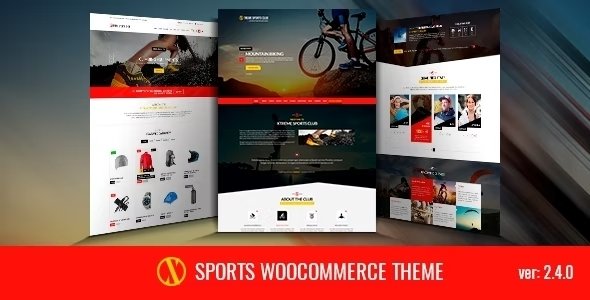
Stuck on your Xsports WordPress theme? Let's fix it.
No endless back-and-forth. Just send us the details and we'll get it done.
No obligation · Replies within 1 hour · Quote within 1 day
Setup · Customization · Bug fixes · WooCommerce integration
About Xsports WP Theme
Xsports is a WordPress theme built by Templines for sports clubs, fitness brands, gyms, and athletic organizations. It ships with a bold visual style designed to match the energy of competitive sports content, with pre-built page templates for teams, schedules, events, and player profiles.
The theme is built on a drag-and-drop page builder foundation, making layout changes accessible without custom code. It supports WooCommerce for selling merchandise, memberships, or event tickets directly from the site. Responsive across devices, Xsports handles the layout demands of media-heavy sports content reasonably well out of the box.
Templines has positioned Xsports specifically for sports niches, which means the demo content and template library reflect real-world use cases like football clubs, MMA gyms, cycling teams, and personal trainers. That specificity saves setup time compared to adapting a generic theme.
Get matched with a Xsports developer in under one day
Tell us about your Xsports project. Small fixes, Xsports theme customization, or a full website build, whatever you need, we've got it covered.
We'll connect you to the right Xsports developers, define the scope, and get everything 100% clear.
You'll get one estimate, hire your preferred developer, and start collaborating.
Getting Xsports configured the way you actually want it takes more than clicking through the demo importer. Layout adjustments, custom fields, third-party plugin integration, and WooCommerce setup all add up quickly.
FoxyConcept works with vetted Xsports developers through Codeable, a platform built specifically for serious WordPress work. Every developer is screened, and you get a fixed estimate before any work starts. No guessing on cost, no offshore lottery.
If you need it built properly the first time, this is how to do it.
Pros
- Purpose-built for sports niches with relevant demo templates for clubs, gyms, and teams
- Includes pre-designed player profile and team roster layouts that save significant build time
- WooCommerce compatible for selling merchandise, memberships, or event tickets
- Page builder integration makes layout editing accessible without writing PHP or CSS
- Bold visual design suits media-heavy content like match photos, videos, and highlight reels
Cons
- Demo import can leave behind bloat that slows the site if not cleaned up properly
- Fixture and schedule features are limited without adding dedicated sports management plugins
- Deep customizations to custom post type templates require developer knowledge
- Plugin conflicts are possible with heavily built-out installs, especially around WooCommerce
- Support response times from Templines can be slow for complex or theme-specific technical issues
Who is Xsports for?
Football and Soccer Clubs
Xsports works well for amateur and semi-professional football clubs needing a site that handles fixture lists, match results, player profiles, and a club shop. The pre-built templates map closely to what a typical club site needs, reducing the amount of custom work required before launch.
Gyms and Fitness Studios
Gyms and fitness studios can use Xsports to publish class schedules, trainer bios, membership pricing, and sell packages through WooCommerce. The bold layout handles hero imagery well, and the template structure suits timetable-style content without heavy customization upfront.
MMA and Combat Sports
MMA gyms, boxing clubs, and combat sports academies fit naturally into the Xsports design language. Event promotion templates work for fight nights and competitions. Fighter profiles and training program pages can be built using the existing post layouts with modest customization from a developer.
Cycling and Endurance Sports
Cycling clubs, triathlon teams, and endurance sports organizations benefit from Xsports’ event and schedule templates. The theme handles route information, race calendars, and results well when paired with a dedicated events plugin, making it a practical choice for active community sports groups.
Personal Trainers and Coaches
Personal trainers and sports coaches can use Xsports to build a focused client-facing site covering services, credentials, testimonials, and online booking or payment. The WooCommerce integration supports selling training plans or session packages without needing a separate ecommerce platform.

Customizing Xsports
Xsports gives you a solid starting point, but most serious projects will need customization beyond what the theme options panel covers. Color schemes, typography, and header layouts are adjustable through the WordPress Customizer, but structural changes to templates or custom post type layouts typically require developer input.
Adding features like live score feeds, fixture tables, membership gating, or custom athlete profile fields means working outside the core theme. An Xsports expert will know which plugins integrate cleanly with the theme and where custom code is the better route.
If you want a site that goes beyond the demo, working with an Xsports expert from the start avoids the back-and-forth of retrofitting changes later. Things like custom event filtering, dynamic team rosters, or sponsor sections all benefit from planned implementation rather than patched workarounds.
Recommended plugins for Xsports
Xsports pairs well with several plugin categories worth considering at build time. WooCommerce handles ticket sales, club kits, and memberships. The Events Calendar adds structured scheduling with filtering by sport or team. WPML covers multilingual needs for international clubs.
For performance, image-heavy sports sites need caching and a CDN configured properly. Poorly optimized Xsports installs often struggle with load times on mobile. See our WordPress performance service for what that involves.
If visibility matters, structured markup for events and teams helps search engines index your content correctly. Our WordPress SEO service covers that setup end to end.
Not sure which plugins to use? This WordPress plugins directory covers the most popular options with reviews and setup guides.
Xsports common issues
Xsports theme slow loading after demo import
Demo imports pull in all sample media, dummy plugins, and placeholder content in one go. The result is often a bloated install with uncompressed images, unused plugins still active, and widget areas full of placeholder data. Start by deactivating and removing any demo-specific plugins. Run an image optimization pass, clear your cache, and configure a caching plugin properly. If load times are still poor, the issue may be hosting-related or require deeper work. Our WordPress bug fixing service can identify exactly where the bottleneck sits.
Xsports player profile template not displaying correctly
Player profile display issues in Xsports usually come from a conflict between the theme’s custom post type templates and a page builder override, or from missing custom field data that the template expects. Check whether the profile template is being overridden by your page builder. If fields appear blank, confirm the custom field values are saved and mapped correctly. In some cases, a theme update changes field keys without migrating existing data. A developer can audit the template and fix the mapping without data loss. See our bug fixing service for this type of issue.
Xsports WooCommerce shop page layout broken
Broken WooCommerce layouts in Xsports are typically caused by a theme update that did not carry over WooCommerce template overrides, or a WooCommerce major version update that changed template structure. Check your child theme or theme folder for outdated WooCommerce template files. Updating those files to match the current WooCommerce version usually resolves it. If you are not running a child theme, a theme update may have directly overwritten your customizations. A developer can fix the templates and set up a child theme to prevent it happening again.
Xsports theme update broke my site layout
Layout breaks after a theme update almost always mean a customization was made directly in the parent theme files rather than through a child theme or custom plugin. When Templines pushes an update, those changes get overwritten. First, check your revision history or backups to identify what was changed. Rebuild those changes in a child theme so future updates cannot touch them. If you have no backup, a developer may be able to reconstruct the layout from screenshots or a cached version. Ongoing WordPress maintenance with regular backups prevents this situation entirely.
Xsports FAQ
Yes, Xsports is one of the more practical choices for a football club site. It comes with player profile templates, match schedule layouts, and team page designs that reflect how club sites are actually structured. You will still need a developer for anything beyond the demo, like live scores or dynamic standings tables, but the foundation is solid for this use case.
Xsports is WooCommerce compatible. You can sell merchandise, memberships, event tickets, or training plans through a standard WooCommerce setup. Some styling adjustments may be needed to match the shop pages to the rest of your design, and complex setups like memberships with gated content will need additional plugins and configuration work.
Xsports does not include a built-in fixtures and results system. You will need a dedicated plugin like SP Football Manager or WP Team Manager to handle structured fixture data, results, and standings. These plugins can be embedded into Xsports pages, but getting the styling to match the theme typically needs a developer’s attention.
Xsports is built with a page builder in mind, and most of the demo layouts depend on it for structure. You can technically edit basic content without the page builder, but rebuilding or significantly modifying layouts without it is difficult. If you want to avoid page builder dependency, a developer can extract the layouts into cleaner custom templates, though that requires custom development work.
Setup costs vary based on how much you diverge from the demo. A straightforward install with content added and basic customization typically runs a few hundred dollars. A full custom build with player databases, WooCommerce, and event management can run significantly higher. Get a free estimate and describe your project to get an accurate number before committing to anything.
Hire an Xsports Developer
Whether you need a full Xsports build from scratch, help fixing a specific issue, or a customization that the theme options panel cannot handle, we can match you with the right developer for the job.
Work is scoped and priced before anything starts. No hidden costs, no surprises. Get a free estimate and describe what you need. You will hear back within 24 hours with a clear plan.
You'll need a free Codeable account so developers can ask questions and send their quotes.