Muzze WordPress Theme
by ovatheme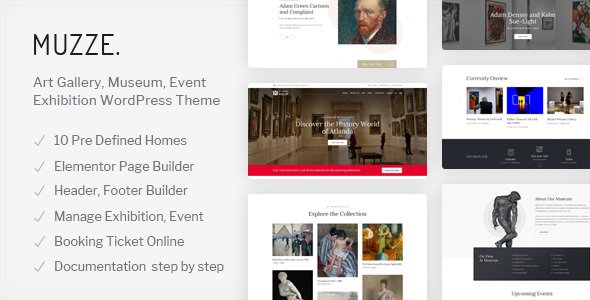
Stuck on your Muzze WordPress theme? Let's fix it.
No endless back-and-forth. Just send us the details and we'll get it done.
No obligation · Replies within 1 hour · Quote within 1 day
Setup · Customization · Bug fixes · WooCommerce integration
About Muzze WP Theme
Muzze is a museum and art gallery WordPress theme built by Ovatheme. It targets cultural institutions, artists, and creative studios that need a clean, exhibition-style layout without building one from scratch.
The theme ships with multiple homepage demos, a portfolio post type, event listings, and WooCommerce support for selling prints or tickets. Layouts are built with Elementor, so most visual changes are handled in a drag-and-drop editor rather than custom code.
Muzze suits organisations that want a polished online presence quickly. The demo content is specific to galleries and museums, which cuts setup time significantly compared to adapting a generic theme. It handles collections, exhibitions, and artist profiles out of the box.
Get matched with a Muzze developer in under one day
Tell us about your Muzze project. Small fixes, Muzze theme customization, or a full website build, whatever you need, we've got it covered.
We'll connect you to the right Muzze developers, define the scope, and get everything 100% clear.
You'll get one estimate, hire your preferred developer, and start collaborating.
Muzze is built for a specific niche, and that specificity means customisation requires someone who knows the theme structure. Generic WordPress advice does not always apply. Ovatheme uses its own framework alongside Elementor, so issues can appear in unexpected places.
Developers on Codeable have worked across dozens of museum and gallery projects. They know where Muzze creates friction and how to fix it cleanly. You get a vetted developer, a free estimate, and no obligation to proceed.
Pros
- Purpose-built for museums, galleries, and cultural institutions with relevant demo content included
- Elementor-based page builder means most layout changes require no coding
- Built-in portfolio and event post types reduce plugin dependency for core features
- WooCommerce-ready for selling prints, tickets, or memberships directly from the site
- Multiple pre-built homepage demos available, covering different gallery styles and layouts
Cons
- Heavily dependent on Elementor, which adds page weight and can create performance issues on image-heavy sites
- Ovatheme's custom framework adds a layer of complexity that makes deep customisation harder without developer experience
- Support quality can be inconsistent, and documentation does not cover advanced use cases in detail
- Demo import can overwrite existing settings, which is a risk on sites with prior content
- Updates occasionally break custom styling added to child themes, requiring manual fixes after each release
Who is Muzze for?
Art Museum
Museums need structured collection pages, event listings, and accessible design. Muzze handles all three without needing separate plugins for each. Permanent and temporary exhibition pages can be built using the existing post types, and ticketing plugins integrate without major conflicts.
Independent Art Gallery
Independent galleries benefit from Muzze’s clean whitespace layouts and portfolio grid options. You can showcase artists, manage exhibition archives, and sell artwork through WooCommerce. The minimal design keeps focus on the work rather than the interface around it.
Artist Portfolio
Individual artists get a professional online presence without custom development. Muzze’s portfolio post type handles series and individual works. Combined with an about page and contact form, it covers what most artists need from a site without unnecessary complexity.
Cultural Centre
Cultural centres with multiple programmes, events, and departments can use Muzze’s homepage sections to organise content clearly. The Events Calendar integration handles recurring and one-off events. Multilingual support via WPML works for institutions serving diverse communities.
Photography Studio
Photography studios need large image display and fast loading. Muzze supports full-width gallery layouts and lazy loading. With proper performance optimisation, it handles high-resolution image portfolios well. Client proofing and booking functionality can be added through compatible plugins.

Customizing Muzze
Muzze gives you a solid starting point, but most serious projects need changes beyond what the Elementor editor allows. Typography adjustments, custom post type tweaks, header layout changes, and WooCommerce styling often require CSS or PHP work that falls outside the visual builder.
A Muzze expert can restructure page templates, add custom fields for artwork metadata, integrate ticketing or booking plugins, and keep the design consistent across devices without breaking the existing layout.
If you need something beyond default Muzze behaviour, such as a filterable collection archive, multi-language support, or a custom artist profile system, working with a developer saves a significant amount of trial and error.
Recommended plugins for Muzze
Muzze works well with several plugins that extend its core functionality. WPML or Polylang handle multilingual collections. The Events Calendar integrates cleanly for exhibition scheduling. WooCommerce adds a shop for prints, merchandise, or memberships.
For performance, caching and image optimisation matter a lot on media-heavy gallery sites. See our WordPress performance service for specifics. If you are running SEO for a cultural institution, our WordPress SEO service covers structured data and indexing strategy for portfolio and event content.
Not sure which plugins to use? This WordPress plugins directory covers the most popular options with reviews and setup guides.
Muzze common issues
Muzze theme header not displaying correctly after update
Header display issues after a Muzze update usually come from a conflict between the theme’s built-in header settings and a cached version of the page. Start by clearing your server and browser cache. If the issue persists, check whether a child theme or custom CSS is targeting header elements that the update changed. In some cases, Ovatheme modifies header markup between versions, which breaks selector-based styles. A developer can audit your CSS and update selectors to match the current theme structure. Our bug fixing service handles this type of issue directly.
Muzze portfolio grid not loading on mobile
Portfolio grid failures on mobile typically trace back to Elementor’s responsive settings or a CSS overflow issue in the theme’s grid container. Open the page in Elementor, switch to mobile preview, and check column settings for each section. Muzze’s default grid sometimes sets fixed pixel widths that do not scale correctly. Set widths to percentage values and check padding. If the grid uses a Muzze-specific widget rather than a standard Elementor element, the fix may require CSS overrides in the child theme targeting that specific widget class.
Muzze demo import failed or incomplete
Failed demo imports in Muzze usually happen because of server memory limits or a timeout during the import process. Increase WP_MEMORY_LIMIT to at least 256MB in your wp-config.php file and set max_execution_time to 300 seconds via php.ini or .htaccess. Also confirm that required plugins, including Elementor and Ovatheme’s companion plugin, are installed and activated before importing. If the import still fails partially, a developer can import XML content manually and rebuild missing sections.
Muzze WooCommerce shop page layout broken
Muzze WooCommerce layout issues usually occur when the theme’s shop template conflicts with WooCommerce’s default template structure after a WooCommerce update. Ovatheme includes custom WooCommerce templates, and these can fall out of sync when WooCommerce releases major updates. Go to WooCommerce > Status > System Status and look for outdated templates. A developer can update those template files in the child theme to match the current WooCommerce version without losing Muzze’s styling. See our WordPress bug fixing service for hands-on help.
Muzze FAQ
Ovatheme updates Muzze to maintain WordPress compatibility, but there is often a lag after major WordPress releases. Before updating WordPress on a live site running Muzze, check the theme’s changelog on ThemeForest and test on a staging environment first. If you need ongoing compatibility management, our WordPress maintenance service handles this as part of regular site upkeep.
Muzze works with the free version of Elementor for most layout tasks. Some advanced features, such as custom form widgets, popup builders, or role-based display conditions, require Elementor Pro. Ovatheme’s companion plugin adds Muzze-specific widgets that sit alongside Elementor. You do not need Elementor Pro to run a functional Muzze site, but it adds flexibility for more complex builds.
Yes. Muzze is compatible with WPML and Polylang for multilingual sites. You will need to manually translate Elementor template content and custom post types such as portfolio items and events. This setup requires configuration beyond the standard WPML install. A developer familiar with Muzze can set up the translation workflow correctly so content is not duplicated or orphaned.
Official support comes through Ovatheme’s ThemeForest comments and their own support portal. Response times vary. For faster, more technical help, working with a third-party WordPress developer is often more efficient. Our WordPress bug fixing service provides direct access to developers who know the Muzze theme structure and can resolve issues without waiting on the theme author.
Migrating an existing site to Muzze is possible but requires careful planning. You need to map your current content types to Muzze’s structure, rebuild page layouts in Elementor, and reconfigure menus and widgets. Images and posts transfer via standard migration tools. For a smooth move without data loss, our WordPress migration service covers the full process including pre- and post-migration checks.
Hire a Muzze WordPress Developer
Whether you need a full Muzze setup, a specific feature added, or a bug fixed, our developers handle it through Codeable. Post your project and receive a free estimate within 24 hours. No commitment required.
From custom collection archives to WooCommerce integration and performance fixes, a Muzze developer on our team can scope and deliver exactly what you need. Get a free estimate and describe your project today.
You'll need a free Codeable account so developers can ask questions and send their quotes.