Social Activity WordPress Theme
by cmsmasters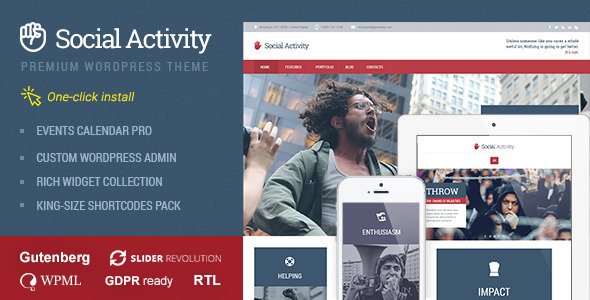
Stuck on your Social Activity WordPress theme? Let's fix it.
No endless back-and-forth. Just send us the details and we'll get it done.
No obligation · Replies within 1 hour · Quote within 1 day
Setup · Customization · Bug fixes · WooCommerce integration
About Social Activity WP Theme
Social Activity is a WordPress theme by cmsmasters built for community-driven websites, social networks, and activity-based platforms. It integrates tightly with BuddyPress and bbPress, giving you member profiles, activity streams, friend connections, private messaging, and group management out of the box.
The theme ships with the cmsmasters framework, a front-end page builder, and a large collection of shortcodes. Layout options cover standard blog formats, portfolio grids, and full social network structures. It supports WooCommerce for selling memberships or digital products alongside your community.
Built before the Gutenberg era, Social Activity relies on classic editor patterns and the cmsmasters composer. It still functions well on modern WordPress but requires attention during major core updates. Overall, it is a solid foundation for community sites that want more than a basic blog.
Get matched with a Social Activity developer in under one day
Tell us about your Social Activity project. Small fixes, Social Activity theme customization, or a full website build, whatever you need, we've got it covered.
We'll connect you to the right Social Activity developers, define the scope, and get everything 100% clear.
You'll get one estimate, hire your preferred developer, and start collaborating.
Social Activity is not a theme you configure once and forget. BuddyPress updates, PHP version changes, and WooCommerce compatibility all require ongoing attention. Finding a developer who knows the cmsmasters framework specifically makes a real difference.
Through Codeable, every developer is vetted before taking client work. You get matched with someone who has handled community sites built on this theme, not a generalist guessing at template file locations. Post your project, get an estimate, and only move forward when you are confident in the fit.
Pros
- Deep BuddyPress integration with styled profiles, activity streams, groups, and private messaging built into the design
- Ships with a front-end page composer and extensive shortcode library for building custom layouts without extra plugins
- bbPress forum styling is included, so community discussion boards match the overall theme without custom CSS work
- WooCommerce compatibility allows selling memberships, digital goods, or subscriptions alongside community features
- Wide layout flexibility across headers, sidebars, post formats, and archive styles via the cmsmasters options panel
Cons
- Built around the classic editor and cmsmasters composer, so Gutenberg block editing is limited and block-based workflows feel awkward
- BuddyPress template overrides are buried inside the theme, making updates risky if you have not used a child theme from the start
- The cmsmasters framework adds page weight and can slow load times on community sites with high activity stream traffic
- ThemeForest support threads show gaps in documentation for less common BuddyPress components and third-party plugin conflicts
- Mobile experience on member profiles and activity feeds needs manual testing and CSS adjustments on smaller screen sizes
Who is Social Activity for?
Online Community Platform
Social Activity is well suited to general community platforms where members create profiles, post activity updates, join groups, and message each other. The BuddyPress integration handles the core social layer while the theme provides a polished visual structure. Moderators can manage groups and members from the standard WordPress admin without additional tools.
Membership Subscription Site
Pair Social Activity with WooCommerce Memberships or Paid Memberships Pro to gate content, restrict group access, or sell subscription tiers. The theme handles the front-end display while the membership plugin manages access rules. This setup works for creators, coaches, or professional associations wanting paid community access alongside regular content.
Niche Social Network
Hobby groups, local interest communities, and industry-specific networks benefit from Social Activity’s profile customization and group structure. BuddyPress extended profiles let you add custom fields relevant to your niche. Combined with GamiPress for points and badges, you can build engagement loops that keep active members returning consistently.
Corporate Intranet
Companies use Social Activity to build internal networks for staff directories, team groups, announcements, and document sharing via BuddyPress plugins. Restricting registration to company email domains or using a plugin like BP Block User keeps the network private. The activity stream works well as a lightweight internal news feed replacing heavier intranet software.
Educational Community
Online learning communities built with LearnDash or LifterLMS can use Social Activity to add peer connection and group study features alongside course content. Students create profiles, join course-specific groups, and interact through the activity stream. bbPress integration adds course discussion forums that match the overall site design without extra styling effort.

Customizing Social Activity
Customizing Social Activity goes well beyond color pickers. The cmsmasters Theme Options panel controls typography, header layouts, sidebar positions, post formats, and BuddyPress component styling. Getting everything consistent across member profiles, groups, and activity feeds takes real work.
A Social Activity expert knows where the theme overrides BuddyPress templates, how the composer shortcodes interact with custom CSS, and which child theme structure prevents updates from wiping changes. Without that knowledge, small edits can break the activity stream layout or push profile elements out of alignment.
Custom member badges, profile field layouts, restricted content areas, and WooCommerce membership integration are all achievable but need careful implementation. Working with a developer who has handled Social Activity before saves significant time and avoids common conflicts between the theme framework and BuddyPress hooks.
Recommended plugins for Social Activity
Social Activity pairs naturally with BuddyPress extensions like BP Group Documents, BuddyBoss components, and GamiPress for gamification and member rewards. bbPress forum styling is built in, so adding advanced forum plugins works without heavy CSS overrides.
For performance, the theme benefits from proper caching configuration since BuddyPress activity streams generate high database load. A WordPress performance audit is worth running once your community grows past a few hundred active members.
If organic search matters to your community, pairing Social Activity with Yoast or Rank Math and reviewing your WordPress SEO setup ensures member-generated content and group pages get properly indexed rather than creating duplicate URL problems.
Not sure which plugins to use? This WordPress plugins directory covers the most popular options with reviews and setup guides.
Social Activity common issues
Social Activity theme BuddyPress templates not displaying correctly after update
This usually happens when BuddyPress updates its template structure and the theme’s built-in overrides no longer match. Check the BuddyPress template hierarchy inside your theme or child theme folder. Compare outdated files against the current BuddyPress plugin templates. Replace or update the overrides while preserving any custom styling. If you skipped the child theme step, restoring from backup before re-applying changes is the safest approach. A WordPress bug fixing service can audit and patch all affected template files systematically.
cmsmasters page builder content broken or missing on Social Activity site
The cmsmasters composer stores content in a custom post meta format. After a WordPress core update or plugin conflict, shortcode output can stop rendering or display raw code. First check whether the cmsmasters framework plugin is active and matches the theme version. Clear all caching layers including server-side cache. If specific shortcodes are broken, check the browser console for JavaScript errors that block composer scripts from loading. Rebuilding affected sections in the composer and saving again often resolves isolated rendering failures.
Social Activity theme slow loading with BuddyPress activity stream
BuddyPress activity streams run multiple database queries per page load. On larger communities, this creates bottlenecks. Install a persistent object cache like Redis or Memcached, configure a full-page caching plugin with BuddyPress exclusions for logged-in users, and review your hosting plan for adequate memory limits. Reducing the number of activity items loaded per page in BuddyPress settings also helps. For a full audit, review the WordPress performance service options to identify the exact query and asset bottlenecks.
Social Activity member profile layout broken on mobile
Social Activity’s profile grid uses fixed widths in several breakpoints that do not adapt cleanly below 480px. Inspect the affected profile components using browser dev tools and target the specific BuddyPress member header and field group containers. Add responsive overrides in your child theme’s style.css targeting the correct cmsmasters and BuddyPress class names. Test across iOS Safari and Android Chrome since they handle flexbox and overflow differently. Avoid editing the parent theme CSS directly as any update will overwrite those changes.
Social Activity FAQ
Social Activity functions on current WordPress versions but was built before Gutenberg and full-site editing. The classic editor and cmsmasters composer work correctly, but block editor support is minimal. Running a staging environment before major WordPress core updates is strongly recommended. Check the ThemeForest changelog and test BuddyPress template compatibility after each update cycle to catch any breaking changes early.
Social Activity is designed for native BuddyPress, not the BuddyBoss Platform, which replaces BuddyPress with its own component structure. You can run both, but template conflicts are common and the BuddyBoss front-end components will override Social Activity’s styled profile and activity templates in most cases. A developer familiar with both systems can map which overrides need updating, but it requires significant testing.
Yes. The core theme layouts, page composer, blog post formats, and portfolio features work independently of BuddyPress. You lose the social profile, activity stream, groups, and messaging features, but the general design system remains functional. Without BuddyPress active, you simply get a standard WordPress theme with the cmsmasters framework driving layout and styling options.
Migrating Social Activity involves moving files, the database, and updating URL references. BuddyPress stores some user data and activity entries in custom tables, so a standard WordPress migration process covers them correctly. Use a migration plugin or manual export, then update siteurl and home values. For a smooth transfer with no downtime, the WordPress migration service handles all cmsmasters and BuddyPress data correctly.
cmsmasters has released other products since Social Activity, and update frequency for this specific theme has slowed. The ThemeForest listing still shows it available for purchase, but checking the changelog tab gives the most accurate picture of recent activity. For production community sites, having ongoing WordPress maintenance in place ensures compatibility issues from plugin and PHP updates are caught before they affect your members.
Hire a Social Activity Developer
If your Social Activity site needs custom BuddyPress templates, a layout overhaul, performance fixes, or WooCommerce membership integration, working with a specialist is the fastest path forward. Get a free estimate through FoxyConcept and Codeable. Describe your project, receive a clear quote within 24 hours, and decide without any obligation. No guesswork, no wasted time on developers who have never opened a cmsmasters theme before.
You'll need a free Codeable account so developers can ask questions and send their quotes.