Suave WordPress Theme
by commercegurus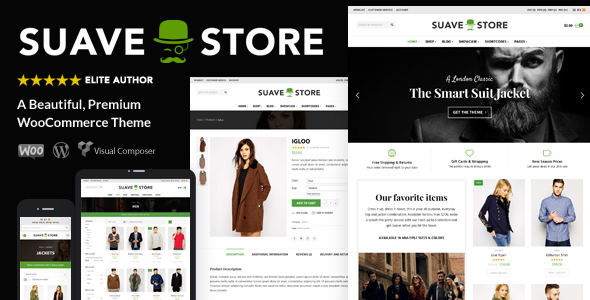
Stuck on your Suave WordPress theme? Let's fix it.
No endless back-and-forth. Just send us the details and we'll get it done.
No obligation · Replies within 1 hour · Quote within 1 day
Setup · Customization · Bug fixes · WooCommerce integration
About Suave WP Theme
Suave is a WooCommerce theme built by CommerceGurus, the team behind popular themes like Shoptimizer and CommerceKit. It targets fashion, apparel, and lifestyle stores that need a clean, minimal design without sacrificing conversion-focused features.
The theme ships with a fast, lightweight codebase and integrates tightly with WooCommerce. You get a full-screen mobile menu, sticky add-to-cart bars, off-canvas filters, and a distraction-free checkout. Page speed is a clear priority in how it’s structured.
Suave suits store owners who want a polished look out of the box but also need flexibility to build a brand. It works with Elementor and supports CommerceKit, CommerceGurus’ own plugin suite, which extends WooCommerce with features like size guides, trust badges, and product tabs.
Get matched with a Suave developer in under one day
Tell us about your Suave project. Small fixes, Suave theme customization, or a full website build, whatever you need, we've got it covered.
We'll connect you to the right Suave developers, define the scope, and get everything 100% clear.
You'll get one estimate, hire your preferred developer, and start collaborating.
Getting Suave set up properly takes more than installing the theme. Header configuration, CommerceKit setup, product page layout, and checkout optimisation all require careful attention. A wrong setting early on affects performance and conversions across the whole store.
Through Codeable, you get matched with a vetted WordPress and WooCommerce developer who knows Suave and CommerceGurus’ ecosystem. Post your project, get a free estimate, and only move forward if it makes sense. No pressure, no risk.
Pros
- Built specifically for WooCommerce with conversion-focused product page features included
- Lightweight codebase that loads fast without heavy page builder dependency
- Tight integration with CommerceKit for size guides, trust badges, and variation swatches
- Clean mobile layout with a full-screen menu and sticky add-to-cart bar on product pages
- Distraction-free checkout built in, reducing drop-off without needing extra plugins
Cons
- Smaller community than themes like Flatsome or Astra, fewer third-party tutorials available
- CommerceKit is a separate paid plugin, adding to the overall cost for full feature access
- Customizer options are limited for users who want deep control without touching code
- Elementor compatibility is present but not the primary design workflow the theme is built around
- Documentation is decent but thin on edge cases and advanced developer-level configuration
Who is Suave for?
Fashion and Apparel Stores
Suave’s minimal aesthetic suits fashion stores that want imagery to lead. The full-width layouts and clean typography keep attention on the product. CommerceKit’s size guide and variation swatches are particularly useful for clothing, reducing size-related returns and improving the buying experience for shoppers.
Lifestyle and Homewares Brands
Homewares brands benefit from Suave’s ability to present products in context. The flexible homepage sections let you build editorial-style layouts alongside standard shop listings. The sticky cart and clean checkout keep the purchase path short, which matters when customers are browsing rather than searching with intent.
Beauty and Skincare Shops
Beauty stores need product pages that build trust and communicate ingredients clearly. Suave’s product tab support via CommerceKit handles this well. Trust badges, clean imagery, and a distraction-free checkout all reduce hesitation. The theme also handles variable products, shade ranges and bundle sets, without the layout breaking.
Boutique Jewellery Retailers
Jewellery stores rely on high-quality photography, and Suave’s layouts respect that. Minimal chrome keeps the focus on images. The sticky add-to-cart bar keeps conversion options visible as customers scroll through product details. For stores with a smaller catalogue, the clean archive pages work well without feeling sparse.
Independent Clothing Labels
Independent labels need a store that reflects their brand without months of development time. Suave gives you a professional foundation quickly. Custom fonts, brand colours, and a curated product grid can be configured without code. For anything beyond that, a Suave developer can extend the theme to match exactly what the brand needs.

Customizing Suave
Suave gives you a solid starting point, but most stores will need some level of custom work to match a brand fully. The WordPress Customizer handles fonts, colors, header layout, and basic typography. For deeper changes, you’ll need to touch code or use Elementor for page-level design.
CommerceKit adds useful controls for product pages, but connecting all the pieces, custom layouts, conditional logic, bespoke checkout flows, or third-party integrations, takes real WooCommerce knowledge.
A Suave expert can configure the theme correctly from the start, avoiding the trial-and-error that burns time and introduces bugs. Whether you need a custom homepage template, modified archive layout, or a tailored mobile experience, working with someone who knows Suave and CommerceGurus’ toolset makes a real difference.
Recommended plugins for Suave
Suave pairs well with CommerceKit, which adds product badges, size charts, sticky add-to-cart, and variation swatches without bloating your install. For performance, a good caching layer like WP Rocket or FlyingPress keeps scores high. Check out our WordPress performance service if speed is a priority.
On the SEO side, Suave’s clean markup works well with Yoast or Rank Math. If you need help structuring your store for search, our WordPress SEO optimisation service covers WooCommerce-specific needs. Keep plugin count lean. Suave doesn’t need much to perform well.
Not sure which plugins to use? This WordPress plugins directory covers the most popular options with reviews and setup guides.
Suave common issues
Suave theme product page not showing variation swatches
Variation swatches in Suave require CommerceKit to be installed and activated. If CommerceKit is active but swatches aren’t showing, check that you’ve assigned swatch types to your product attributes under Products > Attributes. Each attribute needs to be set to colour, image, or label type. If swatches still don’t appear, a plugin conflict is likely the cause. Our WordPress bug fixing service can diagnose and resolve conflicts quickly.
Suave WooCommerce theme slow loading on mobile
Suave is a lightweight theme, but mobile speed issues usually come from unoptimised images, render-blocking scripts, or a slow hosting environment. Start with an image audit using Imagify or ShortPixel. Check whether any third-party scripts are loading on mobile unnecessarily. If you’re on shared hosting, a move to a faster server makes an immediate difference. Our WordPress performance service can identify exactly what’s slowing your store down.
Suave theme header layout broken after update
Header layout issues after a Suave update are often caused by a conflict between the updated theme and a cached version of your CSS or a setting that changed in the new release. Clear all caches first, including server-side caching if applicable. If the layout is still broken, compare your Customizer header settings against the theme’s changelog. A child theme is the correct way to preserve custom header modifications across updates.
CommerceKit not working with Suave theme
CommerceKit requires a valid licence key entered under CommerceKit > Settings in your dashboard. If the plugin is installed but features aren’t appearing on the front end, check the licence is active and that individual modules are toggled on within the settings panel. Some features are off by default. If your licence is valid and features are enabled but still not showing, check for JavaScript errors in the browser console, which usually point to a plugin conflict.
Suave FAQ
Suave is a premium theme sold by CommerceGurus. It’s not available for free. Pricing is on a per-site or bundle basis through the CommerceGurus website. Some features, particularly those related to product page conversion tools, also require a separate CommerceKit subscription on top of the theme purchase.
Suave is compatible with Elementor, but it isn’t built around it. The theme has its own homepage and page templates. You can use Elementor to build custom pages within a Suave install, but the WooCommerce-specific pages like product and archive layouts are controlled through the theme and CommerceKit, not Elementor templates.
Both themes come from CommerceGurus and share a performance-first approach. Shoptimizer is older and more established with a larger user base. Suave is the newer, more visually minimal option aimed at fashion and lifestyle brands. Shoptimizer suits a wider range of store types. Suave is more opinionated in its aesthetic and better suited to style-led brands.
You don’t need CommerceKit to run Suave. The theme works as a standalone WooCommerce theme. However, several key features, variation swatches, size guides, trust badges, sticky add-to-cart controls, and product tabs, are provided by CommerceKit. Without it, you’re missing a significant part of what makes Suave useful for conversion-focused stores.
Yes, you can switch your existing WooCommerce store to Suave. Your product data, orders, and customer records stay intact during a theme change. What needs attention is your page layouts, homepage, and any custom templates. These will need rebuilding in Suave. Our WordPress migration service can handle a theme transition without disrupting your store.
Hire a Suave Expert Developer
Need help setting up, customising, or fixing your Suave store? Our developers know WooCommerce and the CommerceGurus ecosystem inside out. Work is delivered through Codeable, so you’re always dealing with vetted professionals.
Post your project and get a free estimate within 24 hours. There’s no obligation to hire. Get your free estimate now and find out exactly what your Suave build will take.
You'll need a free Codeable account so developers can ask questions and send their quotes.