Theatre WP WordPress Theme
by CurlyThemes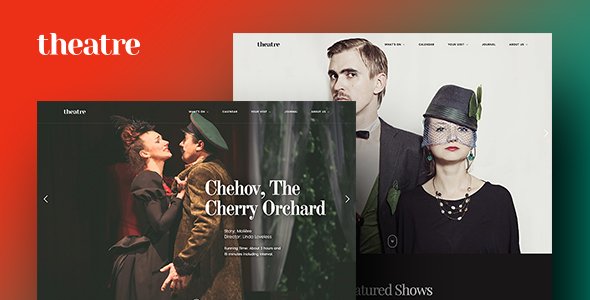
Stuck on your Theatre WP WordPress theme? Let's fix it.
No endless back-and-forth. Just send us the details and we'll get it done.
No obligation · Replies within 1 hour · Quote within 1 day
Setup · Customization · Bug fixes · WooCommerce integration
About Theatre WP WP Theme
Theatre WP is a WordPress theme built by CurlyThemes specifically for performing arts venues, theater companies, and live entertainment businesses. It ships with event management features, ticket booking integration, and a visual style suited to stage productions and concert halls.
The theme includes a custom events post type, cast and crew profiles, season program layouts, and gallery sections designed for production photography. It works with popular plugins like WooCommerce for ticket sales and supports full-width visual presentations that work well for promotional imagery.
CurlyThemes has structured Theatre WP around the practical needs of arts organizations: recurring shows, venue details, age ratings, and booking call-to-actions. If you run a playhouse, opera company, dance studio, or live music venue, this theme gives you a purpose-built starting point rather than a generic layout adapted for the arts.
Get matched with a Theatre WP developer in under one day
Tell us about your Theatre WP project. Small fixes, Theatre WP theme customization, or a full website build, whatever you need, we've got it covered.
We'll connect you to the right Theatre WP developers, define the scope, and get everything 100% clear.
You'll get one estimate, hire your preferred developer, and start collaborating.
Theatre WP is purpose-built for the arts, but getting it configured for your specific venue takes real WordPress experience. A developer who knows the theme can save you hours of trial and error on event layouts, booking integrations, and custom template work.
Through Codeable, you get access to vetted WordPress developers who have worked with performing arts and entertainment sites. Every developer on the platform is thoroughly screened. You post your project, receive estimates within 24 hours, and only pay when you decide to move forward. No risk, no obligation.
Pros
- Built-in events post type with show details, dates, venue, and ticket link fields — no plugin required to get started
- Cast and crew profile layouts designed for performer bios and headshots, saving custom post type setup time
- Full-width hero sections built for high-impact production photography and promotional artwork
- WooCommerce-ready structure allows direct ticket or merchandise sales without major theme modifications
- CurlyThemes provides documentation and updates, giving the theme a maintained codebase rather than an abandoned product
Cons
- The built-in event system lacks recurring event support, which is a real limitation for venues running weekly or rotating shows
- Limited seat map or venue layout functionality — advanced ticketing needs a third-party integration that requires developer work
- Default typography and color options are restricted in the customizer, making brand-specific design changes require CSS or child theme work
- No built-in multilingual support, which matters for international festivals or bilingual productions
- Mobile performance on image-heavy production pages can be slow without additional optimization work
Who is Theatre WP for?
Independent Theater Companies
Small to mid-size theater companies get a production-focused website structure without building from scratch. Season listings, individual show pages with cast information, and ticket call-to-actions are all template-ready. A developer can connect your existing box office software or add a simple WooCommerce checkout for direct sales, giving you full control over the booking process.
Live Music Venues
Music venues need event listings with artist details, show times, age restrictions, and ticket links. Theatre WP’s event post type covers most of this. With customization, you can add setlist archives, artist bios with social links, and recurring weekly event templates. Integrating Spotify previews or embedded video trailers for upcoming shows is straightforward with minor template edits.
Dance Studios and Companies
Dance studios use Theatre WP for both class schedules and performance announcements. The gallery sections work well for recital and rehearsal photography. A developer can add a class booking system alongside the performance calendar, and build out instructor profile pages that connect to relevant class listings. The visual-first layout suits dance organizations particularly well.
Opera and Classical Arts Organizations
Opera companies and classical music organizations benefit from Theatre WP’s formal aesthetic and program-style layouts. Season subscription pages, conductor and soloist profiles, and donor acknowledgment sections are all achievable within the theme framework. Integration with specialized arts ticketing platforms like Spektrix or AudienceView requires custom API work but is well within scope.
Community Arts Centers
Multi-discipline arts centers need flexible event listings that cover theater, music, film, and workshops in one place. Theatre WP can be extended with category-based filtering so visitors find relevant programming quickly. Adding a rental inquiry form for venue hire, a volunteer signup section, and a membership area for supporters rounds out a community center’s full site requirements.

Customizing Theatre WP
Out of the box, Theatre WP covers the basics well. But most performing arts organizations need more than a stock setup. You may need custom booking flows, integration with ticketing platforms like Ticketmaster or Spektrix, multilingual support for international productions, or a members-only area for season ticket holders.
A Theatre WP expert can reconfigure the events system to match your actual programming structure, add custom post types for directors or sponsors, and connect your preferred payment gateway for direct ticket sales. Child theme development keeps your customizations safe through future theme updates.
Design changes beyond the built-in options, such as custom typography, branded color systems, or layout overrides for specific page templates, require hands-on code work. Getting that done properly from the start saves significant rework later.
Recommended plugins for Theatre WP
Theatre WP pairs well with several plugin categories worth considering. WooCommerce handles direct ticket sales with product variations for seating types or show dates. The Events Calendar adds recurring event management with iCal export. WPForms or Gravity Forms work for audition submissions and group booking inquiries.
If your site needs strong search visibility, structured data for events is critical. Proper schema markup helps Google display show dates and ticket links directly in search results. A WordPress SEO specialist can implement this correctly.
For venues with high traffic on opening night announcements, server performance matters. A WordPress performance audit ensures your site handles traffic spikes without slowing down.
Not sure which plugins to use? This WordPress plugins directory covers the most popular options with reviews and setup guides.
Theatre WP common issues
Theatre WP events not showing on homepage
This is usually a query or template issue. Check that your homepage template is set to pull the events post type and that published events have a future date set correctly. If you are using a page builder or a custom homepage, the events loop may not be included by default. A developer can add a custom events widget or shortcode to your homepage template, or troubleshoot the query pulling wrong post types.
Theatre WP ticket button not working
Broken ticket buttons are most often caused by incorrect URL formatting in the event fields, a conflicting plugin blocking the link behavior, or a WooCommerce product that has been unpublished. Check the event post’s ticket URL field first. If the button links to a WooCommerce product, verify the product is published and the variation is in stock. Persistent issues may require inspecting button markup for JavaScript conflicts. Our WordPress bug fixing service can diagnose this quickly.
Theatre WP event images not displaying correctly
Image display problems in Theatre WP usually trace back to incorrect image dimensions registered by the theme versus what was uploaded, or a caching issue after a theme update. Regenerating thumbnails using a plugin like Regenerate Thumbnails often resolves it. If featured images appear cropped incorrectly on event cards, the theme’s registered image sizes may need adjusting in a child theme’s functions.php file.
Theatre WP slow loading on mobile
Theatre WP pages heavy with production photography load slowly on mobile without optimization. Start by enabling a caching plugin and serving images in WebP format. Lazy loading for gallery sections reduces initial load time significantly. If you are using a slider for hero images, consider replacing it with a static image on mobile via CSS. A full WordPress performance review will identify the specific bottlenecks on your site.
Theatre WP FAQ
Theatre WP supports WooCommerce, so yes, you can sell tickets directly through your WordPress site. Each ticket type becomes a product with variations for dates or seating sections. You will need some setup work to connect show event pages to the correct WooCommerce products. For more complex needs like reserved seating maps, a third-party plugin or custom integration is required.
Theatre WP has its own events post type, which can conflict with The Events Calendar if both are active and managing events simultaneously. Most developers recommend choosing one system and sticking with it. If you prefer The Events Calendar’s feature set, a developer can restyle its output to match the Theatre WP design rather than running both in parallel.
Theatre WP is compatible with Elementor at a basic level, but the theme’s custom templates and event layouts are not built as Elementor widgets. This means some pages work well in Elementor while event-specific templates need separate handling. Using a child theme alongside Elementor is the cleanest approach to avoid conflicts during theme updates.
Theatre WP’s native event post type does not support recurring events. For weekly shows or rotating repertoire, you either create individual event posts for each date or install a plugin like The Events Calendar that handles recurrence. A developer can build a lightweight recurring events solution within the theme if you want to avoid adding a heavy plugin dependency.
CurlyThemes continues to sell and update Theatre WP through ThemeForest. The theme receives compatibility updates for current WordPress versions. Before purchasing, check the ThemeForest listing for the last update date and review support thread activity, which gives a realistic picture of how responsive the developer is to reported issues.
Hire a Theatre WP Expert Developer
Whether you need a full Theatre WP setup, a custom ticketing integration, or specific template modifications, working with an experienced developer gets it done without the guesswork. Our developers understand both the theme architecture and the practical needs of performing arts organizations.
Get a free estimate with no obligation. Describe your project, receive developer matches within 24 hours, and decide whether to proceed at your own pace.
You'll need a free Codeable account so developers can ask questions and send their quotes.