Tijarah WordPress Theme
by ThemeBing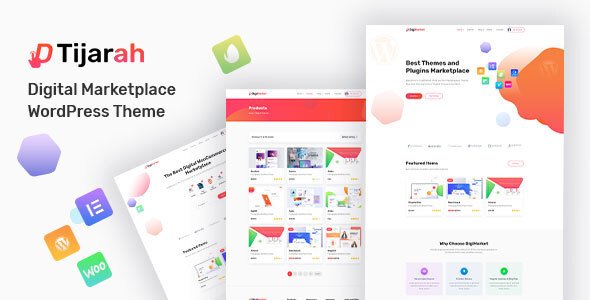
Stuck on your Tijarah WordPress theme? Let's fix it.
No endless back-and-forth. Just send us the details and we'll get it done.
No obligation · Replies within 1 hour · Quote within 1 day
Setup · Customization · Bug fixes · WooCommerce integration
About Tijarah WP Theme
Tijarah is a WooCommerce theme by ThemeBing built specifically for online stores. It targets electronics, fashion, furniture, and multi-category retail shops. The theme ships with multiple homepage layouts, a mega menu, product quick view, and an AJAX-powered cart. It is compatible with popular plugins like WooCommerce, WPML, and Contact Form 7.
Tijarah is built on a clean, widget-driven architecture, which makes it relatively straightforward to set up without touching code. The design leans toward professional eCommerce layouts rather than flashy visual effects. ThemeBing maintains the theme actively, with updates tracking WooCommerce core changes. If you need a store that looks polished from day one and handles a large product catalog, Tijarah is a solid starting point.
Get matched with a Tijarah developer in under one day
Tell us about your Tijarah project. Small fixes, Tijarah theme customization, or a full website build, whatever you need, we've got it covered.
We'll connect you to the right Tijarah developers, define the scope, and get everything 100% clear.
You'll get one estimate, hire your preferred developer, and start collaborating.
Tijarah has a lot of moving parts: WooCommerce templates, demo data, widget areas, and multiple layout options. Getting everything to work together the way you want takes real experience with the theme. A vetted Tijarah developer on Codeable can handle setup, customization, and ongoing fixes without guesswork. All developers on Codeable are screened, so you are not rolling the dice on quality. Post your project, get an estimate, and decide from there with no obligation.
Pros
- Multiple homepage layouts included, covering different store types without extra plugins
- AJAX cart and quick view work out of the box with no configuration required
- Mega menu supports large product catalogs with image-based category navigation
- One-click demo import makes initial store setup fast for standard use cases
- Active ThemeBing support with regular updates tracking WooCommerce core changes
Cons
- Customizer options are limited for advanced layout changes without child theme edits
- Some bundled demo content imports slowly and can leave orphaned widgets on cleanup
- Elementor integration is partial, page builder does not control WooCommerce shop templates
- Mobile menu can feel clunky on stores with very deep product category hierarchies
- Documentation covers basic setup well but is thin on developer-level template customization
Who is Tijarah for?
Electronics Store
Tijarah handles large electronics catalogs well. The mega menu lets you organize products by brand, type, and price tier without overwhelming visitors. Product comparison and quick view reduce friction for shoppers evaluating multiple specifications. A developer can configure filtered navigation to match how your customers actually search for electronics.
Fashion and Apparel Shop
Fashion stores benefit from Tijarah’s clean product grid layouts and variation swatches. Color and size selectors display clearly on product pages, which matters for apparel conversions. The wishlist integration and lookbook-style homepage options give fashion brands the visual presentation their products need without requiring a fully custom theme.
Furniture and Home Decor
Furniture retailers need room to show large product images and detailed specifications. Tijarah’s wide layout options and image-heavy category pages support this well. A Tijarah developer can extend the theme with custom room-type filtering and product dimension fields, keeping the store functional for shoppers who need specifics before purchasing.
Multi-Category Marketplace
Tijarah’s widget-driven homepage and flexible category structure make it a practical base for stores selling across unrelated product types. The mega menu supports cross-category navigation cleanly. For stores with many vendors or departments, a developer can integrate WooCommerce extensions to handle commissions, separate catalogs, or role-based pricing on top of the theme.
Health and Beauty Products
Health and beauty stores often rely on ingredient transparency and trust signals. Tijarah accommodates product badges, star ratings, and review highlights prominently on listing pages. Custom tab layouts on product pages can present ingredient lists or usage instructions cleanly. The theme’s straightforward structure makes these additions achievable without major template rewrites.

Customizing Tijarah
Out of the box, Tijarah covers the basics through the WordPress Customizer. You can adjust colors, typography, header layout, and footer columns without writing any code. The theme also includes multiple pre-built demo skins you can import in one click.
Beyond that, things get more involved. Custom category landing pages, non-standard product layouts, and checkout flow changes usually require child theme work or PHP edits. A Tijarah expert knows where the theme hooks into WooCommerce templates and how to override them cleanly. That avoids conflicts when ThemeBing pushes updates. If your store needs anything beyond default Customizer options, working with someone who has hands-on Tijarah experience will save you significant time and frustration.
Recommended plugins for Tijarah
Tijarah works well with WooCommerce extensions like WooCommerce Subscriptions, Product Bundles, and YITH Wishlist. For search, integrating SearchWP or FiboSearch improves the default product search noticeably. Elementor can be used for static pages, though Tijarah’s shop templates sit outside the page builder.
If site speed is a concern, combining Tijarah with a caching plugin and image optimization is essential for a product-heavy catalog. For stores targeting multiple regions, WPML pairs cleanly with the theme. You can also explore our WordPress performance service or WordPress SEO optimisation service to get more out of your Tijarah store.
Not sure which plugins to use? This WordPress plugins directory covers the most popular options with reviews and setup guides.
Tijarah common issues
Tijarah homepage not loading after demo import
This usually happens when the demo import completes but the front page setting reverts to the default blog. Go to Settings > Reading and set the homepage to the imported static page. If the page still looks wrong, check that the correct homepage template is assigned under Page Attributes. Plugin conflicts with caching tools can also prevent demo styles from loading, so flush your cache after import. If the problem persists, our WordPress bug fixing service can diagnose it quickly.
Tijarah product images not displaying correctly
Tijarah relies on WooCommerce’s image size settings. After installing the theme, go to WooCommerce > Settings > Products > Display and confirm thumbnail dimensions match the theme’s recommendations. Then run the Regenerate Thumbnails plugin to rebuild existing image crops. If images still look stretched or cropped incorrectly, the issue is likely in the theme’s CSS overriding WooCommerce defaults, which a developer can fix in a child theme.
Tijarah mega menu not working on mobile
Tijarah’s mega menu uses JavaScript that sometimes conflicts with mobile-specific scripts from caching or optimization plugins. Start by testing with all optimization plugins disabled. If the menu works, re-enable them one at a time to find the conflict. The mega menu is also not designed for deeply nested categories on small screens, so restructuring your category hierarchy may help. A developer can implement a dedicated mobile menu fallback if the conflict cannot be resolved cleanly.
Tijarah AJAX add to cart button not responding
AJAX cart issues in Tijarah are almost always caused by JavaScript conflicts or incorrect WooCommerce permalink settings. First, go to WooCommerce > Settings and ensure your shop page is correctly assigned. Then check the browser console for JS errors, which usually point to a conflicting plugin. Security plugins that block POST requests can also interfere with AJAX calls. Disabling and re-enabling plugins one at a time typically identifies the source. Our WordPress bug fixing service handles these cases regularly.
Tijarah FAQ
Yes. Tijarah is built specifically for WooCommerce and includes features like AJAX cart, product quick view, mega menu, and multiple shop layout options. It tracks WooCommerce updates reasonably well. For simple to mid-complexity stores, it works without much customization. Larger or more complex stores will likely need a developer to extend the theme’s default functionality.
Tijarah supports Elementor for standard pages like the homepage, about page, and landing pages. However, WooCommerce shop and product templates are not controlled by Elementor in Tijarah. Those templates use the theme’s own layout system. If you need full Elementor control over your product archive and single product pages, you would need a WooCommerce builder plugin on top.
After installing Tijarah, go to Appearance > Import Demo Data. Select the demo that matches your store type and run the importer. Make sure required plugins are installed and activated first, including WooCommerce and any plugins the importer flags. The process can take a few minutes. Avoid refreshing the page during import, as this often causes partial imports that are harder to clean up.
Tijarah does not include multi-vendor functionality on its own. You can add a plugin like Dokan or WC Vendors on top of Tijarah, and the theme will generally work alongside them. However, vendor dashboard pages and commission management are controlled by those plugins, not the theme. Some styling adjustments will be needed to match those plugin pages to your Tijarah design.
Yes, Tijarah is listed as WPML compatible by ThemeBing. This means the theme’s strings are translatable and the layout handles RTL languages without breaking. For a full multilingual setup, you will still need WPML or Polylang installed and configured. Product catalog translation and currency switching by region may also require additional WooCommerce Multilingual setup beyond the theme itself.
Hire a Tijarah Developer
Need help setting up Tijarah, customizing templates, or fixing something that broke? FoxyConcept connects you with vetted Tijarah developers through Codeable. You describe the work, get a clear estimate, and only proceed if it makes sense for your project. No hidden fees, no guessing. Get a free estimate and have an expert on your Tijarah store within 24 hours.
You'll need a free Codeable account so developers can ask questions and send their quotes.