Olvi WordPress Theme
by ypromo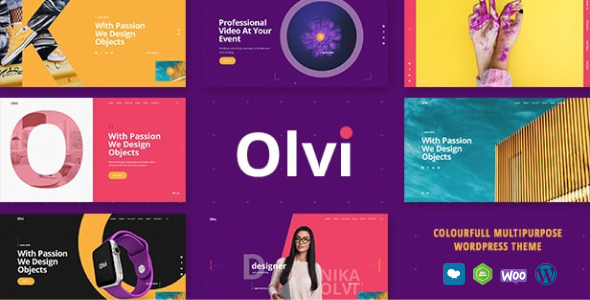
Stuck on your Olvi WordPress theme? Let's fix it.
No endless back-and-forth. Just send us the details and we'll get it done.
No obligation · Replies within 1 hour · Quote within 1 day
Setup · Customization · Bug fixes · WooCommerce integration
About Olvi WP Theme
Olvi is a WordPress theme developed by ypromo, built for creative studios, agencies, and portfolio-focused businesses. It ships with a clean, minimal design and a strong emphasis on visual presentation. The layout options cover full-width sections, grid-based portfolio displays, and flexible content blocks that work without heavy page builder dependency.
Under the hood, Olvi follows standard WordPress coding practices and integrates with the Customizer for live editing. It supports WooCommerce for light shop functionality and is translation-ready out of the box. Performance is reasonable on a well-configured host, though like most multi-purpose themes it benefits from caching and image optimisation. If you run a design-forward site and want a theme that stays out of your way visually, Olvi is worth considering.
Get matched with a Olvi developer in under one day
Tell us about your Olvi project. Small fixes, Olvi theme customization, or a full website build, whatever you need, we've got it covered.
We'll connect you to the right Olvi developers, define the scope, and get everything 100% clear.
You'll get one estimate, hire your preferred developer, and start collaborating.
FoxyConcept works with vetted WordPress specialists through Codeable, a platform that screens developers before they take any project. When you post a job, you get matched with someone who has proven experience, not a random freelancer from a bidding pool.
For Olvi projects specifically, that means a developer who understands the theme’s template hierarchy, its Customizer hooks, and where custom code belongs. You get clean work, properly structured, with no shortcuts that cause problems six months later.
Pros
- Clean, minimal design that works well for creative portfolios and agency sites
- Built-in portfolio post type with flexible grid display options
- WooCommerce compatible for adding a basic shop without major conflicts
- Translation-ready with .po/.mo file support for multilingual setups
- WordPress Customizer integration allows live preview of colour and font changes
Cons
- Theme options panel is limited, so moderate customisation requires child theme work
- Documentation from ypromo is sparse and does not cover edge cases
- Default asset loading adds some page weight that needs manual optimisation
- Limited layout variety out of the box compared to more established commercial themes
- Support from the original developer is inconsistent, especially for older licences
Who is Olvi for?
Creative Agency
Olvi’s structured layout and portfolio grid make it a practical choice for agencies presenting case studies and service pages. A developer can customise the grid to show project categories, add animated transitions, and wire up a contact form to a CRM so inbound leads land in the right place automatically.
Freelance Designer Portfolio
Freelancers need a fast, clean portfolio that does not distract from the work itself. Olvi handles that well. With a child theme in place, a developer can adjust typography, set up a single-page layout, and connect the contact section to an email marketing tool to capture enquiries properly.
Photography Studio
Full-width imagery and minimal chrome make Olvi a solid base for photography sites. The portfolio grid can be configured to display galleries by category. A developer can also optimise image delivery using lazy loading and a CDN, which matters significantly when pages carry high-resolution files.
Architecture or Interior Design Firm
Architecture and interior design firms need a theme that puts visuals first and keeps navigation clean. Olvi fits that model. A developer can build out project pages with custom fields, add a filterable portfolio using taxonomy terms, and structure the site so it ranks for local and service-based search queries.
Small Product or Lifestyle Brand
Olvi supports WooCommerce, which makes it viable for small brands selling a focused product range. A developer can configure the shop pages to match the site’s design language, set up payment gateways, and connect order notifications to a fulfilment or inventory management tool.

Customizing Olvi
Olvi gives you a solid starting point, but most serious projects need changes the theme options panel simply does not cover. That is where an Olvi expert saves time. Custom post type layouts, header modifications, and tweaks to the portfolio grid require direct work in child theme files or custom PHP.
Beyond visual changes, you may need Olvi wired up to third-party tools: CRMs, booking systems, email marketing platforms, or custom contact forms. A developer who knows the theme’s template structure can make those integrations cleanly without breaking future updates.
Work typically includes building a child theme, writing targeted CSS overrides, adjusting template files, and testing across browsers and devices. Getting this done properly from the start avoids compounding technical debt later.
Recommended plugins for Olvi
Olvi pairs well with plugins that extend what the theme cannot do on its own. WooCommerce adds shop functionality. WPForms or Gravity Forms handle lead capture. WPML or Polylang cover multilingual needs.
For speed, pairing Olvi with a caching plugin and a CDN makes a measurable difference. If you want to push further, a developer can audit asset loading and reduce render-blocking resources. See our WordPress performance service for that work.
SEO plugins like Yoast or Rank Math integrate cleanly. If you want structured technical SEO alongside theme work, our WordPress SEO service covers that separately.
Not sure which plugins to use? This WordPress plugins directory covers the most popular options with reviews and setup guides.
Olvi common issues
Olvi theme portfolio grid not displaying correctly
Portfolio grid issues in Olvi usually come from a conflict between the theme’s masonry script and another plugin loading a different version of jQuery or Isotope. Check the browser console for JavaScript errors first. If a conflict is confirmed, deactivate plugins one at a time to isolate the source. A developer can then enqueue the scripts in the correct order via the child theme’s functions.php. See our WordPress bug fixing service if you need this resolved quickly.
Olvi WordPress theme header layout broken after update
Header breakage after a theme update typically means a customisation was made directly in the parent theme files rather than a child theme. When the update overwrites those files, the changes disappear or conflict. The fix is to audit what changed, move customisations into a child theme properly, and re-apply any styling through targeted CSS. Going forward, all modifications should live in the child theme to survive future updates safely.
Olvi theme custom fonts not loading
Custom fonts failing to load in Olvi usually points to one of two causes: the font files were not enqueued correctly in functions.php, or a caching plugin is serving a stale CSS file that references an old font path. Clear all caches first and check the font file paths are correct. If you are loading Google Fonts via the Customizer, confirm the setting saved properly. A developer can hard-code the enqueue call in the child theme to make it reliable.
Olvi theme slow loading speed on mobile
Slow mobile performance on Olvi is almost always an asset loading problem. The theme loads CSS and JavaScript files that may not be needed on every page. Using a plugin like WP Rocket to defer non-critical scripts, combine CSS files, and enable lazy loading for images resolves most of it. For deeper gains, a developer can audit the theme’s enqueued assets and remove anything not in use. Our WordPress performance service covers this in full.
Olvi FAQ
Olvi has partial block editor support. Basic content blocks work, but the theme was built before full-site editing and does not support block-based templates or the Site Editor. Most users build pages using the Classic Editor or a compatible page builder plugin. If you need deeper block editor integration, a developer can add theme.json support and template parts through a child theme.
Yes, Olvi is WooCommerce compatible. The theme includes basic WooCommerce template support so shop, product, and cart pages render without major layout issues. For a polished storefront that matches your brand, a developer will typically style the WooCommerce pages through the child theme, since the default output rarely matches the rest of the site design exactly.
Create a new folder in wp-content/themes with a name like olvi-child. Add a style.css file with the correct header declaring the parent theme as Olvi, then add a functions.php file that enqueues both the parent and child stylesheets using wp_enqueue_style. Activate the child theme from the WordPress dashboard. All your customisations go into the child theme files from that point forward.
Olvi is translation-ready and works with WPML and Polylang. The theme includes .po and .mo file support, so strings can be translated. For a full multilingual setup you will also need to configure WPML’s language switcher, manage translated pages, and ensure any custom post types are set up to support multiple languages. A developer can handle the full configuration.
Yes, migrating an existing site to Olvi is possible but requires planning. Content migrates easily through WordPress’s native export and import tools. The more involved part is rebuilding your page layouts inside Olvi’s template structure and transferring any custom functionality. Our WordPress migration service covers this kind of theme switch properly.
Hire an Olvi Expert Developer
Whether you need a full Olvi build from scratch, targeted customisation, or help fixing something that broke, the right developer makes the difference. FoxyConcept connects you with experienced WordPress developers through Codeable. Post your project, get a free estimate within 24 hours, and decide from there with no obligation.
Get a free estimate for your Olvi project and see exactly what the work involves before you commit.
You'll need a free Codeable account so developers can ask questions and send their quotes.