Fit Coach WordPress Theme
by ThemeKalia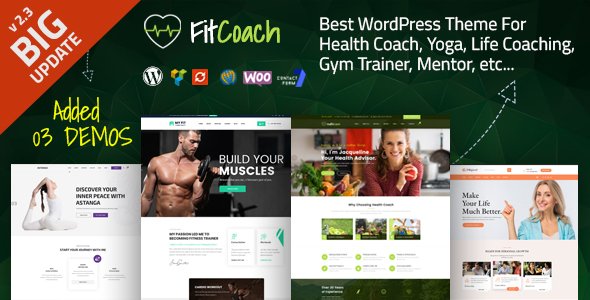
Stuck on your Fit Coach WordPress theme? Let's fix it.
No endless back-and-forth. Just send us the details and we'll get it done.
No obligation · Replies within 1 hour · Quote within 1 day
Setup · Customization · Bug fixes · WooCommerce integration
About Fit Coach WP Theme
Fit Coach is a WordPress theme built by ThemeKalia for fitness professionals, personal trainers, and gym owners. It ships with a clean, energetic layout designed to convert visitors into clients — featuring prominent call-to-action sections, class schedules, trainer profiles, and a pricing table out of the box.
The theme is built on a page builder-friendly structure, making it practical for non-developers who want to get a site live quickly. It supports WooCommerce for selling training programs or merchandise, and includes integration points for booking plugins.
If you need a fitness-focused WordPress site without starting from scratch, Fit Coach gives you a solid foundation. That said, customizing it beyond the demo requires some technical know-how — especially around typography, color palettes, and mobile breakpoints.
Get matched with a Fit Coach developer in under one day
Tell us about your Fit Coach project. Small fixes, Fit Coach theme customization, or a full website build, whatever you need, we've got it covered.
We'll connect you to the right Fit Coach developers, define the scope, and get everything 100% clear.
You'll get one estimate, hire your preferred developer, and start collaborating.
ThemeKalia builds clean themes, but no theme ships ready for every business. A Fit Coach developer on Codeable has worked with the theme’s structure before — they know its quirks, its CSS architecture, and exactly where customization should live to survive future updates.
Rather than trial and error, you get a developer who can scope your project accurately, warn you about potential conflicts before they happen, and deliver work that actually holds up. That’s the difference between a freelancer guessing and a vetted specialist who’s done it before.
Pros
- Pre-built fitness sections — class schedules, trainer profiles, and pricing tables are included from the start
- WooCommerce compatible for selling training packages, merch, or digital downloads
- Page builder friendly layout makes content editing manageable without code
- Clean, high-contrast design that works well for fitness branding and CTA visibility
- Booking plugin integration points are built in, reducing setup work for appointment-based businesses
Cons
- Limited native options for complex class timetables — a separate plugin is almost always needed
- Mobile layout for the hero and schedule sections often needs manual CSS adjustments
- Typography customization is shallow in the theme panel — custom fonts require extra work
- Demo content import can overwrite existing settings if not handled carefully
- ThemeKalia's documentation is sparse, which makes troubleshooting harder without developer experience
Who is Fit Coach for?
Personal Trainers
Fit Coach is a strong starting point for personal trainers who need a professional site fast. The trainer profile sections, testimonial layouts, and CTA placement are built for conversion. A developer can tailor the booking flow to match how you actually take on clients — whether that’s Calendly, Amelia, or a custom inquiry form.
Boutique Gyms
Boutique gyms need class schedules, membership options, and a way to show off their space. Fit Coach handles the visual side well. With WooCommerce and a scheduling plugin layered on, it can manage memberships and class bookings. A Fit Coach developer ensures these integrations don’t break the theme’s layout or slow the site down.
Online Fitness Coaches
Online coaches selling programs, courses, or one-to-one sessions can use Fit Coach’s WooCommerce support to build a proper shop. The homepage layout suits digital product promotion with some customization. Connecting it to a course plugin like LearnDash or Tutor LMS is straightforward with developer help.
Yoga and Pilates Studios
Yoga and pilates studios need a calmer aesthetic than the default Fit Coach style. The theme’s structure supports that with color palette changes and typography swaps. A developer can adjust the class schedule section to display session types, difficulty levels, and instructor names in a format that suits studio clients.
Nutrition and Wellness Coaches
Nutrition coaches and wellness practitioners benefit from Fit Coach’s service listing and pricing table sections. These can be repurposed for consultation packages or meal plan tiers. Pairing the theme with a contact form and calendar tool gives clients a clear path from landing on the site to booking a session.

Customizing Fit Coach
Out of the box, Fit Coach looks polished — but most trainers and gym owners need changes that go beyond the theme options panel. Custom color schemes, font pairings, adjusted layouts for class timetables, or a booking flow that matches your actual business model all require hands-on work.
A Fit Coach expert knows where ThemeKalia’s theme stores its settings, which options are safe to override via child theme, and which require direct CSS or PHP changes. This matters because updates to the parent theme can break customizations made in the wrong place.
Common customization requests include adding custom post types for coaches, modifying the pricing section, integrating third-party scheduling tools, and adjusting the homepage hero for mobile. Getting this right the first time saves hours of rework later.
Recommended plugins for Fit Coach
Fit Coach pairs well with several plugins that extend its core functionality. For bookings, Amelia or Simply Schedule Appointments slot in cleanly. WooCommerce handles online program sales without major conflicts. For lead generation, WPForms integrates without layout issues.
If site speed matters — and it should — pairing Fit Coach with proper caching and image optimization is essential. See our WordPress performance services for specifics. For trainers running content marketing, structured SEO setup makes a real difference. Our WordPress SEO optimisation service covers that end-to-end.
Not sure which plugins to use? This WordPress plugins directory covers the most popular options with reviews and setup guides.
Fit Coach common issues
Fit Coach theme mobile layout broken on phones
Mobile layout issues in Fit Coach usually come from hero image scaling or navigation menu breakpoints not triggering correctly. The first step is checking whether a plugin or custom CSS is conflicting with the theme’s responsive stylesheet. If you’ve added custom CSS directly to the parent theme, a theme update may have overwritten it. Moving overrides to a child theme or the Additional CSS panel fixes this. For persistent breakpoint issues, our WordPress bug fixing service can diagnose and resolve it properly.
Fit Coach class schedule not displaying correctly
Fit Coach’s built-in schedule section is basic. If you’re using a third-party plugin like Amelia or BookingPress alongside it, column conflicts or CSS specificity issues often cause display problems. Check for JavaScript errors in the browser console first — these usually point to a plugin conflict. If the schedule shortcode is rendering but the layout is broken, the theme’s row styling is likely overriding the plugin’s own CSS. A targeted CSS fix or plugin configuration change usually resolves it.
Fit Coach WooCommerce shop page layout messed up
WooCommerce shop page layout problems in Fit Coach are typically caused by the theme’s grid CSS conflicting with WooCommerce’s default column classes. This happens most often after a WooCommerce update changes its HTML structure. The fix usually involves adding specific CSS rules that target WooCommerce’s updated class names, or installing a WooCommerce child theme compatibility patch. Avoid editing WooCommerce template files directly inside the Fit Coach theme folder — use the proper override directory structure instead.
Fit Coach theme update broke my customizations
If a Fit Coach update broke your site, customizations were likely made in the parent theme files rather than a child theme. Parent theme updates overwrite any file changes you made directly. The recovery path involves comparing your old customizations against the updated files and migrating changes into a child theme. Going forward, all CSS, template, and function overrides should live in the child theme only. If you need help recovering lost customizations, our WordPress bug fixing service handles exactly this.
Fit Coach FAQ
Yes, Fit Coach is a practical choice for personal trainers. It includes trainer profile sections, testimonials, service listings, and CTA layouts that suit a training business. It’s not the most flexible theme on the market, but for straightforward trainer sites it reduces setup time significantly. More complex needs — custom booking flows, specific layouts — will require developer input.
Fit Coach supports WooCommerce, but the integration is basic. Simple product listings and a checkout work fine. If you need a polished shop with custom product layouts, filtered categories, or subscription products, some CSS and configuration work is needed. A developer familiar with both Fit Coach and WooCommerce can set this up without layout conflicts.
Yes. Fit Coach works with popular booking plugins like Amelia, Simply Schedule Appointments, and Bookly. The theme doesn’t include a native booking system, so a plugin is required for appointment scheduling. Getting the plugin’s layout to match the theme’s style typically needs a small amount of CSS work, but the functionality integrates without major issues.
Fit Coach demo content is installed via the theme’s built-in demo importer, usually found under Appearance or a theme-specific menu in the WordPress dashboard. Before importing, install all required plugins the theme lists. Importing demo content on an existing site with live content carries risk — it can overwrite menus and settings. Always back up first.
For basic setup and content changes, no. The theme panel and page builder handle most visual edits. But if you need custom functionality, layout changes beyond the theme options, plugin integrations, or performance improvements, a developer saves significant time. Our free estimate lets you scope the work before committing to anything.
Hire a Fit Coach WordPress Developer
Whether you need a Fit Coach expert to set up your site from scratch, customise the layout for your training business, or fix something that’s broken — we can help. Work is delivered through Codeable, which means you get a vetted developer, a free estimate upfront, and no obligation to hire. Get your free estimate today and have a developer matched to your project within 24 hours.
You'll need a free Codeable account so developers can ask questions and send their quotes.