Cartzilla WordPress Theme
by MadrasThemes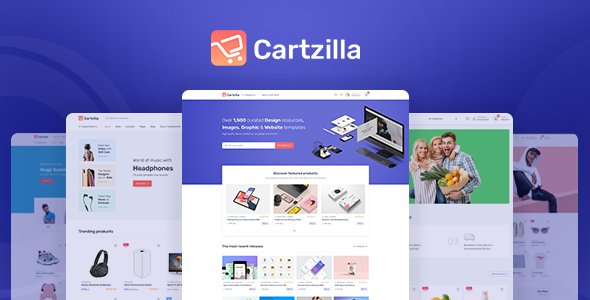
Stuck on your Cartzilla WordPress theme? Let's fix it.
No endless back-and-forth. Just send us the details and we'll get it done.
No obligation · Replies within 1 hour · Quote within 1 day
Setup · Customization · Bug fixes · WooCommerce integration
About Cartzilla WP Theme
Cartzilla is a WooCommerce theme built by MadrasThemes, designed specifically for online stores that need a clean, conversion-focused layout. It ships with multiple pre-built demo stores covering electronics, fashion, grocery, and multi-vendor marketplaces, making it a solid starting point for a range of ecommerce projects.
The theme integrates tightly with WooCommerce and supports popular plugins like Dokan, WCFM, and WC Vendors for marketplace builds. It uses a modular page builder approach with Elementor, so building product pages, category pages, and landing pages doesn’t require custom code. Performance is reasonable out of the box, and the codebase is structured well enough for developers to extend without fighting the theme architecture.
MadrasThemes maintains the theme actively, with updates tracking WooCommerce releases and addressing compatibility issues fairly quickly.
Get matched with a Cartzilla developer in under one day
Tell us about your Cartzilla project. Small fixes, Cartzilla theme customization, or a full website build, whatever you need, we've got it covered.
We'll connect you to the right Cartzilla developers, define the scope, and get everything 100% clear.
You'll get one estimate, hire your preferred developer, and start collaborating.
Cartzilla has enough moving parts that getting it set up correctly the first time matters. A misconfigured header, a slow product page, or a broken checkout flow all cost sales. Working with a vetted Cartzilla developer through Codeable means you get someone who has worked on WooCommerce stores before, understands the theme’s structure, and won’t experiment on your live site. Codeable screens every developer before they can take on projects, so you’re not rolling the dice on quality. You post your project, get a clear estimate, and only move forward if you’re happy with it.
Pros
- Multiple pre-built demo stores cover electronics, fashion, grocery, and marketplace use cases
- Native Dokan, WCFM, and WC Vendors support makes multi-vendor marketplace builds straightforward
- Elementor-based page building means product and category pages can be edited visually without touching code
- MadrasThemes maintains the theme actively with regular WooCommerce compatibility updates
- Mega menu system is well-built and supports images, icons, and product highlights out of the box
Cons
- Demo import can be slow and occasionally incomplete, requiring manual cleanup before the store is usable
- Elementor dependency means page performance takes a hit without additional optimization work
- Heavy plugin requirements to match demo functionality can create version conflict risks down the line
- Customizer options are extensive but not always intuitive, and some settings only work in specific header or layout combinations
- Theme documentation covers basics but lacks depth for advanced WooCommerce customization scenarios
Who is Cartzilla for?
Electronics Store
Cartzilla has a dedicated electronics demo with comparison tables, spec-heavy product layouts, and a category structure suited to products with multiple variants. It handles large catalogs reasonably well and supports sticky add-to-cart bars and quick-view modals that matter for high-consideration purchases.
Online Grocery Shop
The grocery demo includes a compact product grid, quantity selectors, and a fast-add cart flow suited to repeat purchases. Cartzilla’s header can be configured to show delivery zone info and cart totals prominently, which works well for grocery stores where checkout speed affects conversion.
Multi-Vendor Marketplace
With built-in support for Dokan and WCFM, Cartzilla is one of the better-prepared themes for marketplace builds. Vendor storefronts, product listings by seller, and commission management all work within the theme without heavy customization, though a developer is typically needed to configure the setup correctly.
Fashion and Apparel Store
The fashion demo uses a lookbook-style layout with large imagery, color and size swatches, and a wishlist feature. Product pages support video embeds and Instagram feed integration, which suits apparel brands that rely on visual merchandising to drive purchase decisions.
Dropshipping Store
Cartzilla works well for dropshipping stores built on WooCommerce with plugins like AliDropship or DSers. The theme’s import-ready product layout and fast cart experience suit high-volume single-niche stores. Adding a custom landing page for hero products is straightforward with the included Elementor widgets.

Customizing Cartzilla
Cartzilla gives you a lot of flexibility through the WordPress Customizer and Elementor widgets, but there’s a gap between what the demos show and what you can actually build without developer help. Adjusting the header layout, mega menus, product card styles, and checkout flow all have options built in, but combining them the way you want often takes more effort than expected.
For store owners who want a specific look, custom category filters, or a checkout process tailored to their workflow, working with a Cartzilla expert saves significant time. A developer who knows the theme’s structure can modify templates, add custom Elementor widgets, and hook into WooCommerce without breaking theme updates.
Child theme setup is strongly recommended before making any direct customizations. Without it, theme updates will overwrite your changes. A Cartzilla expert will handle this from the start and keep your customizations update-safe.
Recommended plugins for Cartzilla
Cartzilla works well with the WooCommerce extension ecosystem. Payment gateways, subscription plugins, product bundles, and wishlist tools all integrate without major issues. For marketplace functionality, Dokan and WCFM both have dedicated compatibility built into the theme.
If you’re running a large catalog, pairing Cartzilla with a proper caching layer and image optimization is worth doing early. You can also extend the theme’s filtering with FacetWP or AJAX search plugins for better category browsing. Need help with WordPress performance or WooCommerce SEO? Both are areas where Cartzilla stores commonly need extra attention beyond what the theme handles by default.
Not sure which plugins to use? This WordPress plugins directory covers the most popular options with reviews and setup guides.
Cartzilla common issues
Cartzilla demo import not working
Demo import failures in Cartzilla usually come from PHP memory limits, upload size restrictions, or missing required plugins. Check that your server has at least 256MB memory and 128MB max upload size set in your PHP configuration. All required plugins listed in the theme setup wizard must be installed and activated before importing. If the import stalls midway, try the XML import method manually through Tools > Import rather than using the one-click demo importer. If issues persist, a WordPress bug fixing service can resolve it quickly.
Cartzilla header not showing correctly on mobile
Mobile header issues in Cartzilla are commonly caused by conflicting header layout settings between desktop and mobile breakpoints in the Customizer. Check the Header Builder section and review mobile-specific toggles for the header elements. Some elements visible on desktop are not automatically hidden on mobile. Also check for custom CSS that may be overriding the theme’s responsive styles. Clearing cache after any Customizer changes is necessary before testing the result on a real mobile device.
Cartzilla WooCommerce checkout page broken
A broken checkout page in Cartzilla is most often caused by a plugin conflict, a missing WooCommerce page assignment, or a failed page builder load. Start by going to WooCommerce > Status > Tools and running the checkout page recreator. If the page exists but displays incorrectly, check that no Elementor template is overriding the default WooCommerce checkout template. Deactivate plugins one at a time to isolate conflicts. Payment gateway plugins are common culprits. See our WordPress bug fixing service if the issue persists.
Cartzilla slow loading on product pages
Cartzilla product page speed issues typically stem from unoptimized images, multiple Elementor widget scripts loading simultaneously, and unminified CSS and JS. Start by running the site through GTmetrix or PageSpeed Insights to identify specific bottlenecks. Enable a caching plugin, compress images with ShortPixel or Imagify, and consider loading Elementor assets only on pages that use them. Hosting plays a large role too. A PHP 8.x environment on a fast host makes a measurable difference. For a full audit, see our WordPress performance service.
Cartzilla FAQ
Yes. Cartzilla is built specifically for WooCommerce and includes product layouts, cart and checkout templates, and category page designs tailored to ecommerce. It supports most major WooCommerce extensions and is actively updated to stay compatible with new WooCommerce releases. It’s a reasonable choice for stores that want a well-designed storefront without building everything from scratch.
Yes. Cartzilla has native compatibility with Dokan and includes a marketplace demo built around it. The theme styles vendor storefronts, product listings, and the vendor dashboard to match the overall design. WCFM and WC Vendors are also supported. That said, complex marketplace configurations still benefit from developer input to avoid setup issues.
Cartzilla uses Elementor for its page building functionality, and most of the demo content is built with it. You don’t strictly need Elementor for a basic WooCommerce store, but most of the flexibility and visual design features depend on it. Removing Elementor would leave you with the core WooCommerce templates and limited layout control through the Customizer alone.
Always use a child theme before making any changes to Cartzilla’s template files. Custom CSS, template overrides, and function additions should live in the child theme, not the parent. This way, updating Cartzilla through the theme update process won’t overwrite your work. Plugin customizations are separate and update independently. If you’ve already customized the parent theme directly, a developer can migrate those changes to a child theme before you update.
Yes, switching your WooCommerce store to Cartzilla is possible. Your product data, orders, and customer records stay in the database regardless of theme. What changes is the front-end presentation. You’ll need to rebuild any custom page layouts and recheck checkout and product page templates. A proper WordPress migration process on a staging environment before going live is strongly recommended to catch template and plugin conflicts early.
Hire a Cartzilla Developer
Whether you need a full Cartzilla store built from a demo, a specific feature added, or an existing store fixed and optimized, a specialist developer will get it done faster and cleaner than trial and error. Post your project and get a free estimate with no obligation to hire. You’ll hear back within 24 hours from developers who know Cartzilla and WooCommerce inside out.
You'll need a free Codeable account so developers can ask questions and send their quotes.