Prolancer WordPress Theme
by ThemeBing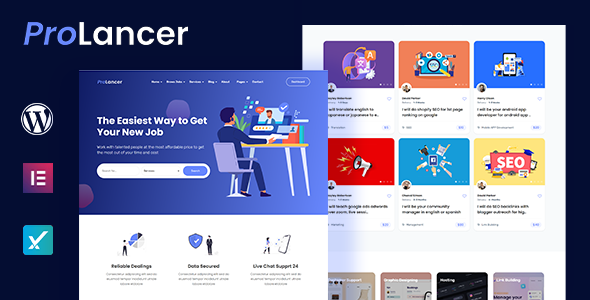
Stuck on your Prolancer WordPress theme? Let's fix it.
No endless back-and-forth. Just send us the details and we'll get it done.
No obligation · Replies within 1 hour · Quote within 1 day
Setup · Customization · Bug fixes · WooCommerce integration
About Prolancer WP Theme
Prolancer is a WordPress theme by ThemeBing built specifically for freelancers and independent professionals. It gives you a clean, portfolio-focused layout with built-in sections for showcasing services, client testimonials, and a project gallery. The theme is compatible with Elementor, making visual editing straightforward without touching code.
It ships with multiple homepage demos, a functional contact form setup, and WooCommerce support for selling services or digital products directly from your site. The design leans minimal and professional, which suits developers, designers, writers, and consultants who want a site that looks credible without a lot of setup overhead.
ThemeBing maintains the theme with regular updates, and it follows standard WordPress coding practices. If you need a freelancer site up quickly, Prolancer covers most of the essentials out of the box.
Get matched with a Prolancer developer in under one day
Tell us about your Prolancer project. Small fixes, Prolancer theme customization, or a full website build, whatever you need, we've got it covered.
We'll connect you to the right Prolancer developers, define the scope, and get everything 100% clear.
You'll get one estimate, hire your preferred developer, and start collaborating.
Prolancer is straightforward to set up, but getting it to perform well and convert visitors into clients takes real WordPress experience. Codeable connects you with vetted WordPress developers who have worked with themes like Prolancer across dozens of freelancer and portfolio projects. You get a fixed estimate upfront, no bidding war, and no risk. If you need customisation, troubleshooting, or a full build, the process starts with a free estimate and no obligation to move forward.
Pros
- Purpose-built for freelancers with relevant sections already in place, including services, portfolio, and testimonials
- Compatible with Elementor, so visual layout editing is accessible without writing code
- Multiple homepage demo options included, reducing setup time for a first launch
- WooCommerce ready for selling services, packages, or downloadable files directly
- Regularly updated by ThemeBing with compatibility checks against current WordPress versions
Cons
- Design options in the Customizer are limited, so meaningful branding changes often need custom CSS or developer help
- Demo content import can be inconsistent depending on server configuration, sometimes requiring manual setup
- Elementor dependency means page speed scores can suffer without additional optimisation work
- No built-in client portal or project management functionality despite targeting freelancers
- Support from ThemeBing can be slow during peak periods, which is a problem if you have a live site issue
Who is Prolancer for?
Freelance Web Designers
Prolancer’s portfolio grid and project detail layout make it a natural fit for web designers. You can showcase work visually, list your design services clearly, and include client logos or testimonials. A developer can extend this with filterable categories, case study templates, and a contact flow that qualifies leads before they reach your inbox.
Independent Copywriters
Copywriters need a site that focuses on credibility and samples. Prolancer’s service blocks and testimonial sections handle that well. You can add a blog for content marketing, a lead magnet download via WooCommerce, and a simple contact form. The minimal design keeps focus on the writing rather than visual noise.
Freelance Developers
Developers using Prolancer to market their own services get a clean, professional base. The theme handles the visual side while you focus on the content. With some customisation, you can add a skills section, GitHub project links, and a scoped-project inquiry form that filters out low-quality leads early in the process.
Creative Consultants
Consultants in branding, strategy, or UX benefit from Prolancer’s structured layout. Service descriptions, a clear process section, and a testimonial block together build the trust that consulting work requires. A developer can add a booking integration like Calendly or a custom discovery call form tied to your CRM.
Digital Marketing Freelancers
Digital marketers can use Prolancer to present case studies, results data, and service packages. WooCommerce makes it easy to sell audits or strategy sessions. SEO plugin integration and a blog section round out the setup for someone who wants their own site to demonstrate what they offer clients.

Customizing Prolancer
Prolancer works well as a starting point, but most freelancers want something that actually reflects their brand rather than a demo. That means adjusting typography, colour schemes, layout spacing, and service section structure beyond what the default Customizer options allow.
A Prolancer expert can also wire up custom post types for case studies, build a filterable portfolio, integrate a booking or inquiry form, and make sure the mobile experience is properly optimised. If you are using Elementor with Prolancer, a developer can build out reusable templates and fix any conflicts between the theme and your installed plugins.
More complex work like custom pricing tables, client dashboards, or multi-step contact flows typically requires hands-on PHP and CSS work that goes well beyond standard theme settings.
Recommended plugins for Prolancer
Prolancer pairs well with several plugin categories. WooCommerce lets you sell packages or downloads directly. WPForms or Gravity Forms handle inquiry and booking flows. Yoast or Rank Math covers on-page SEO, and a caching plugin like WP Rocket handles speed.
For deeper performance tuning on a Prolancer site, see our WordPress performance optimisation service. If organic traffic matters to your freelance business, our WordPress SEO service can help you rank for the right terms.
Not sure which plugins to use? This WordPress plugins directory covers the most popular options with reviews and setup guides.
Prolancer common issues
Prolancer theme not loading demo content correctly
Demo import failures in Prolancer are usually caused by server memory limits, timeouts, or missing required plugins. First, make sure Elementor and any ThemeBing companion plugins are installed and activated before importing. Increase the PHP memory limit to at least 256MB in your wp-config.php file. If the import still stalls, try importing the XML content file manually through Tools > Import rather than using the one-click demo importer. If the issue persists, a WordPress bug fixing service can diagnose the root cause quickly.
Prolancer portfolio section not displaying properly on mobile
Mobile display issues with the Prolancer portfolio section are often tied to Elementor column settings or custom CSS that does not account for smaller breakpoints. Open the affected section in Elementor, switch to mobile view, and check column widths, image sizing, and padding values specifically at the mobile breakpoint. In some cases, the theme’s own stylesheet overrides Elementor’s responsive settings. Adding targeted CSS for mobile viewports via the Customizer or a child theme usually resolves this without affecting the desktop layout.
Elementor layout broken after Prolancer theme update
After a Prolancer update, Elementor layouts sometimes break due to changes in theme template structure or CSS class names. The first step is to go to Elementor > Tools and run the CSS Regeneration and Sync Library options. If elements are still misaligned, check whether the update changed any global fonts or colour settings in the Customizer, as Elementor picks those up dynamically. Rebuilding affected sections using Elementor’s own styling rather than relying on theme CSS reduces this problem in future updates.
Prolancer contact form not sending emails
If the Prolancer contact form is not sending emails, the problem is almost always server-side mail configuration rather than the theme or form plugin itself. WordPress’s default wp_mail function relies on the server’s sendmail, which many hosts block. Install an SMTP plugin such as WP Mail SMTP and connect it to a transactional mail service like SendGrid, Mailgun, or your Google Workspace account. Also check spam folders and confirm the form’s recipient email is correctly set. See our WordPress maintenance service for ongoing monitoring.
Prolancer FAQ
Yes, Prolancer is designed specifically with freelancers in mind. It includes service listing sections, a portfolio grid, testimonials, and a contact area out of the box. It works well for designers, developers, writers, and consultants. That said, most freelancers will need at least some customisation to match their branding and set up a contact or inquiry flow that actually converts visitors.
Yes, Prolancer is built with Elementor compatibility in mind. The demo content is built using Elementor templates, and you can edit pages visually using the free or Pro version. Keep both the theme and Elementor updated to avoid layout conflicts, and consider using a child theme if you plan to add custom CSS so updates do not overwrite your changes.
Prolancer supports WooCommerce, which means you can sell services, project packages, or digital downloads directly from your freelancer site. The theme’s styling applies to basic WooCommerce pages. For a heavily customised shop layout or checkout flow, you may need developer help to make everything look consistent with the rest of your site.
Switching to Prolancer from another theme involves exporting your existing content, importing it into a new WordPress install or your live site, and then rebuilding page layouts using Prolancer’s demo structure or Elementor. Content like posts and pages transfers cleanly, but layout and design work needs to be redone. Our WordPress migration service can handle this process without disrupting your live site.
ThemeBing updates Prolancer to maintain compatibility with new versions of WordPress and Elementor. Updates are not always frequent, but the theme has an active update history. Before applying any theme update on a live site, take a full backup and test on a staging environment first, especially if you have made direct customisations to theme files rather than using a child theme.
Hire a Prolancer Developer
Whether you need a full Prolancer setup, specific feature additions, or fixes to an existing site, we can match you with an expert who knows the theme well. Work is scoped clearly, priced fairly, and delivered through Codeable’s vetted network. Get a free estimate and tell us what you need. No commitment required.
You'll need a free Codeable account so developers can ask questions and send their quotes.