VintWood WordPress Theme
by CreativeWS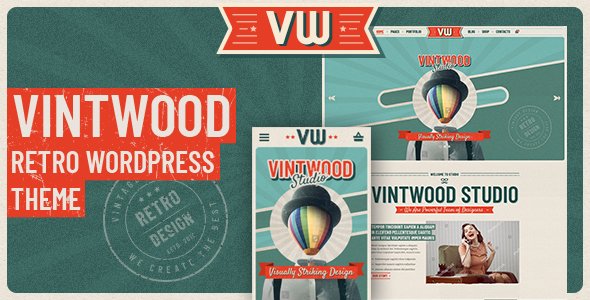
Stuck on your VintWood WordPress theme? Let's fix it.
No endless back-and-forth. Just send us the details and we'll get it done.
No obligation · Replies within 1 hour · Quote within 1 day
Setup · Customization · Bug fixes · WooCommerce integration
About VintWood WP Theme
VintWood is a WordPress theme by CreativeWS built around a warm, wood-textured aesthetic. It targets shops, studios, and portfolio sites that want a handcrafted, organic feel without sacrificing clean layout structure. The theme ships with WooCommerce support, a drag-and-drop page builder, and several pre-built demo layouts covering furniture stores, craft workshops, and interior design portfolios.
Typography choices lean toward serif and slab fonts that reinforce the vintage tone. Header options include a full-width hero with overlay text and a sticky navigation bar that works well on mobile. Performance is reasonable out of the box, though image-heavy demos can slow load times without proper optimization. VintWood sits in a specific visual niche and does it well, making it a strong pick for brands that want character over minimalism.
Get matched with a VintWood developer in under one day
Tell us about your VintWood project. Small fixes, VintWood theme customization, or a full website build, whatever you need, we've got it covered.
We'll connect you to the right VintWood developers, define the scope, and get everything 100% clear.
You'll get one estimate, hire your preferred developer, and start collaborating.
VintWood has enough moving parts that generic WordPress advice does not always apply. CreativeWS ships regular updates, and customizations done outside a child theme break on update. A developer who has worked with VintWood specifically knows where the theme hooks are, which filters CreativeWS exposes, and how to extend functionality cleanly. Through Codeable, vetted WordPress developers with theme-specific experience are matched to your project within 24 hours. You get a free estimate before committing to anything.
Pros
- Distinctive wood-texture aesthetic that stands out from generic minimal themes
- Solid WooCommerce compatibility with dedicated product page style controls
- Multiple pre-built demo layouts covering furniture, craft, and interior design niches
- Sticky header and mobile navigation work reliably without extra plugins
- Regular updates from CreativeWS with active support documentation
Cons
- Demo content is image-heavy and requires optimization before going live
- Deep layout changes require child theme knowledge and PHP work
- Limited built-in blog layout options compared to more general-purpose themes
- Some style conflicts appear when pairing with Elementor on inner pages
- The vintage aesthetic is polarizing and does not suit all brand directions
Who is VintWood for?
Handmade Furniture Store
VintWood was practically designed for furniture retailers. The warm textures and serif typography frame product photography naturally. WooCommerce integration handles product variations like wood finish and size. The shop archive grid keeps collections organized without feeling clinical. A developer can add custom product attributes and filtered navigation to help buyers find exactly what they want.
Interior Design Studio
Interior design studios benefit from VintWood’s portfolio layouts and clean project gallery options. The full-width hero section showcases completed room designs effectively. Service pages can be built out using the included page templates. Adding a client inquiry form and a testimonial section requires minimal customization and fits the theme’s visual language without looking forced.
Craft Workshop or Maker Space
Craft workshops and maker spaces need a site that communicates texture and character. VintWood does this without extra effort. Class schedules, product listings for supplies, and an about section all slot into the existing demo structure. A developer can wire up an events plugin or booking system to manage class registrations directly through the site.
Vintage and Antiques Shop
Antique and vintage shops need visual warmth that generic ecommerce themes rarely provide. VintWood’s background textures and muted palette align with the category. WooCommerce handles individual item listings, and the theme’s badge and label controls work well for marking sold or reserved pieces. Custom filtering by era or category improves browsability.
Woodworking Portfolio
Woodworkers and craftspeople using VintWood as a portfolio base get a theme that matches their work aesthetically. Project galleries, a skills section, and a contact form cover the essentials. A developer can set up a custom portfolio post type with filterable categories so visitors browse by project type, material, or commission status without relying on standard page builders.

Customizing VintWood
VintWood customization happens primarily through the WordPress Customizer and an included options panel from CreativeWS. You can switch color palettes, swap background textures, adjust font pairings, and control header layout from one place. WooCommerce product pages have dedicated style controls for button colors, badge styles, and sidebar visibility.
Widget areas cover the footer, sidebar, and a homepage feature strip. For anything beyond surface styling, like restructuring the shop archive grid, adding custom post types, or integrating third-party plugins, you need solid PHP and CSS knowledge. A VintWood expert can handle layout rebuilds, custom template overrides, and child theme development without touching core files. That keeps your site update-safe and avoids breaking existing styles during changes.
Recommended plugins for VintWood
VintWood works well with several popular plugins. WooCommerce is the obvious pairing for product-based sites. Elementor or WPBakery can extend layout flexibility on interior pages, though some style conflicts need CSS fixes. YITH plugins for wishlists and product filters integrate cleanly.
For site speed, image lazy loading and a caching plugin like WP Rocket are almost mandatory given the texture-heavy design. Check the WordPress performance service if load times are a concern. If you are running a content-heavy site on VintWood, pairing it with proper schema markup and on-page structure through a WordPress SEO service will help search visibility considerably.
Not sure which plugins to use? This WordPress plugins directory covers the most popular options with reviews and setup guides.
VintWood common issues
VintWood header not showing on mobile
This usually comes down to a z-index conflict between the sticky header script and a plugin adding its own fixed element. Open browser DevTools on mobile view and check what is overlapping the nav. If the header is present in the DOM but invisible, a transparent background color set in the Customizer for the mobile breakpoint is often the cause. Clearing the theme’s CSS cache after making changes also helps. If the issue persists after those checks, a WordPress bug fixing service can isolate it quickly.
VintWood WooCommerce product images not displaying correctly
VintWood uses specific image size registrations that WooCommerce relies on for product thumbnails and gallery images. If images appear cropped oddly or fail to load at the right size, regenerating thumbnails using a plugin like Regenerate Thumbnails usually resolves it. Check that your WooCommerce image size settings in Appearance match what VintWood expects. Switching image sizes after installing the theme without regenerating is the most common cause of this problem.
VintWood child theme not inheriting parent styles
A VintWood child theme needs to enqueue the parent stylesheet explicitly using wp_enqueue_scripts in functions.php. Relying on @import in style.css is unreliable and causes missing styles. The enqueue function should load the parent style with get_template_directory_uri() and then the child style with get_stylesheet_uri(). If CreativeWS ships a starter child theme, use that as your base to avoid missing hooks or registered sidebars that the parent declares.
VintWood page builder layout broken after update
Theme updates from CreativeWS can override template files that a page builder has already modified at the file level rather than through hooks. If your layout breaks after updating, first check whether you are running a child theme. If not, any template customizations made directly in the parent theme are gone. Roll back using a backup, move changes to a child theme, then re-apply the update. Running a WordPress maintenance plan that includes pre-update backups prevents this scenario entirely.
VintWood FAQ
Yes. VintWood includes dedicated WooCommerce templates for the shop archive, single product page, and cart. Style controls in the Customizer cover button colors, product badge styling, and sidebar visibility on shop pages. Complex WooCommerce setups with custom product types or advanced filtering may need additional development work to match the theme’s visual style.
VintWood is compatible with Elementor but not purpose-built for it. Most inner pages build without issues. Some style conflicts appear in the header and footer areas where VintWood’s own controls overlap with Elementor’s full-width section settings. A few CSS fixes usually resolve these. Using Elementor on VintWood works best when you build within the content area and leave the header and footer to the theme.
Demo content for VintWood is imported through the theme’s one-click demo importer, accessible from the theme options panel after activation. The importer pulls in pages, posts, widgets, and Customizer settings. You will need to have WooCommerce and any required plugins installed first. Importing on a fresh WordPress install avoids conflicts with existing content or settings.
Moving an existing site to VintWood involves switching the active theme, which changes your layout significantly. Content like posts, pages, and products transfers fine, but any styling tied to your previous theme does not. A planned WordPress migration approach works better here than a live switch. Build and test the VintWood version on a staging environment before pointing your domain to it.
CreativeWS maintains VintWood with periodic updates covering WordPress core compatibility and security patches. Check the theme’s changelog on ThemeForest or the CreativeWS site for the latest release date. If the last update is more than 12 months old, test carefully before upgrading WordPress core, as older themes can develop compatibility issues with newer versions of PHP and WordPress.
Hire a VintWood Developer
Whether you need a layout built from a design file, a WooCommerce integration, or a bug fixed before a product launch, a specialist gets it done faster and cleaner than trial and error. Post your project and get matched with a vetted VintWood developer through Codeable. Get a free estimate with no obligation to hire. All work is 100% risk-free.
You'll need a free Codeable account so developers can ask questions and send their quotes.