Beoreo WordPress Theme
by Beplusthemes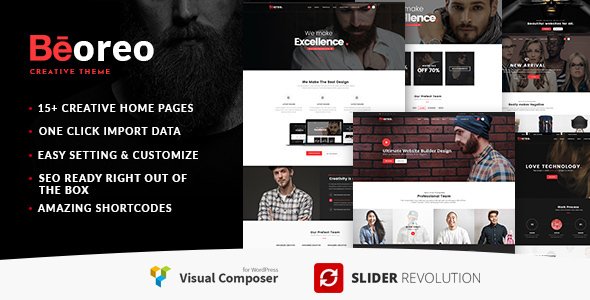
Stuck on your Beoreo WordPress theme? Let's fix it.
No endless back-and-forth. Just send us the details and we'll get it done.
No obligation · Replies within 1 hour · Quote within 1 day
Setup · Customization · Bug fixes · WooCommerce integration
About Beoreo WP Theme
Beoreo is a multipurpose WordPress theme from Beplusthemes, built for blogs, magazines, and content-heavy websites. It ships with a clean layout system, multiple header styles, and a block-based design that works well with the WordPress block editor.
The theme is lightweight by Beplusthemes standards, meaning pages load fast without heavy JavaScript dependencies. It supports WooCommerce out of the box, making it a reasonable pick for shops that also run editorial content alongside products.
Beplusthemes maintains Beoreo actively, with regular updates that address compatibility with newer versions of WordPress core. The theme documentation covers most setup tasks, though custom layout work usually needs a developer once you move past the default demo content.
Get matched with a Beoreo developer in under one day
Tell us about your Beoreo project. Small fixes, Beoreo theme customization, or a full website build, whatever you need, we've got it covered.
We'll connect you to the right Beoreo developers, define the scope, and get everything 100% clear.
You'll get one estimate, hire your preferred developer, and start collaborating.
Beoreo is a solid starting point, but most real-world projects need adjustments the Customizer cannot handle. That’s where a specialist saves time. FoxyConcept delivers Beoreo development through Codeable, a vetted network of WordPress developers. Every project starts with a free estimate. You review the scope, approve the price, then work begins. No guesswork, no back-and-forth with unvetted freelancers.
Pros
- Lightweight codebase with no mandatory page builder dependency
- Supports native WordPress block editor without layout conflicts
- Built-in WooCommerce compatibility for hybrid shop and blog sites
- Multiple header and footer layout options available from the Customizer
- Active updates from Beplusthemes with solid WordPress core compatibility
Cons
- Customizer options run thin for advanced layout control
- Demo import can be unreliable depending on server configuration
- Limited third-party tutorial resources compared to mainstream themes
- Child theme is required for any code-level customisation to survive updates
- WooCommerce styling needs manual CSS work for non-default product layouts
Who is Beoreo for?
Personal Blog
Beoreo’s clean typography and minimal sidebar setup make it a practical choice for personal blogs. The reading experience holds up on mobile without extra configuration. Writers who want to focus on content rather than fighting the theme’s structure will find the defaults reasonable. A developer can tighten the layout further if needed.
Online Magazine
The theme’s category archive layouts and featured post options suit editorial magazines. You can surface recent content across multiple topics without things looking cluttered. Beplusthemes built Beoreo with multi-category publishing in mind, and it shows in how the homepage grid handles posts from different sections.
WooCommerce Store with Blog
Beoreo handles WooCommerce product pages and blog posts within the same site without obvious visual inconsistency. If you run a shop that also publishes content, the theme keeps both sides functional. Custom styling of product cards and archive pages usually needs a Beoreo developer to match your exact brand requirements.
News Website
News sites need fast-loading archive pages and clear category navigation. Beoreo delivers both without excessive overhead. The header layout options support top navigation bars and breaking news tickers with the right plugin. For high-traffic news setups, pair it with a solid WordPress performance stack.
Portfolio with Writing Samples
Writers and journalists who want to show published work alongside a portfolio can use Beoreo to combine both. The theme handles post layouts and static pages cleanly within one design. Adding a custom portfolio section usually needs some development work beyond the default theme settings.

Customizing Beoreo
Beoreo gives you access to the WordPress Customizer for core settings like colors, typography, header layout, and footer columns. Most visual changes can be made without code, but the options stop short of full design control if you have specific brand requirements.
For anything beyond the default configuration, including custom post templates, non-standard sidebar logic, or modified WooCommerce layouts, you need a Beoreo expert who knows the theme’s structure. A Beoreo expert can also help you safely extend the theme using a child theme so your changes survive updates.
FoxyConcept works with Beoreo on a regular basis. Whether you need a single layout adjusted or a full custom build on top of Beoreo, we can scope the work accurately and deliver it cleanly.
Recommended plugins for Beoreo
Beoreo integrates with popular plugins without major conflicts. WooCommerce works out of the box. Yoast SEO and Rank Math both apply cleanly to Beoreo’s archive and single post templates, which matters for WordPress SEO optimisation.
For performance, Beoreo responds well to caching plugins and image optimisation tools. Running it through a proper WordPress performance setup, including lazy loading and CSS minification, can cut load times noticeably on content-heavy pages. The theme does not bundle unnecessary page builder dependencies, which keeps the baseline payload manageable.
Not sure which plugins to use? This WordPress plugins directory covers the most popular options with reviews and setup guides.
Beoreo common issues
Beoreo demo import not working
Demo import failures in Beoreo are usually caused by server memory limits or upload size restrictions. Check your PHP memory limit is at least 256MB and max upload size is set to 64MB or higher. If the one-click import stalls, try importing the XML file manually through WordPress Tools and then setting up widgets and Customizer options separately. If the issue persists, our WordPress bug fixing service can resolve it quickly.
Beoreo header not displaying correctly on mobile
Mobile header issues in Beoreo often come from conflicting CSS from a plugin or a custom stylesheet that wasn’t scoped to desktop only. Open browser DevTools on mobile view and check which rule is overriding the hamburger menu or header container width. Clear any caching plugin after making changes. If the conflict is inside the theme’s own stylesheet, you need a child theme fix rather than Customizer edits.
Beoreo WooCommerce product page layout broken
Broken WooCommerce layouts in Beoreo usually happen after a WooCommerce major version update that changes template file structure. Beoreo may be loading outdated WooCommerce templates. Check the WooCommerce status page under WooCommerce > Status > Templates for flagged outdated files. A developer can update those templates inside a child theme. Our WordPress bug fixing service covers this type of issue directly.
Beoreo update broke my site customisations
If a Beoreo update wiped your customisations, you were likely editing the parent theme files directly. Beoreo updates overwrite parent theme files by design. Going forward, all code changes need to live in a child theme. If you lost styles or template changes, they can often be recovered from a backup. Check your WordPress maintenance setup to make sure automated backups run before every update.
Beoreo FAQ
Yes. Beoreo is built to work with the native WordPress block editor. You can use core blocks for page and post content without layout conflicts. Some design elements like custom headers and widget areas are still controlled through the Customizer rather than full-site editing, depending on which version of Beoreo you are running.
Beoreo includes built-in WooCommerce support. Product pages, cart, and checkout pages render without major visual conflicts out of the box. That said, styling product grids and customising the checkout layout to match a specific brand usually needs CSS work or template overrides handled by a developer.
Create a child theme by making a new folder in your themes directory, adding a style.css file with the correct template header pointing to Beoreo, and enqueueing the parent stylesheet via functions.php. Any template or style changes go in the child theme only. This keeps your changes safe when Beplusthemes releases Beoreo updates.
Migrating an existing site to Beoreo is possible but requires careful planning. Post content carries over cleanly, but widget configurations, menu assignments, and Customizer settings need rebuilding. If you are switching from a page builder theme, layout shortcodes will not translate. Our WordPress migration service handles this type of transition properly.
Beoreo is available as both a free and premium version from Beplusthemes. The free version covers basic layouts and core features. The premium version unlocks additional header styles, colour controls, and priority support from Beplusthemes. For most professional projects, the premium version is worth the cost given the additional layout flexibility.
Hire a Beoreo Expert Developer
Need a Beoreo developer who can work without hand-holding? FoxyConcept handles everything from layout customisation to full theme builds on Beoreo. Work is scoped clearly before anything starts. Get a free estimate today through Codeable. No obligation to hire. You get a clear price and a developer with real Beoreo experience before committing to anything.
You'll need a free Codeable account so developers can ask questions and send their quotes.