Cluster WordPress Theme
by Codestag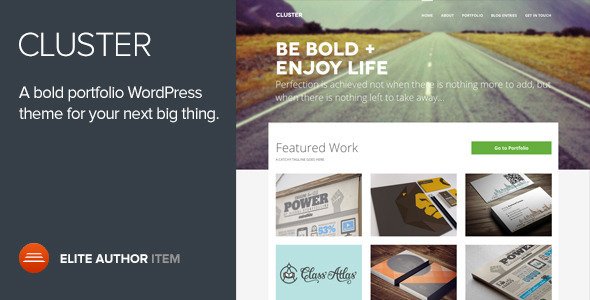
Stuck on your Cluster WordPress theme? Let's fix it.
No endless back-and-forth. Just send us the details and we'll get it done.
No obligation · Replies within 1 hour · Quote within 1 day
Setup · Customization · Bug fixes · WooCommerce integration
About Cluster WP Theme
Cluster is a WordPress theme built by Codestag, designed for portfolio and agency websites. It uses a masonry-style grid layout to display work samples in a visually clean way, making it a practical choice for photographers, designers, and creative studios.
The theme is built on a custom framework and comes with multiple portfolio styles, full-screen sliders, and a filterable project grid. Typography options are handled through Google Fonts integration, and the layout adapts well across screen sizes.
Cluster is sold through ThemeForest and has been updated to support modern WordPress versions. It works with the classic editor and does not require a page builder to set up, which keeps the learning curve low for developers comfortable working with theme options panels.
Get matched with a Cluster developer in under one day
Tell us about your Cluster project. Small fixes, Cluster theme customization, or a full website build, whatever you need, we've got it covered.
We'll connect you to the right Cluster developers, define the scope, and get everything 100% clear.
You'll get one estimate, hire your preferred developer, and start collaborating.
Codestag themes are well-structured, but working inside them still requires familiarity with their custom framework and options architecture. Finding a developer who has actually worked with Cluster before saves time and avoids the guesswork.
Through FoxyConcept’s WordPress development services, work is matched and delivered via Codeable, a vetted platform where every developer is reviewed before joining. You get a developer with real experience, not a generalist figuring it out on your project budget.
Pros
- Clean masonry portfolio grid that works well without a page builder
- Multiple pre-built portfolio layouts reduce setup time on creative sites
- Full-screen slider built in, no additional plugin needed
- Google Fonts integration with solid typography control in the options panel
- Responsive layout holds up well across mobile and tablet without extra configuration
Cons
- Not compatible with Gutenberg blocks out of the box, limiting modern editor workflows
- Custom framework means fewer third-party tutorials and community resources compared to Genesis or Divi
- WooCommerce styling requires manual CSS work to match the rest of the theme
- Theme options panel can feel limiting once a project grows beyond a basic portfolio
- Child theme documentation is sparse, making it harder for developers new to Codestag themes
Who is Cluster for?
Freelance Photographer Portfolio
Cluster’s full-screen image support and masonry grid make it a natural fit for photographers. Projects can be organized by category with filterable tags, letting visitors browse work by subject or style. A developer can add custom lightbox behavior, lazy loading for large image sets, or a client gallery section behind a password-protected page.
Creative Agency Website
Agencies need to show case studies, not just images. With custom post type adjustments, a Cluster developer can restructure the portfolio section to include project details, client names, outcomes, and calls to action. The clean layout keeps focus on the work while supporting the copy-heavy structure agencies typically need.
Graphic Designer Portfolio
Designers working across branding, print, and digital need a grid that handles varied aspect ratios cleanly. Cluster’s masonry layout handles this without forcing uniform crop sizes. Adding a filterable tag system lets visitors sort by project type, and custom single project templates can display process work alongside final deliverables.
Interior Design Studio
Interior design studios often have high-resolution project photography that needs to load fast and look sharp. Cluster handles large image formats well, and with performance optimization a developer can keep page speed scores high. A before-and-after slider or room-type filter can be added to improve how projects are browsed.
Digital Art or Illustration Portfolio
Artists selling prints or licensing digital work can combine Cluster’s portfolio display with WooCommerce for a functional shop. A developer can create a layout where each portfolio item links directly to a product page, keeping the browsing experience visual while making it easy to purchase. Custom taxonomy pages help organize work by series or medium.

Customizing Cluster
Out of the box, Cluster gives you a theme options panel for colors, fonts, header styles, and layout switches. That covers the basics. But client projects rarely stay basic.
If you need a custom portfolio filter, a unique project layout, a specific header behavior, or integration with a CRM or booking tool, you will need a developer who knows the theme’s structure. A Cluster expert can work inside the theme without breaking updates, using child themes and targeted hooks rather than editing core files.
Custom post type adjustments, WooCommerce integration for selling creative work, and WPML setup for multilingual agency sites are all common requests that go beyond what the options panel can handle on its own.
Recommended plugins for Cluster
Cluster works with most standard WordPress plugins. Contact Form 7 and WPForms handle inquiries well. WooCommerce can be added if you are selling prints, digital downloads, or services directly from the site.
For SEO, adding a plugin like Yoast or Rank Math pairs well with a proper WordPress SEO setup. If your portfolio site is loading slowly due to unoptimized images or scripts, a structured WordPress performance audit can make a real difference. WPML works for multilingual builds, though some template adjustments are usually needed.
Not sure which plugins to use? This WordPress plugins directory covers the most popular options with reviews and setup guides.
Cluster common issues
Cluster theme portfolio filter not working after WordPress update
Portfolio filter issues after a WordPress update are usually caused by a JavaScript conflict introduced by a plugin or a jQuery version change. Open the browser console and look for JS errors on the portfolio page. Deactivate plugins one at a time to isolate the conflict. If the filter was working before the update, a developer can patch the issue without rebuilding the layout. For recurring plugin conflicts, see our WordPress bug fixing service.
Cluster theme slider not displaying correctly on mobile
Cluster’s full-screen slider sometimes breaks on mobile due to viewport height issues or touch event conflicts with certain plugins. First check if the issue appears with all plugins disabled. If it does, the problem is likely in the theme’s slider script handling 100vh on iOS or Android browsers. A CSS fix targeting mobile breakpoints usually resolves it. A developer can also swap the slider component for a more stable alternative if the issue persists across updates.
Cluster theme custom CSS not applying after theme update
If custom CSS stops applying after a theme update, the most likely cause is that changes were made directly to the theme’s style.css file rather than through a child theme or the Additional CSS field in the customizer. Direct file edits are always overwritten on update. Move all custom CSS into a child theme stylesheet or the customizer’s Additional CSS section. A developer can migrate your existing styles safely without losing any customization.
Cluster theme slow loading on image-heavy portfolio pages
Large unoptimized images are the most common cause of slow portfolio pages. Install an image compression plugin like ShortPixel or Imagify and run it across your media library. Enable lazy loading if it is not already active. If speed is still poor after image optimization, a full WordPress performance audit can identify caching issues, render-blocking scripts, or hosting bottlenecks that need to be addressed at the server level.
Cluster FAQ
Cluster has received updates from Codestag to maintain compatibility with recent WordPress versions. That said, always check the ThemeForest changelog before updating WordPress on a live site. Test updates on a staging environment first. If you are on an older version of Cluster and need to update safely, a developer can handle the compatibility check and resolve any conflicts before pushing changes live.
Cluster is not built for page builders and does not include official Elementor or WPBakery support. You can install either builder, but layout conflicts are common because Cluster uses its own custom framework for portfolio pages. Most developers working with Cluster stick to the built-in options panel and custom code rather than adding a builder on top. If you need page builder functionality, a developer can assess whether integration is practical for your specific project.
WooCommerce can be installed alongside Cluster, but the theme does not include styled WooCommerce templates. Product pages, cart, and checkout will use WooCommerce’s default styles, which will look inconsistent with the rest of the site. A developer can write custom WooCommerce templates that match the Cluster design, or scope the store to a separate section of the site with a different styling approach.
Creating a child theme for Cluster follows the standard WordPress process. Create a new folder in wp-content/themes/, add a style.css file with the correct header including Template: cluster, and create a functions.php that enqueues the parent stylesheet. Activate the child theme from the WordPress dashboard. All custom CSS and template overrides should go into the child theme to survive future updates.
Yes, migrating an existing portfolio to Cluster is straightforward if your content is already in WordPress. Portfolio items will need to be reassigned to Cluster’s custom post type, and featured images should be checked against the theme’s required image dimensions. If you are migrating from a different platform or a site with a large media library, a WordPress migration service can handle the move without data loss or downtime.
Hire a Cluster WordPress Developer
Whether you need a layout customized, a feature added, or a bug fixed, working with someone who knows Cluster saves time and money. Post your project through FoxyConcept and get matched with a vetted Cluster developer via Codeable within 24 hours. Free estimate, no obligation to hire. Get your free estimate here.
You'll need a free Codeable account so developers can ask questions and send their quotes.