BuildMe WordPress Theme
by freevision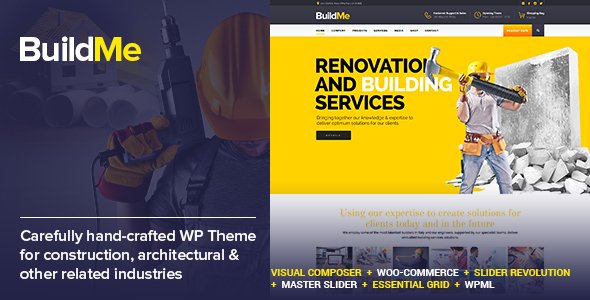
Stuck on your BuildMe WordPress theme? Let's fix it.
No endless back-and-forth. Just send us the details and we'll get it done.
No obligation · Replies within 1 hour · Quote within 1 day
Setup · Customization · Bug fixes · WooCommerce integration
About BuildMe WP Theme
BuildMe is a WordPress theme developed by freevision, built for construction companies, contractors, and building-related businesses. It ships with a page builder, pre-built demo content, and layouts tailored to showcase services, project portfolios, and team members.
The theme supports WooCommerce, Contact Form 7, and includes widgets specific to the construction niche, such as project galleries and service grids. Setup is straightforward if you follow the demo import process, and the theme options panel covers most visual adjustments without touching code.
It works well as a starting point for small to medium construction businesses that need a professional-looking site without a custom build. That said, like most niche themes, you will likely hit limitations once your requirements go beyond the default layouts.
Get matched with a BuildMe developer in under one day
Tell us about your BuildMe project. Small fixes, BuildMe theme customization, or a full website build, whatever you need, we've got it covered.
We'll connect you to the right BuildMe developers, define the scope, and get everything 100% clear.
You'll get one estimate, hire your preferred developer, and start collaborating.
BuildMe looks polished out of the box, but most construction businesses need more than a demo import. Custom project filters, quote request forms with conditional logic, Google Maps integration for service areas, and mobile-optimised galleries all require developer work.
Through Codeable, you get matched with vetted WordPress developers who have worked on BuildMe and similar construction themes. You describe what you need, get an estimate within 24 hours, and only proceed if the scope and price work for you. No guesswork, no offshore bidding wars.
Pros
- Pre-built demo content designed specifically for construction and contracting businesses
- WPBakery Page Builder included, which reduces reliance on custom code for layout changes
- Custom post types for projects and team members are set up out of the box
- WooCommerce compatible for businesses that want to sell products or services online
- Redux-based options panel makes global style changes accessible without editing theme files
Cons
- WPBakery Page Builder creates shortcode lock-in, making it difficult to switch themes later
- Project archive and single project templates offer limited layout flexibility without child theme work
- Revolution Slider bundled in older versions may not receive updates aligned with current WordPress releases
- Theme updates from freevision have been infrequent, raising long-term compatibility concerns with newer PHP versions
- Documentation is thin on advanced customisation, so anything beyond the demo requires developer knowledge
Who is BuildMe for?
General Contractors
BuildMe suits general contractors well. The project portfolio post type lets you showcase completed builds with before/after galleries. Add a quote request form with conditional fields for job type, location, and budget, and the theme becomes a functional lead generation tool rather than just a brochure site.
Roofing Companies
Roofing companies benefit from BuildMe’s service grid layouts and the ability to list coverage areas. Pair the theme with a local SEO plugin and a Google Maps block, and you can target specific postcodes or cities. The contact form templates are ready to take service enquiries without heavy configuration.
Interior Design Studios
Interior design studios can use BuildMe’s portfolio layouts to present project photography in a clean grid. The WPBakery builder handles full-width image rows and text-beside-image sections well. You will likely want a developer to adjust typography and remove the construction-specific elements that do not fit the brand.
Architecture Firms
Architecture firms get a structured starting point with BuildMe’s project post type and filterable portfolio grid. Adding taxonomy filters by project type, such as residential or commercial, is achievable with a small amount of custom code. The clean header options keep the focus on visuals rather than navigation clutter.
Home Renovation Businesses
Home renovation businesses can use BuildMe to list services, display a project gallery, and collect enquiries. The theme’s testimonial section and team member layouts add credibility. A developer can add a project cost calculator or a multi-step quote form to increase conversion rates beyond the default contact form setup.

Customizing BuildMe
BuildMe gives you a theme options panel built on Redux Framework, which covers colors, fonts, header layout, and footer configuration. You can swap logo, adjust typography, and change the color scheme without writing CSS.
For layout changes, BuildMe works with WPBakery Page Builder, so most structural edits happen through drag-and-drop. The pre-built inner page templates speed things up for service pages, project listings, and contact layouts.
Custom post types handle projects and team members, but adjusting their archive templates or adding custom fields typically requires developer input. A BuildMe expert can extend those templates, add ACF field groups, and create layouts that match your brand rather than just the demo skin. This is where custom work pays off quickly.
Recommended plugins for BuildMe
BuildMe integrates with several plugins that extend its functionality beyond the default setup. WooCommerce support means you can add a shop for materials or branded merchandise. Revolution Slider is bundled in some versions for homepage hero sections.
For performance, image-heavy construction portfolios benefit from a proper caching layer and CDN setup. Check our WordPress performance service if your BuildMe site loads slowly on mobile.
If you need better search visibility, pairing BuildMe with Yoast SEO or Rank Math is straightforward, but schema markup for local construction businesses needs manual configuration. Our WordPress SEO service covers that.
Not sure which plugins to use? This WordPress plugins directory covers the most popular options with reviews and setup guides.
BuildMe common issues
BuildMe theme not loading demo content after import
Demo import failures in BuildMe usually come down to server memory limits or execution timeouts. Set memory_limit to at least 256MB and max_execution_time to 300 in your php.ini or wp-config.php. Also ensure the required plugins, WPBakery, Revolution Slider, and the BuildMe core plugin, are all installed and activated before running the import. If the import still stalls, try importing the XML file manually through the WordPress importer tool.
BuildMe WPBakery elements not displaying correctly on front end
WPBakery rendering issues in BuildMe are often caused by plugin conflicts or a missing CSS enqueue from the theme’s core plugin. First, disable other plugins one by one to isolate the conflict. If elements appear unstyled, check whether the BuildMe core plugin is active. Also confirm you are using the version of WPBakery bundled with the theme rather than a separately purchased copy. Our WordPress bug fixing service can diagnose this quickly.
BuildMe theme broken after WordPress update
BuildMe breaking after a WordPress update is typically a PHP compatibility issue or a conflict introduced by a change in the WordPress core. Check your error logs first. Common problems include deprecated functions in the Redux options panel and outdated WPBakery shortcode rendering. Switching to a child theme before updates prevents core file overwrites from wiping customisations. If the site is down, a developer can patch the affected files without a full rebuild.
BuildMe contact form not sending emails
BuildMe uses Contact Form 7 for its default contact layouts. If emails are not arriving, the issue is almost always server-side mail delivery rather than the theme itself. Install an SMTP plugin such as WP Mail SMTP and configure it to send through a proper mail service like SendGrid or Mailgun. Also check your spam folder and confirm the form’s recipient address matches a real mailbox. Test delivery using the WP Mail SMTP diagnostic tool.
BuildMe FAQ
BuildMe has not had frequent updates from freevision, so compatibility with newer WordPress and PHP versions is not guaranteed. It tends to work on WordPress 6.x but may show deprecation notices on PHP 8.1 or above. Before updating your live site, test on a staging environment first. If you encounter errors after an update, a developer can patch compatibility issues without rebuilding the site from scratch.
BuildMe is built around WPBakery, so its page templates use WPBakery shortcodes. Switching to Elementor means those shortcodes will render as raw text. You can install Elementor alongside BuildMe, but you will need to rebuild each page. It is doable, but plan for the rebuild time. A developer can speed this up by converting key templates first and working through the rest systematically.
Yes, BuildMe declares WooCommerce support and includes basic shop, cart, and checkout template styling. It is suitable for simple product listings. For more complex stores with custom layouts, filtered product grids, or subscription products, additional development work will be needed. The default WooCommerce styling fits the theme reasonably well without heavy CSS overrides.
BuildMe registers a custom post type called Projects. In your WordPress admin, go to Projects and click Add New. Fill in the project title, description, and featured image. You can assign project categories to enable portfolio filtering on the front end. To adjust how individual project pages look, you will need either the WPBakery editor or a child theme template override if you want layout changes beyond the default.
Yes, a BuildMe site migrates like any other WordPress site. You need to move the database and all files, then update the site URL in the database. The design and content travel with the migration as long as all plugins and the theme folder are included. We offer a WordPress migration service if you need this handled without downtime or data loss.
Hire a BuildMe Developer
Whether you need a full BuildMe setup, a layout that goes beyond the demo, or fixes to an existing site, working with an experienced developer saves time and avoids broken templates. Post your project and get a free estimate through our free estimate page. You will hear back within 24 hours with a clear scope and price. No obligation to hire. If it does not feel right, you walk away at no cost.
You'll need a free Codeable account so developers can ask questions and send their quotes.