Lawnella WordPress Theme
by SteelThemes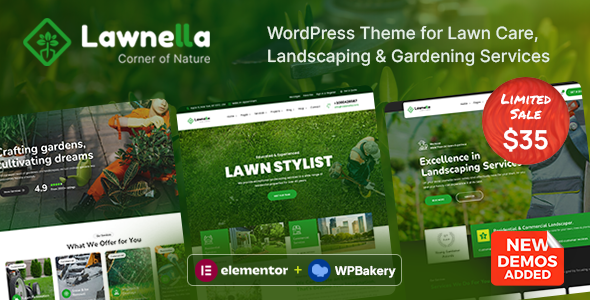
Stuck on your Lawnella WordPress theme? Let's fix it.
No endless back-and-forth. Just send us the details and we'll get it done.
No obligation · Replies within 1 hour · Quote within 1 day
Setup · Customization · Bug fixes · WooCommerce integration
About Lawnella WP Theme
Lawnella is a WordPress theme built by SteelThemes for lawn care, landscaping, and garden service businesses. It comes with a clean layout focused on local service conversions: prominent phone numbers, service area sections, before-and-after image galleries, and quote request forms built in.
The theme works with Elementor, making it accessible for business owners who want to update content without touching code. It includes pre-built page templates for services, pricing, testimonials, and a blog. The design is mobile-first, which matters for local trades where most visitors arrive from a phone after a quick Google search.
SteelThemes designed Lawnella specifically for outdoor service companies, so the layout decisions reflect real business needs rather than a generic multipurpose template stretched to fit.
Get matched with a Lawnella developer in under one day
Tell us about your Lawnella project. Small fixes, Lawnella theme customization, or a full website build, whatever you need, we've got it covered.
We'll connect you to the right Lawnella developers, define the scope, and get everything 100% clear.
You'll get one estimate, hire your preferred developer, and start collaborating.
Lawnella is straightforward to set up, but getting it to actually generate leads takes more than installing the demo. A vetted developer through Codeable can configure the theme to match your service area, connect your booking system, and optimize the layout for local search conversions. Whether you need a single fix or a full build, working with a specialist means you get a site that works for your business rather than a demo with your logo swapped in. The work is scoped clearly upfront, and you only proceed if the estimate makes sense.
Pros
- Purpose-built for lawn and landscaping businesses, not a generic theme adapted for the niche
- Elementor-compatible, so non-technical owners can update content and seasonal promotions without a developer
- Includes pre-built templates for services, pricing tables, testimonials, and quote request forms
- Mobile-first layout with prominent click-to-call buttons suited to local search traffic
- Before-and-after image gallery section built in, useful for showcasing completed lawn transformations
Cons
- Limited out-of-box booking or scheduling functionality; a plugin or custom integration is usually needed
- Design feels familiar to other SteelThemes products, so differentiation requires custom work
- Demo import can overwrite settings if not handled carefully, creating extra cleanup work
- Fewer third-party tutorials and community resources compared to major multipurpose themes like Astra or Divi
- WooCommerce support for selling service packages requires additional configuration not covered in documentation
Who is Lawnella for?
Residential Lawn Care Companies
Lawnella is a strong fit for residential lawn care operators who need a site that converts local searchers into quote requests. The built-in service area sections, testimonials layout, and click-to-call buttons address exactly what a residential customer looks for before picking up the phone. A developer can add postcode-based service area filtering to qualify leads before they submit a form.
Commercial Landscaping Contractors
Commercial landscaping contractors need to communicate scale and professionalism. Lawnella’s portfolio and before-and-after gallery sections work well here, especially when customized to show project types like car parks, office grounds, or industrial estates. Adding a case study post type and a tender inquiry form turns the site into a proper B2B lead tool rather than just a brochure.
Garden Design Studios
Garden design businesses can use Lawnella’s gallery-heavy layout to showcase completed projects by style or plant type. With some customization, the services section becomes a design consultation booking flow. Integrating a calendar tool for site visits and linking to an Instagram feed for recent work makes the theme practical for design-led businesses targeting homeowners with larger budgets.
Snow Removal and Seasonal Services
Seasonal service companies can adapt Lawnella for snow removal or autumn clean-up offerings by swapping homepage sections and updating the service template pages. A developer can add a seasonal banner system so the homepage messaging changes automatically based on the time of year, keeping the site relevant without manual updates every few months.
Franchise Lawn Service Networks
Lawn service franchises with multiple locations can use Lawnella as a base theme with custom multisite configuration. Each franchise location gets its own service area page, local phone number, and testimonials section while sharing a common design. A developer familiar with WordPress multisite can structure this properly so central branding stays consistent but local content remains editable per site.

Customizing Lawnella
Lawnella gives you a solid starting point, but most lawn care businesses need adjustments to match their brand, service area, and booking process. A Lawnella expert can rework the homepage hero to highlight seasonal offers, restructure the services section to match your actual offerings, and connect a scheduling or CRM tool to the quote form.
Beyond visual changes, customization often involves adding custom post types for service zones, integrating Google reviews automatically, or building a filterable gallery of completed jobs. These go beyond what the default Elementor setup handles out of the box.
If you need multilingual support for a bilingual service area, or want to add online payments for recurring lawn maintenance contracts, a developer familiar with Lawnella can handle that without breaking the existing template structure.
Recommended plugins for Lawnella
Lawnella pairs well with WooCommerce if you want to sell lawn care packages or gift vouchers directly from your site. Yoast SEO or Rank Math integrate cleanly for local SEO, which matters a lot for geotargeted searches like “lawn care near me.” For WordPress performance, combining Lawnella with a caching plugin and a CDN keeps load times fast on mobile.
If local search is a priority, pairing the theme with structured data markup for local businesses can improve how your listing appears in Google. Read more about WordPress SEO options to get the most from Lawnella’s clean markup.
Not sure which plugins to use? This WordPress plugins directory covers the most popular options with reviews and setup guides.
Lawnella common issues
Lawnella contact form not sending emails
This is almost always an email deliverability problem, not a form issue. WordPress uses wp_mail() by default, which many hosts block or flag as spam. Install an SMTP plugin like WP Mail SMTP and connect it to a transactional email provider such as Mailgun, SendGrid, or your Google Workspace account. Test the form after configuring SMTP. If the form still fails, check whether a security plugin is blocking form submissions. Visit our WordPress bug fixing service if you need hands-on help.
Lawnella Elementor layout broken after update
Elementor layout breaks after updates are usually caused by a version mismatch between Elementor, Elementor Pro, and the theme. Check that all three are updated to compatible versions. If the layout is broken after a specific update, use a staging site to roll back the plugin version and identify the conflict. Regenerating the CSS cache inside Elementor’s settings often resolves visual glitches without a full rollback. If multiple widgets are affected, the issue may be a deprecated widget requiring replacement. Our bug fixing team can diagnose this quickly.
Lawnella mobile menu not working
A broken mobile menu in Lawnella usually points to a JavaScript conflict with another plugin. Open your browser’s developer console on the mobile view and look for JS errors. Common culprits are optimization plugins that minify or defer scripts incorrectly. In your caching or performance plugin, exclude the theme’s navigation scripts from deferral. If you recently added a cookie consent or chat plugin, temporarily disable it to confirm whether that is the source. If the problem persists after an update, the theme’s menu toggle script may need a targeted fix.
Lawnella demo import not loading correctly
Demo import failures in Lawnella are often caused by PHP memory limits or upload size restrictions on your hosting account. Before importing, set max_execution_time to 300, memory_limit to 256M, and upload_max_filesize to at least 64M in your php.ini or via your host’s control panel. Import in stages if a one-click import is failing: import content first, then widgets, then customizer settings. If the demo still does not load correctly, contact SteelThemes support with your error log, or use our bug fixing service for faster resolution.
Lawnella FAQ
Yes, Lawnella is built to work with Elementor and is compatible with Elementor Pro. The theme’s pre-built page templates use standard Elementor widgets, so Elementor Pro features like custom headers, theme builder templates, and popup forms can be layered in without conflicts. Always test compatibility on a staging site after major Elementor Pro updates before pushing changes to production.
Lawnella can support multiple locations, but it requires custom development rather than a built-in feature. The most scalable approach is WordPress Multisite, where each location gets its own subsite sharing the same theme. Alternatively, a developer can build a location post type with individual service area pages. Either approach works, but both need hands-on configuration to set up properly.
Lawnella does not ship with WooCommerce layouts built in, but WooCommerce installs alongside it without breaking the theme. For selling lawn care packages, subscriptions, or gift cards, a developer can build out WooCommerce product pages that match the Lawnella design. WooCommerce Subscriptions is the usual plugin for recurring lawn maintenance billing. Basic setup is straightforward; custom checkout flows require developer time.
Lawnella does not include a native booking system. The most common integrations are Bookly, Simply Schedule Appointments, or Calendly embedded via a widget. Each has different complexity levels. Bookly offers the most control over service types and staff scheduling but requires more setup. A developer can integrate any of these with Lawnella’s quote form so submissions flow into your booking calendar automatically.
Lawnella has a clean HTML structure that supports good on-page SEO, but the theme alone does not make your site rank locally. You still need proper meta titles, local schema markup, Google Business Profile integration, and location-specific content. Pairing Lawnella with a solid SEO plugin and building out individual service area pages is what drives local rankings. See our WordPress SEO service for more detail.
Hire a Lawnella Developer
Need help building or customizing your Lawnella site? Our vetted WordPress developers specialize in service business themes and know how to get the most out of SteelThemes’ framework. From layout changes to booking integrations and local SEO setup, you get a clear scope and a fixed estimate before any work begins. Get a free estimate with no obligation to hire. Projects are matched within 24 hours.
You'll need a free Codeable account so developers can ask questions and send their quotes.