Luxe WordPress Theme
by theme_bubble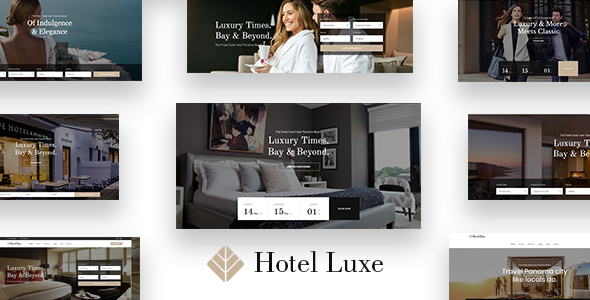
Stuck on your Luxe WordPress theme? Let's fix it.
No endless back-and-forth. Just send us the details and we'll get it done.
No obligation · Replies within 1 hour · Quote within 1 day
Setup · Customization · Bug fixes · WooCommerce integration
About Luxe WP Theme
Luxe is a premium WordPress theme by theme_bubble, built for high-end brands and visual storytelling. It ships with a clean, minimalist layout that puts photography and product imagery front and center. The theme is built on a solid HTML5 and CSS3 foundation, with full Gutenberg support and WooCommerce compatibility out of the box.
Luxe targets creative businesses, boutique shops, and lifestyle brands that need a polished online presence without heavy customisation effort. The theme includes multiple homepage layouts, custom post types for portfolios, and a header builder with sticky navigation options. Typography controls are handled through Google Fonts integration, giving you tight control over brand consistency. It is translation-ready and supports popular page builders, making it a practical choice for both developers and DIY site owners.
Get matched with a Luxe developer in under one day
Tell us about your Luxe project. Small fixes, Luxe theme customization, or a full website build, whatever you need, we've got it covered.
We'll connect you to the right Luxe developers, define the scope, and get everything 100% clear.
You'll get one estimate, hire your preferred developer, and start collaborating.
Luxe is polished out of the box, but making it fit a specific brand often means going deeper than the Customizer allows. A developer who knows theme_bubble’s codebase can build reliable child theme customisations, fix plugin conflicts quickly, and extend the theme without creating technical debt.
Through Codeable, you get matched with vetted WordPress specialists who have hands-on experience with premium themes like Luxe. Every developer on the platform has been screened, so you are working with someone qualified from the first message. No bidding, no guesswork.
Pros
- Clean minimalist design that suits high-end and lifestyle brands without heavy styling overrides
- Full WooCommerce compatibility with styled product pages, cart, and checkout templates included
- Live Customizer with real-time previews for colours, fonts, headers, and layout widths
- Gutenberg-ready with custom blocks that match the theme's visual style
- Translation-ready with WPML and Polylang support for multilingual store builds
Cons
- Advanced layout changes beyond the Customizer require child theme work and PHP knowledge
- Limited built-in mega menu options; complex navigation structures need a plugin or custom code
- Demo content import can be slow and occasionally incomplete on shared hosting environments
- Some bundled premium plugins require separate licence renewals after the first year
- Community support forums are smaller than larger theme frameworks, so troubleshooting can take longer
Who is Luxe for?
Luxury Fashion Boutique
Luxe suits fashion boutiques that sell online and need product imagery to lead. The WooCommerce templates handle collections cleanly, and the minimal layout keeps attention on the clothes rather than the interface. A developer can add lookbook-style category pages and custom size guide templates that match the brand’s visual language.
Interior Design Studio
Interior design studios need strong portfolio presentation. Luxe’s custom post types and full-width image layouts make project showcases straightforward to build. A Luxe developer can create filterable portfolio grids, add before-and-after sliders, and connect an enquiry form that feeds directly into a CRM or email sequence.
Fine Dining Restaurant
Restaurants benefit from Luxe’s typography control and hero section options. You can build a landing page that leads with atmosphere, then connects to a reservation plugin or an online ordering system. Menu pages built as custom templates keep the content structured and easy to update without touching code each time the kitchen changes a dish.
Beauty and Skincare Brand
Skincare and beauty brands need a clean, trustworthy storefront. Luxe’s WooCommerce support handles product listings, ingredient detail pages, and checkout without visual clutter. A developer can wire up subscription plugins for replenishment orders, add review widgets, and build a quiz-style product recommender that fits the theme’s styling.
Photography Portfolio
Photographers need fast-loading, full-bleed image display. Luxe’s layout options support wide and full-width galleries without plugin dependencies. A Luxe developer can set up lazy loading correctly, build client proof galleries behind password protection, and connect a print-on-demand or licensing enquiry workflow directly into the site.

Customizing Luxe
Luxe ships with a live Customizer panel that covers colours, fonts, layout widths, header styles, and footer configurations. Most visual changes can be made without touching code, but there are real limits once you move beyond the built-in options.
Custom post templates, advanced WooCommerce layout tweaks, and brand-specific animations typically require a developer who knows the theme structure well. A Luxe expert can build child theme overrides cleanly, so your changes survive updates. They can also extend the built-in header builder, add custom sections via Gutenberg blocks, and wire up third-party plugins without breaking the theme’s styling. If you need Luxe to behave exactly the way your brand demands, working with someone who has direct experience with theme_bubble’s codebase saves significant time and avoids common compatibility problems.
Recommended plugins for Luxe
Luxe works well with a focused plugin stack. WooCommerce handles product pages and checkout. Yoast SEO or Rank Math slot in cleanly for on-page SEO work. For speed, pairing Luxe with a caching plugin and a CDN makes a measurable difference, and a developer can fine-tune asset loading for better WordPress performance.
Contact Form 7, WPForms, and Gravity Forms all integrate without styling conflicts. Slider Revolution and WPBakery are supported but add page weight, so use them selectively. WPML and Polylang work for multilingual setups. Stick to well-maintained plugins to keep the theme’s clean load times intact.
Not sure which plugins to use? This WordPress plugins directory covers the most popular options with reviews and setup guides.
Luxe common issues
Luxe theme header not showing correctly on mobile
Mobile header issues in Luxe are usually caused by a CSS conflict with a caching plugin or a child theme stylesheet overriding the responsive breakpoints. Start by clearing all caches and checking the site in an incognito window. If the problem persists, open browser dev tools and look for conflicting styles on the header element. If you recently added a plugin, deactivate it and retest. Persistent layout issues are worth handing to a WordPress bug fixing specialist to resolve cleanly.
Luxe WooCommerce product page layout broken after update
WooCommerce layout breaks after updates typically happen when theme_bubble’s WooCommerce template files fall out of sync with the current WooCommerce version. Go to WooCommerce > Status > System Status and look for outdated template warnings. Updating those templates in a child theme, rather than the parent, keeps your changes safe for future updates. If you are not comfortable editing template files directly, a developer can handle the update and test across your product types without disrupting the live store.
Luxe theme fonts not loading or falling back to default
If Luxe fonts are not loading, the most common causes are a blocked Google Fonts request due to GDPR consent settings, a caching plugin serving a stale CSS file, or a SSL mixed-content error preventing the font stylesheet from loading over HTTPS. Check the browser console for blocked requests first. If you are using a cookie consent plugin, make sure Google Fonts is either self-hosted or explicitly allowed. Clearing the cache and regenerating CSS usually resolves it. A developer can also set up local font hosting to remove the Google dependency entirely.
Luxe homepage slider not displaying on Safari
Safari handles certain JavaScript and CSS animations differently from Chrome and Firefox. If Luxe’s homepage slider is blank or broken on Safari, check whether the slider plugin has a pending update, since older versions often have known Safari compatibility bugs. Also check for CSS overflow or transform property conflicts in the theme’s hero section styles. Disabling hardware acceleration in the slider settings sometimes resolves it. If the issue only appears on iOS Safari, it is often related to autoplay restrictions on video backgrounds rather than the slider itself.
Luxe FAQ
Yes. Luxe includes styled WooCommerce templates for product listings, single product pages, cart, and checkout. It handles most standard store setups without additional configuration. For complex requirements like custom product builders, subscriptions, or multi-vendor setups, you will need additional plugins and likely a developer to integrate them without breaking the theme’s layout.
Luxe is compatible with both Elementor and WPBakery. However, theme_bubble designed Luxe primarily around the native WordPress Customizer and Gutenberg. Using a page builder on top of the theme adds page weight and can create styling conflicts in the header, footer, and WooCommerce sections. A developer can configure the page builder to work within defined content areas rather than overriding the full theme structure.
Luxe includes a one-click demo import tool under the theme’s options panel. Before importing, install and activate all required plugins listed in the theme documentation. Run the import on a clean WordPress install where possible. On shared hosting, increase PHP memory and execution time limits first, as large demo packages with images can time out mid-import. If the import fails partway through, a developer can import content manually in sections.
Luxe is translation-ready and compatible with WPML and Polylang, both of which handle multilingual content on WordPress. The theme’s text strings can be translated using a .po file. For full multilingual WooCommerce stores with separate language URLs and currency switching, a more involved setup is needed. A developer familiar with WordPress migrations and multilingual configurations can handle this properly.
Always use a child theme for any code-level changes to Luxe. Customizer settings are stored in the database and survive theme updates, but edits made directly to parent theme files will be overwritten. Before updating, back up your site and check the theme changelog for template changes. If you are on a WordPress maintenance plan, your developer can handle updates safely and test for regressions before pushing to production.
Hire a Luxe WordPress Developer
Need help setting up Luxe, customising its layouts, or solving a specific problem? Our WordPress developers have direct experience with theme_bubble themes and can handle everything from minor tweaks to full site builds.
Post your project and get a free, no-obligation estimate within 24 hours. There is no risk and no pressure to hire. Get your free estimate today and have a qualified Luxe developer ready to start work quickly.
You'll need a free Codeable account so developers can ask questions and send their quotes.