Eternity WordPress Theme
by ThemeChills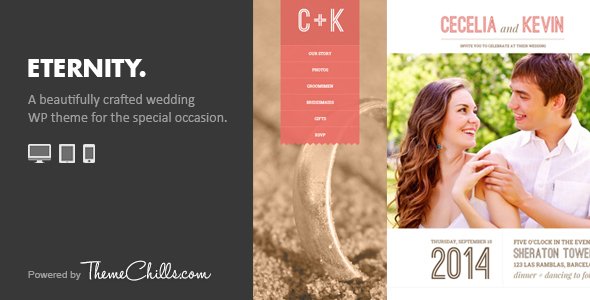
Stuck on your Eternity WordPress theme? Let's fix it.
No endless back-and-forth. Just send us the details and we'll get it done.
No obligation · Replies within 1 hour · Quote within 1 day
Setup · Customization · Bug fixes · WooCommerce integration
About Eternity WP Theme
Eternity is a free WordPress theme developed by ThemeChills, designed primarily for photography, portfolio, and creative agency websites. It features a clean, minimal aesthetic built around full-width imagery and a dark, elegant layout that makes visual content stand out without distraction.
The theme supports the WordPress Customizer for live previewing changes, and is compatible with popular page builders. It ships with a responsive layout, custom widget areas, and basic SEO-friendly markup. Eternity is a good starting point for creatives who want a polished look without spending on a premium theme from day one.
ThemeChills keeps the codebase relatively lean, which means page loads stay manageable. However, the free version does have feature limitations, and extending it beyond its default design often requires either the pro upgrade or custom development work.
Get matched with a Eternity developer in under one day
Tell us about your Eternity project. Small fixes, Eternity theme customization, or a full website build, whatever you need, we've got it covered.
We'll connect you to the right Eternity developers, define the scope, and get everything 100% clear.
You'll get one estimate, hire your preferred developer, and start collaborating.
Eternity looks simple on the surface, but getting it to behave exactly as you need, custom layouts, WooCommerce integration, performance tuning, or a design that doesn’t look like every other Eternity site, takes real WordPress development knowledge.
Through Codeable, FoxyConcept connects you with vetted WordPress developers who have hands-on experience with ThemeChills themes. You get a free estimate before committing to anything, and work is backed by Codeable’s satisfaction guarantee. No guesswork, no freelancer lottery.
Pros
- Clean, minimal design that makes photography and visual content the focus
- Free to use with no initial cost, good for testing a site concept quickly
- Responsive layout works well across mobile, tablet, and desktop without extra configuration
- Compatible with major page builders and popular plugins without major conflicts
- Lightweight codebase keeps baseline page load times reasonable out of the box
Cons
- Many desirable features are locked behind the Pro upgrade, limiting the free version significantly
- Limited layout variety makes it hard to differentiate your site from other Eternity users
- WooCommerce styling requires manual CSS work to match the theme's visual style properly
- ThemeChills support for the free version is limited to documentation and community forums
- Custom header and footer modifications require template overrides or a child theme, adding development effort
Who is Eternity for?
Photography Portfolio
Eternity’s full-width image support and dark layout make it a natural fit for photographers. You can showcase a portfolio cleanly without the design competing with your work. Pair it with a gallery plugin for filtered portfolio grids and a contact form for client inquiries, and you have a functional photography site with minimal setup.
Creative Agency
Small creative agencies can use Eternity as a base to present their work, services, and team. The minimal aesthetic works well for branding, motion, or design studios. You’ll likely want custom sections and a page builder to move beyond the default layout, but the visual foundation is solid for this kind of positioning.
Freelance Designer
Freelance designers and illustrators benefit from Eternity’s emphasis on imagery over text. The theme puts work front and center, which matters for first impressions. A freelancer can have a professional-looking portfolio online quickly, then extend it with a contact form, testimonials section, and simple service pages as the site grows.
Wedding Services
Wedding photographers, planners, and florists find Eternity’s elegant, dark aesthetic works well for their market. The clean layout suits romantic, premium branding. Adding a booking form plugin and a gallery of past work gives clients exactly what they’re looking for when researching wedding services online.
Art Gallery or Exhibition
Art galleries and exhibition spaces need their work displayed without visual clutter. Eternity handles this well with its focus on full-width images and minimal interface elements. A gallery plugin, event calendar, and simple navigation structure make it practical for both physical venues promoting shows and online-only art stores.

Customizing Eternity
Eternity’s built-in Customizer options cover the basics: logo upload, color scheme, typography selection, and homepage layout settings. For most simple photography or portfolio sites, this is enough to get a clean result quickly.
Where things get more involved is when you want layouts that differ from the defaults, custom post grids, unique header styles, or specific functionality not included out of the box. That’s where an Eternity expert becomes worth the time saved. A developer familiar with the theme can modify templates directly, add custom CSS without breaking updates, and integrate plugins cleanly into the existing design system rather than fighting against it.
Child theme development is strongly recommended before making any code-level changes to Eternity to protect customizations during theme updates.
Recommended plugins for Eternity
Eternity works with WooCommerce for basic shop functionality, though the styling may need adjustment to match the theme’s aesthetic properly. WPForms and Contact Form 7 both integrate cleanly for contact pages.
For galleries, Envira Gallery and FooGallery slot in well given the theme’s visual focus. If you need more control over page layouts, Elementor and Beaver Builder are compatible, though you’ll likely want custom CSS to keep things consistent.
SEO plugins like Yoast or Rank Math work without conflict. For site speed, pairing Eternity with a caching plugin and image optimization tool is worth doing early. See our WordPress performance service and WordPress SEO service for more.
Not sure which plugins to use? This WordPress plugins directory covers the most popular options with reviews and setup guides.
Eternity common issues
Eternity theme header not displaying logo correctly
Logo display issues in Eternity usually come down to image dimensions or a CSS conflict. The theme has specific size recommendations for the header logo. If your image is too large or an unusual aspect ratio, it may overflow or be cropped unexpectedly. Upload a PNG with a transparent background sized to the theme’s recommended dimensions. If the issue persists after that, check for plugin-added CSS or a child theme stylesheet overriding the logo styles. Our WordPress bug fixing service can diagnose header issues quickly.
Eternity WordPress theme homepage not showing featured images
If featured images aren’t appearing on the homepage, the first thing to check is whether featured images are actually set on each post. Eternity’s homepage template relies on them. If they’re set and still not showing, confirm the image size registered by the theme matches what was uploaded. Regenerating thumbnails using a plugin like Regenerate Thumbnails often resolves this. A caching plugin serving stale pages can also cause this symptom after images are added or changed.
Eternity theme menu not working on mobile
Mobile menu failures in Eternity are typically caused by a JavaScript conflict with another plugin or a missing jQuery dependency. Open the browser console on mobile or in a responsive preview and look for JS errors. Disabling plugins one by one can isolate the conflict. If the hamburger icon appears but nothing happens on tap, the toggle script is likely blocked. A child theme or custom JS snippet can also re-initialize the menu event listener as a workaround while the conflict is identified.
Eternity theme slow loading on shared hosting
Eternity’s baseline load time is reasonable, but shared hosting with no caching layer or unoptimized images will slow any theme down. Start by installing a caching plugin like WP Super Cache or LiteSpeed Cache, then run images through an optimizer like ShortPixel. Remove any inactive plugins and check for render-blocking scripts. If performance is still poor after these steps, the issue may be server-side. See our WordPress performance service for a full audit.
Eternity FAQ
Yes, Eternity by ThemeChills is available for free from the WordPress theme repository. You can install it directly from your WordPress dashboard under Appearance > Themes. The free version includes core layout and Customizer options. A Pro version is available separately with additional features, section templates, and priority support from ThemeChills.
The Pro version of Eternity unlocks additional homepage sections, more layout options, extended typography controls, demo imports, and premium ThemeChills support. The free version is workable for basic portfolio sites but becomes restrictive if you need a multi-section layout or specific design features. Many users upgrade to Pro or hire a developer to extend the free version through custom code.
Eternity is compatible with Elementor. You can use the Elementor page builder to create custom page layouts within the theme. However, some areas like the header, footer, and blog archive are controlled by theme templates rather than Elementor, so full design control over those sections may require Elementor Pro’s Theme Builder or custom template overrides in a child theme.
Eternity can be used with WooCommerce, but it isn’t purpose-built for ecommerce. Basic shop pages will function, but the default WooCommerce styles won’t match Eternity’s aesthetic without additional CSS customization. If your site is primarily a store, a WooCommerce-specific theme is a better starting point. If the shop is secondary to a portfolio or creative site, Eternity can work with some styling effort.
Always use a child theme before making any code changes to Eternity. Updates to the parent theme will overwrite any modifications made directly to theme files. Customizer settings are stored in the database and survive updates, but template edits and custom CSS added to theme files will not. If you haven’t set up a child theme yet, do that before your next update. A developer can set this up quickly if needed.
Hire an Eternity WordPress Developer
Whether you need a small tweak or a full custom build on top of Eternity, FoxyConcept can match you with the right developer fast. Projects are scoped through Codeable, which means you get a clear estimate upfront, a vetted developer, and no obligation to proceed until you’re ready.
From layout customization to plugin conflicts and performance issues, our WordPress development specialists have you covered. Get a free estimate today and describe exactly what you need.
You'll need a free Codeable account so developers can ask questions and send their quotes.