Bigcart WordPress Theme
by C-Themes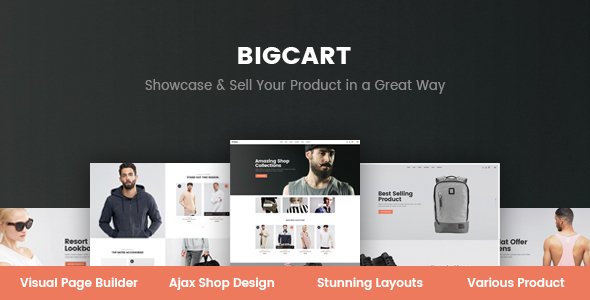
Stuck on your Bigcart WordPress theme? Let's fix it.
No endless back-and-forth. Just send us the details and we'll get it done.
No obligation · Replies within 1 hour · Quote within 1 day
Setup · Customization · Bug fixes · WooCommerce integration
About Bigcart WP Theme
Bigcart is a WooCommerce theme built by C-Themes, designed specifically for large online stores that need a clean, fast shopping experience. It ships with multiple homepage layouts, a mega menu, Ajax cart functionality, and product filtering built in. The design leans toward electronics, fashion, and multi-category retail, but works across most ecommerce niches.
Out of the box, Bigcart includes a product quick-view, wishlist support, a sticky header, and RTL compatibility. It works with Elementor and includes WPBakery support. Performance is reasonable for a feature-heavy theme, though stores with large catalogs will benefit from additional optimization. Overall, it is a solid starting point for a serious WooCommerce build without needing a custom theme from scratch.
Get matched with a Bigcart developer in under one day
Tell us about your Bigcart project. Small fixes, Bigcart theme customization, or a full website build, whatever you need, we've got it covered.
We'll connect you to the right Bigcart developers, define the scope, and get everything 100% clear.
You'll get one estimate, hire your preferred developer, and start collaborating.
Bigcart is feature-rich, but getting it to behave exactly how you need takes real WooCommerce and PHP knowledge. A developer who has worked with the theme before knows where the customization limits are and how to work around them cleanly. Through Codeable, you get matched with vetted WordPress professionals who understand themes like Bigcart at a code level, not just the settings panel. No guesswork, no wasted time on workarounds that break on the next update.
Pros
- Multiple pre-built homepage demos covering different store types and layouts
- Ajax cart and quick-view product modal reduce page reloads during browsing
- Built-in mega menu with image support works well for large product catalogs
- RTL language support and translation-ready for international stores
- Includes both Elementor and WPBakery, giving flexibility on the page builder front
Cons
- WPBakery shortcode lock-in makes it hard to switch page builders later
- Theme options panel can feel cluttered and inconsistent compared to modern themes
- Demo import does not always replicate exactly what you see in the preview
- Limited documentation makes advanced customization harder without developer help
- Some built-in features duplicate popular plugins, which can cause conflicts
Who is Bigcart for?
Electronics and Gadgets Store
Bigcart’s product comparison feature and mega menu make it a practical fit for electronics retailers. Customers can filter by specs, compare models side by side, and browse a deep category structure without getting lost. The quick-view modal reduces friction on product discovery pages, which matters when your catalog runs into the hundreds of SKUs.
Fashion and Apparel Retail
The theme handles variable products well, which is essential for clothing stores dealing with size and color combinations. The wishlist integration and clean product gallery make the browsing experience feel polished. A fashion store benefits from Bigcart’s visual layout options and the ability to showcase lookbooks or seasonal collections through custom homepage sections.
Multi-Category Marketplace
Bigcart’s multi-column mega menu and category-based layouts suit stores selling across several unrelated product lines. You can organize navigation by department, highlight featured categories, and use different homepage sections for different product groups. It handles breadth of catalog better than most mid-range WooCommerce themes.
Home and Furniture Shop
Large product images and a spacious grid layout make Bigcart a workable choice for furniture and home decor stores. The theme supports full-width sections that give room for lifestyle imagery. Filtering by room type or material is achievable with the right plugin setup, and the sticky header keeps navigation accessible during long scroll sessions.
Wholesale and B2B Store
With some customization, Bigcart can support B2B use cases like bulk pricing display, quote request forms, and restricted product visibility. These features need plugin support or custom development, but the theme’s structure does not get in the way. A developer can extend it cleanly without fighting the base layout.

Customizing Bigcart
Bigcart gives you a decent range of customization through the WordPress Customizer and its own theme options panel. You can switch layouts, adjust typography, change color schemes, and configure the header and footer without touching code. WPBakery comes bundled for drag-and-drop page building.
That said, deeper changes, like modifying the checkout flow, adjusting the mega menu structure, or integrating third-party plugins cleanly, often require custom PHP or child theme work. A Bigcart expert can handle these without breaking existing functionality or creating update conflicts. If your store has specific layout requirements or needs custom product templates, working with a developer who knows the theme saves a lot of trial and error.
Recommended plugins for Bigcart
Bigcart works well with the standard WooCommerce plugin stack. Common additions include WooCommerce Subscriptions, YITH plugins for wishlists and compare tables, and advanced filtering tools like FacetWP or WooCommerce Product Filter.
For stores that need better load times, pairing Bigcart with a caching plugin and a CDN is worth doing early. You can also explore our WordPress performance services to get more out of your store. If organic traffic matters, structured data and on-page optimization are areas where our WordPress SEO services can make a real difference for product pages.
Not sure which plugins to use? This WordPress plugins directory covers the most popular options with reviews and setup guides.
Bigcart common issues
Bigcart mega menu not working or showing blank
A blank or broken mega menu in Bigcart is usually caused by a JavaScript conflict with another plugin, or the menu not being assigned to the correct theme location. First, check the Appearance > Menus screen and confirm the right menu is set for the primary location. Then disable plugins one by one to find a conflict. If the issue persists after ruling those out, a WordPress bug fixing service can trace the exact JS error causing the problem.
Bigcart product quick view not loading correctly
Quick view failures in Bigcart often come from a missing or overridden WooCommerce template. This happens when a plugin modifies the single product template in a way the theme does not expect. Check your browser console for 400 or 500 errors when triggering quick view. Clearing any server-side cache sometimes resolves it instantly. If the templates are the issue, a developer will need to reconcile the plugin output with Bigcart’s quick view markup.
Bigcart Ajax add to cart not working
Ajax add to cart breaking usually points to a caching layer serving a stale page, a nonce mismatch, or a JavaScript error from a conflicting plugin. Start by disabling your caching plugin and testing again. If that fixes it, you need to configure your cache to exclude WooCommerce cart fragments. For persistent issues, check the browser console for failed XHR requests and trace the error from there. Our bug fixing team handles this type of issue regularly.
Bigcart demo import not matching the preview
Bigcart’s demo import relies on sample data XML files, required plugins being active, and image files downloading correctly during import. If the result looks different from the preview, the most common causes are missing plugins, failed image imports due to server timeouts, or a theme options file that did not import properly. Import the theme options JSON file separately if the importer provides one, and check that all bundled plugins are installed and activated before running the import.
Bigcart FAQ
C-Themes generally keeps Bigcart updated alongside major WooCommerce releases, but there is sometimes a short gap after a WooCommerce update before the theme catches up. Always test updates on a staging environment before applying them to a live store. If you are running the latest WooCommerce and notice template warnings, a developer can apply the updated template files from WooCommerce into your child theme.
Yes, Bigcart includes Elementor compatibility and some themes in the C-Themes lineup bundle Elementor demos. You can build and edit pages using Elementor’s editor. However, certain theme-specific elements like the mega menu and header are controlled through the theme’s own settings, not Elementor. Keep that separation in mind when planning your build.
Bigcart is listed as WPML compatible, meaning the theme strings can be translated and the layout holds up across languages. You will need WPML installed and configured separately. RTL is supported out of the box, which helps for Arabic or Hebrew stores. For complex multilingual setups, testing each language version of the shop pages before launch is worth the time.
Create a new folder in wp-content/themes with a name like bigcart-child. Inside it, add a style.css file with the correct header declaring the parent theme as Bigcart, and a functions.php file that enqueues the parent stylesheet. Any template overrides or custom CSS go into the child theme. This protects your changes from being wiped out when Bigcart updates.
Yes, switching to Bigcart from another theme is doable, but it is not always straightforward. Your products and orders carry over fine since those live in the database. The work involves rebuilding your page layouts, reconfiguring menus, and adjusting WooCommerce templates to match your previous setup. Our WordPress migration service covers theme transitions with minimal downtime.
Hire a Bigcart Developer for Your WooCommerce Store
Whether you need a full Bigcart store built from scratch, a custom layout added, or a specific bug fixed, our developers have hands-on experience with WooCommerce and C-Themes builds. Work is scoped clearly, delivered on time, and backed by Codeable’s vetted network. Get a free estimate with no obligation to hire. You describe the project, we scope it, you decide.
You'll need a free Codeable account so developers can ask questions and send their quotes.