FixTeam WordPress Theme
by AncoraThemes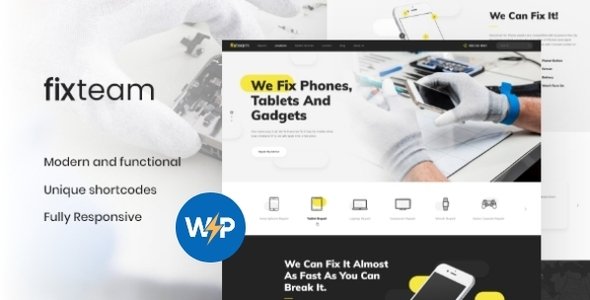
Stuck on your FixTeam WordPress theme? Let's fix it.
No endless back-and-forth. Just send us the details and we'll get it done.
No obligation · Replies within 1 hour · Quote within 1 day
Setup · Customization · Bug fixes · WooCommerce integration
About FixTeam WP Theme
FixTeam is a WordPress theme built by AncoraThemes for repair businesses, technical service companies, and maintenance teams. It ships with a clean, professional layout designed to convert visitors into service bookings. The theme includes pre-built page templates for services, pricing, testimonials, and contact forms, so you can launch a working site without starting from scratch.
Built on a solid page builder foundation, FixTeam supports Elementor and WPBakery, giving you visual control over layouts without touching code. It includes multiple homepage demos aimed at different service niches, from appliance repair to IT support. The theme is translation-ready and WooCommerce compatible, making it usable for shops selling parts or service packages alongside standard business pages.
Get matched with a FixTeam developer in under one day
Tell us about your FixTeam project. Small fixes, FixTeam theme customization, or a full website build, whatever you need, we've got it covered.
We'll connect you to the right FixTeam developers, define the scope, and get everything 100% clear.
You'll get one estimate, hire your preferred developer, and start collaborating.
AncoraThemes builds solid themes, but every business has specific requirements that go beyond a demo import. A vetted FixTeam developer on Codeable can customize your layout, wire up booking systems, fix conflicts with third-party plugins, and make sure the site actually performs under real traffic. Codeable screens every developer before they work on client projects, so you get someone who knows WordPress properly, not just the surface settings.
Pros
- Ships with multiple service-focused demo sites that import in one click
- Compatible with both Elementor and WPBakery for visual page editing
- Includes a working appointments and booking section out of the box
- WooCommerce ready for selling parts, products, or service packages
- Translation-ready with WPML compatibility for multilingual service businesses
Cons
- Demo content import can be slow and occasionally requires manual cleanup
- Some design elements feel dated compared to newer page builder themes
- WPBakery dependency adds plugin bloat if you prefer working in Elementor only
- Limited documentation for advanced customizations beyond the demo layouts
- Theme updates from AncoraThemes have slowed down in recent releases
Who is FixTeam for?
Appliance Repair Business
FixTeam suits appliance repair businesses well. The service listing templates let you display specific repair types, pricing tiers, and turnaround times clearly. Add a booking form and a testimonials section, and customers can find your services and request a callout without picking up the phone.
IT Support Company
IT support companies can use FixTeam to present tiered service packages, team credentials, and a contact flow for new clients. The clean layout works well for B2B audiences who want clear pricing and a professional appearance before they commit to a managed service contract.
HVAC and Plumbing Services
HVAC and plumbing businesses benefit from FixTeam’s service area pages and call-to-action sections. You can build out emergency contact forms, highlight certifications, and list service zones. The theme’s mobile layout handles well, which matters when customers are searching from their phone during an emergency.
Auto Repair Shop
Auto repair shops can use FixTeam to list services, publish transparent pricing, and collect booking requests online. The WooCommerce integration works if you sell parts or consumables alongside labor. Customer reviews display prominently, which builds trust before a first visit.
Home Maintenance and Handyman Services
Handyman and home maintenance services fit the FixTeam structure well. You can organize jobs by category, show before and after project photos, and include a quote request form. The theme handles a wide service range without the layout feeling cluttered, which is useful when you cover multiple trade types.

Customizing FixTeam
FixTeam gives you a decent starting point, but most businesses need adjustments before the site feels like their own. The WordPress Customizer handles basic settings like fonts, colors, and header layout. For deeper changes, you will need to work inside Elementor or WPBakery, depending on which demo you imported.
Common customization requests include custom booking flows, branded service pages, and integration with third-party CRM or scheduling tools. A FixTeam expert can handle these without breaking the original structure. If you need custom post types for specific services or a tailored pricing table that matches your actual rates, a developer familiar with AncoraThemes builds will save you significant time and avoid compatibility issues down the line.
Recommended plugins for FixTeam
FixTeam works well with several plugins that extend its core functionality. WooCommerce adds product and service purchasing. WPForms or Gravity Forms handle advanced booking and quote request forms. WPML covers multilingual needs if you serve multiple regions.
For performance, pairing FixTeam with a caching plugin and a CDN is worth doing early. The theme loads several assets by default, and optimization helps significantly on mobile. You can learn more about WordPress performance tuning or explore WordPress SEO setup to get better search visibility for your service pages.
Not sure which plugins to use? This WordPress plugins directory covers the most popular options with reviews and setup guides.
FixTeam common issues
FixTeam theme not loading demo content properly
Demo import failures in FixTeam usually come down to server memory limits or a PHP timeout during the import process. Check that your host allows at least 256MB of memory and that the max execution time is set above 300 seconds. If the import stalls, try importing the XML content manually through WordPress and then applying Revolution Slider files separately. If the problem persists, a WordPress bug fixing service can diagnose and complete the import cleanly.
FixTeam booking form not sending emails
FixTeam contact and booking forms rely on your server’s mail function or an SMTP plugin. If emails are not arriving, the issue is almost always server-level email delivery, not the theme itself. Install an SMTP plugin like WP Mail SMTP, connect it to a transactional mail service such as SendGrid or Mailgun, and test again. Check spam folders before assuming the form is broken. If the form itself is not submitting, check for JavaScript conflicts in the browser console.
FixTeam page layout broken after plugin update
A broken layout after a plugin update usually points to a conflict between WPBakery or Elementor and another plugin or the theme’s built-in shortcodes. Start by deactivating recently updated plugins one at a time and refreshing the affected page. If you use WPBakery, check whether an update reset your VC settings. Clearing your cache after each change matters here. If the layout breaks persist across multiple pages, get a developer to look at it before making further changes.
FixTeam theme slow loading on mobile
FixTeam loads several CSS and JavaScript files by default, which adds weight on mobile connections. Start by running a PageSpeed Insights test to identify the largest assets. Minify and combine scripts using a plugin like Asset CleanUp or Perfmatters. Lazy load images if the theme does not do it automatically. Replace large hero images with compressed versions. For a more thorough fix, WordPress performance optimization covers the full process including server-level improvements.
FixTeam FAQ
Yes, FixTeam supports Elementor. Some demos are built with WPBakery and others with Elementor, so check which page builder a specific demo uses before importing. Mixing both builders on the same site creates conflicts and should be avoided. If you want to switch from a WPBakery demo to an Elementor build, a developer can help you rebuild the pages cleanly.
FixTeam is WooCommerce compatible. You can add a shop to your site for selling spare parts, service packages, or maintenance plans. The theme’s default WooCommerce styling is functional but basic. If you need a more polished shop layout that matches the rest of your FixTeam design, some custom CSS or developer help will be needed.
After purchasing and activating FixTeam, go to the theme’s import panel, usually found under Appearance or a dedicated theme menu. Select the demo you want and run the one-click import. Make sure required plugins are installed first, including WPBakery or Elementor depending on the demo. Server limits can cause imports to fail, so check your PHP memory and timeout settings before starting.
FixTeam is translation-ready and works with WPML for multilingual setups. You will need a valid WPML license and the String Translation add-on to cover theme strings. Some hard-coded text inside shortcodes may need manual handling. For a full multilingual build, a developer familiar with both FixTeam and WPML can map out which strings need translation and set up language switchers correctly.
Yes, you can migrate an existing site to FixTeam, but it takes planning. Your current content carries over, but your old theme’s page layouts will not. You will need to rebuild pages using FixTeam’s templates or page builder. If you are also changing hosting at the same time, check out WordPress migration services to handle both steps without losing content or downtime.
Hire a FixTeam Developer
Need help setting up, customizing, or fixing your FixTeam site? A specialist developer can get it done correctly the first time. Through Codeable, you post your project, get matched with a FixTeam-experienced developer within 24 hours, and receive a free estimate before committing to anything. No risk, no obligation.
Get your free estimate today and describe exactly what you need built or fixed.
You'll need a free Codeable account so developers can ask questions and send their quotes.