LogisticsHub WordPress Theme
by LiquidThemes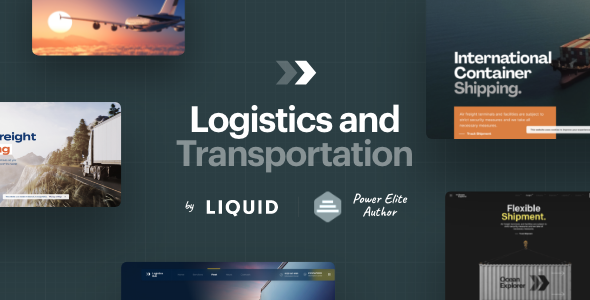
Stuck on your LogisticsHub WordPress theme? Let's fix it.
No endless back-and-forth. Just send us the details and we'll get it done.
No obligation · Replies within 1 hour · Quote within 1 day
Setup · Customization · Bug fixes · WooCommerce integration
About LogisticsHub WP Theme
LogisticsHub is a WordPress theme built by LiquidThemes for freight, transport, and supply chain businesses. It ships with a purpose-built homepage layout, service area pages, a request-a-quote form, and pre-built sections for fleet showcases and tracking integrations.
The theme runs on Elementor, so page layouts are editable without touching code. It includes WooCommerce compatibility for selling logistics services or add-ons directly. The design is clean and professional, aimed at companies that need to look credible fast without building from scratch.
Out of the box, LogisticsHub covers most of what a transport or courier company needs. That said, real-world deployments often need custom tracking integrations, route calculators, or carrier-specific booking flows that go beyond what any theme ships with by default.
Get matched with a LogisticsHub developer in under one day
Tell us about your LogisticsHub project. Small fixes, LogisticsHub theme customization, or a full website build, whatever you need, we've got it covered.
We'll connect you to the right LogisticsHub developers, define the scope, and get everything 100% clear.
You'll get one estimate, hire your preferred developer, and start collaborating.
LogisticsHub looks straightforward in the demo, but connecting it to real business operations takes more than clicking around in Elementor. Booking systems, quote forms, carrier API integrations, and custom user flows all need developer input.
FoxyConcept works with vetted WordPress specialists through Codeable. Every developer on the platform has been reviewed and tested. You get matched with someone who has relevant experience, not a generalist taking a guess. Post your project, get a clear estimate, and decide from there with no obligation.
Pros
- Purpose-built for logistics businesses with relevant pre-built sections like fleet display, coverage maps, and service listings
- Built on Elementor, making layout edits accessible without code for most standard page changes
- Includes a request-a-quote form out of the box, which is a core need for most freight and courier companies
- WooCommerce compatible, allowing logistics companies to sell services, add-ons, or subscriptions directly
- LiquidThemes maintains active updates and provides documentation, reducing long-term abandonment risk
Cons
- Heavy Elementor dependency means performance can suffer without proper optimization and caching setup
- No native carrier API integration, so connecting to FedEx, UPS, or DHL requires additional plugins or custom development
- Demo content import can be unreliable, sometimes requiring manual setup of sections and widgets from scratch
- Limited multi-language support out of the box, which is a problem for international logistics operations
- The default quote form is basic and lacks conditional logic, weight-based pricing, or multi-stop route fields
Who is LogisticsHub for?
Freight and Trucking Companies
LogisticsHub suits regional and national freight carriers that need a professional web presence with service area pages, fleet information, and a quote request flow. A developer can extend the theme with weight-based freight calculators and carrier-specific booking forms tailored to your rate structure.
Courier and Last-Mile Delivery Services
Courier businesses need fast, clear websites that convert visitors into booking requests. LogisticsHub’s service layout and quote form cover the basics. Custom integration with route planning tools or delivery tracking APIs can be layered on top for a more functional customer experience.
Warehouse and Fulfillment Providers
Fulfillment providers can use LogisticsHub to showcase storage capacity, service tiers, and onboarding steps for new clients. The WooCommerce integration makes it possible to sell pallet storage or pick-and-pack services with pricing tables and checkout flows built into the site.
Customs Brokerage and Import-Export Businesses
Customs brokers and import-export firms need sites that communicate authority and process. LogisticsHub’s structured layouts work well for service breakdowns, compliance information, and document checklists. A developer can add client portals or document submission forms to support actual workflow needs.
Moving and Relocation Companies
Moving companies benefit from LogisticsHub’s quote request forms and service area displays. The theme can be customized to include move size calculators, date-based availability checks, and customer review integrations that help convert local search traffic into booked jobs.

Customizing LogisticsHub
LogisticsHub gives you a solid starting point, but most logistics businesses have specific requirements the default setup does not cover. That includes custom freight quote calculators, multi-carrier booking forms, driver management pages, or client portal access.
A LogisticsHub expert can extend the theme without breaking its update path. That means working with child themes, custom Elementor widgets, and plugin integrations that fit your workflow rather than forcing you to work around them.
LiquidThemes updates the theme regularly, which is good for security but can conflict with heavy customizations done directly to theme files. Working with someone who knows the theme structure keeps your site stable through updates and avoids the common trap of losing changes after a theme refresh.
Recommended plugins for LogisticsHub
LogisticsHub pairs well with plugins like WP Overnight’s PDF Invoices, ShipStation for order fulfillment, and Google Maps API integrations for route and coverage area displays. If you are running an ecommerce angle, WooCommerce with a shipping rate plugin covers quote-to-payment flows.
For site speed, image optimization and caching are important since LogisticsHub pages tend to be image-heavy. See our WordPress performance services if load times are a concern. If you need better search visibility for your logistics services, our WordPress SEO service can help you target freight and shipping keywords effectively.
Not sure which plugins to use? This WordPress plugins directory covers the most popular options with reviews and setup guides.
LogisticsHub common issues
LogisticsHub contact form not sending emails
This is almost always a server mail configuration issue, not a theme bug. WordPress uses PHP mail by default, which many hosts block. Install an SMTP plugin like WP Mail SMTP and connect it to a transactional email service such as Mailgun, SendGrid, or your Google Workspace account. Test the connection through the plugin’s diagnostic tool. If the form still fails, check whether a form plugin conflict or a missing nonce field is blocking submission. Our WordPress bug fixing service can diagnose and resolve this quickly.
LogisticsHub demo import not working correctly
LogisticsHub’s one-click demo import depends on your server meeting specific memory and timeout thresholds. Increase PHP memory limit to at least 256MB and set max execution time to 300 seconds. If the import still stalls or loads without images, import the XML content manually and re-link the required plugins. Some demo sections also require Elementor Pro, which is not always clearly flagged. Check LiquidThemes’ documentation for the full plugin list before importing.
LogisticsHub site slow after adding Elementor widgets
Elementor adds page weight quickly, especially when combined with sliders, map embeds, and custom fonts. Start by enabling Elementor’s built-in asset loading improvements in Settings > Elementor > Performance. Add a caching plugin like WP Rocket or LiteSpeed Cache and enable CSS and JS minification. Use a CDN for static assets and compress images with ShortPixel or Imagify. If the site is still sluggish, see our WordPress performance service for a full audit.
LogisticsHub layout broken after theme update
Layout breaks after a theme update usually mean customizations were made directly to theme files rather than through a child theme. Check your browser console for CSS errors and compare your current template files against the updated versions. If you did not use a child theme, some overrides will have been wiped. Going forward, all custom CSS and template modifications should live in a child theme. If you need help recovering a broken layout, our WordPress bug fixing service can restore and restructure your setup safely.
LogisticsHub FAQ
LiquidThemes actively maintains LogisticsHub and releases updates to keep pace with WordPress core changes. Before updating either WordPress or the theme, back up your site. If you have made customizations directly to theme files rather than a child theme, updates will overwrite them. Always test major updates in a staging environment first.
Yes. LogisticsHub is WooCommerce compatible, which means you can sell logistics services, memberships, or add-ons through your site. The default WooCommerce templates will inherit basic styling from the theme, though you may need custom CSS or a developer to match the store pages fully to the LogisticsHub design.
LogisticsHub is built around Elementor, so most of its page layouts and demo content depend on it. You can use the theme without Elementor, but you will lose access to the pre-built page sections and drag-and-drop editing. The theme’s basic WordPress template structure remains intact, but the visual output will differ significantly from the demo.
LogisticsHub does not include native shipment tracking. You can add it through plugins like TrackShip, AfterShip, or a carrier-specific API integration built by a developer. The plugin output can be embedded into any LogisticsHub page using a shortcode or Elementor HTML widget. Custom tracking pages with branded styling require developer work.
Yes, LogisticsHub can be migrated to a new host without losing its design. Use a migration plugin like All-in-One WP Migration or Duplicator to move files and the database together. Update site URLs in the database after migration. Elementor sometimes stores absolute URLs in its data, so run a search-replace tool to catch those. Our WordPress migration service handles this end to end.
Hire a LogisticsHub Expert Developer
If your LogisticsHub site needs custom integrations, booking forms, freight calculators, or anything beyond the default setup, the right developer saves time and prevents costly mistakes. FoxyConcept connects you with experienced WordPress developers through Codeable’s vetted network.
Get a free estimate with no obligation. Describe your project and get matched within 24 hours. 100% risk-free.
You'll need a free Codeable account so developers can ask questions and send their quotes.