Cvio WordPress Theme
by bslthemes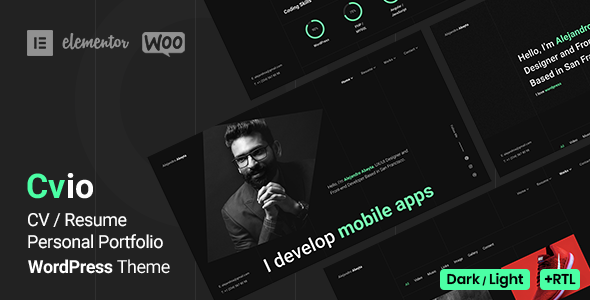
Stuck on your Cvio WordPress theme? Let's fix it.
No endless back-and-forth. Just send us the details and we'll get it done.
No obligation · Replies within 1 hour · Quote within 1 day
Setup · Customization · Bug fixes · WooCommerce integration
About Cvio WP Theme
Cvio is a resume and CV WordPress theme built by BSLThemes. It targets freelancers, creatives, and job seekers who want a personal portfolio site that doubles as an online resume. The theme includes pre-built demo layouts, a timeline section for work history, skill bars, portfolio grids, and a contact form. It works with Elementor, making layout edits accessible without touching code.
BSLThemes designed Cvio specifically for personal branding. You get sections for testimonials, services, client logos, and a blog. The theme is lightweight compared to multipurpose alternatives, which helps with load times. It ships with WooCommerce compatibility if you want to sell digital products like ebooks or templates alongside your portfolio. Overall, it is a focused, well-structured theme for anyone building a professional online presence.
Get matched with a Cvio developer in under one day
Tell us about your Cvio project. Small fixes, Cvio theme customization, or a full website build, whatever you need, we've got it covered.
We'll connect you to the right Cvio developers, define the scope, and get everything 100% clear.
You'll get one estimate, hire your preferred developer, and start collaborating.
Cvio looks straightforward until you need something custom. Moving sections, integrating APIs, or fixing layout breaks in specific browsers takes real WordPress knowledge. FoxyConcept works through Codeable, a vetted network of WordPress developers. Every developer on Codeable is screened, so you are not rolling the dice on quality. If you need a Cvio developer who knows the theme inside out, this is the fastest way to get reliable help. See our full WordPress development services.
Pros
- Purpose-built for personal CV and portfolio sites, so the core sections are already structured correctly
- Native Elementor compatibility means layout editing works without writing code
- Includes a dedicated timeline section for work history and education, which most generic themes lack
- Lighter codebase than multipurpose themes, which benefits page load performance
- WooCommerce ready if you want to sell digital products alongside your portfolio
Cons
- Limited layout variety compared to multipurpose themes, so niche use cases may require custom development
- Skill bar animations can look outdated and are difficult to replace without custom CSS
- Demo import does not always replicate exactly what is shown in the preview, requiring manual adjustments
- BSLThemes support response times can be slow for complex technical issues
- Deep customization requires a child theme; editing the parent theme directly leads to lost changes on updates
Who is Cvio for?
Freelance Designers
Cvio gives freelance designers a clean grid portfolio with case study support and client testimonials. The Elementor integration makes it easy to display visual work without a developer. Adding a contact form connected to your email or CRM keeps leads organized from the first visit.
Software Developers
Developers can use Cvio to list skills, link to GitHub repos, and show employment history using the timeline section. The minimal design keeps focus on content rather than visual noise. A custom code block or shortcode can embed live project demos directly on the page.
Marketing Consultants
Marketing consultants benefit from Cvio’s services section, testimonials, and blog. You can position your expertise clearly and drive inbound leads. Connecting the contact form to a CRM like HubSpot or ActiveCampaign turns the site into a lead generation tool, not just a digital business card.
Photographers
Cvio’s portfolio grid handles image-heavy layouts well. Photographers can group work by category, add lightbox functionality, and display client testimonials. For selling prints or presets, the built-in WooCommerce compatibility means you do not need a separate platform.
Job Seekers in Finance or Law
Finance and legal professionals need a site that looks credible and loads fast. Cvio’s structured layout, timeline for career history, and clean typography fit that requirement. Adding schema markup for a personal profile improves visibility in Google search results for your name and specialization.

Customizing Cvio
Cvio gives you a solid starting point, but most clients need adjustments that go beyond what the theme panel offers. Changing the layout structure, adding custom post types, or integrating third-party tools like Calendly or a booking system requires actual development work.
A Cvio expert can modify the Elementor templates without breaking future updates, add custom CSS that survives theme changes, and wire up contact forms to CRMs like HubSpot or Mailchimp. If the default color schemes or typography do not match your brand, a developer can apply a child theme so your changes stay intact after every update. BSLThemes updates Cvio regularly, so working with a Cvio expert from the start saves you from repeated fixes down the line.
Recommended plugins for Cvio
Cvio works well with a focused set of plugins. Elementor Pro adds form widgets, popups, and dynamic content that the free version lacks. For performance, combining Cvio with a caching plugin like WP Rocket and a CDN keeps load times low. Learn more about WordPress performance optimization.
For visibility, an SEO plugin like Rank Math or Yoast handles meta tags and schema markup for your personal brand pages. Explore WordPress SEO services for deeper work. Smash Balloon can pull in Instagram or LinkedIn feeds. WPML adds multilingual support if you work internationally.
Not sure which plugins to use? This WordPress plugins directory covers the most popular options with reviews and setup guides.
Cvio common issues
Cvio demo content not importing correctly
Demo import failures in Cvio usually happen because the server’s maximum upload size or PHP memory limit is too low. Check that your host allows at least 64MB memory and a 32MB upload limit. Also confirm that the required plugins listed in the demo documentation are installed and activated before importing. If the import still fails, a developer can import the XML content manually and rebuild widget settings from the demo screenshots. Visit our WordPress bug fixing service for fast help.
Cvio mobile menu not working or not opening
A broken mobile menu in Cvio is usually caused by a JavaScript conflict with another plugin or a cached version of a script. Start by clearing your cache and testing in an incognito window. Deactivate plugins one at a time to find the conflict. If the menu worked before a plugin update, roll that plugin back. A developer can also add a custom script to force the menu to initialize correctly without removing other plugins you need.
Cvio portfolio section not displaying properly after Elementor update
Elementor updates sometimes break template layouts, especially grid and portfolio widgets in themes like Cvio. If portfolio items are misaligned or missing after an update, regenerate the CSS from Elementor’s tools panel first. If that does not fix it, the issue is likely a deprecated widget that needs replacing. A Cvio developer can audit your Elementor templates, replace broken widgets, and rebuild the section to match your original design. See our bug fixing service.
Cvio contact form not sending emails
When the Cvio contact form stops sending emails, the problem is almost always server-level mail configuration rather than the theme itself. WordPress uses the PHP mail function by default, which many hosts block. Install an SMTP plugin like WP Mail SMTP and connect it to a transactional email service such as SendGrid, Mailgun, or Gmail SMTP. Configure the from address to match your domain. Test with the plugin’s built-in email test tool to confirm delivery before going live.
Cvio FAQ
Yes, Cvio is built to work with Elementor. The theme’s demo layouts are Elementor templates, and you can edit every section through the Elementor page builder without touching code. For advanced functionality like forms, popups, and dynamic content, Elementor Pro is recommended. Some widgets in the demos require the Pro version to function as shown.
Cvio includes WooCommerce compatibility. This makes it possible to sell digital products, prints, or templates directly from your personal site without switching themes. The default WooCommerce templates are styled to match the Cvio design. For heavily customized shop pages, a developer may need to adjust the styling to keep things consistent.
Cvio supports multi-page builds. While it is marketed as a single-page CV theme, you can create separate pages for portfolio, services, blog, and contact. The navigation menu handles standard multi-page linking. If you need a more complex site structure with custom post types or taxonomies, a developer can extend the theme to support that.
Always use a child theme before making any code changes to Cvio. Edits made to the parent theme files are overwritten when BSLThemes releases an update. A child theme keeps your CSS and template overrides separate. If you have not set up a child theme yet, a developer can migrate your current changes into one before your next update. See WordPress maintenance services.
Cvio has a clean HTML structure that gives it a reasonable SEO baseline. For better results, pair it with a plugin like Rank Math or Yoast to control meta titles, descriptions, and schema. The theme does not block indexing by default. Page speed also affects SEO, and Cvio performs well on this metric compared to heavier multipurpose themes, particularly with caching enabled.
Hire a Cvio WordPress Developer
Need a Cvio developer to customize your layout, fix a bug, or build a feature the theme does not include out of the box? FoxyConcept delivers WordPress work through Codeable. Post your project, get matched with a vetted developer within 24 hours, and receive a free estimate before any commitment. Get a free estimate today and see exactly what your project will cost before you hire anyone.
You'll need a free Codeable account so developers can ask questions and send their quotes.