Optometry WordPress Theme
by AncoraThemes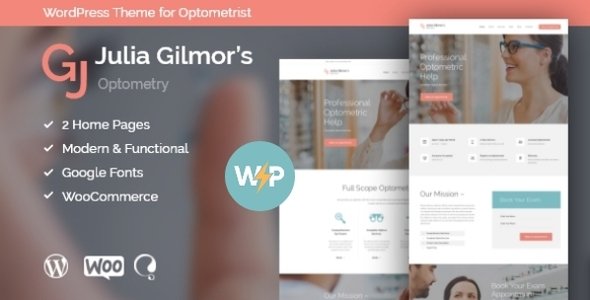
Stuck on your Optometry WordPress theme? Let's fix it.
No endless back-and-forth. Just send us the details and we'll get it done.
No obligation · Replies within 1 hour · Quote within 1 day
Setup · Customization · Bug fixes · WooCommerce integration
About Optometry WP Theme
Optometry by AncoraThemes is a WordPress theme built specifically for eye care practices, opticians, and vision clinics. It comes with a clean, professional layout that puts appointment booking, service listings, and contact information front and center.
The theme includes multiple homepage demos, a pre-built services section, testimonials, staff profiles, and a working contact form. It is built on a solid page builder foundation, so most layout changes can be made without touching code.
Optometry is responsive out of the box, loads reasonably fast on standard hosting, and is compatible with popular plugins like WooCommerce for selling eyewear online and Appointment Hour Booking for scheduling. It suits small independent practices as well as multi-location optical chains.
Get matched with a Optometry developer in under one day
Tell us about your Optometry project. Small fixes, Optometry theme customization, or a full website build, whatever you need, we've got it covered.
We'll connect you to the right Optometry developers, define the scope, and get everything 100% clear.
You'll get one estimate, hire your preferred developer, and start collaborating.
Optometry is a capable theme, but most practices need more than a default install. A vetted WordPress developer can handle everything from initial setup to custom feature builds. Through Codeable, you get matched with specialists who have real experience with medical and health care sites, not generalists figuring it out as they go. Whether you need booking system integration, a WooCommerce eyewear shop, or a full custom build on top of the theme, the right developer is available. No guesswork, no wasted budget.
Pros
- Purpose-built for eye care and optical practices with relevant sections already included
- Multiple pre-built homepage demos reduce initial setup time significantly
- WooCommerce compatible for selling frames, lenses, and accessories directly
- Includes staff profiles and testimonials sections suited to building patient trust
- Regular updates from AncoraThemes and solid documentation for common customizations
Cons
- Appointment booking requires a third-party plugin; nothing built-in for scheduling
- Page builder dependency means migrating to a different builder later is painful
- Default demo content requires significant replacement before it looks like your practice
- Limited built-in options for multi-location practices without custom development
- Some sections feel visually dated compared to newer medical WordPress themes
Who is Optometry for?
Independent Optometry Practice
A single-location optometry practice can use the theme to showcase services like eye exams, contact lens fittings, and frame selection. Combined with an appointment booking plugin, patients can request visits directly through the site. The staff profile section builds familiarity before the first visit.
Online Eyewear Retailer
With WooCommerce integrated, the theme supports a full product catalogue of frames, lenses, and accessories. Variable products handle size and color options well. Adding a simple prescription upload form rounds out the purchase flow for contact lens orders without requiring a custom build.
Ophthalmology Clinic
Ophthalmology clinics can use the services section to detail surgical procedures, diagnostic testing, and specialist consultations. The theme’s clean layout keeps medical content readable. A developer can add patient resource downloads, referral forms, and insurance information pages without heavy customization work.
Optician Chain with Multiple Locations
Multi-location optical chains need custom work to get real value from this theme. A developer can build location-specific pages, integrate Google Maps for each branch, and configure contact forms routed to the right office. The base theme provides a solid visual starting point for this kind of build.
Pediatric Eye Care Specialist
Pediatric eye care sites need a warmer tone and content aimed at parents rather than patients. The theme’s flexible layout supports this shift. Custom sections for parent resources, school vision screening information, and child-friendly service descriptions can be added without restructuring the entire theme.

Customizing Optometry
Getting Optometry configured the way your practice actually needs it takes more than swapping a logo and picking a color. An Optometry expert can restructure the homepage layout, set up a proper appointment booking flow, and wire up the contact forms to your CRM or email system.
Custom work often includes building out individual service pages for eye exams, contact lens fittings, and frame consultations, adding a WooCommerce shop for eyewear, and integrating Google Maps for multi-location practices.
Beyond layout, a developer can tighten up typography, improve mobile navigation, and make sure your branding is consistent across every page rather than just the hero section. These are the kinds of details that make the site feel built for you, not just installed.
Recommended plugins for Optometry
Optometry pairs well with several plugins that extend its core functionality. WooCommerce adds an online eyewear shop. Appointment Hour Booking or Simply Schedule Appointments handles patient scheduling. WPML covers multilingual practices.
If you want to improve how your site ranks in local search, pairing the theme with proper on-page work through a WordPress SEO service makes a real difference for eye care clinics targeting local patients.
Speed is another area worth addressing. A WordPress performance service can reduce load times, which matters for both patient experience and search rankings.
Not sure which plugins to use? This WordPress plugins directory covers the most popular options with reviews and setup guides.
Optometry common issues
Optometry theme appointment booking not working
Most booking issues with Optometry come from plugin conflicts or misconfigured form settings rather than the theme itself. Check that your booking plugin is updated and that its shortcode is placed correctly on the page. If you are using Appointment Hour Booking, verify the service and time slot configuration inside the plugin dashboard. Persistent issues often need a developer to audit the full stack. See our WordPress bug fixing service for help.
Optometry WordPress theme slow loading on mobile
Slow mobile performance on Optometry usually traces back to unoptimized images, unminified CSS from the page builder, or render-blocking scripts in the header. Start by running the site through PageSpeed Insights to identify the specific bottlenecks. Compressing images and enabling caching through a plugin like LiteSpeed Cache handles most cases. For deeper fixes, a WordPress performance service addresses the underlying code issues properly.
Optometry theme WooCommerce shop page layout broken
WooCommerce layout breaks in Optometry often happen after a WooCommerce major version update changes template files the theme has not yet caught up with. Check the AncoraThemes changelog for a compatible update. If none is available yet, a developer can create a child theme override for the affected WooCommerce template files. This keeps your shop functional without waiting for the theme to release a patch. Our bug fixing service handles this quickly.
Optometry theme contact form not sending emails
Contact form email failures on Optometry are almost always a server mail delivery issue, not a theme problem. WordPress uses PHP mail by default, which most shared hosts block or filter. Install WP Mail SMTP and connect it to a transactional email service like Mailgun, SendGrid, or your Google Workspace account. Set up a test email after configuring to confirm delivery. If forms are still failing after SMTP setup, check spam folders and your plugin conflict log.
Optometry FAQ
Yes. The Optometry theme from AncoraThemes is well suited to small independent practices. It includes the core sections a local eye care site needs: services, staff, contact, and testimonials. A developer can get a small practice site live quickly using the pre-built demos as a starting point, then adjust branding and content to match the specific clinic.
The theme does not include booking functionality natively. You need a plugin like Appointment Hour Booking, Simply Schedule Appointments, or Bookly. These integrate through shortcodes placed on a dedicated booking page. A developer can configure the plugin to match your appointment types, staff availability, and confirmation email setup without modifying the theme core.
Yes, Optometry is WooCommerce compatible. You can add a shop for frames, lenses, or accessories. Product pages, cart, and checkout all work within the theme’s visual style. Variable products handle frame size and color options. For more complex shop configurations, a developer may need to create child theme templates to get the layout exactly right.
Customization costs vary based on scope. A basic setup using the demo content with adjusted branding and content is a few hundred dollars. Custom booking integration, a WooCommerce shop, and multi-location features push costs higher. Get a free estimate to get an accurate number for your specific project before committing to anything.
Yes, migrating an existing optometry site to this theme is possible. The process involves transferring your content, configuring the new theme layout, and redirecting old URLs to preserve search rankings. A WordPress migration service handles this properly so you do not lose patient traffic or break existing links during the switch.
Hire an Optometry WordPress Developer
If you want your Optometry theme set up properly, customized to your practice, and connected to the tools you actually use, working with a specialist saves time and avoids costly mistakes. Our developers have handled health care and medical sites across dozens of configurations.
Get a free estimate with no obligation. Describe your project and get matched with an Optometry WordPress expert within 24 hours through Codeable.
You'll need a free Codeable account so developers can ask questions and send their quotes.