Zoa WordPress Theme
by BoostifyThemes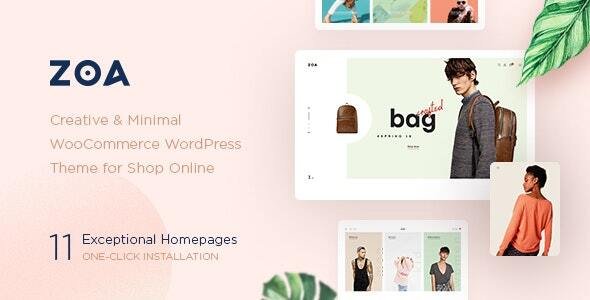
Stuck on your Zoa WordPress theme? Let's fix it.
No endless back-and-forth. Just send us the details and we'll get it done.
No obligation · Replies within 1 hour · Quote within 1 day
Setup · Customization · Bug fixes · WooCommerce integration
About Zoa WP Theme
Zoa is a multipurpose WordPress theme built by BoostifyThemes, designed to work with Elementor. It ships with a library of pre-built templates covering portfolios, agencies, SaaS landing pages, and service businesses. The theme is lightweight by default and loads fast out of the box, which matters for both user experience and search rankings.
Zoa uses a clean codebase and integrates tightly with the Elementor widget ecosystem. You get full header and footer builder support, WooCommerce compatibility, and a collection of custom Elementor widgets specific to the theme. It suits freelancers, small agencies, and product-based businesses that want a polished site without writing code. BoostifyThemes maintains the theme actively, with regular updates and documented support.
Get matched with a Zoa developer in under one day
Tell us about your Zoa project. Small fixes, Zoa theme customization, or a full website build, whatever you need, we've got it covered.
We'll connect you to the right Zoa developers, define the scope, and get everything 100% clear.
You'll get one estimate, hire your preferred developer, and start collaborating.
Most Zoa sites hit a ceiling when the built-in options run out. Custom layouts, third-party integrations, checkout modifications, or performance tuning all require developer input. Working with a vetted Zoa developer through Codeable means you get someone who has seen these problems before and knows where the theme’s boundaries are. You avoid guesswork, broken layouts, and hours spent in support threads. The work gets done properly the first time.
Pros
- Ships with a broad template library covering multiple niches, reducing initial build time
- Tight Elementor integration means most layout changes require no code
- WooCommerce-ready with styled product pages and cart elements included
- Header and footer builder supports sticky headers, multiple layout rows, and mobile breakpoints
- Actively maintained by BoostifyThemes with consistent update history
Cons
- Relies heavily on Elementor, so performance depends on how lean your page builds are
- Template imports can bring in demo images and settings that need manual cleanup
- Advanced dynamic content requires Elementor Pro, which is a separate paid license
- Limited native blogging or magazine layout options compared to editorial-focused themes
- Support response times vary depending on your license tier
Who is Zoa for?
Creative Agency
Zoa’s agency-focused templates include case study layouts, team sections, and service grids. Agencies can present work cleanly without custom development. Pairing it with Elementor Pro allows dynamic portfolio filtering and popup case study previews, which suits firms that update their work regularly.
SaaS Landing Page
The theme includes feature comparison sections, pricing tables, and hero blocks suited for SaaS products. Landing pages can be built from a single template and customised to match brand guidelines. Integration with Mailchimp, ActiveCampaign, or HubSpot forms is straightforward through standard embed or plugin connection.
Freelance Portfolio
Freelancers can use Zoa’s portfolio templates to showcase work, display client testimonials, and present a clear services section. The theme handles single-page and multi-page structures equally well. For designers or developers presenting a personal brand, the typography controls give enough flexibility without overcomplicating the setup.
Local Service Business
Plumbers, electricians, cleaners, and other local businesses benefit from Zoa’s service page templates and contact block layouts. Adding a Google Maps embed, a click-to-call button, and a booking form plugin is simple. The theme works well with local SEO plugins and structured schema markup tools.
eCommerce Store
Zoa supports WooCommerce natively and includes styled product archive and single product templates. Small product catalogues work well without extra configuration. For stores that need custom checkout flows, filtered product search, or subscription billing, a developer will need to handle those additions beyond what the theme provides.

Customizing Zoa
Zoa gives you a lot of control through the WordPress Customizer and Elementor’s visual editor. You can adjust global typography, color palettes, spacing, and layout widths without touching CSS. The header builder supports multiple rows, sticky behavior, and mobile-specific layouts. Footer sections are equally flexible.
That said, deeper customization has limits. If you need custom post types, advanced query logic, conditional template rules, or anything outside what Elementor handles natively, you will need a developer. A Zoa expert can extend the theme with custom Elementor widgets, child theme modifications, or PHP-level template overrides without breaking compatibility with future updates. Getting that work done properly from the start saves significant time later.
Recommended plugins for Zoa
Zoa works with the wider WordPress plugin ecosystem without conflicts in most cases. You can add WooCommerce for selling products, contact form plugins, booking systems, membership tools, or LMS platforms like LearnDash. Performance plugins like WP Rocket or NitroPack work well alongside it.
For more advanced needs, consider pairing Zoa with Elementor Pro for popup builder, form widgets, and dynamic content. If site speed is a priority, a WordPress performance audit can identify bottlenecks introduced by heavy plugins. For organic traffic, structured WordPress SEO work on top of the theme delivers measurable results.
Not sure which plugins to use? This WordPress plugins directory covers the most popular options with reviews and setup guides.
Zoa common issues
Zoa theme header not showing on mobile
Mobile header issues in Zoa are usually caused by conflicting breakpoint settings in the header builder. Check that your mobile header layout has been set separately from the desktop version inside the Zoa header settings. Also confirm that no caching plugin is serving a stale desktop header. Clear all cache layers, including browser cache, and test on an actual mobile device rather than browser emulation. If the issue persists, a WordPress bug fix can isolate the cause quickly.
Zoa Elementor widgets not loading after update
After a theme or Elementor update, custom widgets sometimes fail to register correctly. First, clear the Elementor CSS cache under Elementor > Tools > Regenerate CSS. Then deactivate and reactivate the Zoa theme’s companion plugin if one is active. If widgets still do not appear, check for PHP error logs, as a conflict with another plugin or a PHP version mismatch is the most common cause. Keeping Elementor and Zoa on compatible version pairs prevents most of these issues.
Zoa theme demo import not working
Demo import failures in Zoa are typically caused by PHP upload limits, execution timeouts, or missing required plugins. Before importing, verify that max_execution_time is at least 300 seconds and upload_max_filesize is set to 64MB or higher. Install all required plugins listed in the demo documentation before starting the import. If the import stalls partway through, try importing only the content XML file first, then import widgets and Customizer settings separately.
Zoa WooCommerce product page layout broken
Broken WooCommerce layouts in Zoa usually follow a plugin update that changes how WooCommerce templates are structured. Zoa may use overridden template files that no longer match the current WooCommerce version. Check Appearance > Theme Check or WooCommerce’s status report for outdated templates. Updating the theme to its latest version often resolves this. If the theme version hasn’t caught up yet, a developer can manually update the overridden template files to match the current WooCommerce output.
Zoa FAQ
Zoa is available in both a free version on the WordPress theme directory and a paid pro version through BoostifyThemes. The free version includes core layouts and basic customization options. The pro version unlocks additional templates, advanced header and footer options, and priority support. For most business sites, the pro version is worth the cost given the additional layout flexibility.
Zoa is built around Elementor and expects it to be active for full functionality. Without Elementor, most of the template library and custom widgets will not function correctly. The theme can display basic content using the WordPress block editor, but you would lose the majority of what makes Zoa useful. If you want a block-editor-native theme, Zoa is not the right fit.
Yes. Zoa includes WooCommerce support with pre-styled shop, product archive, and single product layouts. It handles standard catalogue and simple product setups well. For more complex stores with variable products, subscriptions, or custom checkout flows, additional configuration or developer work will be needed beyond what the theme provides natively.
Before updating Zoa, back up your site including files and database. If you have made edits directly to theme files, those will be overwritten. Always use a child theme for customizations. Test the update on a staging environment first if your site is live and business-critical. A WordPress maintenance plan handles this process automatically and keeps updates from causing unexpected issues.
Zoa produces clean HTML output and supports popular SEO plugins like Yoast and Rank Math without conflicts. Page speed depends heavily on how you build pages in Elementor, not just the theme itself. Heavy use of animations, large images, and stacked widget sections will hurt Core Web Vitals scores. A lean build with compressed images and a caching layer performs well in practice.
Hire a Zoa Developer
If your Zoa site needs custom development, a fix that’s gone unsolved, or a build from scratch, working with a specialist is the fastest route to a finished result. Post your project and get matched with a vetted Zoa developer within 24 hours. Get a free estimate with no obligation to hire. The process is straightforward and the work is guaranteed through Codeable’s escrow model.
You'll need a free Codeable account so developers can ask questions and send their quotes.