Fire Department WordPress Theme
by AncoraThemes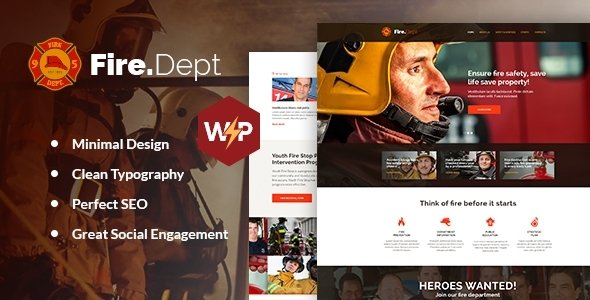
Stuck on your Fire Department WordPress theme? Let's fix it.
No endless back-and-forth. Just send us the details and we'll get it done.
No obligation · Replies within 1 hour · Quote within 1 day
Setup · Customization · Bug fixes · WooCommerce integration
About Fire Department WP Theme
Fire Department is a WordPress theme by AncoraThemes built specifically for fire stations, emergency services, and public safety organizations. It ships with a clean layout, department-specific sections, and a design that communicates authority and urgency without feeling cluttered.
Out of the box you get a homepage with a services section, team profiles, news/events, and a contact area. The theme is built on a solid foundation with Elementor compatibility, making it easier to adjust layouts without touching code.
It suits volunteer fire departments, municipal fire stations, and emergency response teams that need a professional web presence fast. The design language is serious and clear, which is exactly what visitors expect when they land on an emergency services site.
Get matched with a Fire Department developer in under one day
Tell us about your Fire Department project. Small fixes, Fire Department theme customization, or a full website build, whatever you need, we've got it covered.
We'll connect you to the right Fire Department developers, define the scope, and get everything 100% clear.
You'll get one estimate, hire your preferred developer, and start collaborating.
AncoraThemes builds solid niche themes, but every department has specific needs the default setup does not cover. A vetted WordPress developer on Codeable can handle custom layouts, plugin integrations, and performance tuning without the back-and-forth of hiring blind.
Work is scoped clearly, estimated for free, and only starts when you agree to the price. No retainers, no surprise invoices. If the Fire Department theme needs work done right the first time, that is the practical route.
Pros
- Purpose-built layout for fire and emergency services with relevant sections included from the start
- Elementor compatible, so layout changes can be made visually without writing code
- Clean typography and high-contrast design that works well for public safety audiences
- Includes team, services, news, and events sections that fire departments actually use
- AncoraThemes provides regular updates and has a track record of maintaining their theme catalog
Cons
- Limited built-in options panel compared to multi-purpose themes, so heavier customization needs custom CSS or PHP
- No built-in emergency alert bar or banner, which many fire departments need and must add via plugin or custom code
- Demo content import can be inconsistent depending on hosting environment and plugin versions
- Typography and color controls are basic, requiring manual CSS for anything beyond the preset options
- Not designed for multilingual setups out of the box, which matters for departments serving diverse communities
Who is Fire Department for?
Municipal Fire Station Website
A city or county fire station can use Fire Department to publish contact information, station locations, response areas, and news updates. The theme’s layout communicates professionalism to the public and gives the department a credible online presence without requiring a large web budget or ongoing maintenance overhead.
Volunteer Fire Department
Volunteer departments often need to recruit members and accept donations alongside standard department information. The Fire Department theme provides a solid base. Adding a donation plugin and a volunteer application form extends it into a functional recruitment and fundraising site with minimal development work required.
Fire Safety Training Center
Training centers offering fire safety courses to businesses or the public can use the theme’s services and events sections to list course schedules, certification programs, and instructor profiles. A booking or registration plugin completes the setup and allows participants to sign up directly through the site.
Emergency Medical Services Unit
EMS units attached to fire departments can adapt the Fire Department theme to highlight paramedic services, response times, and community health programs. The team section works well for showcasing certified staff, and the news area supports public health announcements and incident updates as needed.
Wildfire or Rural Fire District
Rural fire districts and wildfire response teams need a site that is fast to load on mobile during an incident. The Fire Department theme’s clean structure keeps page weight low. Pairing it with performance optimization and a map integration gives residents quick access to evacuation zones and fire status updates.

Customizing Fire Department
The default Fire Department setup covers the basics, but most departments need adjustments before the site feels like their own. That includes swapping color schemes to match official department branding, restructuring the homepage to highlight emergency contact numbers, and adding custom post types for apparatus listings or incident reports.
A Fire Department expert can also integrate donation plugins for volunteer departments, set up event calendars for training schedules, and connect the site to social feeds. AncoraThemes provides decent documentation, but customization beyond the options panel requires PHP and CSS knowledge.
Hiring someone familiar with this theme saves time. They will know where the theme overrides core styles, which hooks are available, and how to extend functionality without breaking updates.
Recommended plugins for Fire Department
Fire Department works well with a handful of plugins that extend its core features. The Events Calendar handles training schedules and community events cleanly. WPForms or Gravity Forms handle emergency contact and volunteer application forms. For volunteer recruitment, adding a membership or application plugin is straightforward.
If your department runs a public-facing site with high traffic during incidents, pairing the theme with a caching solution and a CDN is worth doing early. You can read more about that on the WordPress performance page. For departments targeting local search visibility, an SEO setup covered in the WordPress SEO optimisation guide will help.
Not sure which plugins to use? This WordPress plugins directory covers the most popular options with reviews and setup guides.
Fire Department common issues
Fire Department theme demo content not importing correctly
Demo import failures on the Fire Department theme usually come down to a PHP memory limit or a missing required plugin like Elementor not being active before import. Set memory_limit to at least 256MB in your php.ini or wp-config.php, activate all required plugins first, then re-run the import. If images fail to load, re-run the import tool or use the WordPress importer separately for media. If problems continue, a developer can handle it through the WordPress bug fixing service.
Fire Department WordPress theme header layout broken after update
Header breaks after a Fire Department theme update are usually caused by a conflict between the updated theme files and a cached version of the stylesheet. Clear your caching plugin, purge any CDN cache, and check whether a child theme is overriding the header template with outdated code. If you modified the theme directly without a child theme, those changes would have been overwritten. Restore from a backup and rebuild changes in a proper child theme to prevent this happening again.
How to add emergency alert bar to Fire Department theme
The Fire Department theme does not include a native emergency alert bar. The most reliable way to add one is with a plugin like WPFrontman or a simple custom HTML widget injected into the header area via a hook. If you are comfortable with code, adding a conditional banner through wp_head or a theme hook gives you full control. For a styled, toggleable alert system tied to post status, a custom solution from a developer is cleaner than stacking multiple plugins.
Fire Department theme slow loading on mobile
Mobile speed issues on the Fire Department theme are usually tied to unoptimized images loaded in the hero or slider sections, and render-blocking scripts. Run the page through Google PageSpeed Insights to identify the specific bottlenecks. Compress images before upload, enable lazy loading, and use a caching plugin with minification enabled. If the theme is loading unused Elementor assets on every page, selective asset loading in Elementor settings will cut load time noticeably. More detail is on the WordPress performance page.
Fire Department FAQ
The Fire Department theme by AncoraThemes is a premium theme available through ThemeForest. A one-time purchase gives you the theme files, documentation, and six months of support from the author. Extended support can be purchased at checkout. There is no free version, though AncoraThemes occasionally offers demos you can preview before buying.
Yes. The Fire Department theme is built with Elementor compatibility in mind. The demo content is designed around Elementor page layouts. You will need the free version of Elementor installed to edit pages as intended. Some sections may use the theme’s own widgets, so it is worth checking the documentation before assuming everything is standard Elementor output.
Yes. The theme works for any type of fire department regardless of funding model. Volunteer and non-profit fire departments often add donation functionality using plugins like GiveWP, which integrates cleanly with the Fire Department theme layout. Nothing in the theme restricts its use to paid or government-funded organizations specifically.
The Fire Department theme does not include a donations system by default. Install a dedicated plugin like GiveWP or WooCommerce with a simple donation product. Create a donations page, drop in the plugin’s shortcode or block, and link it from your main navigation. A developer can style the donation form to match the theme if the default output looks inconsistent with the rest of the design.
Yes, migrating an existing fire department site to the Fire Department theme is possible. The process involves moving content, rebuilding the layout in Elementor, and redirecting any changed URLs. If your old site has a lot of structured content like apparatus records or staff profiles, a developer can map that data properly. The WordPress migration service covers this kind of work end to end.
Hire a Fire Department WordPress Developer
Whether you need a quick layout fix or a full custom build on the Fire Department theme, working with an experienced developer makes the difference. Through Codeable, you get matched with a vetted WordPress expert who knows this space, within 24 hours.
There is no obligation to hire after the estimate. Get a free estimate and see exactly what the work involves before committing to anything.
You'll need a free Codeable account so developers can ask questions and send their quotes.