Konstruk WordPress Theme
by rs-theme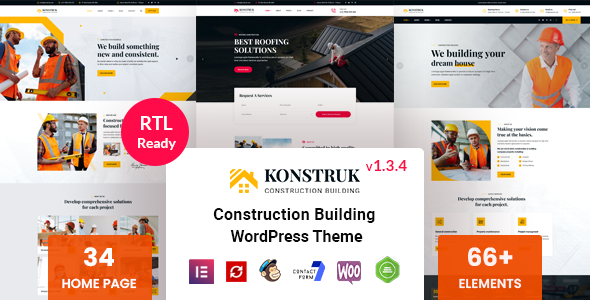
Stuck on your Konstruk WordPress theme? Let's fix it.
No endless back-and-forth. Just send us the details and we'll get it done.
No obligation · Replies within 1 hour · Quote within 1 day
Setup · Customization · Bug fixes · WooCommerce integration
About Konstruk WP Theme
Konstruk is a construction and building industry WordPress theme developed by rs-theme. It targets contractors, architects, renovation companies, and civil engineering firms that need a professional online presence without starting from scratch.
The theme ships with multiple pre-built demo layouts, a drag-and-drop page builder, project portfolio features, and service-focused templates. It also includes a team section, testimonials, and a contact form setup suited to service businesses.
Konstruk is built on a clean foundation and integrates with popular plugins like WPBakery Page Builder and Contact Form 7. If you run a trade business and want a site that looks credible to potential clients, Konstruk gives you a solid starting point without a custom build budget.
Get matched with a Konstruk developer in under one day
Tell us about your Konstruk project. Small fixes, Konstruk theme customization, or a full website build, whatever you need, we've got it covered.
We'll connect you to the right Konstruk developers, define the scope, and get everything 100% clear.
You'll get one estimate, hire your preferred developer, and start collaborating.
Most Konstruk issues come down to one thing: the theme was set up by someone who was figuring it out as they went. The result is slow pages, inconsistent layouts, and customizations that break on updates.
Working with a vetted WordPress developer through Codeable means you get someone who has dealt with these problems before. No guesswork, no trial and error on your live site. Whether you need a full setup, a specific fix, or ongoing changes, the work gets done properly the first time. See what our WordPress development services cover.
Pros
- Multiple construction-specific demo layouts included, reducing initial setup time
- Built-in project portfolio with category filtering works well for showcasing past work
- WPBakery Page Builder included, so most layout changes can be made without touching code
- Service and team page templates are specifically designed for trade and contracting businesses
- One-click demo import makes it fast to get a working site foundation up
Cons
- WPBakery shortcodes create content lock-in, making it difficult to switch page builders later
- Demo content relies heavily on stock imagery, which needs replacing before the site looks credible
- Mobile responsiveness on some demo layouts needs manual adjustment after import
- Limited documentation compared to major themes, which slows down independent troubleshooting
- Theme updates from rs-theme can be infrequent, raising long-term compatibility concerns
Who is Konstruk for?
General Contractors
Konstruk is a natural fit for general contractors. The project portfolio displays completed jobs clearly, service pages cover what trades you handle, and the contact section is set up to generate enquiries. Add a quote request form and the site does real business work.
Architecture Firms
Architecture firms need a site that shows work without clutter. Konstruk’s portfolio templates handle project galleries well. The clean layout structure gives enough flexibility to present a professional image while keeping the focus on the work itself rather than overly styled page elements.
Renovation and Remodeling Companies
Renovation companies benefit from before-and-after portfolio layouts and clear service breakdowns. Konstruk includes section templates suited to this. A developer can configure the portfolio to filter by project type, making it easy for visitors to find relevant examples of your specific work.
Civil Engineering Companies
Civil engineering firms need credibility-focused design rather than flashy visuals. Konstruk’s structured layouts support this. Team profiles, certifications, and project case study pages can all be built out cleanly. The theme handles text-heavy content better than many visually-led construction themes.
Interior Design Studios
Interior design studios can use Konstruk’s portfolio and gallery features to show room transformations and project case studies. The layout is adaptable enough with WPBakery to shift the visual weight toward imagery, which is essential for a design-led business trying to attract the right clients.

Customizing Konstruk
Out of the box, Konstruk covers the basics. But most businesses need more than a demo import. That is where a Konstruk expert saves time and prevents frustration.
Common customization work includes adjusting the header layout, modifying color schemes to match brand guidelines, restructuring the homepage sections, and setting up a project portfolio with custom filtering. Service pages often need restructuring to convert visitors rather than just list information.
Beyond visuals, customization also means cleaning up unused scripts, tightening mobile layouts, and making the theme work with third-party tools like CRMs, booking systems, or quote request forms.
A developer who knows Konstruk can make these changes cleanly, without breaking the theme or leaving behind messy code that causes problems later.
Recommended plugins for Konstruk
Konstruk works well with several plugins that extend its core functionality.
- WPML for multilingual construction company sites serving international clients
- WooCommerce if you sell products, materials, or paid consultations
- Yoast or Rank Math to handle on-page SEO, which pairs well with a proper WordPress SEO setup
- WP Rocket or LiteSpeed Cache to improve load times, especially on image-heavy project portfolio pages, covered in more detail on the WordPress performance page
- Gravity Forms for detailed quote request or project enquiry forms
Not sure which plugins to use? This WordPress plugins directory covers the most popular options with reviews and setup guides.
Konstruk common issues
Konstruk theme page builder not loading after update
This usually happens when a WPBakery update conflicts with the version bundled inside Konstruk. First, check if WPBakery is installed both as a standalone plugin and through the theme. Deactivate one instance. If the issue persists, clear your cache, then check the browser console for JavaScript errors pointing to a specific script. If you cannot isolate the conflict, a WordPress bug fixing service can resolve this quickly without risking further breakage.
Konstruk portfolio filter not working correctly
Portfolio filter issues in Konstruk are usually caused by a jQuery conflict with another plugin, or by incorrect category assignments on portfolio items. Start by checking the browser console for JavaScript errors on the portfolio page. Verify that each portfolio post is assigned to at least one portfolio category. If you recently added a plugin and the filter stopped working, deactivate plugins one by one to identify the conflict. A developer can also rebuild the filter using a more reliable script if the built-in solution keeps failing.
Konstruk theme slow loading on mobile
Konstruk loads several scripts and large images by default, which hurts mobile performance. Start by running the site through PageSpeed Insights to identify the biggest offenders. Common fixes include enabling lazy loading for portfolio images, deferring non-critical JavaScript, and using a caching plugin. Replacing the bundled slider with a lighter alternative also helps significantly. For a full performance overhaul, see the WordPress performance service.
Konstruk header layout broken after plugin conflict
Header layout breaks in Konstruk are often triggered by a caching plugin outputting an outdated CSS file, or by a conflict with a plugin that also modifies the header area. Clear all caches first. If the layout is still broken, open the browser inspector and check which CSS rules are overriding the header styles. A sticky header or mega menu plugin is a frequent cause. Temporarily deactivating recently added plugins will usually identify the source within a few minutes.
Konstruk FAQ
Konstruk is a reasonable choice for construction companies that want a purpose-built theme rather than adapting a generic layout. It includes portfolio, service, and team templates that suit contracting businesses. The main caveat is that the demo content needs proper customization to work for your specific business. Without that, it looks like every other Konstruk site.
Konstruk is built around WPBakery Page Builder, not Elementor. You can install Elementor alongside it, but expect conflicts in the page structure and header areas. It is not a supported combination. If you prefer Elementor, you would be better served by a theme built for it rather than trying to force compatibility with Konstruk.
After activating Konstruk, navigate to Appearance and look for the theme’s demo importer option, usually under a theme-specific menu item. You will need to install the required plugins first, including WPBakery and any others the importer flags. The process imports pages, posts, menus, and widgets. Allow a few minutes for the import to finish before making changes.
Technically yes, but practically it is difficult. All the demo layouts are built with WPBakery shortcodes. If you deactivate WPBakery, those pages display as raw shortcode text rather than formatted content. You would need to rebuild the pages in a different editor. For most users, keeping WPBakery active is the simpler path unless a rebuild is planned.
Update frequency from rs-theme has been inconsistent. The theme receives occasional updates but not on a regular schedule. This is worth factoring in if long-term compatibility with WordPress core and plugin updates matters to you. Check the ThemeForest changelog before purchasing. If you need a more actively maintained setup, WordPress maintenance support can help manage compatibility issues as they arise.
Hire a Konstruk Developer
If you need help setting up, customizing, or fixing your Konstruk site, you can get a free estimate with no obligation. Projects are matched to vetted WordPress developers through Codeable within 24 hours.
Whether it is a single fix or a full build, the process is straightforward. Describe your project, get an estimate, and decide if you want to proceed. Get your free estimate here.
You'll need a free Codeable account so developers can ask questions and send their quotes.