Büro WordPress Theme
by Mikado-Themes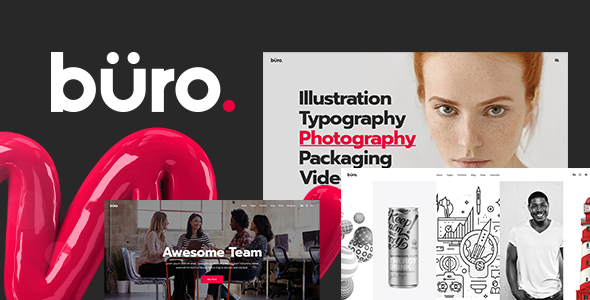
Stuck on your Büro WordPress theme? Let's fix it.
No endless back-and-forth. Just send us the details and we'll get it done.
No obligation · Replies within 1 hour · Quote within 1 day
Setup · Customization · Bug fixes · WooCommerce integration
About Büro WP Theme
Büro is a WordPress theme built by Mikado-Themes, designed for agencies, studios, and freelancers who want a clean, professional web presence. It ships with a structured layout system suited to portfolio and service-based businesses, and uses Mikado’s own page builder alongside Elementor compatibility.
The theme includes multiple pre-built demo sites covering creative agencies, consulting firms, and digital studios. Each demo is importable in one click, giving you a working starting point without building from scratch.
Büro supports WooCommerce, custom post types for portfolio work, and a range of header and footer configurations. Typography controls are solid, and the theme handles whitespace well, which suits brands that want an understated, editorial feel. It’s actively maintained by Mikado-Themes, a team with a long track record on ThemeForest.
Get matched with a Büro developer in under one day
Tell us about your Büro project. Small fixes, Büro theme customization, or a full website build, whatever you need, we've got it covered.
We'll connect you to the right Büro developers, define the scope, and get everything 100% clear.
You'll get one estimate, hire your preferred developer, and start collaborating.
Büro has quirks that take time to learn. Mikado-Themes builds tightly coupled systems, meaning small changes can have unexpected effects elsewhere in the layout. Working with someone who already knows the theme saves you that discovery time.
Through Codeable, you get access to vetted WordPress developers who have worked with Mikado themes before. You post your project, get a clear estimate, and only proceed if it makes sense. No retainers, no guesswork. Visit our WordPress development services page to see what’s possible.
Pros
- Clean, whitespace-focused design that suits agency and studio brands without heavy styling
- Multiple one-click demo imports covering different business types within the same theme
- Built-in portfolio post type with flexible grid and list layout options
- Actively maintained by Mikado-Themes with regular updates for WordPress compatibility
- WooCommerce and WPML support included without requiring additional paid extensions
Cons
- Mikado's custom page builder adds learning time and is harder to hand off than standard Elementor-only builds
- Demo content can be heavily styled, making it time-consuming to strip back to a neutral starting point
- Bundled JavaScript and CSS can affect page speed scores if not optimized after setup
- Some advanced layout options are only accessible through shortcodes, not a visual interface
- Plugin conflicts occasionally appear with third-party sliders and popup tools due to Mikado's own script loading
Who is Büro for?
Creative Agency
Büro’s structured grid layouts and portfolio post type make it a practical choice for agencies presenting case studies and client work. The demo designs lean toward minimal, which helps the work itself stand out rather than the template. A developer can restructure the service pages and team section to match how your agency is actually organized.
Freelance Designer Portfolio
Freelancers who want a professional site without a heavy visual identity benefit from Büro’s restrained aesthetic. The portfolio archive handles image-heavy work well, and the single project layout gives space to explain process and outcomes. Typography customization means you can align it with your personal brand without a full redesign.
Consulting Firm
Consulting firms need pages that communicate credibility quickly. Büro’s homepage demos include service sections, team bios, and testimonial areas that map well to this structure. The theme handles text-heavy content better than most portfolio-oriented themes, which matters when you’re explaining complex service offerings to prospective clients.
Architecture or Interior Design Studio
Architecture and interior design studios rely on visual presentation, and Büro handles full-width image galleries and project case studies cleanly. The whitespace approach suits high-resolution photography without crowding it. A developer can configure the portfolio categories to separate residential, commercial, and hospitality work into distinct browsable sections.
Digital Marketing Studio
Digital marketing studios often need a site that shows both creativity and process. Büro supports blog layouts alongside portfolio work, so you can publish thought leadership content while showcasing campaign results. Service pages can be built out with icons, stats, and client logos using the theme’s built-in elements.

Customizing Büro
Büro gives you a reasonable amount of control through its theme options panel, but pushing beyond the built-in settings usually requires someone who knows the theme well. A Büro expert can help you restructure demo layouts, apply custom CSS without breaking responsiveness, and configure the portfolio post types to match your actual workflow.
Common customization requests include modifying the header behavior on scroll, adjusting grid layouts for project case studies, and integrating third-party plugins that Büro doesn’t officially support out of the box.
If you’re working with a specific brand identity, a developer can strip back the demo styling and rebuild the visual layer to match your guidelines precisely, rather than fighting against pre-set spacing and color schemes. That saves significant time compared to doing it manually through the options panel.
Recommended plugins for Büro
Büro works with WooCommerce if you’re adding a shop to an agency or studio site. It also supports popular contact form plugins and WPML for multilingual setups.
For performance, the theme’s bundled scripts can add page weight, so pairing it with proper caching and image optimization is worth doing early. See our WordPress performance service for that.
If organic search matters to your business, Büro is compatible with Yoast SEO and Rank Math. Our WordPress SEO service covers technical SEO configuration on top of whatever the theme provides by default.
Not sure which plugins to use? This WordPress plugins directory covers the most popular options with reviews and setup guides.
Büro common issues
Büro theme portfolio not showing on homepage
This usually happens when the portfolio post type isn’t being pulled into the homepage template correctly. Check that your portfolio posts are published and assigned to a category. If you imported the demo, verify the homepage is set to use the correct template under Page Attributes. If the portfolio shortcode is in use, confirm the category slug matches exactly. Mikado’s query settings in the shortcode parameters are case-sensitive and easy to mistype.
Büro WordPress theme slow loading after demo import
Demo imports pull in all demo media and page builder data, which adds significant weight. After importing, deactivate any plugins bundled with the demo that you’re not using. Then audit your page builder sections for redundant elements. Mikado themes load multiple script files by default, so combining and deferring those through a caching plugin helps. Our WordPress performance service handles this systematically.
Büro theme header menu not working on mobile
Büro’s mobile menu relies on specific JavaScript that can conflict with other plugins or caching setups. First, clear all caches and test in an incognito window. If the hamburger icon appears but the menu doesn’t open, there’s likely a JS conflict, check the browser console for errors. If the icon doesn’t appear at all, a CSS conflict with another plugin is the more likely cause. Disabling plugins one by one helps isolate it.
Büro custom CSS not applying after theme update
If you added custom CSS through the Customizer’s Additional CSS field, it should survive updates. If you edited theme files directly, those changes will be overwritten on update. Move any CSS to a child theme or the Customizer field. If you’re using a Mikado-specific options field for CSS, check whether that field was reset during the update, which occasionally happens when the options schema changes between versions.
Büro FAQ
Büro primarily uses Mikado’s own page builder, but it does offer Elementor compatibility. That said, some of the theme’s built-in elements and shortcodes are specific to the Mikado builder. If you plan to build entirely in Elementor, expect some features to work differently than the demos show. A developer can help you map out which approach suits your project before you commit to a direction.
Yes, Büro includes WooCommerce support. The shop, product, and cart pages are styled to match the theme’s aesthetic out of the box. It works best for studios adding a small product range rather than large catalogues. For more complex shop requirements, additional configuration and possibly some custom CSS will be needed to keep everything consistent with your design.
You can, but it’s harder. The demo import sets up the page templates, widget areas, and menu structure that the theme expects. Starting from scratch means manually recreating those structures. For most users, importing a demo close to what you want and stripping it back is faster. If you want a genuinely blank start, a developer can scaffold the basic structure without demo content cluttering it.
Never edit theme files directly, use a child theme for any code changes. Store custom CSS in the Customizer’s Additional CSS field or in the child theme stylesheet. Theme options set through the Mikado panel are stored in the database and survive updates. Before any major update, take a full backup. Our WordPress maintenance service handles updates safely as part of ongoing site care.
Büro produces clean HTML and is compatible with Yoast SEO and Rank Math, so the technical foundation is reasonable. The main SEO considerations are page speed, which requires optimization after setup, and proper heading structure across your page builder layouts. The theme itself doesn’t hinder SEO, but bundled scripts and unoptimized images from the demo can if left unaddressed.
Hire a Büro WordPress Developer
Whether you need a full Büro setup from a demo import, a customization that’s gone further than the options panel allows, or a fix for something that broke after an update, we can match you with a developer who knows this theme.
Work is delivered through Codeable, so you get a vetted developer, a clear scope, and no obligation to hire until the estimate makes sense to you. Get a free estimate and describe what you need.
You'll need a free Codeable account so developers can ask questions and send their quotes.