Nexgen WordPress Theme
by Themeasy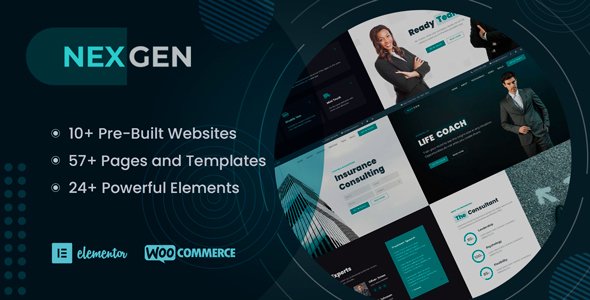
Stuck on your Nexgen WordPress theme? Let's fix it.
No endless back-and-forth. Just send us the details and we'll get it done.
No obligation · Replies within 1 hour · Quote within 1 day
Setup · Customization · Bug fixes · WooCommerce integration
About Nexgen WP Theme
Nexgen is a WordPress theme built by Themeasy, designed for agencies, freelancers, and businesses that want a clean, modern site without heavy page-builder overhead. It ships with a block-based layout system, making it compatible with the native WordPress editor out of the box.
The theme focuses on fast load times and structured design patterns. You get a solid set of pre-built templates for landing pages, service pages, and portfolios. Typography controls, color schemes, and spacing options are handled through the WordPress Customizer, keeping the setup straightforward.
Nexgen works well for teams that want a professional look without hiring a designer for every page. That said, deeper customization — custom layouts, third-party integrations, or WooCommerce setups — usually requires developer input to get right.
Get matched with a Nexgen developer in under one day
Tell us about your Nexgen project. Small fixes, Nexgen theme customization, or a full website build, whatever you need, we've got it covered.
We'll connect you to the right Nexgen developers, define the scope, and get everything 100% clear.
You'll get one estimate, hire your preferred developer, and start collaborating.
Nexgen is straightforward to set up, but getting it to behave exactly the way your business needs takes experience. Custom layouts, plugin conflicts, WooCommerce styling, or performance tuning all require hands-on WordPress knowledge.
FoxyConcept works with vetted WordPress developers through Codeable, matching you with someone who has worked with themes like Nexgen before. You get a free estimate within 24 hours, no commitment required. Specific problems get fixed properly, not patched with workarounds that break on the next update.
Pros
- Block editor native — no mandatory page builder required
- Lightweight codebase produces fast initial load times
- Clean, structured Customizer controls for non-technical users
- Pre-built page templates cover agencies, portfolios, and service businesses
- WooCommerce compatible with minimal configuration needed
Cons
- Limited design flexibility without custom CSS or a child theme
- Pre-built templates are fairly generic and need customisation to stand out
- No built-in mega menu — requires a plugin or custom code
- WooCommerce styling requires additional CSS work to match the main theme
- Community support and documentation are thinner than major theme frameworks
Who is Nexgen for?
Creative Agency
Nexgen’s structured layout system suits agencies that need to present case studies, team pages, and service breakdowns clearly. The block editor approach lets content editors update pages without developer involvement, which matters for teams managing their own site after launch.
Freelance Portfolio
Freelancers benefit from Nexgen’s portfolio templates and clean typographic defaults. Setting up a project grid, a bio section, and a contact form is fast. A developer can add filtering by project type or connect a CRM to the contact form without needing to rebuild the entire theme structure.
Small Business Services
Service businesses get a solid starting point with Nexgen’s landing page and service page templates. The Customizer handles branding basics, and a developer can add custom forms, booking integrations, or location-specific pages when the business needs more than the defaults provide.
SaaS or Tech Product
SaaS and tech product sites need clear feature sections, pricing tables, and CTA blocks. Nexgen’s block patterns cover these layouts at a basic level. Custom pricing logic, trial signup flows, or API integrations will need developer work, but the theme doesn’t get in the way of that work.
WooCommerce Store
Nexgen supports WooCommerce, making it a usable base for product stores. Out of the box, the store pages are functional but plain. A developer can style product archives, cart pages, and checkout to match the rest of the site and add custom fields or conditional shipping logic where needed.

Customizing Nexgen
Out of the box, Nexgen covers the basics: fonts, colors, header styles, and footer layouts through the Customizer. For most standard sites, that’s enough to get a polished result without touching code.
Where things get more involved is custom post types, advanced block patterns, conditional logic for forms, or bespoke landing page layouts. These tasks go beyond what the Customizer offers and require direct PHP, CSS, or JavaScript work.
A Nexgen expert can also handle child theme setup — important if you want to preserve your changes across theme updates. Whether you need a minor tweak or a full custom build on top of Nexgen, working with a developer who knows the theme saves a significant amount of trial and error.
Recommended plugins for Nexgen
Nexgen pairs well with WooCommerce for product and checkout pages, though you may need custom CSS to match the store styling to the rest of your site. WPForms and Gravity Forms both integrate cleanly for lead capture.
For SEO, Nexgen produces clean HTML output that works well with Yoast or Rank Math — learn more about WordPress SEO optimisation options. On the performance side, the theme is compatible with caching plugins and image optimisation tools covered in our WordPress performance services. Contact Form 7, WPML for multilingual sites, and Elementor as an optional page builder also work alongside Nexgen without major conflicts.
Not sure which plugins to use? This WordPress plugins directory covers the most popular options with reviews and setup guides.
Nexgen common issues
Nexgen theme header not displaying correctly on mobile
Mobile header issues in Nexgen usually come from conflicting CSS between the theme and a plugin adding its own styles, or a custom CSS rule overriding the responsive breakpoints. Start by disabling recently added plugins one at a time to isolate the conflict. If the issue persists, inspect the header element in browser dev tools to find which rule is overriding the layout. A developer can resolve this cleanly without breaking other parts of the theme. Our WordPress bug fixing service covers exactly this type of issue.
Nexgen WordPress theme slow loading after plugin install
A speed drop after installing a plugin usually means the plugin is loading scripts or styles on every page, even where it isn’t needed. Use a tool like Query Monitor to identify what’s being loaded and where. You can also check if the plugin conflicts with your caching setup. In some cases, the plugin needs asset loading conditions added via code. If performance has dropped significantly, our WordPress performance services can audit and fix the root cause.
Nexgen theme custom CSS not saving in Customizer
Custom CSS failing to save in the Customizer is often a permissions issue, a JavaScript error blocking the save action, or a caching layer serving an old version of the stylesheet. Check your browser console for JS errors when saving. Clear all caches — server, plugin, and browser. If you’re on a managed host, their object cache may need flushing separately. If the problem continues, it may be a theme or plugin conflict that needs direct debugging through our bug fixing service.
Nexgen WooCommerce pages not matching theme style
WooCommerce uses its own template files, and Nexgen may not override all of them with styled versions. This means shop pages, product pages, and checkout can look disconnected from the rest of your site. The fix involves creating WooCommerce template overrides in a child theme and applying matching CSS. Doing this in the parent theme directly is not recommended since updates will overwrite your changes. A Nexgen developer can set up the child theme and style all store pages consistently.
Nexgen FAQ
Yes. Nexgen is built around the native WordPress block editor and ships with custom block patterns. You don’t need a separate page builder to build pages. Most layout work happens directly in the editor, and the theme’s Customizer handles global settings like fonts and colors. Some advanced layouts may still need custom block patterns or developer input.
Nexgen can work alongside Elementor, but the two aren’t designed to be used together on the same pages. Using Elementor adds its own layout wrappers that can conflict with Nexgen’s spacing and typography defaults. If you want Elementor for specific pages, a developer can configure it to coexist cleanly without breaking the theme’s default styles elsewhere on the site.
Creating a child theme for Nexgen involves adding a new folder to your themes directory with a stylesheet that references Nexgen as the parent and a functions.php file to enqueue the parent styles. This protects your custom CSS and code from being overwritten when Nexgen updates. It’s a straightforward process for a developer, and it’s strongly recommended before making any code-level changes to the theme.
Nexgen supports WooCommerce and the basic shop pages will function after activation. The default WooCommerce templates display correctly, but the styling may not fully match the rest of your Nexgen site. Product pages, cart, and checkout often need additional CSS or template overrides to look consistent. A developer can handle that through a child theme without touching the core theme files.
Migrating an existing WordPress site to Nexgen is possible but involves more than just activating the theme. Your current content and layout will need to be rebuilt to fit Nexgen’s templates and block patterns. Menus, widgets, and custom page layouts will likely need rebuilding. Our WordPress migration service can manage the transition and ensure nothing is lost or broken in the process.
Hire a Nexgen WordPress Developer
Need help with your Nexgen site? Whether it’s a layout that isn’t cooperating, a WooCommerce integration, or a full custom build from scratch, our developers have the experience to get it done correctly.
Through our WordPress development services, you’re matched with a vetted Nexgen developer via Codeable within 24 hours. Get a free estimate — no obligation, no risk, just a clear answer on what your project needs.
You'll need a free Codeable account so developers can ask questions and send their quotes.