Cliniq WordPress Theme
by BoldThemes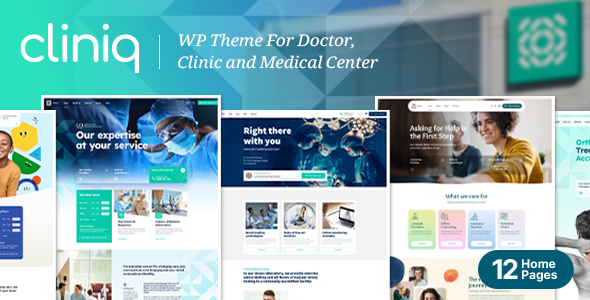
Stuck on your Cliniq WordPress theme? Let's fix it.
No endless back-and-forth. Just send us the details and we'll get it done.
No obligation · Replies within 1 hour · Quote within 1 day
Setup · Customization · Bug fixes · WooCommerce integration
About Cliniq WP Theme
Cliniq is a WordPress theme built by BoldThemes specifically for medical and healthcare websites. It ships with a full appointment booking system, doctor profile layouts, department pages, and a timetable plugin that handles scheduling without third-party tools.
The theme is built on BoldThemes’ own Bold Page Builder, and it includes multiple pre-built demo imports covering clinics, dental practices, veterinary offices, and private hospitals. Each demo is fully responsive and comes with dedicated service pages, pricing tables, and patient testimonial sections.
Cliniq also integrates with WPML for multilingual sites and WooCommerce for selling products or online consultations. It is a practical choice for any healthcare provider who wants a professional online presence without building from scratch.
Get matched with a Cliniq developer in under one day
Tell us about your Cliniq project. Small fixes, Cliniq theme customization, or a full website build, whatever you need, we've got it covered.
We'll connect you to the right Cliniq developers, define the scope, and get everything 100% clear.
You'll get one estimate, hire your preferred developer, and start collaborating.
Cliniq is well-built for healthcare, but its proprietary page builder and custom post type architecture mean that non-standard requirements quickly become time-consuming without the right experience. A developer who knows BoldThemes’ codebase can customise doctor profiles, modify booking workflows, and integrate third-party tools cleanly.
Through Codeable, you get access to vetted WordPress specialists who have worked with themes like Cliniq before. You post your project, get an estimate within 24 hours, and only move forward if the scope and price work for you. No risk, no obligation.
Pros
- Built-in timetable and appointment booking plugin included at no extra cost
- Dedicated custom post types for doctors, departments, and services work well out of the box
- Multiple healthcare demo imports covering dental, veterinary, and hospital niches
- WPML compatible for multilingual clinic sites serving diverse patient bases
- WooCommerce integration supports product sales and paid online consultation bookings
Cons
- Bold Page Builder is proprietary and harder to work with than Elementor or the block editor
- Theme updates have occasionally broken customisations, requiring fixes after each major release
- Limited documentation for advanced customisation scenarios or plugin conflicts
- Default page speed scores are moderate and need optimisation work before going live
- Switching away from Cliniq later is difficult because content is tied to Bold Page Builder shortcodes
Who is Cliniq for?
General Medical Practice
Cliniq suits GP and family medicine practices well. The doctor profile system lets each physician have their own page with qualifications, specialisations, and a linked appointment schedule. Patients can find the right doctor and book directly from the same page without being redirected to an external tool.
Dental Clinic
The dental demo import includes service pages for treatments like implants, orthodontics, and whitening. Pricing tables are built in, and the timetable plugin handles appointment slots cleanly. A developer can connect it to Amelia or Bookly if you need more advanced scheduling logic like multi-chair bookings or staff-specific availability.
Veterinary Practice
Cliniq’s veterinary demo covers pet services, staff profiles for vets and nurses, and a clean layout for listing treatments by animal type. The department structure works well for practices offering both small and large animal care. Custom forms can capture pet details alongside owner contact information during booking.
Private Hospital or Specialist Centre
Larger medical centres can use Cliniq’s department pages to organise specialisms like cardiology, orthopaedics, and oncology. Each department can list its own team, services, and contact details. With WooCommerce and a developer’s help, the site can also handle paid specialist referrals or medical report requests online.
Mental Health and Therapy Practice
Therapy and counselling practices benefit from Cliniq’s clean, trust-focused design. The appointment booking system supports one-to-one session scheduling, and the testimonial sections help build credibility with new patients. A developer can strip back the clinical aesthetic and apply warmer brand colours to suit a mental health context.

Customizing Cliniq
Cliniq gives you a reasonable amount of control through its Theme Options panel, where you can adjust colors, fonts, header styles, and layout widths. The Bold Page Builder handles most page construction, using drag-and-drop modules specific to healthcare content like doctor cards, appointment forms, and opening hours widgets.
That said, the builder has a steeper learning curve than Elementor or Gutenberg. Custom post types for doctors, services, and departments are built in, but extending them or restyling individual components often requires CSS or PHP edits.
A Cliniq expert can handle these adjustments efficiently, whether you need a custom booking flow, a non-standard layout, or specific brand styling applied across all templates. Getting this right the first time saves hours of troubleshooting later.
Recommended plugins for Cliniq
Cliniq works with several popular plugins out of the box. WooCommerce adds e-commerce for medical products or paid consultations. WPML handles multilingual content for clinics serving multiple language communities. Contact Form 7 and Gravity Forms both integrate cleanly for patient intake forms.
For appointment booking beyond the built-in timetable, many users add Amelia or Bookly. These require some configuration to match Cliniq’s styling. If you want better search visibility or faster load times, professional help with WordPress SEO and performance optimisation is worth considering once your site is live.
Not sure which plugins to use? This WordPress plugins directory covers the most popular options with reviews and setup guides.
Cliniq common issues
Cliniq appointment booking not sending confirmation emails
This is usually a WordPress email delivery issue rather than a Cliniq-specific bug. WordPress relies on PHP mail by default, which many hosts block or deprioritise. Install an SMTP plugin like WP Mail SMTP, connect it to a transactional mail service such as Mailgun or SendGrid, and test the booking form again. Also check that the notification email address in the timetable settings is correct and not filtered as spam.
Cliniq timetable plugin not displaying correctly on mobile
The BoldThemes timetable uses a table-based layout that does not always scale cleanly on small screens. This typically needs custom CSS to adjust column widths, font sizes, and scroll behaviour on mobile viewports. Some setups benefit from switching the mobile view to a list format instead. If the issue appeared after a theme update, check whether a CSS override was lost. A developer can audit and fix this quickly. See our WordPress bug fixing service for help.
Bold Page Builder content not showing after Cliniq update
After major Cliniq updates, Bold Page Builder shortcodes occasionally stop rendering and display as raw text or blank sections. This usually happens when the builder plugin version falls out of sync with the theme. Go to Appearance, check whether a plugin update is available for Bold Page Builder, and run it. If content is still missing, a child theme may have overridden templates that the update replaced. A developer can reconcile the conflict without losing your content.
Cliniq doctor profile pages returning 404 error
Doctor profile 404 errors almost always mean the custom post type permalink structure needs to be flushed. Go to Settings, then Permalinks, and click Save Changes without changing anything. This forces WordPress to regenerate rewrite rules. If the issue persists, check that the Cliniq theme is active and that no caching plugin is serving stale rules. On multisite or subdirectory installs, the rewrite rules may need manual adjustment. Our bug fixing team can sort this out fast.
Cliniq FAQ
Cliniq is a solid choice for medical websites. It includes built-in appointment booking, doctor profiles, department pages, and healthcare-specific layouts that most general themes do not have. It works best when set up by someone familiar with BoldThemes’ architecture. For general practices, dental clinics, and specialist centres, it covers the main requirements without needing many additional plugins.
Cliniq is designed around Bold Page Builder and does not officially support Elementor. You can install Elementor separately and use it on individual pages, but the two builders do not share components, and mixing them creates maintenance headaches. If you prefer Elementor, a different theme may be a better fit. A developer can advise whether Cliniq or an alternative is the right call for your project.
Cliniq adds a Doctors custom post type to your WordPress dashboard. Go to Doctors, add new, fill in the profile fields including specialisation, qualifications, and photo, then assign the doctor to a department. You can also connect them to timetable entries for appointment scheduling. If you need to import multiple doctors at once or customise the profile fields, that requires developer work.
Technically yes, but it is awkward. Cliniq’s demo content and most of its pre-built pages are built with Bold Page Builder shortcodes. If you disable the builder, those pages break. You can build new pages using the WordPress block editor, but you lose access to the healthcare-specific modules. Most users either commit to the builder or hire a developer to migrate content to a different structure.
Cliniq does not have a built-in multi-location system. You can create separate pages for each location manually and add location-specific contact details, maps, and opening hours. For more structured multi-location management, such as location-filtered doctor listings or per-location booking, custom development is needed. This is a common request for small clinic chains and is achievable within Cliniq’s framework.
Hire a Cliniq WordPress Developer
Whether you need a full Cliniq setup, a custom feature added, or a specific bug fixed, working with an experienced developer saves time and avoids costly mistakes. Our developers know BoldThemes inside out and can handle everything from demo imports to fully custom builds.
Get a free estimate and describe what you need. You’ll hear back within 24 hours. There’s no obligation to hire, and the estimate costs nothing.
You'll need a free Codeable account so developers can ask questions and send their quotes.