ROSIE WordPress Theme
by freevision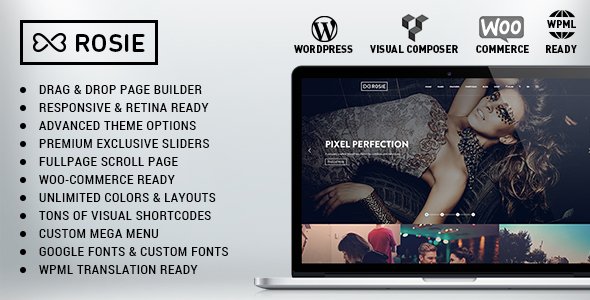
Stuck on your ROSIE WordPress theme? Let's fix it.
No endless back-and-forth. Just send us the details and we'll get it done.
No obligation · Replies within 1 hour · Quote within 1 day
Setup · Customization · Bug fixes · WooCommerce integration
About ROSIE WP Theme
ROSIE is a WordPress theme built by freevision, designed for creative businesses, florists, wedding planners, and lifestyle brands. It ships with a clean, feminine aesthetic built around large imagery, soft typography, and a layout that puts visual content first.
The theme is built on a solid foundation that works well with standard WordPress tools and page builders, making it a practical choice for small business owners who want a polished site without heavy development work. ROSIE supports WooCommerce, which makes it suitable for shops selling physical or digital products.
Out of the box, ROSIE gives you a well-structured homepage, portfolio sections, and blog layouts. It is responsive across devices and keeps the codebase light enough for decent loading performance on shared hosting. For businesses in visually driven niches, it is a focused, purpose-built option worth considering.
Get matched with a ROSIE developer in under one day
Tell us about your ROSIE project. Small fixes, ROSIE theme customization, or a full website build, whatever you need, we've got it covered.
We'll connect you to the right ROSIE developers, define the scope, and get everything 100% clear.
You'll get one estimate, hire your preferred developer, and start collaborating.
ROSIE has a specific visual system. Changing it without understanding that system leads to broken layouts and inconsistent design. A developer who knows the theme skips the learning curve and works directly on your actual requirements.
Through Codeable, FoxyConcept connects you with vetted WordPress developers who have hands-on experience with themes like ROSIE. Every developer on the platform is screened, so you are not gambling on quality. You get a fixed estimate before any work starts, and you only proceed if you are satisfied with the plan. No contracts, no risk.
Pros
- Clean, feminine aesthetic well-suited to lifestyle, floral, and wedding niches
- WooCommerce compatibility built in, usable for small product shops without major rework
- Responsive layouts that hold up across mobile, tablet, and desktop without extra configuration
- Lightweight codebase relative to multipurpose themes, which helps baseline load times
- Focused design system that keeps pages visually consistent without requiring design experience
Cons
- Limited layout flexibility compared to block-based or page builder themes
- Niche aesthetic means it does not adapt well to technical, corporate, or unrelated industries
- Customization beyond the theme options panel requires developer involvement
- Smaller community and fewer third-party tutorials compared to mainstream themes like Astra or Divi
- Some WooCommerce page styles need manual CSS work to match the overall theme design
Who is ROSIE for?
Florists and Flower Shops
ROSIE’s large image sections and soft color palette match the visual expectations of a florist’s online presence. The WooCommerce integration supports bouquet ordering, seasonal product listings, and local delivery options. With a developer handling the shop setup and product page styling, a floral business can launch a functional, good-looking online storefront quickly.
Wedding Planners and Venues
Wedding planners and venues need a site that creates an immediate emotional impression. ROSIE’s homepage structure, gallery support, and typography choices are well-matched to that goal. A developer can wire in a booking or inquiry form, create service package pages, and set up a portfolio section that showcases past events without overcomplicating the layout.
Photography Studios
Photography businesses rely on the image presentation quality of their site. ROSIE handles full-width imagery and portfolio grids cleanly. A developer can configure gallery plugins, set up client proof galleries, and adjust the portfolio post type to sort and filter by shoot category. The result is a site that keeps focus on the work rather than the interface.
Handmade and Gift Product Shops
Small product shops selling handmade goods, candles, stationery, or gifts benefit from ROSIE’s WooCommerce support and approachable visual style. With proper shop page customization, product variations, and checkout flow adjustments handled by a developer, the theme functions as a complete small e-commerce solution without requiring a heavier platform.
Beauty and Wellness Brands
Beauty salons, skincare brands, and wellness practitioners need a site that communicates trust and calm. ROSIE’s layout supports service listing pages, team profiles, and booking integrations well. A developer can connect a scheduling plugin, add a before-and-after section, and configure the blog for skincare or wellness content that supports organic search traffic.

Customizing ROSIE
ROSIE gives you a reasonable starting point, but most serious businesses will need customization to stand out. The theme’s design language is distinctive, which means changes to fonts, color palettes, section layouts, and header styles all need to stay coherent with its overall structure.
Working with a ROSIE expert means you get someone who already understands freevision’s template hierarchy, custom post types, and how the theme handles its styling. That matters when you need to add a booking form, restructure the shop pages, or build a custom portfolio grid that does not break on mobile.
Common customization requests include modifying the WooCommerce product pages, adding custom sections to the homepage, adjusting typography scales, and integrating third-party plugins like contact forms or email marketing tools. A developer familiar with ROSIE can handle these without introducing conflicts or stripping out the theme’s visual identity.
Recommended plugins for ROSIE
ROSIE works with the core WordPress plugin ecosystem. WooCommerce is the natural fit for product sales, and the theme handles it reasonably well without heavy CSS overrides. For bookings, plugins like Amelia or Simply Schedule Appointments can be integrated with some styling work.
If site speed is a concern, pairing ROSIE with a caching plugin and an image optimization tool makes a measurable difference. See our WordPress performance service for details. For shops relying on organic traffic, structured SEO work alongside the theme is important. Our WordPress SEO service covers that end. Contact form plugins, gallery tools, and slider plugins all integrate cleanly with some configuration.
Not sure which plugins to use? This WordPress plugins directory covers the most popular options with reviews and setup guides.
ROSIE common issues
ROSIE theme header not displaying correctly on mobile
Mobile header issues in ROSIE are usually caused by a plugin conflict affecting the menu script, or custom CSS that overrides the responsive breakpoints. Start by deactivating plugins one at a time to isolate the conflict. If the header still breaks, inspect the element in browser dev tools to identify which CSS rule is causing the collapse. Our WordPress bug fixing service handles these exactly if you would rather not dig through code yourself.
WooCommerce product pages not matching ROSIE theme styles
ROSIE’s WooCommerce styles are not always complete for every product page template. Single product pages, cart, and checkout often need additional CSS to match the theme’s font choices, button styles, and spacing. The fix involves adding targeted CSS through the customizer or a child theme, not editing the core theme files. A developer familiar with both ROSIE and WooCommerce can do this without breaking future updates.
ROSIE homepage sections not saving changes in customizer
Customizer changes not saving in ROSIE are often caused by a caching plugin holding the old version, a PHP memory limit being hit during save, or a permission issue on the wp-content directory. Clear all caches first and retry. If the problem persists, check your PHP error log for timeout or memory messages. Increasing the memory limit in wp-config.php often resolves it. Persistent issues may point to a theme or plugin conflict worth investigating.
ROSIE theme images blurry or not loading on retina screens
Blurry images in ROSIE on high-density screens usually mean the uploaded image dimensions are smaller than the display size the theme expects. ROSIE’s full-width sections need source images of at least 1920px wide for sharp rendering. Run Regenerate Thumbnails after uploading correctly sized images. If images still look soft, check whether a lazy-load or compression plugin is reducing quality aggressively beyond acceptable thresholds.
ROSIE FAQ
ROSIE works with the native WordPress block editor and is generally compatible with Elementor for basic page building. However, some sections of the theme are template-driven and may not expose every layout area to a page builder without developer adjustments. If you plan to build heavily with Elementor, test your key page types first to confirm the integration behaves as expected before committing to a full build.
Yes. ROSIE includes WooCommerce support and handles product listing pages and basic shop functionality without major issues. The shop and product page styles may need CSS adjustments to fully match the theme’s design. For a professional shop setup including checkout flow, product variation styling, and payment gateway configuration, working with a developer will save you significant time and avoid common setup mistakes.
Creating a child theme for ROSIE follows the standard WordPress method. Create a new folder in wp-content/themes, add a style.css file with a Template header pointing to the ROSIE parent theme, and create a functions.php that enqueues the parent stylesheet. Using a child theme is strongly recommended before making any customizations, as it protects your changes from being overwritten when ROSIE updates.
ROSIE by freevision is available through the WordPress theme directory or freevision’s distribution channel. Pricing and licensing terms depend on the version. Check the official freevision site or the WordPress theme repository for current availability and whether a premium version with additional features exists. Confirm licensing before deploying on a commercial project.
Migrating an existing site to ROSIE involves moving your content, then rebuilding page layouts to match the new theme’s templates. Content itself transfers cleanly, but your current design will not carry over automatically. The amount of rebuild work depends on how complex your existing pages are. Our WordPress migration service covers theme transitions as part of a full site move if needed.
Hire a ROSIE WordPress Developer
If your ROSIE site needs custom work done properly, a specialist is the faster route. Whether you need layout changes, WooCommerce adjustments, plugin integration, or a full build from scratch using the theme, FoxyConcept can match you with the right developer through Codeable.
The process is straightforward. Post your project, get matched within 24 hours, receive a clear estimate, and decide from there. There is no obligation to hire. Get a free estimate today and see exactly what your project would cost before committing.
You'll need a free Codeable account so developers can ask questions and send their quotes.