Mobilize WordPress Theme
by BeantownThemes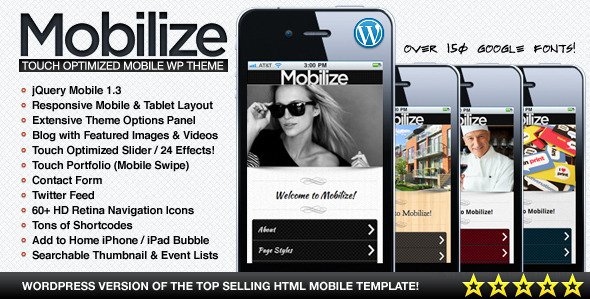
Stuck on your Mobilize WordPress theme? Let's fix it.
No endless back-and-forth. Just send us the details and we'll get it done.
No obligation · Replies within 1 hour · Quote within 1 day
Setup · Customization · Bug fixes · WooCommerce integration
About Mobilize WP Theme
Mobilize is a WordPress theme built by BeantownThemes, designed primarily for nonprofit organizations, political campaigns, and community advocacy groups. It ships with a clean layout focused on driving action: donations, volunteer sign-ups, event registrations, and petition support.
The theme includes built-in sections for mission statements, team profiles, event listings, and calls to action. It works with popular page builders and integrates with plugins like GiveWP and The Events Calendar without heavy configuration.
Mobilize is a solid starting point for organizations that need a site up quickly without hiring a designer. That said, most serious deployments benefit from developer input to customize layouts, integrate payment processing, and tune performance for mobile visitors, who make up the majority of traffic for cause-based sites.
Get matched with a Mobilize developer in under one day
Tell us about your Mobilize project. Small fixes, Mobilize theme customization, or a full website build, whatever you need, we've got it covered.
We'll connect you to the right Mobilize developers, define the scope, and get everything 100% clear.
You'll get one estimate, hire your preferred developer, and start collaborating.
BeantownThemes builds themes for a specific audience, and Mobilize is no exception. Getting the most out of it usually requires someone who knows WordPress development well, not just the theme options panel.
Through Codeable, you get access to vetted WordPress developers who have worked with nonprofit and advocacy sites before. No junior freelancers, no guesswork on quality. Post your project and get a real estimate within 24 hours. Our WordPress development services page has more detail on what we handle.
Pros
- Purpose-built for nonprofits and advocacy organizations, so core sections like donations and events are already structured
- Compatible with GiveWP for donation management without requiring custom coding to make it look right
- Mobile-first layout that works well for audiences reached through social media and email campaigns
- Includes homepage sections for mission, team, events, and CTAs without needing a separate page builder
- BeantownThemes provides documentation and support, which reduces setup time for straightforward deployments
Cons
- Limited layout flexibility compared to block-based themes, which makes significant design changes harder without developer help
- Theme options can feel restrictive if your branding has specific typography or color system requirements
- Not ideal for complex membership or multi-tiered donation structures without additional plugin configuration
- Updates from BeantownThemes are infrequent, which can create compatibility concerns with newer WordPress and PHP versions
- Third-party plugin conflicts are more common than with larger theme ecosystems that have broader community testing
Who is Mobilize for?
Nonprofit Organizations
Mobilize fits nonprofits that need a fast, credible web presence with donation and event support built in. Organizations can publish their mission, post staff profiles, and accept donations through GiveWP without a lengthy build process. A developer can extend this with CRM integrations or grant reporting features.
Political Campaigns
Campaign sites need fast load times, clear calls to action, and simple donation flows. Mobilize covers these structurally. A developer can add voter registration embeds, volunteer sign-up forms, and event calendars tied to specific districts or precincts to make the site work harder during active campaign periods.
Community Advocacy Groups
Local advocacy groups often run on small budgets and need a site that looks professional without requiring ongoing design work. Mobilize provides that baseline. Adding petition plugins, email list integrations, and multilingual support turns it into a functional organizing tool for groups working across communities.
Fundraising Campaigns
Short-term fundraising campaigns benefit from Mobilize’s donation-oriented layout. Progress bars, recurring gift options through GiveWP, and clear impact statements can all be configured within the theme. A developer can also set up campaign-specific landing pages that match the visual style without altering the main site.
Volunteer-Driven Initiatives
Groups that depend on volunteer coordination need more than a contact form. Mobilize can be extended with volunteer management plugins and scheduling tools. Developers can build intake forms, role-based dashboards, and automated onboarding emails that connect directly to how the organization actually operates.

Customizing Mobilize
Out of the box, Mobilize gives you theme options for colors, fonts, homepage sections, and header layout. That covers the basics. Where most organizations hit a wall is when they need something beyond the default: a custom donation flow, a membership portal, multilingual support, or integration with a CRM like Salesforce or NationBuilder.
A Mobilize expert can extend the theme cleanly without breaking updates. That means child theme development, custom post types for campaigns or events, and WooCommerce or GiveWP configuration tailored to your fundraising goals.
If you have specific layout requirements or need to match existing brand guidelines precisely, working with a developer familiar with BeantownThemes builds will save you significant back-and-forth compared to trial and error in the customizer.
Recommended plugins for Mobilize
Mobilize pairs well with several plugins depending on your goals. GiveWP handles donation forms cleanly within the theme’s design. The Events Calendar adds event management without visual conflicts. WooCommerce works if you sell merchandise or paid event tickets.
For performance, image optimization and caching are worth addressing early, especially for mobile users. See our WordPress performance services for specifics. If your organization needs to rank locally or for cause-related searches, pairing Mobilize with an SEO strategy is worth the investment. We cover that through our WordPress SEO service.
Not sure which plugins to use? This WordPress plugins directory covers the most popular options with reviews and setup guides.
Mobilize common issues
Mobilize theme not showing homepage sections after update
This usually happens when a theme update resets widget areas or homepage template settings. Check your Reading settings to confirm the homepage is set to a static page, not the latest posts. If sections disappeared, the widget areas tied to the homepage template may need to be repopulated. A developer can restore the layout and set up a child theme so future updates do not wipe your configuration again. Our WordPress bug fixing service handles this type of issue quickly.
GiveWP donation form not styling correctly with Mobilize theme
GiveWP uses its own form styles, and Mobilize’s CSS can conflict with button colors, input fields, and layout containers. The fix usually involves adding targeted CSS overrides in a child theme rather than editing theme files directly. If you have customized GiveWP templates, check whether a plugin or theme update changed the template version. A developer can audit the conflict and apply clean fixes without affecting other page styles.
Mobilize WordPress theme slow on mobile
Slow mobile performance on Mobilize often comes from unoptimized images, render-blocking scripts, or large theme asset files loading on every page. Start by running the site through PageSpeed Insights to identify the specific bottlenecks. Caching plugins and a CDN help, but server-side fixes and code-level optimizations make the biggest difference. See our WordPress performance service for a structured approach to this.
Mobilize theme header menu not working on mobile devices
Mobile menu issues in Mobilize are commonly caused by JavaScript conflicts with other plugins, or a caching plugin serving a stale version of the page. Clear all caches first and test in an incognito window. If the issue persists, check the browser console for JS errors pointing to the menu toggle script. A developer can identify whether the conflict is theme-level or plugin-level and apply the right fix without disrupting the rest of the site.
Mobilize FAQ
BeantownThemes releases updates periodically, but Mobilize does not follow a frequent release schedule. This means some newer WordPress or PHP versions may surface minor compatibility issues before an official fix is released. It is worth testing updates in a staging environment before applying them to a live site. A developer can also patch compatibility issues directly if an update is delayed.
Mobilize is not a block-based theme, so full Gutenberg block editing is limited compared to FSE themes. It works with classic editor patterns and basic blocks. Elementor can be used for individual pages, but some theme sections are controlled through widgets and theme options rather than a page builder, which can create overlap. A developer can clarify which areas are editable where.
Mobilize does not include WooCommerce-specific templates, but the plugin will activate and function using WooCommerce’s default styles. Visual inconsistencies are common on cart, checkout, and product pages. A developer can write targeted CSS and template overrides to bring those pages in line with the rest of the Mobilize design.
Mobilize includes header customization options in the theme settings, but adding a styled donation button typically requires either a custom menu item with a button class or a small code addition in the header template. Using a child theme is the right approach so the change survives updates. This is a quick task for a developer familiar with BeantownThemes theme structure.
Yes, migrating an existing site to Mobilize is straightforward for content but requires planning for design and functionality. Posts, pages, and media transfer cleanly. Custom post types, forms, and donation records need individual attention. Our WordPress migration service covers the full process and ensures nothing is lost or broken during the switch.
Hire a Mobilize WordPress Developer
Whether you need help with initial setup, custom functionality, or fixing something that broke, a qualified Mobilize developer can sort it out. Work is delivered through Codeable, which means every developer is vetted and reviewed. No obligation to hire after your estimate.
Tell us what you need and get a free estimate within 24 hours. It costs nothing to find out what your project will take.
You'll need a free Codeable account so developers can ask questions and send their quotes.