Mellifera WordPress Theme
by Mikado-Themes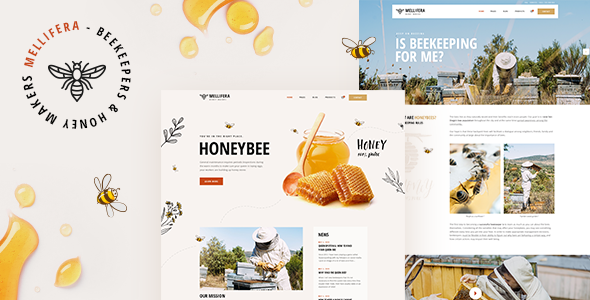
Stuck on your Mellifera WordPress theme? Let's fix it.
No endless back-and-forth. Just send us the details and we'll get it done.
No obligation · Replies within 1 hour · Quote within 1 day
Setup · Customization · Bug fixes · WooCommerce integration
About Mellifera WP Theme
Mellifera is a WordPress theme built by Mikado-Themes, designed primarily for organic shops, honey producers, and natural food brands. It ships with a clean, earthy aesthetic that fits product-focused businesses wanting a polished storefront without heavy custom development.
The theme is WooCommerce-ready out of the box, includes multiple demo layouts, and uses the Elementor page builder for front-end editing. Typography is handled carefully, with serif and soft sans-serif pairings that reinforce the natural, artisan feel. Mikado-Themes has a solid track record on ThemeForest, and Mellifera follows their usual pattern: detailed documentation, regular updates, and a wide set of shortcodes and widgets included in the package.
It suits small to medium-sized eCommerce businesses that want a distinctive visual identity without starting from a blank canvas.
Get matched with a Mellifera developer in under one day
Tell us about your Mellifera project. Small fixes, Mellifera theme customization, or a full website build, whatever you need, we've got it covered.
We'll connect you to the right Mellifera developers, define the scope, and get everything 100% clear.
You'll get one estimate, hire your preferred developer, and start collaborating.
Mellifera looks straightforward until you need something specific. Custom WooCommerce templates, layout conflicts after a plugin update, or a design that drifts from the original vision once content gets added — these are the kinds of problems that eat time fast.
Working through Codeable, our developers handle Mellifera projects regularly. You get a vetted professional who knows the theme’s structure, not a generalist guessing through the code. Post your project, get an estimate free, and only move forward if the scope and price make sense for you.
Pros
- Purpose-built for organic and artisan eCommerce with matching demo layouts included
- WooCommerce integration is solid out of the box with styled product, cart, and checkout pages
- Elementor compatibility makes front-end editing accessible without coding
- Mikado-Themes provides detailed documentation and maintains regular theme updates
- WPML support allows multilingual store builds without a separate compatibility layer
Cons
- Bundled plugins like WPBakery add page weight even if you use Elementor instead
- Some design sections are shortcode-dependent and cannot be edited visually in Elementor
- Heavy demo content import can conflict with existing WordPress configurations
- Custom WooCommerce product page templates require developer work to extend cleanly
- The niche visual style makes it harder to adapt for industries outside food and wellness
Who is Mellifera for?
Honey and Beekeeping Producers
Mellifera was built with honey producers in mind. The demo layouts feature warm amber tones, product-focused sections, and clean WooCommerce shop pages that suit small-batch, artisan producers. A developer can tailor the product pages to highlight provenance, seasonal availability, and bulk order options specific to honey businesses.
Organic Food Stores
Organic grocery and specialty food shops benefit from Mellifera’s clean product grid layouts and WooCommerce foundation. The theme handles variable products, custom categories, and featured collections well. With some developer input, you can add subscription box functionality or local delivery options that fit the organic market audience.
Natural Skincare Brands
The soft typography and earthy color palette translate naturally to skincare and beauty brands with a natural positioning. Product detail pages can be extended to include ingredient lists, sourcing information, and certifications. WooCommerce handles the shop side, and the theme’s aesthetic avoids the clinical feel that generic themes often carry.
Farm-to-Table Businesses
Restaurants, CSA boxes, and farm direct businesses can use Mellifera to combine a story-led homepage with a working online shop. The theme supports blog-style content alongside product listings, which suits businesses that want to communicate their farming practices alongside selling. A developer can integrate booking or order pickup plugins without disrupting the layout.
Herbal and Wellness Shops
Herbal supplement and wellness product brands fit naturally within Mellifera’s visual language. The theme supports product bundles and tiered pricing through WooCommerce, and the homepage layouts allow for educational content sections alongside the store. SEO-friendly structure helps wellness brands build organic traffic over time.

Customizing Mellifera
Mellifera gives you a reasonable amount of control through its theme options panel, but there are limits. Color palettes, fonts, header layouts, and footer configurations are all adjustable without touching code. Elementor handles most page-level changes, though some sections are still tied to shortcodes that require a bit of learning.
Custom post types for portfolio and testimonials are built in, which is useful but can get in the way if your project needs something different. WooCommerce styling works well for the default shop layout, but custom product page templates often need a developer to extend properly.
If you need changes beyond what the panel offers, a Mellifera expert can modify templates, override styles, and build new sections that stay consistent with the theme’s design language without breaking future updates.
Recommended plugins for Mellifera
Mellifera works well alongside several common WordPress plugins. WooCommerce is the obvious first addition for any shop. WPML is supported for multilingual stores, and Contact Form 7 integrates cleanly into the existing layouts.
For performance, the theme can be paired with caching and image optimization tools, though the bundled Visual Composer elements can slow things down if not managed carefully. See our WordPress performance service for help with that.
If organic search traffic matters to your business, pairing Mellifera with a proper setup through our WordPress SEO service will give you a stronger foundation than relying on the theme alone.
Not sure which plugins to use? This WordPress plugins directory covers the most popular options with reviews and setup guides.
Mellifera common issues
Mellifera theme not loading demo content correctly
Demo import failures in Mellifera usually come down to server memory limits or a conflict with existing plugins. Start by raising your PHP memory limit to at least 256MB in your wp-config.php file. Deactivate all non-essential plugins before importing, then re-import only the demo you need. If content imports but images are missing, run the media importer separately. Persistent issues after these steps usually indicate a server configuration problem. Our WordPress bug fixing service can diagnose and resolve this cleanly.
Mellifera WooCommerce product page layout broken
Broken WooCommerce product page layouts in Mellifera often occur after a WooCommerce update changes template hooks that the theme overrides. Check whether Mellifera’s WooCommerce template files are outdated by going to WooCommerce > Status > Tools > Template Overrides. Updating those files to match the current WooCommerce version usually fixes the layout. If the issue started after a theme update rather than a WooCommerce update, a CSS conflict is more likely. A developer can isolate and fix this without affecting other pages.
Mellifera Elementor sections not displaying on mobile
Mobile display issues in Mellifera’s Elementor sections are often caused by column settings or custom CSS that doesn’t include responsive breakpoints. Open each affected section in Elementor, switch to tablet and mobile preview modes, and adjust column widths and padding explicitly for smaller screens. Avoid relying on desktop values to cascade down. If the problem is with Mellifera’s own shortcode-based sections rather than Elementor blocks, CSS overrides in the customizer or a child theme are the right approach.
Mellifera theme slow page speed after setup
Mellifera’s page speed issues typically come from unoptimized images in the demo content, multiple scripts loaded by bundled plugins like WPBakery, and Google Fonts requests. Start by disabling any bundled plugins you are not actively using. Compress images on upload and consider a caching plugin. Script loading order also matters. Our WordPress performance service handles Mellifera-specific optimization including script deferral, image lazy loading, and server-level caching configuration.
Mellifera FAQ
Yes. Mellifera is built with WooCommerce in mind and includes styled templates for the shop, product, cart, and checkout pages. It handles variable products and product categories cleanly. For more complex store setups — subscriptions, custom checkout fields, or wholesale pricing — you will likely need a developer to extend what the theme provides by default.
Mellifera supports Elementor and most of its demo content is built with it. However, some sections still rely on Mikado’s own shortcodes, which sit outside Elementor’s editing environment. This means a few layout areas cannot be edited visually through Elementor and require either shortcode editing or developer intervention to modify.
Technically yes, but it takes more effort. The theme’s visual identity is strongly tied to organic and natural aesthetics. Using it for a tech company or a legal firm, for example, would require significant restyling to avoid looking mismatched. It’s easier to get good results in food, wellness, beauty, or lifestyle niches that align with the design direction.
Always use a child theme for any code-level customizations. Changes made directly to parent theme files will be overwritten during updates. Customizer settings and Elementor page designs are stored in the database and survive updates. Before any update, back up your site fully. Our WordPress maintenance service handles this process safely on a regular basis.
Yes. Mellifera declares WPML compatibility, which means you can build a multilingual store or site using the WPML plugin. String translation, language switchers, and WooCommerce multilingual product pages all work within this setup. Setup still requires careful configuration to avoid layout issues when switching between languages, particularly with Elementor-built pages.
Hire a Mellifera Developer
Whether you need a full site built on Mellifera, a specific feature added, or a layout that isn’t behaving as expected, we can help. Our developers know the Mikado-Themes codebase and have handled Mellifera projects across eCommerce, food brands, and service businesses.
Post your project and get a free, no-obligation estimate within 24 hours. No risk, no commitment until you decide to move forward. Get your free estimate here.
You'll need a free Codeable account so developers can ask questions and send their quotes.