Onehost WordPress Theme
by OceanThemes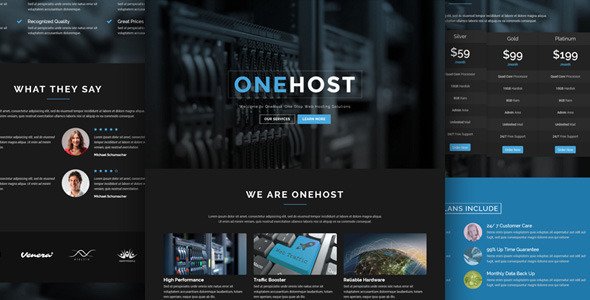
Stuck on your Onehost WordPress theme? Let's fix it.
No endless back-and-forth. Just send us the details and we'll get it done.
No obligation · Replies within 1 hour · Quote within 1 day
Setup · Customization · Bug fixes · WooCommerce integration
About Onehost WP Theme
Onehost is a WordPress theme built by OceanThemes, designed specifically for web hosting companies, domain registrars, and tech service providers. It ships with a clean layout, pricing tables, and sections tailored to presenting hosting plans clearly.
The theme is built on a solid page builder foundation, making it straightforward to arrange sections without touching code. It includes pre-built demo content that covers a typical hosting business homepage, inner pages, and a blog layout.
Onehost works with WooCommerce, which means you can sell hosting plans or digital products directly from your site. It supports WHMCS integration for client billing, which is a practical requirement for actual hosting businesses. Performance is reasonable out of the box, though some optimization work helps it load faster in competitive markets.
Get matched with a Onehost developer in under one day
Tell us about your Onehost project. Small fixes, Onehost theme customization, or a full website build, whatever you need, we've got it covered.
We'll connect you to the right Onehost developers, define the scope, and get everything 100% clear.
You'll get one estimate, hire your preferred developer, and start collaborating.
Onehost covers the basics for a hosting company site, but turning it into something that actually converts visitors into customers takes more than the demo content. Layout decisions, pricing table clarity, WHMCS integration, and page speed all affect whether someone signs up or leaves.
Through Codeable, you get matched with a vetted developer who has worked with themes like Onehost before. No chasing freelancers, no guesswork on quality. Post your project, get an estimate, and decide from there with no obligation.
Pros
- Purpose-built for hosting and tech service businesses with relevant section types out of the box
- Pricing table blocks are included and work well for presenting tiered hosting plans
- WooCommerce compatible, allowing direct sale of hosting packages or digital products
- Demo content covers a full hosting homepage, which speeds up initial setup significantly
- Supports WHMCS integration, a key requirement for billing and client account management
Cons
- Design looks generic without significant customization and resembles many other hosting templates
- WHMCS integration requires a separate bridge plugin and technical configuration, it is not plug and play
- Page builder dependency means performance can suffer without optimization work
- Limited community and documentation compared to larger theme ecosystems like Astra or GeneratePress
- Domain search functionality is not built in and requires third-party tools or custom development
Who is Onehost for?
Web Hosting Providers
Onehost suits shared hosting companies that need to present multiple plans side by side. The built-in pricing tables handle feature comparison well. Pair it with WooCommerce for direct checkout and WHMCS for billing, and you have a functional hosting sales site without building from scratch.
Domain Registrars
Domain registrars can use Onehost as a marketing front end. The layout supports feature highlights and trust-building sections. A domain search tool from a third party can be embedded, though it needs styling work to match the theme. Works well for smaller registrars launching a new brand.
Managed WordPress Hosting
Managed WordPress hosting companies benefit from Onehost’s clean service page layouts. You can structure pages around plan tiers, support response times, and included features. The theme handles this kind of content presentation without much friction, though the design needs differentiation to stand out from competitors.
VPS and Dedicated Server Providers
VPS and dedicated server providers often have more technical audiences. Onehost supports detailed specification layouts and comparison tables. With some customization, you can present CPU, RAM, and storage options clearly. The pricing table component handles configurable plans better than most hosting-specific themes at this price point.
IT and Tech Service Companies
IT companies and tech consultancies offering managed services or infrastructure support can use Onehost as a base. The service section layouts adapt to non-hosting use cases without much effort. Some copy and icon changes, plus a contact form integration, turn the hosting demo into a credible tech services front end.

Customizing Onehost
Onehost gives you a base, but most hosting businesses need something more specific. Pricing tables need to match your actual plans. The hero section usually needs copy and layout changes. Color schemes and typography often drift far from the default demo.
If you are using WHMCS or WooCommerce alongside Onehost, connecting those systems cleanly takes some technical work. A Onehost expert can handle custom shortcodes, section layouts, and plugin integrations without breaking the theme structure.
More specific customizations include adding live chat widgets, trust badges, uptime stats blocks, or a custom domain search tool. These are not built in but are common requests for hosting sites. Getting them to fit visually inside Onehost requires targeted CSS and sometimes child theme development.
Recommended plugins for Onehost
Onehost works well with several plugins that extend its core function. WooCommerce adds an e-commerce layer for hosting plans. WHMCS Bridge or similar tools connect client billing. Contact Form 7 or WPForms handle lead capture.
For speed, pairing Onehost with a caching plugin and an image optimization tool makes a real difference. Hosting company sites compete on trust and speed, so performance matters. See our WordPress performance service for specifics.
SEO plugins like Rank Math or Yoast help structure service pages properly. If you want search visibility for your hosting plans, structured content and meta optimization matter. Our WordPress SEO service covers this end to end.
Not sure which plugins to use? This WordPress plugins directory covers the most popular options with reviews and setup guides.
Onehost common issues
Onehost theme pricing table not displaying correctly
Pricing table display issues in Onehost usually come from plugin conflicts or CSS overrides from a parent plugin like Elementor or WPBakery. First, check whether a recent plugin update changed the column rendering. Clear your cache after each test. If the issue persists, inspect the element in your browser dev tools to spot overriding styles. A targeted CSS fix in your child theme resolves most cases. Need help? Our WordPress bug fixing service handles this type of issue quickly.
WHMCS not connecting properly with Onehost WordPress theme
WHMCS integration with Onehost requires a bridge plugin such as WHMCS Bridge or Full WHMCS Bridge. The connection breaks most often due to incorrect API credentials, URL mismatches, or SSL configuration issues. Check that your WHMCS installation URL is accessible, that API access is enabled for the right IP, and that your WordPress site is running HTTPS. If the bridge plugin throws errors after setup, check the WHMCS system logs first before adjusting WordPress settings.
Onehost theme slow loading on mobile
Slow mobile performance on Onehost sites usually comes from unoptimized images, render-blocking scripts, or heavy page builder output. Start by running a test on PageSpeed Insights to identify the specific bottlenecks. Enable lazy loading for images, defer non-critical JavaScript, and use a caching plugin. If Onehost is loading all its scripts site-wide rather than only on relevant pages, a developer can conditionally load assets. See our WordPress performance service for a full audit.
Onehost demo content not importing correctly
Onehost demo import failures typically result from server memory limits, PHP timeout settings, or missing required plugins. Before importing, install all plugins listed in the theme documentation. Increase your PHP memory limit to at least 256MB and set the max execution time to 300 seconds. If the one-click import stalls, try importing the XML content manually through the WordPress importer tool, then import the customizer settings separately. Most partial imports can be completed this way without starting over.
Onehost FAQ
Onehost is compatible with Elementor. The theme’s page sections can be rebuilt or extended using Elementor’s drag-and-drop editor. Some users prefer to use the theme’s native builder controls and only bring in Elementor for specific pages. Running both simultaneously can cause style conflicts, so it is worth testing your setup after any major plugin update.
Yes. Onehost is WooCommerce compatible, which means you can list hosting plans as products and process payments through the standard WooCommerce checkout. You will need to configure product variations for plan tiers and set up a payment gateway. For a more integrated billing experience, combining WooCommerce with WHMCS via a bridge plugin gives you both storefront and client management.
WHMCS integration is not built directly into Onehost, but it is achievable using a third-party bridge plugin. These plugins embed WHMCS client area pages within your WordPress site so customers do not leave to manage their accounts. Setup requires API access configuration on the WHMCS side and correct URL mapping. A developer familiar with both systems will save you time here.
Always use a child theme for customizations. If your changes live in a child theme, updating the parent Onehost theme will not overwrite them. Before any update, back up your site fully. Check the theme changelog to see what changed, since updates sometimes alter template files you may have copied into your child theme. Our WordPress maintenance service covers safe update management.
Onehost works well as a starting point for hosting company websites. It includes the right section types and pricing table components that hosting businesses need. The main limitation is that without customization it looks similar to many competitors. With the right development work, it can become a distinctive, high-converting site for a hosting brand of any size.
Hire a Onehost Developer
Whether you need a full site build, a specific customization, or help fixing something that broke, a Onehost developer can get it done properly. Work is delivered through Codeable, a vetted WordPress developer network trusted by thousands of businesses.
Post your project today and receive a free, no-obligation estimate within 24 hours. Get your free estimate here and see what is possible with the right developer on your project.
You'll need a free Codeable account so developers can ask questions and send their quotes.