Synergia WordPress Theme
by Select-Themes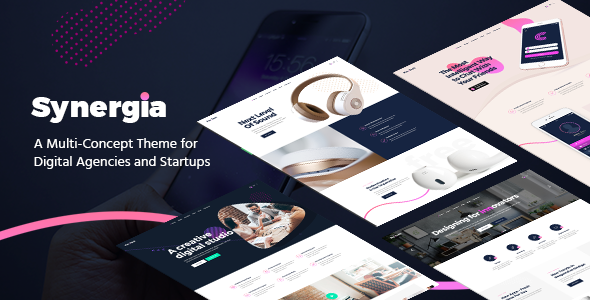
Stuck on your Synergia WordPress theme? Let's fix it.
No endless back-and-forth. Just send us the details and we'll get it done.
No obligation · Replies within 1 hour · Quote within 1 day
Setup · Customization · Bug fixes · WooCommerce integration
About Synergia WP Theme
Synergia is a multipurpose WordPress theme developed by Select-Themes. It targets agencies, businesses, and creative studios that need a structured layout without starting from scratch. The theme ships with a drag-and-drop page builder, a set of pre-built demo layouts, and support for WooCommerce, making it usable across service and product-based sites.
Select-Themes built Synergia with clean code standards and a responsive grid that holds up across screen sizes. It supports custom post types, advanced typography controls, and widget-heavy sidebars. The theme integrates with popular plugins like Contact Form 7 and WPML for multilingual setups. If you want a theme that covers a wide range of business needs without heavy plugin dependency, Synergia is a practical starting point worth evaluating.
Get matched with a Synergia developer in under one day
Tell us about your Synergia project. Small fixes, Synergia theme customization, or a full website build, whatever you need, we've got it covered.
We'll connect you to the right Synergia developers, define the scope, and get everything 100% clear.
You'll get one estimate, hire your preferred developer, and start collaborating.
Synergia has enough moving parts that DIY customization can get messy fast. A vetted developer knows where the theme’s defaults create problems and how to fix them without breaking other things. Through Codeable, you get matched with a WordPress specialist who has real experience with themes like Synergia. No generalist freelancers, no bidding wars. Post your project, get an estimate within 24 hours, and decide from there with zero obligation. It’s the fastest way to move from a demo layout to a site that actually fits your business.
Pros
- Ships with multiple pre-built demo layouts that cover agency, business, and portfolio use cases
- WooCommerce compatible out of the box with minimal styling conflicts on product and cart pages
- WPML support makes it a practical choice for multilingual business sites
- Drag-and-drop page builder included reduces reliance on third-party builder plugins
- Responsive grid handles mobile and tablet layouts without requiring extra CSS overrides in most cases
Cons
- Demo content import can be unreliable and sometimes requires manual cleanup after installation
- Theme options panel is dated compared to full Customizer-based themes, making live preview edits awkward
- Built-in page builder lacks the flexibility and community support of Elementor or Beaver Builder
- Update frequency from Select-Themes has slowed, which raises long-term compatibility concerns with newer WordPress versions
- Typography controls are limited without additional CSS or a plugin like Google Fonts Typography
Who is Synergia for?
Digital Agency Website
Synergia’s agency-style demo layout includes service sections, team grids, and case study post types. A developer can adapt these into a fully custom agency site with client-specific branding, custom service pages, and contact funnels that convert. The theme’s structure supports the kind of multi-section homepage most agencies want without rebuilding from zero.
Corporate Business Site
Corporate sites need structured content hierarchies and clear navigation. Synergia handles both with its header options and page template variety. Pair it with custom post types for news, team members, and services, and you get a professional site that’s easy for non-technical staff to update through the WordPress editor.
Portfolio and Creative Studio
The portfolio post type built into Synergia supports image-heavy project showcases with category filtering. For creative studios, a developer can extend this with lightbox galleries, client testimonial sections, and custom grid layouts that better reflect the studio’s visual identity. It’s a faster build than starting from a blank theme.
WooCommerce Product Store
Synergia’s WooCommerce support covers standard shop pages, product archives, and cart flows. For stores with more than basic needs, a developer can add custom product templates, filtered category pages, and upsell sections. It won’t replace a dedicated WooCommerce theme, but it works well for businesses where the store is one part of a larger site.
Multilingual Business Platform
WPML compatibility makes Synergia a workable foundation for businesses that need separate language versions of their site. With proper setup, menus, page templates, and custom content can all be translated. A developer familiar with both Synergia and WPML can configure the language switcher, hreflang tags, and translated content structures correctly from the start.

Customizing Synergia
Synergia gives you a solid base, but most sites need adjustments that go beyond the theme options panel. Header layouts, custom post type templates, font pairings, and responsive breakpoints often require direct PHP or CSS work to get right.
A Synergia expert can rebuild page templates to match your brand, wire up custom fields using ACF, or strip out default styling that conflicts with your design direction. Child theme setup is the right approach here so your changes survive updates. Whether you need a homepage that looks nothing like the demo or a custom archive layout for a blog or portfolio, working with someone who knows the Synergia codebase saves hours of trial and error. The theme is flexible, but that flexibility has a ceiling without custom development.
Recommended plugins for Synergia
Synergia works well with several plugin categories. For eCommerce, WooCommerce slots in cleanly with minimal styling conflicts. For forms, Contact Form 7 and WPForms both integrate without issues. WPML support makes it a candidate for multilingual business sites.
If you want to push further, pairing Synergia with a caching plugin and a CDN will noticeably cut load times. Check our WordPress performance service if speed is a priority. For search visibility, on-page structure matters as much as content. Our WordPress SEO service can help you get the technical side sorted alongside your theme setup.
Not sure which plugins to use? This WordPress plugins directory covers the most popular options with reviews and setup guides.
Synergia common issues
Synergia theme demo import not working
Demo import failures in Synergia usually come down to server memory limits or PHP timeout settings. Set memory_limit to at least 256MB and max_execution_time to 300 in your php.ini or wp-config.php. If the import still stalls, try importing XML content manually through Tools > Import. If recurring import problems are affecting your build timeline, our WordPress bug fixing service can resolve it quickly.
Synergia homepage layout broken after WordPress update
Broken layouts after a WordPress update usually point to a JavaScript conflict or a deprecated function the theme relies on. Check the browser console for JS errors first. If Synergia’s page builder scripts are failing, clearing the cache and deactivating plugins one by one helps isolate the cause. Themes that haven’t been updated recently are more likely to break on new WordPress versions. A developer can patch the issue and future-proof the critical functions.
Synergia theme mobile menu not opening
A non-functional mobile menu in Synergia is almost always a JavaScript conflict. Another plugin or script is likely loading a jQuery version that clashes with the theme’s menu script. Open your browser’s developer tools, check the console for errors, and look for script loading order issues. Switching to a child theme and enqueueing scripts correctly often resolves this. Deactivating plugins temporarily helps confirm whether the conflict is theme-side or plugin-side.
Synergia WooCommerce pages not styled correctly
WooCommerce styling issues in Synergia typically appear after WooCommerce updates that change template file structure. Synergia’s bundled WooCommerce templates may be outdated. Copy the relevant template files from the WooCommerce plugin folder into your child theme’s woocommerce directory and update them to match the current WooCommerce version. If you’re not comfortable doing this manually, our WordPress bug fixing service covers exactly this type of issue.
Synergia FAQ
Synergia was not built with the Block Editor as a primary concern, so full site editing features are not supported. Core functionality generally works on recent WordPress versions, but some advanced features or page builder elements may behave unexpectedly. Testing on a staging site before updating production is strongly recommended. If you run into compatibility problems, a developer can patch specific functions without replacing the theme entirely.
Elementor can be installed alongside Synergia, but the two page builders will overlap. Synergia’s native builder and Elementor both output competing layout structures, which can cause visual conflicts. Most developers recommend picking one and disabling the other. If you want Elementor as your primary builder, a developer can dequeue Synergia’s builder scripts to prevent conflicts and set up page templates that work cleanly with Elementor’s structure.
Create a new folder in wp-content/themes/ named something like synergia-child. Add a style.css with the correct Template: synergia header and a functions.php that enqueues the parent theme stylesheet. Activate the child theme from Appearance > Themes. All your customizations go into the child theme files so updates to the parent theme won’t overwrite your work. This is the correct way to modify Synergia.
Yes, Synergia includes WooCommerce support. Shop pages, product archives, single product pages, cart, and checkout all work within the theme’s layout. Basic styling is handled automatically. For heavily customized stores with unique product layouts or checkout flows, additional development work is usually needed. The built-in WooCommerce templates may also need updating if you’re running a recent version of WooCommerce.
Select-Themes has slowed down on Synergia updates in recent years. The theme still works, but it’s worth monitoring compatibility with each major WordPress release. If you’re building a new site, consider whether the lack of frequent updates is a risk for your project long-term. A developer can maintain compatibility manually if needed. For ongoing upkeep, our WordPress maintenance service covers theme compatibility checks.
Hire a Synergia Developer
Need a Synergia developer who can handle custom templates, layout fixes, or a full site build? FoxyConcept connects you with vetted WordPress specialists through Codeable. You get a free estimate within 24 hours and no obligation to hire. Whether it’s a small tweak or a complete customization project, the right developer is a few clicks away. Get your free estimate now and describe what you need. No upfront payment, no risk.
You'll need a free Codeable account so developers can ask questions and send their quotes.