TouchUp WordPress Theme
by Mikado-Themes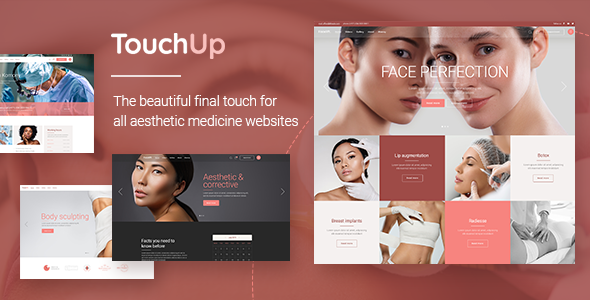
Stuck on your TouchUp WordPress theme? Let's fix it.
No endless back-and-forth. Just send us the details and we'll get it done.
No obligation · Replies within 1 hour · Quote within 1 day
Setup · Customization · Bug fixes · WooCommerce integration
About TouchUp WP Theme
TouchUp is a WordPress theme built by Mikado-Themes, designed primarily for beauty salons, spas, barbershops, and wellness businesses. It ships with a clean, feminine aesthetic and a set of pre-built demos that cover a range of beauty industry niches.
The theme is built on Mikado’s own framework and uses Elementor for page building. It includes appointment booking support, a service showcase layout, a team member section, and pricing tables out of the box. WooCommerce compatibility means you can sell products directly from your salon site.
TouchUp is a solid starting point if you want a polished beauty site without building everything from scratch. That said, getting it configured the way you want, especially with booking plugins and custom branding, often requires more time than the demo import suggests.
Get matched with a TouchUp developer in under one day
Tell us about your TouchUp project. Small fixes, TouchUp theme customization, or a full website build, whatever you need, we've got it covered.
We'll connect you to the right TouchUp developers, define the scope, and get everything 100% clear.
You'll get one estimate, hire your preferred developer, and start collaborating.
Mikado-Themes builds polished themes, but their custom framework means there’s a learning curve. Getting TouchUp to look like the demo, let alone something custom, takes hands-on WordPress knowledge.
Our developers on Codeable work with beauty and wellness sites regularly. They know the TouchUp framework, common plugin conflicts, and how to deliver a site that actually works for your clients on day one. No guesswork, no back-and-forth for weeks.
Pros
- Pre-built demos designed specifically for beauty, spa, and barbershop niches save setup time
- Elementor integration means most layout changes can be made without touching code
- WooCommerce compatible out of the box for selling salon products or gift cards
- Includes team member, pricing table, and service showcase sections built for beauty businesses
- Mikado-Themes provides regular updates and documentation for their framework
Cons
- Mikado's custom framework adds a layer of complexity not found in simpler themes
- Demo content import doesn't always produce a pixel-perfect result and often needs manual cleanup
- Heavy demo assets can cause slow load times without performance optimization
- Appointment booking requires a third-party plugin and setup is not guided within the theme
- Customizing outside the provided demos can feel restrictive due to framework-specific settings
Who is TouchUp for?
Beauty Salon
TouchUp’s salon demo includes service listings, a team showcase, pricing tables, and appointment booking support. It’s built to present a beauty salon professionally without a lot of custom work. A developer can wire up a booking plugin and get the site live quickly.
Day Spa
The spa demo uses soft tones, fullscreen imagery, and section layouts that suit treatment menus and package pricing. WooCommerce support means you can sell gift vouchers or skincare products directly. Performance tuning is recommended given the image-heavy layouts.
Barbershop
TouchUp includes a barbershop demo with a stronger, more masculine visual direction. It works well for showcasing cuts, team bios, and pricing. Pairing it with an online booking plugin like Amelia rounds out the client experience.
Nail Studio
Nail studios benefit from TouchUp’s gallery and service showcase layouts. You can display nail art portfolios, list services with prices, and collect bookings. A developer can customize the color palette and fonts to match your studio’s brand identity.
Wellness Coach
For wellness coaches or individual practitioners, TouchUp’s cleaner demo layouts work well for presenting programs, testimonials, and contact forms. It’s less out-of-the-box for this use case but manageable with some customization from an experienced developer.

Customizing TouchUp
TouchUp gives you a decent set of options through its theme panel, but customization beyond the demo styles takes real work. Font pairings, color schemes, and section layouts can all be adjusted, though some changes require touching CSS or working inside Elementor at a component level.
If you want a custom appointment flow, a unique homepage layout, or WooCommerce styled to match your brand exactly, a TouchUp expert will save you significant time. The Mikado framework has its own logic, and knowing where settings interact with each other matters.
A TouchUp developer can also help you set up booking plugins like Bookly or Amelia correctly within the theme, which is one of the more common pain points for DIY setups.
Recommended plugins for TouchUp
TouchUp works with standard WordPress plugins, but a few pairings are worth prioritizing. Amelia or Bookly handle appointment scheduling cleanly. Contact Form 7 or WPForms cover lead capture. For product sales, WooCommerce slots in with minimal friction.
If your site needs to rank locally, pairing TouchUp with a proper SEO setup matters. Check out our WordPress SEO service. Page speed is also worth addressing early. Image-heavy beauty sites can slow down fast. Our WordPress performance service covers that.
Not sure which plugins to use? This WordPress plugins directory covers the most popular options with reviews and setup guides.
TouchUp common issues
TouchUp theme demo import not working
Demo import failures in TouchUp are usually caused by server memory limits, PHP timeout settings, or a missing required plugin. Start by checking that Elementor and the Mikado core plugin are both installed and active before importing. Increase PHP memory to at least 256MB in your wp-config.php. If the import still fails, try importing XML content manually and then applying the demo widgets separately.
TouchUp WordPress site loading slowly
TouchUp demo sites use large images and load several scripts from the Mikado framework and Elementor. Start with image compression using a plugin like ShortPixel, then look at deferring non-critical JavaScript. A caching plugin like WP Rocket helps. For deeper gains, consider our WordPress performance service to audit and fix loading issues properly.
Booking plugin not displaying correctly in TouchUp
Most booking plugin display issues in TouchUp come from CSS conflicts between the plugin’s styles and the Mikado framework. Amelia and Bookly both have this occasionally. Try disabling the theme’s custom CSS first to isolate the issue, then add targeted CSS overrides to fix the specific conflicting elements. If the conflict is deeper, a developer can resolve it without breaking other parts of the theme.
TouchUp theme header not showing on mobile
Mobile header issues in TouchUp are often related to Mikado’s header settings conflicting with a specific sticky or transparent header option. Open the Mikado Options panel, go to Header settings, and check whether the mobile header type is explicitly set. Elementor or custom CSS changes to the header area can also override mobile behavior unexpectedly. Our WordPress bug fixing service can isolate and resolve this.
TouchUp FAQ
Yes, TouchUp is built specifically for beauty and wellness businesses. It includes demo layouts for salons, spas, and barbershops. You still need to configure a booking plugin separately, and getting the demo to match your brand takes some work. For a polished result, working with a TouchUp developer is the faster route.
Yes. TouchUp uses Elementor as its page builder. Most layout and content editing happens inside Elementor, while the Mikado Options panel controls global settings like header style, typography, and colors. The two work together but can occasionally conflict, especially after updates.
TouchUp doesn’t include a built-in booking system. It’s designed to work alongside plugins like Amelia or Bookly. Setup requires configuring the plugin separately and then embedding it into your TouchUp pages. Getting the styling to match the theme sometimes requires custom CSS.
Before updating TouchUp, make sure you’re using a child theme for any custom CSS or template changes. If you’ve edited parent theme files directly, those changes will be overwritten on update. Backup your site first. For ongoing updates and maintenance, our WordPress maintenance service handles this safely.
Yes, TouchUp is WooCommerce compatible. You can use it to sell products, gift cards, or treatment packages. The theme includes basic WooCommerce styling, though you may want custom adjustments to match your shop pages with the rest of your site design.
Hire a TouchUp WordPress Developer
Whether you need a full site build, demo customization, booking plugin setup, or a specific fix, we can match you with a vetted TouchUp developer through Codeable. Post your project, get an estimate within 24 hours, and decide if you want to move forward. There’s no obligation and no payment until you’re ready to hire.
Get a free estimate for your TouchUp project and we’ll match you with the right developer.
You'll need a free Codeable account so developers can ask questions and send their quotes.