Discussion WordPress Theme
by Mikado-Themes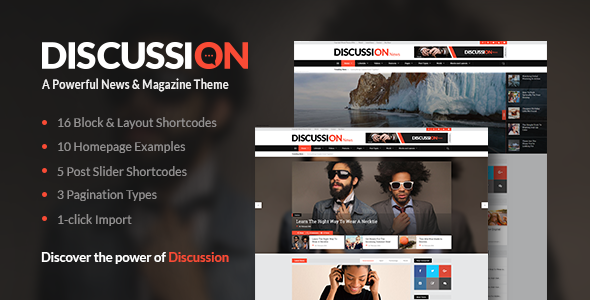
Stuck on your Discussion WordPress theme? Let's fix it.
No endless back-and-forth. Just send us the details and we'll get it done.
No obligation · Replies within 1 hour · Quote within 1 day
Setup · Customization · Bug fixes · WooCommerce integration
About Discussion WP Theme
Discussion is a WordPress theme built by Mikado-Themes, designed specifically for online magazines, news portals, and editorial websites that prioritize content-heavy layouts. It ships with multiple pre-built demo sites, a drag-and-drop page builder, and a clean typographic hierarchy that keeps readers focused on the content.
The theme includes a dedicated post format system covering standard articles, galleries, videos, and audio. Navigation is structured for high-volume publishing, with sticky headers, mega menus, and category-based filtering built in. WooCommerce support is included for sites that sell digital products or subscriptions alongside editorial content.
Mikado-Themes maintains an active update schedule, and Discussion comes with detailed documentation. It runs on Elementor and the Mikado core plugin stack, which is worth factoring into your setup time.
Get matched with a Discussion developer in under one day
Tell us about your Discussion project. Small fixes, Discussion theme customization, or a full website build, whatever you need, we've got it covered.
We'll connect you to the right Discussion developers, define the scope, and get everything 100% clear.
You'll get one estimate, hire your preferred developer, and start collaborating.
Discussion has a lot of moving parts. Between Mikado’s core plugin, Elementor, post format settings, and the theme options panel, small misconfigurations can break layouts in ways that aren’t obvious to diagnose. FoxyConcept connects you with vetted Discussion developers through Codeable, a platform built exclusively for WordPress professionals. You get a fixed estimate before any work starts, and the developer assigned to your project has been screened for quality. No freelancer roulette, no scope creep surprises.
Pros
- Includes 10+ niche-specific demo sites covering tech, lifestyle, food, and news editorial styles
- Built-in mega menu with image support works well for category-heavy publications
- Post formats for video, audio, gallery, and quote are well-implemented and visually distinct
- WooCommerce integration is solid for paywalled content or merchandise alongside editorial
- Mikado-Themes provides regular updates and responds to support tickets on ThemeForest
Cons
- Relies on multiple Mikado-specific plugins that add page weight and plugin dependency risk
- Theme options panel is large and not well-organized, making it slow to find specific settings
- Some demo layouts only work correctly with the exact Elementor version used at import time
- Mobile menu behavior on complex navigation structures sometimes requires custom CSS fixes
- Documentation covers basic setup but skips advanced customization scenarios entirely
Who is Discussion for?
Online News Magazine
Discussion handles high-volume news publishing well. The category filtering, sticky header, and breaking news ticker give editors the tools they need to surface timely content. The grid and list layout options let you run multiple story tiers on the homepage without custom development work.
Tech Blog with Reviews
Review-heavy tech sites benefit from Discussion’s post rating system and comparison-friendly layouts. The sidebar widget areas are flexible enough to display specs or affiliate links cleanly. With a proper SEO setup, the structured markup also helps review pages perform in search results.
Food and Recipe Publication
Discussion includes recipe-friendly layouts with large featured image support and clean typographic hierarchy that works well for ingredients and method sections. The gallery post format is particularly well-suited to food photography-led articles that need both visual impact and readable content.
Digital Subscription Site
Pairing Discussion with WooCommerce and a membership plugin like MemberPress gives you a functional subscription site without a custom build. The theme’s content restriction hooks integrate cleanly, and the homepage layouts support both teaser content for free visitors and full content for paying subscribers.
Agency or Corporate Editorial
Corporate teams publishing thought leadership or industry reports benefit from Discussion’s professional typography and multi-column layouts. Author profiles, contributor archives, and branded category pages give internal publishing programs a polished editorial presence without commissioning a fully custom theme.

Customizing Discussion
Discussion gives you a lot of control through its theme options panel, but getting the most out of it takes time. The demo import gets you a working starting point, but tweaking header layouts, color schemes, typography, and sidebar configurations requires familiarity with both Elementor and Mikado’s own options layer.
Custom post layouts, author archive pages, and category templates all have independent settings. If you want a unique editorial look rather than a demo-clone, that means working through several nested panels and testing across breakpoints.
A Discussion expert can shortcut this significantly. Instead of spending days figuring out which setting overrides which, a developer who knows Mikado-Themes’ architecture will build exactly what you need without the trial and error. FoxyConcept works with Discussion sites regularly and can handle everything from a full custom build to targeted layout fixes.
Recommended plugins for Discussion
Discussion integrates cleanly with several key plugins. WooCommerce handles subscriptions or product sales. WPBakery is available as an alternative to Elementor depending on the demo you import. For SEO, the theme outputs clean markup that works well with Yoast or Rank Math, though you’ll want a proper SEO configuration to get full value from it.
On the performance side, Discussion loads multiple Mikado plugin dependencies on every page. Running a performance audit after setup is strongly recommended, particularly if you’re running ads or heavy media alongside your editorial content.
Not sure which plugins to use? This WordPress plugins directory covers the most popular options with reviews and setup guides.
Discussion common issues
Discussion theme homepage layout broken after update
Layout breaks after updates in Discussion usually trace back to a version mismatch between the theme and one of its required Mikado plugins. Check that Mikado Core, Mikado CPT, and any bundled Elementor widgets are all updated alongside the theme. If a specific section broke, inspect it in Elementor for missing widget references. Regenerating CSS from the theme options panel also fixes rendering issues introduced by cached styles. If the problem persists, a WordPress bug fix is the fastest path to resolution.
Discussion WordPress theme slow loading on mobile
Discussion loads several plugin scripts globally, including Mikado Core assets and Elementor frontend libraries, regardless of whether a given page uses them. Use a plugin like Asset CleanUp to restrict script loading by page template. Compress and lazy-load images, and consider switching to a faster hosting stack. A full performance audit will identify the specific bottlenecks on your installation rather than applying generic fixes that may not match your setup.
Discussion theme mega menu not working correctly
Mega menu issues in Discussion typically come from a CSS z-index conflict with a third-party plugin, or from the Mikado menu options not being saved correctly after a theme update. First, clear all caches including server-side and CDN. Then re-check the mega menu settings under Appearance > Menus and confirm the Mikado menu meta box is set correctly per item. If a plugin is conflicting, disable them one by one in a staging environment to isolate the cause.
Discussion theme demo import fails or shows blank page
Demo import failures in Discussion are usually caused by server memory limits below 256MB, PHP max execution time set too low, or a plugin conflict during import. Increase memory and execution limits in wp-config.php or php.ini before retrying. Import in stages if the full import consistently times out. If the page appears blank after import, check for a fatal error in the PHP error log. A white screen after import almost always means a plugin activation failure, not a theme fault.
Discussion FAQ
Yes. Discussion was built with editorial publishing in mind. It includes a breaking news ticker, category mega menus, multiple homepage grid options, and post format support for video, audio, and gallery content. It handles high article volumes well and the layout system gives editors control over content hierarchy without needing a developer for every change.
Yes, Discussion uses Elementor as its primary page builder for most demo layouts. Some older demos may include WPBakery elements, so check which builder your chosen demo uses before importing. Elementor Pro is not required for basic use, but several layout features work better with it. The theme’s own shortcodes and widgets work independently of the builder.
After purchasing and activating the theme, install the required plugins when prompted. Then go to Mikado Themes > Import and select the demo you want. The importer will pull in pages, widgets, menus, and theme settings. Your server needs at least 256MB PHP memory and a generous max execution time. Import on a clean WordPress install to avoid content conflicts.
No, not fully. Mikado Core is required for custom post types like portfolio items, shortcodes, and several layout features. Removing it breaks a significant portion of the theme’s functionality. You can deactivate optional Mikado plugins for features you don’t use, but the core plugin needs to stay active for the theme to function as designed.
Mikado-Themes updates Discussion on a reasonably consistent schedule through ThemeForest. Updates address WordPress core compatibility, Elementor version changes, and bug fixes reported by users. Checking the ThemeForest changelog before updating on a live site is a good habit. For ongoing update management without the risk, a WordPress maintenance plan handles this safely.
Hire a Discussion WordPress Developer
Whether you need a full Discussion theme setup, a custom layout built from scratch, or fixes to an existing site, FoxyConcept can match you with a developer who knows this theme. Work is delivered through Codeable, so you get a transparent estimate with no obligation to proceed. Every developer is vetted, and your project is scoped before billing starts. Get a free estimate and have a Discussion expert ready within 24 hours.
You'll need a free Codeable account so developers can ask questions and send their quotes.