Livecast WordPress Theme
by code-less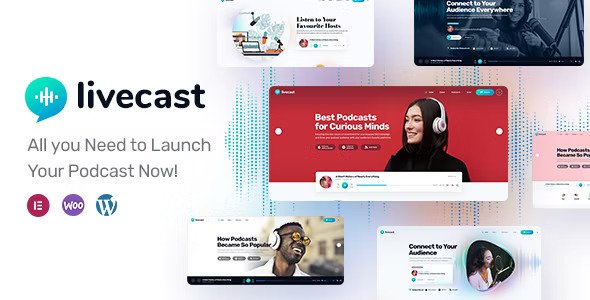
Stuck on your Livecast WordPress theme? Let's fix it.
No endless back-and-forth. Just send us the details and we'll get it done.
No obligation · Replies within 1 hour · Quote within 1 day
Setup · Customization · Bug fixes · WooCommerce integration
About Livecast WP Theme
Livecast is a WordPress theme built by code-less, designed specifically for podcasters, streamers, and video content creators. It ships with a clean, media-forward layout that puts audio and video front and center without burying content in unnecessary sidebars or cluttered widgets.
The theme supports podcast episode management, embedded video players, and live stream integration out of the box. Episode archives, show notes, and guest profiles are all handled through structured templates rather than generic blog layouts.
Built on a solid foundation with Elementor compatibility, Livecast gives content creators a purpose-built starting point. It works well for solo podcasters and multi-show networks alike. If you run a channel, a radio show, or a streaming brand, this theme is worth a serious look before reaching for a generic multipurpose option.
Get matched with a Livecast developer in under one day
Tell us about your Livecast project. Small fixes, Livecast theme customization, or a full website build, whatever you need, we've got it covered.
We'll connect you to the right Livecast developers, define the scope, and get everything 100% clear.
You'll get one estimate, hire your preferred developer, and start collaborating.
Livecast is a focused theme, but focused themes still break, need extending, and require proper configuration. Finding a developer who actually knows the theme saves time and avoids bad fixes that cause new problems.
Through Codeable, you get access to vetted WordPress developers with real track records. No bidding wars, no guessing who you are hiring. Post your project and get a matched expert within 24 hours. Every engagement comes with a free estimate and zero obligation to proceed.
Pros
- Purpose-built for podcasters and video creators, so layouts and templates fit media content without heavy workarounds
- Integrated episode management structure keeps audio and video content organized separately from standard blog posts
- Elementor compatibility gives non-developers a visual way to adjust page layouts without touching code
- Clean, minimal default design loads reasonably fast compared to bloated multipurpose themes in the same category
- Supports multiple podcast shows or channels within one installation, useful for networks or multi-host setups
Cons
- Limited third-party documentation outside the official code-less resources, making troubleshooting harder without developer help
- Player customization options are restricted in the base theme, requiring CSS or plugin workarounds for branded audio players
- WooCommerce integration is not polished out of the box and needs layout adjustments for a clean shop experience
- Update frequency from code-less has been inconsistent, which can create compatibility issues with newer WordPress core releases
- Heavy media sites built on Livecast need extra performance work since the theme does not include built-in lazy loading or caching logic
Who is Livecast for?
Independent Podcasters
Livecast gives solo podcasters a dedicated home for episodes, show notes, and subscriber calls to action without needing a custom build. The episode archive templates handle season and category sorting well. Pair it with Seriously Simple Podcasting for a complete RSS and distribution setup that does not require ongoing developer input to maintain.
Live Streaming Channels
For creators who run regular live streams on YouTube, Twitch, or similar platforms, Livecast provides embed-ready layouts that keep the stream front and center. A developer can add a live/offline state toggle and a schedule display, making the site useful between streams rather than sitting idle until the next broadcast.
Podcast Networks
Multi-show operations benefit from Livecast’s support for separate show identities within one WordPress install. Each show can have its own archive, hosts, and episode feed. A Livecast developer can build out custom taxonomies so listeners can filter by show, topic, or guest without the site becoming hard to navigate.
Online Radio Stations
Online radio stations need continuous playback, scheduling displays, and live stream embeds working together. Livecast handles the media side of this well, though a floating player and program guide require additional development work. It is a strong starting point for a station that wants a professional web presence without building from scratch.
Video Interview Shows
Video interview formats work well with Livecast because the theme handles embedded video and guest profile pages in a structured way. Each episode can feature the guest, topic, and key takeaways alongside the video embed. This works particularly well for B2B shows or educational content where the guest’s credentials matter to the audience.

Customizing Livecast
Livecast ships with sensible defaults, but most sites will need custom work to match a specific brand or workflow. Color schemes, typography, and header layouts can be adjusted through the WordPress Customizer, but deeper changes require template editing or custom CSS.
Episode layouts, player positioning, and sidebar behavior are areas where a Livecast expert can save you hours of trial and error. If you want a custom homepage that mixes live stream embeds with episode archives and sponsor slots, that kind of work is better handled by a developer who knows the theme structure.
Adding custom post types for guests, sponsors, or show categories also requires code-level work. A Livecast developer can extend the theme without breaking updates or creating technical debt you will have to clean up later.
Recommended plugins for Livecast
Livecast pairs well with dedicated podcast plugins like Seriously Simple Podcasting or Powerpress for RSS feed management and episode metadata. For video, Presto Player or Simple Video Press integrate cleanly with the theme’s player areas.
WooCommerce can be added for merchandise or paid memberships, though layout adjustments are usually needed. For site speed and core web vitals, additional optimization work is worth doing given the heavy media assets podcast and streaming sites carry. Strong WordPress SEO and performance optimization make a real difference for discoverability and listener experience on media-heavy sites like this.
Not sure which plugins to use? This WordPress plugins directory covers the most popular options with reviews and setup guides.
Livecast common issues
Livecast WordPress theme audio player not showing on episode pages
This usually happens when a podcast plugin conflict or a missing shortcode breaks the player render. First, check whether your podcast plugin is active and the episode audio file is correctly attached in the episode post meta. If the player template has been overridden in a child theme, compare it against the current theme file. Clearing your caching plugin often resolves display issues that appear after a plugin update. If the problem persists, a WordPress bug fix is the fastest path to a clean resolution.
Livecast theme layout broken after WordPress update
Theme layout breaks after a WordPress core or plugin update are usually caused by deprecated template tags or JavaScript conflicts. Open your browser console and look for JS errors first. Check whether the issue is in a child theme override or the parent theme itself. If you have modified theme files directly, those changes will have been overwritten. Restore a backup, move customizations into a child theme, and test again. Ongoing WordPress maintenance prevents this kind of issue from catching you off guard.
Livecast episode archive not displaying posts correctly
Episode archives not displaying correctly are often a permalink or custom post type registration issue. Go to Settings, then Permalinks, and save without changing anything to flush rewrite rules. If episodes still do not show, check whether the podcast plugin is correctly registering the custom post type and that the archive template in Livecast is assigned to it. A conflict with another plugin registering a post type with the same slug is also worth ruling out before going deeper.
Livecast theme slow loading on mobile
Livecast sites with heavy media assets load slowly on mobile without explicit optimization work. Start by running a PageSpeed Insights test to identify the largest offenders. Uncompressed audio file embeds, unoptimized featured images, and render-blocking scripts are the most common culprits. A caching plugin, image compression, and lazy loading cover the basics. For deeper gains, look at WordPress performance optimization to address core web vitals and improve listener experience on slower connections.
Livecast FAQ
Yes, Livecast is one of the more focused podcast themes available for WordPress. It handles episode management, player embeds, and show notes through purpose-built templates rather than adapting generic blog layouts. It works best when paired with a dedicated podcast plugin for RSS feed generation and distribution. For most indie podcasters it is a solid starting point without requiring extensive custom development.
Livecast is compatible with Seriously Simple Podcasting, which is one of the more common setups for this theme. SSP handles the episode custom post type, RSS feed, and player shortcodes while Livecast provides the visual templates. Some styling adjustments may be needed to get the player to match your brand exactly, but the two work together without major conflicts in most configurations.
Yes, Livecast supports Elementor for page building. This lets you build custom homepage layouts, landing pages, and about pages visually without editing template files. Core episode archive and single episode templates are handled by the theme itself rather than Elementor, so those require CSS or PHP work if you need to change their structure. Elementor is most useful for static or promotional pages.
Livecast does not include a floating sticky audio player by default. You need a third-party plugin to add this functionality. Plugins like Compact Audio Player or custom solutions built on Howler.js can handle persistent playback across page navigation. Getting this set up cleanly with Livecast usually requires some development work to avoid conflicts with the theme’s own player templates.
Yes, migrating an existing podcast site to Livecast is possible. The process involves moving episode content and audio files, remapping custom fields, and reconfiguring your RSS feed to avoid breaking existing subscribers. The complexity depends on what theme or platform you are moving from. A WordPress migration handled by an experienced developer keeps your episode history, feed URLs, and subscriber counts intact.
Hire a Livecast WordPress Developer
Whether you need a Livecast setup from scratch, a custom episode layout, or fixes to something that stopped working, the right developer makes all the difference. Our vetted WordPress specialists have hands-on experience with media and podcast themes and can handle everything from initial configuration to advanced customizations.
Get a free estimate with no obligation. Matched within 24 hours, 100% risk-free.
You'll need a free Codeable account so developers can ask questions and send their quotes.