Iceberg WordPress Theme
by NordStudio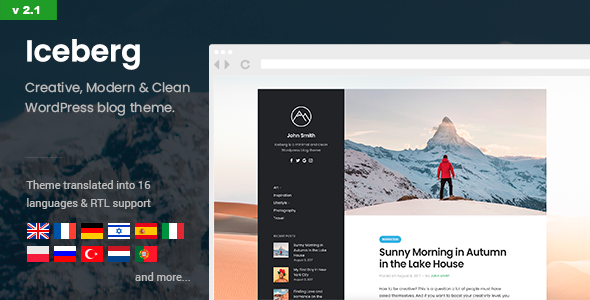
Stuck on your Iceberg WordPress theme? Let's fix it.
No endless back-and-forth. Just send us the details and we'll get it done.
No obligation · Replies within 1 hour · Quote within 1 day
Setup · Customization · Bug fixes · WooCommerce integration
About Iceberg WP Theme
Iceberg is a clean, minimal WordPress theme built by NordStudio. It’s designed primarily for writers and bloggers who want the content to do the talking. The layout strips away sidebars and visual noise, leaving a single-column reading experience that keeps visitors focused on the text.
The theme ships with a custom Gutenberg writing experience, making it one of the few themes built specifically around the block editor rather than bolted onto it. Typography choices are deliberate, whitespace is generous, and page load times are fast out of the box.
If you run a personal blog, publish long-form essays, or maintain a writing portfolio, Iceberg is worth a close look. It won’t suit every site, but for its target use case, it does the job well without requiring constant tweaking.
Get matched with a Iceberg developer in under one day
Tell us about your Iceberg project. Small fixes, Iceberg theme customization, or a full website build, whatever you need, we've got it covered.
We'll connect you to the right Iceberg developers, define the scope, and get everything 100% clear.
You'll get one estimate, hire your preferred developer, and start collaborating.
Most Iceberg issues come down to one thing: pushing a minimal theme to do something it wasn’t designed for. That’s not always the wrong call, but it requires someone who knows the theme’s structure. Our developers have worked with NordStudio themes and understand how Iceberg handles templates, block styles, and the Gutenberg integration. Work is matched through Codeable, so you get a vetted developer, not a freelancer lottery. Fixed pricing, clear scope, no surprises.
Pros
- Built specifically for Gutenberg, not retrofitted
- Minimal code base keeps page load times fast
- Clean single-column layout optimized for long-form reading
- Consistent updates from NordStudio with active support
- Distraction-free writing mode built into the theme
Cons
- Very limited layout options, not suitable for complex multi-column sites
- No built-in sidebar, which rules out certain ad-dependent publishing models
- WooCommerce support is minimal without custom development
- Few bundled templates, so category and archive pages look fairly generic
- Minimal customization options may frustrate users expecting a full theme panel
Who is Iceberg for?
Personal Writing Blog
Iceberg is purpose-built for writers who publish regularly. The single-column layout, clean typography, and distraction-free editor mean you spend less time fighting the theme and more time writing. Setup is fast and the reading experience holds up on mobile without extra work.
Newsletter with Web Archive
Many newsletter creators use Iceberg to host a public archive of past issues. The minimal layout mirrors the clean format most newsletter readers expect. Pair it with a ConvertKit signup form and you have a functional publishing setup without needing a page builder.
Writing Portfolio
Writers and journalists use Iceberg as a portfolio base. The theme handles long prose well, which matters when your samples are essays or articles rather than visual work. A developer can add a custom post type for clips or a filtered portfolio grid if needed.
Independent Journalism
Small independent publications and solo journalists fit well within Iceberg’s structure. The theme keeps the focus on the writing, loads fast on slower connections, and doesn’t require a development team to maintain. Category pages may need some custom work for larger archives.
Digital Notes and Knowledge Base
Some users run Iceberg as a public knowledge base or digital garden, publishing notes, links, and short posts regularly. The clean archive structure handles high post volumes reasonably well, though custom taxonomy pages will need developer input to look polished.

Customizing Iceberg
Iceberg customization works through the WordPress Customizer and block editor settings. You can adjust typography, colors, and content width without touching code. The theme keeps options minimal by design, which speeds up setup but limits flexibility for complex layouts.
If you need something beyond the defaults, like custom post templates, unique archive layouts, a members area, or WooCommerce integration, you’ll need a developer. An Iceberg expert can extend the theme using child themes, custom blocks, or targeted CSS without breaking the original structure.
NordStudio updates Iceberg regularly, so any customizations should be done properly to survive future updates. Hacking the parent theme files directly will cause you problems down the line.
Recommended plugins for Iceberg
Iceberg pairs well with lightweight plugins that don’t bloat the front end. For newsletter signups, ConvertKit and Mailchimp both integrate cleanly. For commenting, Disqus or Jetpack Comments work without style conflicts.
If you’re running ads or sponsored content, you’ll want a developer to handle ad placement properly within the single-column layout. The theme isn’t built for heavy WooCommerce stores, but a simple digital downloads setup is achievable.
For site speed and SEO, see our WordPress performance service and SEO optimisation service to get the most out of Iceberg’s already lean foundation.
Not sure which plugins to use? This WordPress plugins directory covers the most popular options with reviews and setup guides.
Iceberg common issues
Iceberg theme custom fonts not loading correctly
Custom font issues in Iceberg usually come from one of two places: a caching plugin serving a stale stylesheet, or a font loaded via a plugin conflicting with the theme’s own typography settings. Clear your cache first. If the problem persists, check whether a plugin like Autoptimize is concatenating styles incorrectly. If you’re loading a Google Font manually, make sure it’s enqueued in a child theme rather than added through a header injection plugin.
Iceberg block styles breaking after WordPress update
After a WordPress core or Gutenberg update, block styles in Iceberg can shift if NordStudio hasn’t pushed a compatibility update yet. Check the theme changelog on the NordStudio site or WordPress.org to see if a patch is pending. In the meantime, adding targeted CSS to fix layout shifts is the quickest workaround. Our WordPress bug fixing service can handle this quickly if you’d rather not dig into the code yourself.
Iceberg theme header not showing logo or site title
If your logo or site title isn’t appearing, check Appearance > Customize > Site Identity first. Iceberg uses the standard WordPress logo upload field. If you’ve set it and it’s still not showing, check whether a caching plugin is serving an old version of the page. Also check for a CSS rule from a child theme or custom CSS box that might be hiding the header element with display:none or visibility:hidden.
Iceberg theme slow to load after adding plugins
Iceberg is fast on its own, but plugins can undermine that quickly. Common culprits include page builder plugins loading scripts on every page, heavy contact form plugins, and unioptimized image plugins. Use Query Monitor to identify slow database queries and check your browser’s network tab to spot large or render-blocking resources. See our WordPress performance service for a full audit.
Iceberg FAQ
Iceberg is a free theme available from the WordPress.org theme directory. NordStudio also offers a Pro version with additional features including more typography options, color controls, and extended Gutenberg block styles. The free version is fully functional for most writing and blogging use cases.
Iceberg has minimal WooCommerce support. Basic product pages and a cart will function, but the single-column layout isn’t designed for shop pages, product archives, or checkout flows. Selling one or two digital products is possible, but running a proper store on Iceberg will require custom development work.
You can technically install Elementor on an Iceberg site, but it works against the theme’s design philosophy. Iceberg is built around Gutenberg. Using a separate page builder will add significant script weight and may conflict with Iceberg’s block styles. For complex layouts, consider a different theme instead.
Iceberg doesn’t include a sidebar widget area by default. Adding one requires registering a custom sidebar in a child theme’s functions.php file and then modifying the relevant template files to output it. It’s doable but involves editing theme files, which is why most users hire a developer rather than attempt it manually.
Iceberg’s clean markup, fast load times, and minimal JavaScript give it a solid technical SEO foundation. It doesn’t include schema markup by default, so you’ll want a plugin like Yoast or Rank Math for that. Pair the theme with proper heading structure in your content and it performs well in search. See our WordPress SEO service for more.
Hire an Iceberg WordPress Developer
Need help setting up Iceberg, customizing it beyond the defaults, or fixing something that broke after an update? Our developers handle Iceberg projects of all sizes, from quick CSS fixes to full custom builds on top of the theme framework.
Work is delivered through Codeable, which means vetted developers, transparent pricing, and no risk. Get a free estimate and hear back within 24 hours. No obligation to proceed.
You'll need a free Codeable account so developers can ask questions and send their quotes.