Brøk WordPress Theme
by Edge-Themes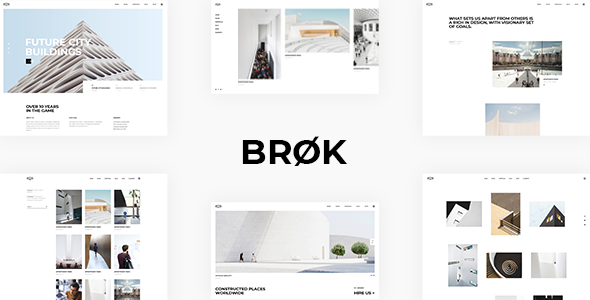
Stuck on your Brøk WordPress theme? Let's fix it.
No endless back-and-forth. Just send us the details and we'll get it done.
No obligation · Replies within 1 hour · Quote within 1 day
Setup · Customization · Bug fixes · WooCommerce integration
About Brøk WP Theme
Brøk is a premium WordPress theme built by Edge-Themes, a studio known for clean design and solid theme architecture. It is aimed at creative agencies, portfolios, and businesses that want a modern, editorial-style layout without heavy page builder dependency.
The theme ships with a collection of pre-built demo sites, covering industries from digital agencies to personal blogs. It uses Edge-Themes’ own framework, which powers most of their catalog, giving you access to a familiar options panel and shortcode system. Brøk leans toward bold typography and grid-based layouts, making it a strong choice for visually driven projects. It supports WooCommerce out of the box and integrates with popular plugins without major conflicts. Initial setup is straightforward if you import a demo, but deeper customization requires some familiarity with the Edge options panel.
Get matched with a Brøk developer in under one day
Tell us about your Brøk project. Small fixes, Brøk theme customization, or a full website build, whatever you need, we've got it covered.
We'll connect you to the right Brøk developers, define the scope, and get everything 100% clear.
You'll get one estimate, hire your preferred developer, and start collaborating.
Edge-Themes’ framework is not standard WordPress. It has its own hooks, shortcodes, and options structure that takes time to learn properly. A developer unfamiliar with it will spend hours just mapping where things are controlled.
Working with a Brøk expert through Codeable means you get someone who already knows the Edge framework, can build inside it correctly, and won’t introduce brittle workarounds. Whether it is a custom post type, a layout fix, or a full child theme build, the right developer makes the difference between a site that holds up and one that breaks on every update.
Pros
- Strong typography system with fine-grained font controls across headings, body, and UI elements
- Large library of pre-built demo sites covering agency, portfolio, blog, and business niches
- WooCommerce integration is built into the theme with styled shop, cart, and product pages
- Header builder supports multiple sticky, transparent, and split header configurations
- Edge-Themes provides regular updates and maintains the theme actively across WordPress versions
Cons
- Most customization happens in the Edge Options panel, not the native WordPress Customizer, which creates a learning curve
- Gutenberg block support is limited; the theme was designed around the classic editor and its own shortcode system
- The Edge framework loads additional scripts and styles that require manual optimization to hit good Core Web Vitals scores
- Shortcodes are proprietary, so switching themes later means rebuilding all shortcode-generated content
- Demo import can pull in large amounts of dummy content and media, requiring cleanup before going live
Who is Brøk for?
Creative Agency Portfolio
Brøk’s grid-based portfolio layouts and bold header options make it a natural fit for creative agencies. You can showcase case studies, set up service pages, and build a team section using built-in shortcodes. The multi-page demo structures give a solid starting point that reduces build time significantly for agency projects.
Freelance Designer Website
Freelancers benefit from Brøk’s clean single-column and sidebar portfolio layouts. The typography controls let you establish a strong personal brand without custom CSS. Contact forms, social links, and a blog section are all manageable from the Edge panel, keeping things simple for solo operators maintaining their own site.
Fashion or Lifestyle Blog
The editorial grid layouts and flexible blog archive options in Brøk suit fashion and lifestyle content well. You can control post card styles, sidebar behavior, and featured image ratios from the options panel. Combined with its WooCommerce support, a blog-to-shop setup is achievable within the same theme installation.
WooCommerce Fashion Store
Brøk ships with WooCommerce-ready templates that match the theme’s visual style. Product pages, category archives, and the cart all inherit the theme’s typography and color settings. For fashion brands selling online, this removes the need for heavy WooCommerce customization just to achieve a consistent brand look.
Photography Studio Site
Full-width image layouts, portfolio grid options, and minimal UI make Brøk a solid base for photography studios. The theme supports large hero images without cropping issues and gives control over gallery column counts and spacing. A clean header with logo-centered options keeps focus on the imagery rather than navigation chrome.

Customizing Brøk
Brøk’s customization lives inside the Edge Options panel, a theme-specific settings area that controls typography, colors, header styles, footer layouts, and more. It does not rely on the native WordPress Customizer for most settings, which can feel unfamiliar if you are used to standard themes.
The theme includes shortcodes and widgets that handle sliders, portfolios, team sections, and pricing tables. You can adjust these through a visual shortcode inserter in the classic editor, though Gutenberg support is partial. For WooCommerce stores, product page layouts and shop archive styles are controllable from the panel.
If you need layouts or functionality beyond what the panel allows, a Brøk expert can build custom templates, write child theme overrides, or extend the Edge framework without breaking future updates. Getting this right the first time saves significant debugging time later.
Recommended plugins for Brøk
Brøk works with several key plugins that expand its native capabilities. WooCommerce adds full e-commerce functionality with theme-matched shop templates. WPML makes the site multilingual, and the theme declares compatibility officially. Revolution Slider and Layer Slider both integrate cleanly for hero sections.
For SEO, the theme’s code is clean enough to pair with Yoast or Rank Math without structural conflicts. Performance-wise, Brøk can be optimized with caching plugins and image compression tools, though the Edge framework does add some script overhead that needs attention. Read more about WordPress performance optimization and WordPress SEO to get the most from your Brøk site.
Not sure which plugins to use? This WordPress plugins directory covers the most popular options with reviews and setup guides.
Brøk common issues
Brøk theme header not showing correctly after update
Header display issues after an Edge-Themes update usually come from cached CSS or a conflict between the theme’s header builder settings and a caching plugin. Start by clearing all caches, including server-level if applicable. Check Edge Options under the Header section and confirm your header type is still selected. If you have a child theme, verify the header template file hasn’t been overridden by an outdated version. For persistent issues, our WordPress bug fixing service can diagnose the conflict quickly.
Brøk shortcodes displaying as plain text in Gutenberg
Brøk’s shortcodes are designed for the classic editor. When viewed in Gutenberg, they render as raw text inside a Classic Block if inserted incorrectly. The fix is to paste shortcodes inside a Classic Block rather than a paragraph or shortcode block. Alternatively, switching the specific page back to the classic editor using the Classic Editor plugin resolves it for individual pages. Long-term, migrating key sections to native blocks or a supported page builder is the cleaner solution.
Brøk demo import not working or incomplete
Failed or incomplete demo imports in Brøk are almost always caused by PHP memory or execution time limits set too low on the hosting server. The import process pulls in images, posts, menus, and widget data simultaneously. Set memory_limit to at least 256MB and max_execution_time to 300 in your PHP configuration. Also confirm the required Edge-Themes plugins listed in the theme documentation are installed and activated before running the import. Retry with a stable connection.
Brøk theme slow page speed and failing Core Web Vitals
The Edge framework loads several CSS and JavaScript files across all pages, which inflates page weight. Start by auditing with Google PageSpeed Insights to identify specific failing assets. Use a plugin like WP Rocket or Perfmatters to defer non-critical scripts and inline critical CSS. Optimize all imported demo images through a compression plugin. For deeper optimization work, see our WordPress performance service to get Core Web Vitals scores into the green without breaking the theme’s layout.
Brøk FAQ
Brøk has partial Gutenberg support. Basic blocks work, but the theme’s own shortcodes and layout features are built around the classic editor. For full functionality, most users keep the Classic Editor plugin active or use Classic Blocks in Gutenberg. Edge-Themes has been gradually improving block compatibility, but full native block support is not the theme’s primary design target as of current versions.
Yes. Brøk includes WooCommerce support with styled templates for the shop archive, single product page, cart, and checkout. Color, typography, and layout settings for WooCommerce areas are available inside the Edge Options panel. It handles standard WooCommerce functionality well, though heavily customized store requirements may need a developer to extend the default templates correctly.
Brøk is WPML-compatible. String translations, language switcher placement, and page-level translations all work through the standard WPML workflow. The theme’s Edge Options strings are also translatable through WPML’s String Translation module. You will need both the WPML core plugin and the String Translation add-on for complete coverage of all theme-generated text.
Create a child theme by making a new folder in /wp-content/themes/ with a style.css that declares the parent as brok and a functions.php that enqueues both parent and child stylesheets. This protects your customizations during theme updates. Edge-Themes does not ship an official child theme starter, so you build it manually. A developer can set this up correctly in under an hour.
Migrating an existing site to Brøk means rebuilding page layouts using the Edge shortcode system and options panel, since content structure from another theme won’t transfer automatically. Text content and media migrate cleanly, but sidebars, widget areas, and custom layouts need to be rebuilt. For complex migrations, our WordPress migration service handles the technical transfer while minimizing downtime and content loss.
Hire a Brøk Expert Developer
If you need custom layouts, plugin integration, WooCommerce setup, or fixes inside Brøk, working with a specialist is faster and safer than trial and error. Our vetted Brøk developers know the Edge-Themes framework inside out and can handle everything from child theme builds to full site customization.
Get a free estimate with no obligation. You’ll hear back within 24 hours with a clear scope and price.
You'll need a free Codeable account so developers can ask questions and send their quotes.